|
Author
|
Message
|
|
sonic7
|
sonic7
Posted 7 Years Ago
|
|
Group: Forum Members
Last Active: 2 Years Ago
Posts: 1.7K,
Visits: 19.4K
|
Yes well this "Cylcle" is in the form of A - B - A so it consists of 2 parts: ● Part 1 ..... A - B ● Part 2 ..... B - A So, as you say, 'part 1' is OK - but 'part 2' is 'Out of Control' Looping a 'repeat' of Part 1 wouldn't produce the correct symmetry of movement: A - B followed by A - B (no) however: *If* A - B was 'Reversed' for the 2nd part, it would then produce: A - B followed by B - A which brings us back to A - B - ASo - maybe I'll try that?
--------------------------------------------------------------------------------------------------------------------------------------------------------
Please be patient with me ..... I don't always 'get it' the first time 'round - not even the 2nd time! :( - yikes! ... ● MSI GT72VR Laptop, i7 7700HQ 4-Core 3.8 GHz 16GB RAM; Nvidia 1070, 8GB Vram ● iClone-7.93 ● 3DXChange Pipeline 7.81 ● CC-3 Pipeline 3.44 ● Live Face ● HeadShot ● Brekel Pro-Body ● Popcorn FX ● iRAY ● Kinect V2 ● DaVinci Resolve17 ● Mixcraft 8.1
|
|
|
|
|
Walvince
|
Walvince
Posted 7 Years Ago
|
|
Group: Forum Members
Last Active: 6 Months Ago
Posts: 99,
Visits: 972
|
I thought about it too, but I guess the character would only go up then down, etc. It would be perfect for a very hesitant character but maybe not for what you're trying to do ^^
|
|
|
|
|
sonic7
|
sonic7
Posted 7 Years Ago
|
|
Group: Forum Members
Last Active: 2 Years Ago
Posts: 1.7K,
Visits: 19.4K
|
Yes, I came to the same conclusion ....'Reversing' A - B simply has the avatar climbing up 1/2 way then climbing back down to the start (bottom of ladder) again.I think it has to be some sort of 'mirrored' version of A - B.I'm not sure how to do that .....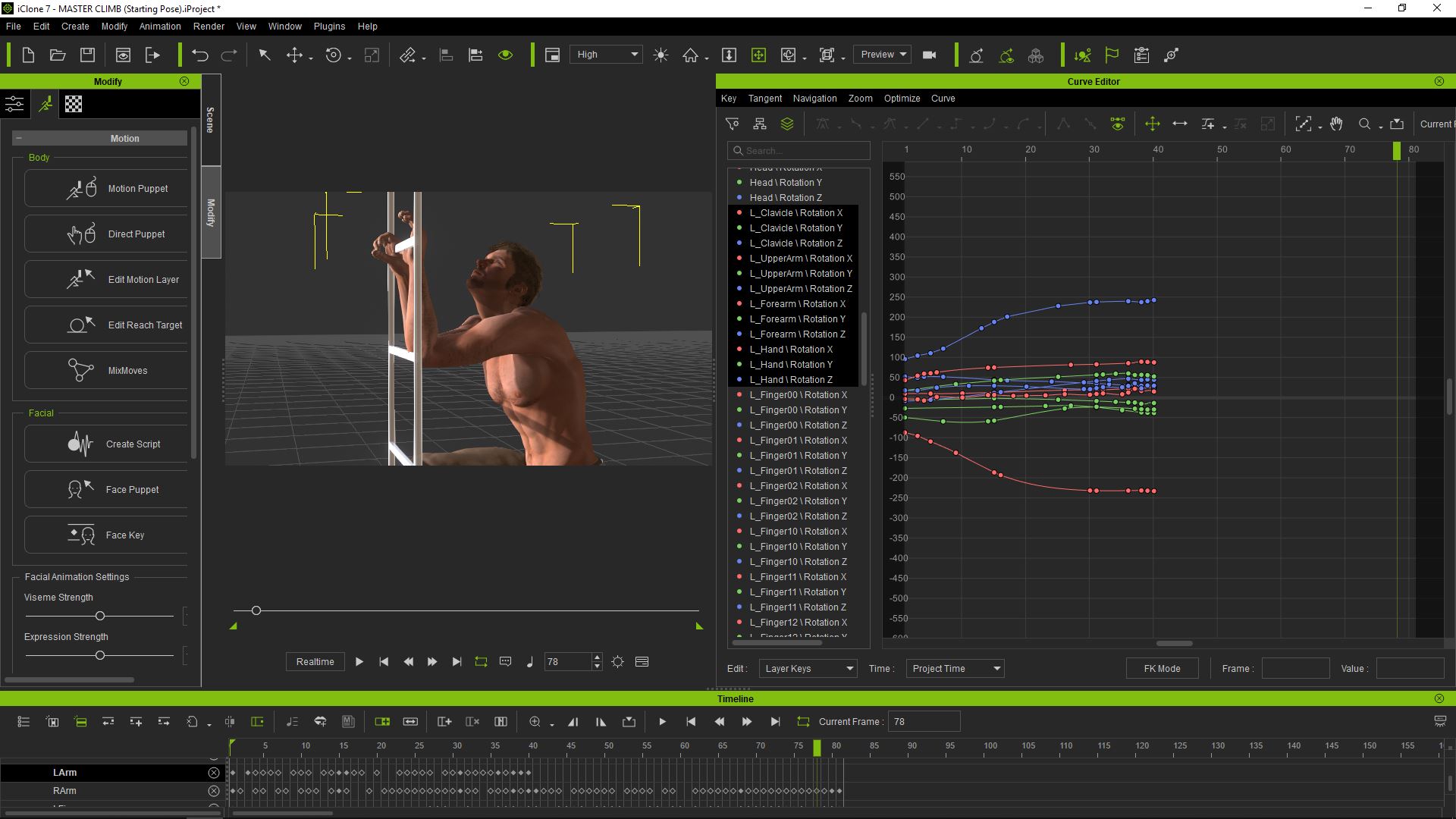 Edit:The root cause of why these distortions (abnormal rotations) even happen in the first place:When a 'hand' is placed on the rung of a ladder and a 'Reach Effector' applied to "lock it down" from moving on the rung, it results in an unnaturally rigid hand that fails to flex with the changing rotations of the forearms during the climb (at the wrists). So then, when "releasing" the effectors (later in the cycle) - you discover unnatural 'bends' in the wrists and distortion problems transferred to other limbs because of the IK. Manually adjusting the rotations can have you chasing your tail because the movements are happening in all three (x, y, z) directions at the same time. Edit:The root cause of why these distortions (abnormal rotations) even happen in the first place:When a 'hand' is placed on the rung of a ladder and a 'Reach Effector' applied to "lock it down" from moving on the rung, it results in an unnaturally rigid hand that fails to flex with the changing rotations of the forearms during the climb (at the wrists). So then, when "releasing" the effectors (later in the cycle) - you discover unnatural 'bends' in the wrists and distortion problems transferred to other limbs because of the IK. Manually adjusting the rotations can have you chasing your tail because the movements are happening in all three (x, y, z) directions at the same time.
If only there was a way to 'loosely pin' the hands in position (translation-wise), but still allow the twisting and turning of the hand that would 'normally' happen when the forearms pull on the hands in changing directions during the climb.
Is such a thing possible?
--------------------------------------------------------------------------------------------------------------------------------------------------------
Please be patient with me ..... I don't always 'get it' the first time 'round - not even the 2nd time! :( - yikes! ... ● MSI GT72VR Laptop, i7 7700HQ 4-Core 3.8 GHz 16GB RAM; Nvidia 1070, 8GB Vram ● iClone-7.93 ● 3DXChange Pipeline 7.81 ● CC-3 Pipeline 3.44 ● Live Face ● HeadShot ● Brekel Pro-Body ● Popcorn FX ● iRAY ● Kinect V2 ● DaVinci Resolve17 ● Mixcraft 8.1
|
|
|
|
|
illusionLAB
|
illusionLAB
Posted 7 Years Ago
|
|
Group: Forum Members
Last Active: 3 Years Ago
Posts: 393,
Visits: 4.8K
|
Hey Steve, Power to you for persevering with the "by hand" animation (no pun intended... well, maybe a little!). You seem to have a lot of keyframes... is this because you sampled the motion or did you create them one by one? You're correct in your deductions that the reach effectors are the root of these troubles - they aren't meant to be part of the animation structure as much as 'temporary constraints'... that is, you'll probably have more success if you animate the character to the best of your abilities without the reach effectors as a 'first pass'. When things look pretty good, you make a second pass using the reach effector to solidify your already mostly good animation. As it is right now, you're animating against the constraint, which is like pinning one end of an elastic band - sure it holds the elastic where you want, but it also allows you to stretch it a little too far, so when the pin is released the elastic snaps to it's natural state.
|
|
|
|
|
Walvince
|
Walvince
Posted 7 Years Ago
|
|
Group: Forum Members
Last Active: 6 Months Ago
Posts: 99,
Visits: 972
|
illusionLAB (12/17/2018)
you'll probably have more success if you animate the character to the best of your abilities without the reach effectors as a 'first pass'. When things look pretty good, you make a second pass using the reach effector to solidify your already mostly good animation.I never thought to animate this way, it should indeed give better results, thanks for the advice ;)sonic7 (12/17/2018)
If only there was a way to 'loosely pin' the hands in position (translation-wise), but still allow the twisting and turning of the hand that would 'normally' happen when the forearms pull on the hands in changing directions during the climb.
Is such a thing possible?If you still want to adjust the hand after having applied the reach effector, you can still rotate/move the reach prop itself with the gizmo and keyframe it. It will move/rotate the hand in the same way.
|
|
|
|
|
sonic7
|
sonic7
Posted 7 Years Ago
|
|
Group: Forum Members
Last Active: 2 Years Ago
Posts: 1.7K,
Visits: 19.4K
|
Mark ..... you may have 'demystified' things somewhat for me .... Yeah - the keyframes - I think I need to 'simplify' my approach. Rampa's video was good to get me going, but the 'hard' part for me is the arms. As the avatar moves up, and changes his 'reach' (with alternating grabs between left & right), the 'angles' become difficult. One moment the arm is stretched to it's very limit, then the same arm has to transition to holding that rung at a much closer distance, with the arm 'tucked-in' closer to the chest. The elbow during this 'change' has to move side-ways adding more dynamics to the mix. And all this has to occur without dislocating the shoulders or causing unnatural 'twisting' of limbs - lol .... If the hand could be made to easily 'pivot' around the rung (constrained by position only but not by rotation) - it would be easier to animate this. They should have a 'Flexible' Reach Target that 'allows' for rotations ..... @Walvince -- thanks - I'll try your suggestion of key framing the rotation separately - I never thought of that .... Here's what I meant about the hand being locked down in a 'rigid' way:
--------------------------------------------------------------------------------------------------------------------------------------------------------
Please be patient with me ..... I don't always 'get it' the first time 'round - not even the 2nd time! :( - yikes! ... ● MSI GT72VR Laptop, i7 7700HQ 4-Core 3.8 GHz 16GB RAM; Nvidia 1070, 8GB Vram ● iClone-7.93 ● 3DXChange Pipeline 7.81 ● CC-3 Pipeline 3.44 ● Live Face ● HeadShot ● Brekel Pro-Body ● Popcorn FX ● iRAY ● Kinect V2 ● DaVinci Resolve17 ● Mixcraft 8.1
|
|
|
|
|
animagic
|
animagic
Posted 7 Years Ago
|
|
Group: Forum Members
Last Active: Last Month
Posts: 15.8K,
Visits: 31.4K
|
I didn't realize that you used effectors, but I have had the same problem with them. They seem to override the motion of what they effect so what you see in the curve editor for the hand may not reflect what is actually happening. In my case I had to animate the effectors as well to get what I wanted. So leaving them off initially is good advice.
|
|
|
|
|
Rampa
|
|
|
Group: Forum Members
Last Active: Last Week
Posts: 8.2K,
Visits: 62.6K
|
The reach effectors and look-at do override any existing motion. They are the "topmost" layer of IK, if you will.
In my tutorial, I chose not to use them, and use the motion locks in the motion layer instead. These do allow for a rotation option with position remaining locked. But there is that wiggle bug (which I put in the tracker).
If you do want to use reach targets for their "complete lockedness", then maybe the reach effectors are not the best choice. Instead, try adding dummies to each rung for the reach target, and select and de-select them as needed.
My experience using the reach effectors is that they are very good in some situations, but not so great in others. It is not a good idea to ever release the reach from one and reattach it. They are actually accessories to your character, and this can cause strange behavior.
|
|
|
|
|
Rampa
|
|
|
Group: Forum Members
Last Active: Last Week
Posts: 8.2K,
Visits: 62.6K
|
To lower the elbow, you can lock the hand and shoulder bones in the motion layer and then use either the rotate or transform gizmo to move the elbow. The hand has a quick lock that you can just click, while the shoulder requires that you first select the bone and then check the boxes for pinning it in place. With both ends of the arm pinned, you can move the elbow to where you need. A gentle touch is required. Be ready to use the "undo"! ;) 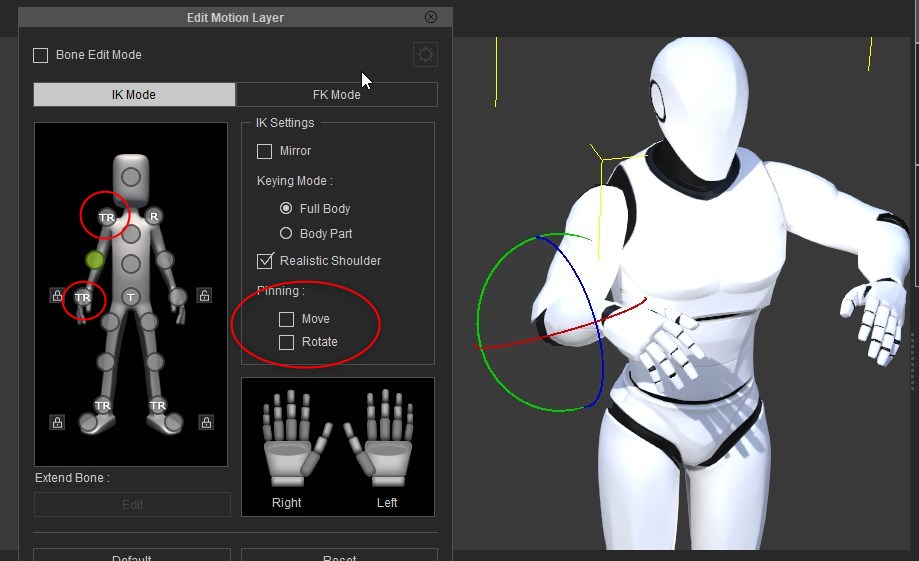
|
|
|
|
|
Rampa
|
|
|
Group: Forum Members
Last Active: Last Week
Posts: 8.2K,
Visits: 62.6K
|
Rampa (12/17/2018)
To lower the elbow, you can lock the hand and shoulder bones in the motion layer and then use either the rotate or transform gizmo to move the elbow. The hand has a quick lock that you can just click, while the shoulder requires that you first select the bone and then check the boxes for pinning it in place. With both ends of the arm pinned, you can move the elbow to where you need. A gentle touch is required. Be ready to use the "undo"! ;) I always like to add in some extra ideas that may be overlooked. That said, I should have included the easier method here as well. That is to lock the hand and use the rotate gizmo on the shoulder. :)
|
|
|
|