|
Joanne (RL)
|
Joanne (RL)
Posted 7 Years Ago
|
|
Group: Administrators
Last Active: Last Month
Posts: 300,
Visits: 4.9K
|
|
|
Joanne (RL)
|
Joanne (RL)
Posted 7 Years Ago
|
|
Group: Administrators
Last Active: Last Month
Posts: 300,
Visits: 4.9K
|
Enhanced: Project > Info now has more detailed information.
Additional project information:
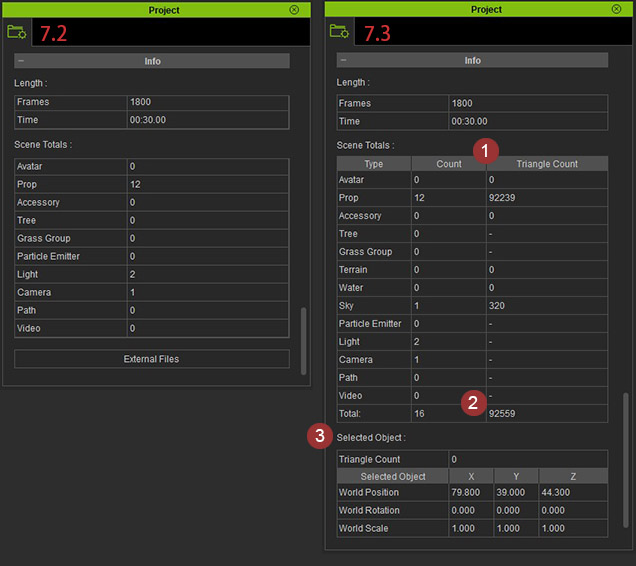
- The aggregated triangle count of each and every asset type in the scene is displayed here.
- The total triangle count for the entire scene.
- The triangle count of the currently selected object along with the exact World Coordinates.
|
|
Joanne (RL)
|
Joanne (RL)
Posted 7 Years Ago
|
|
Group: Administrators
Last Active: Last Month
Posts: 300,
Visits: 4.9K
|
Enhanced: Preference > Control is now organized into categories.
The original user interface has been separated into three different categories
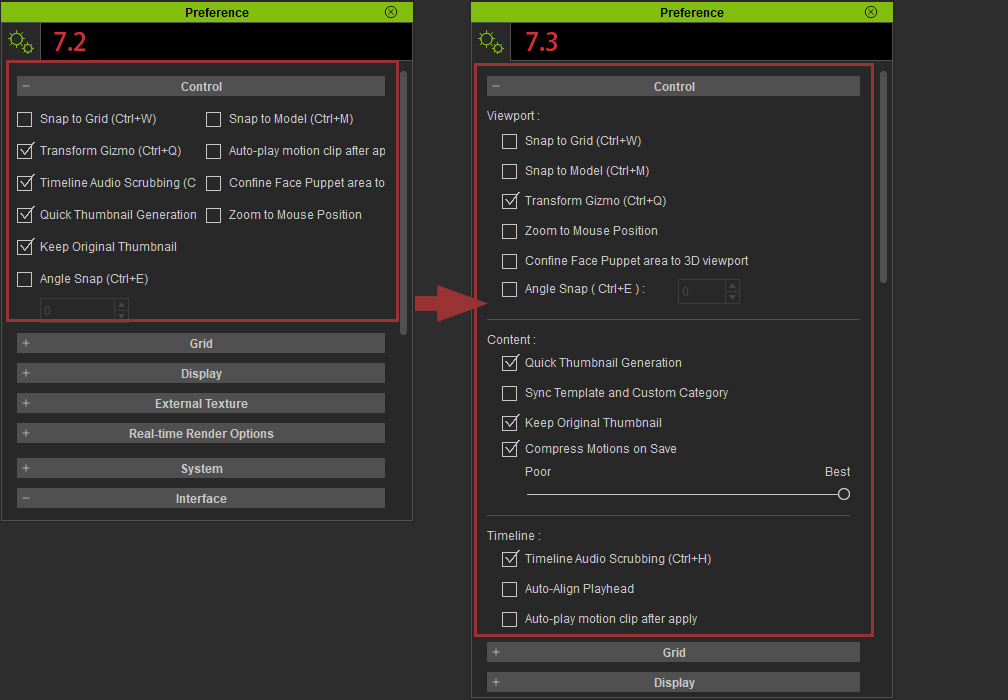
Viewport: anything related to the real-time viewport.
Content: Save settings for the project and assets such as motions.
Timeline: Edit behavior for the animation timeline.
|
|
Joanne (RL)
|
Joanne (RL)
Posted 7 Years Ago
|
|
Group: Administrators
Last Active: Last Month
Posts: 300,
Visits: 4.9K
|
Added: New Preference > Content > Compress Motions on Save
This 3 level slider determines the level of compression for body motions when saved via Timeline / Collect Clip or Content Manager / Add. The better the quality of the compression the larger the file size. When left unchecked, saved motions remain uncompressed.
Compress Motion on Save is disabled by default.
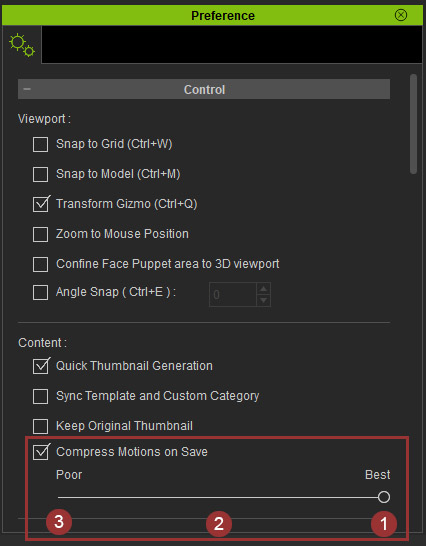
Take the embedded Hold Gun Break Door motion as an example:- 1. Best setting provides the least amount of compression -maintains high fidelity to the original motion data; the file size will be bigger as result.
- 2. When the setting is between Poor and Best, a mid-level motion compression is performed.
- 3. Poor setting provides the most amount of compression -the original motion data becomes highly optimized; the file size will be smaller as a result.
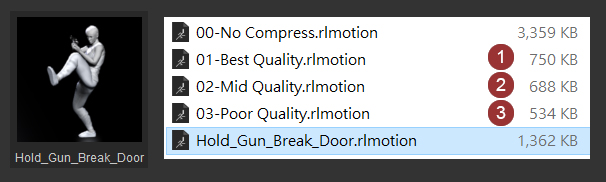
The examples below illustrate the differences in motion:
When the motion quality is adjusted to Poor, the optimized motion resembles less of the original form.
If the motion needs to have high fidelity like holding a gun, then it is best to not perform too much compression on the animation data.
The white android below is the original motion clip while the juxtaposed purple android is the same motion having undergone Poor quality compression..
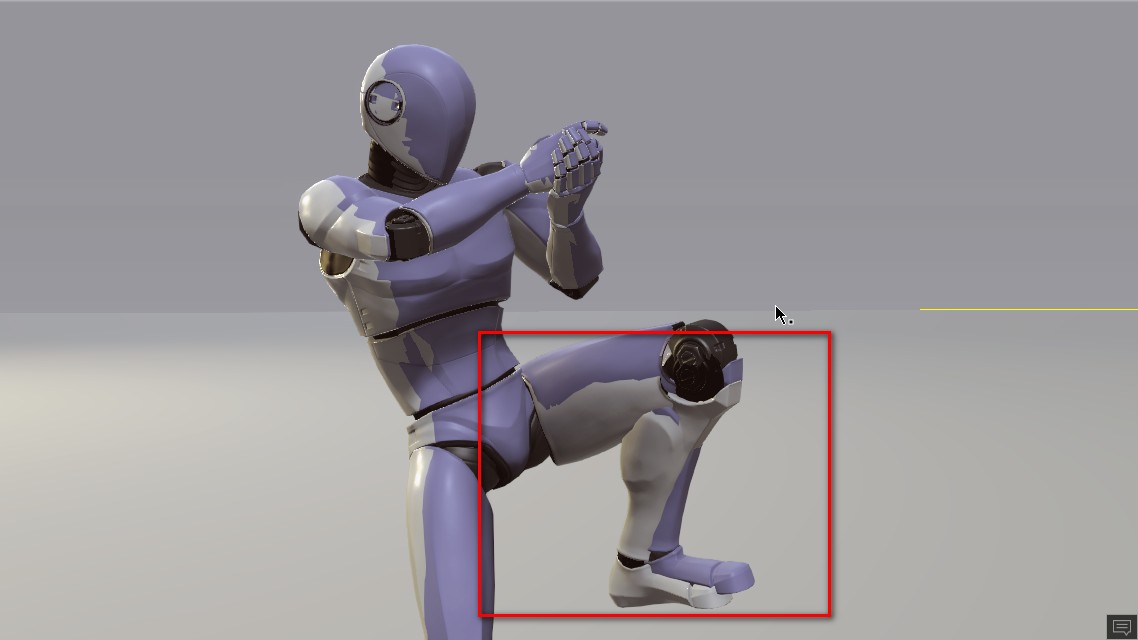
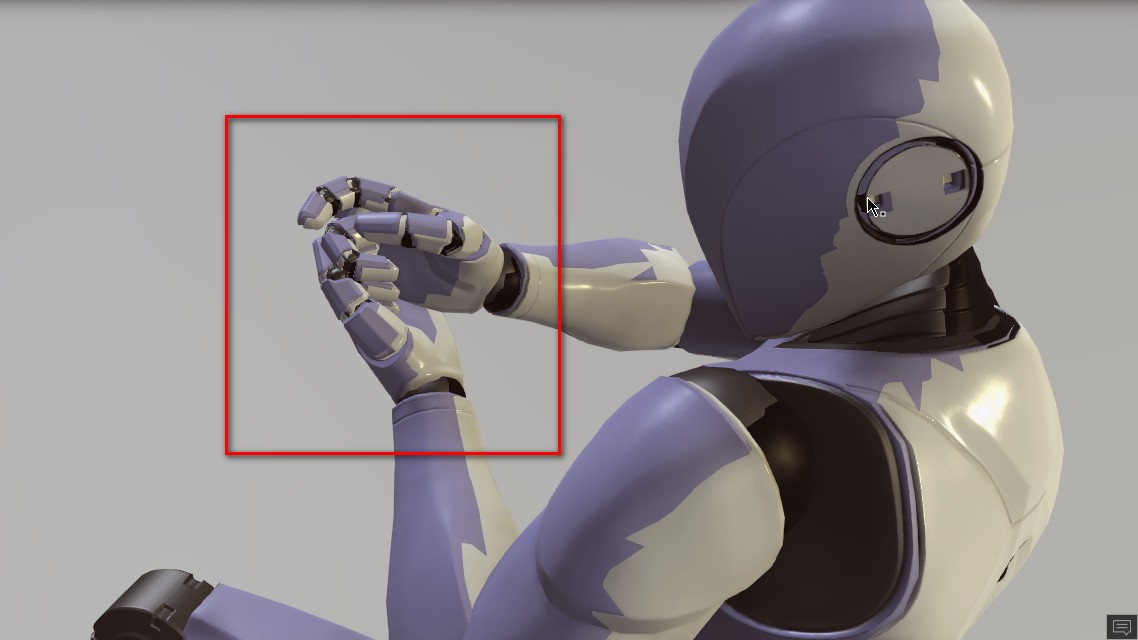
This feature is also available in 3DXchange 7.3:
Menu > Edit > Preference 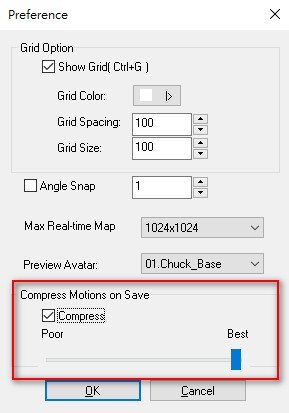
Note: iClone and 3DXchange's default settings are Compress ON / Best.
|
|
Grace (RL)
|
Grace (RL)
Posted 7 Years Ago
|
|
Group: Administrators
Last Active: Last Month
Posts: 497,
Visits: 5.1K
|
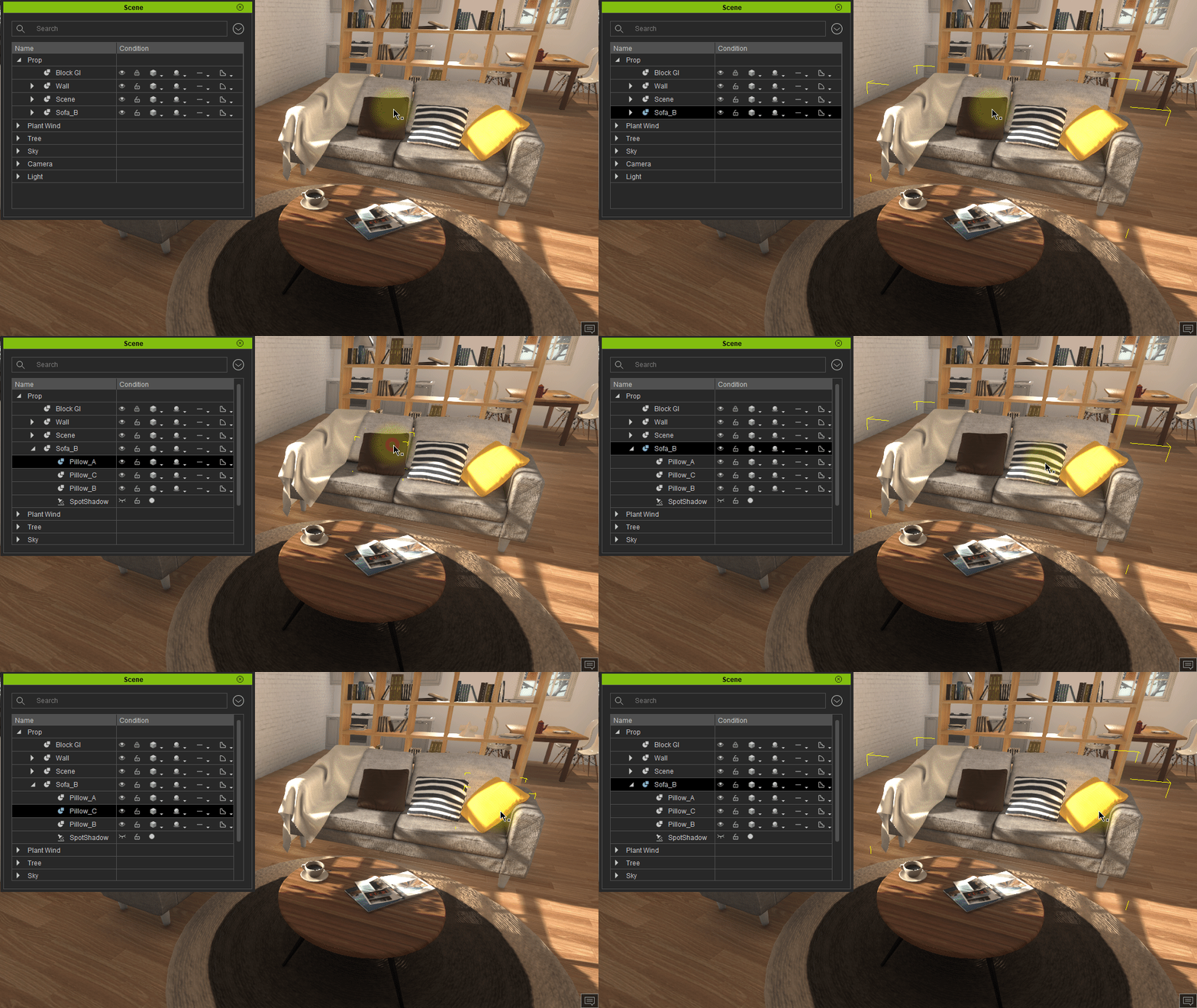
Enhanced: New viewport selection techniques.- Single-click will select the parent object directly.
- Double-click will select the child node of the target object.
Single-clicking on any accessory selects the entire character while double-clicking selects the accessory itself such as clothing, hair, etc.
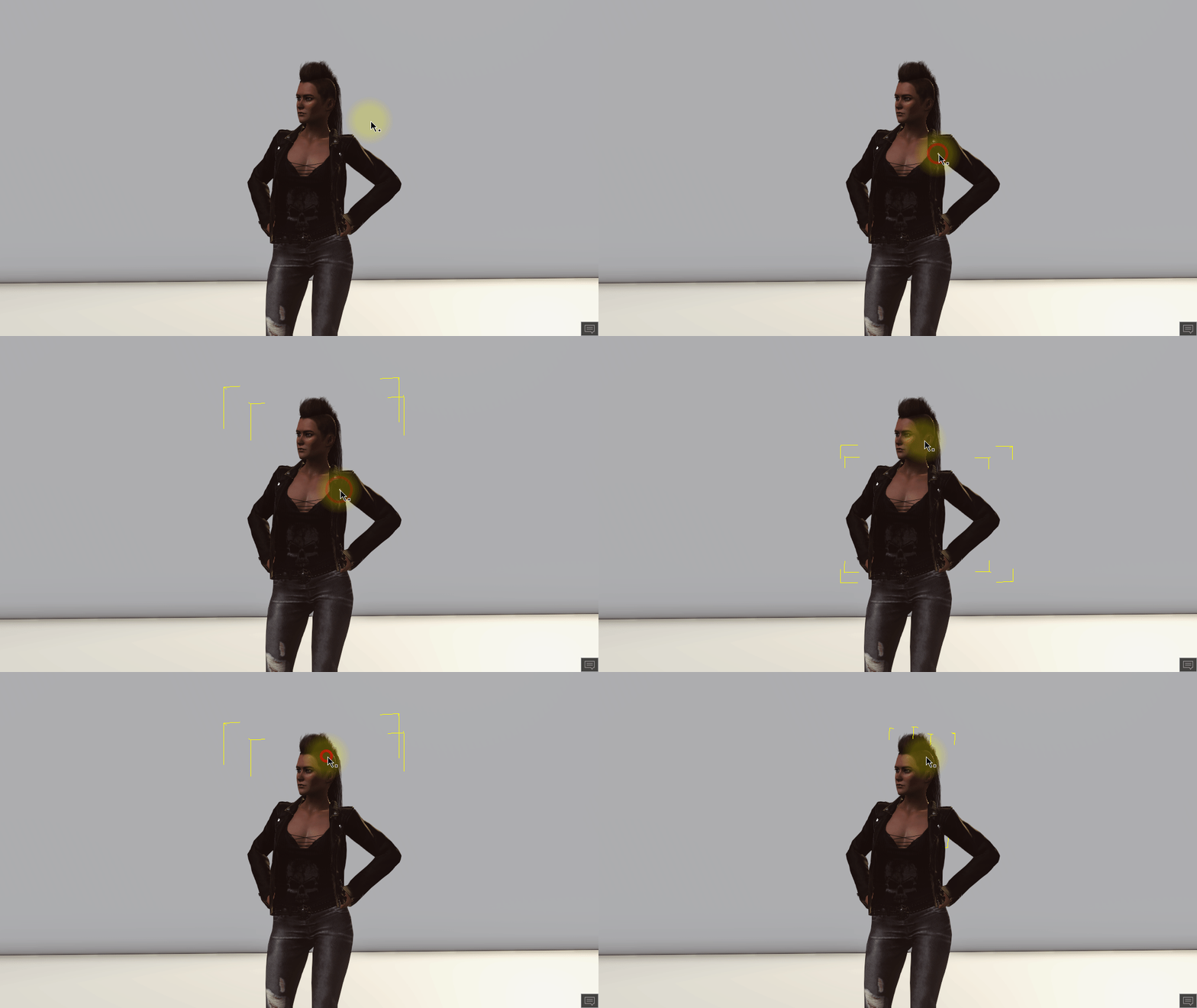
Double-clicking will select the child node of prop (such as a pillow). Single-click will automatically select the parent node (such as the entire sofa prop).
|
|
eternityblue
|
eternityblue
Posted 7 Years Ago
|
|
Group: Forum Members
Last Active: 8 Months Ago
Posts: 769,
Visits: 2.7K
|
Is this the right place to ask about this, my question is will PopcornFX plugin be updated? They are working on V2 of their editor to make it all node based and easier to use. I really hope the relationship is an ongoing one and more development happens. As yet, their beta doesn't include the option to create iClone projects.: PopcornFX Fixed: Crash caused by importing *.pkfx files post version 1.13.- The current PopcornFX plugin does not support *.pkfx files v1.13 or above. Actions that violate this rule will cause the following warning to appear: "The .pkfx file version is not compatible with the current version of iClone."
~~~~~~~~~~~~~~~~~~
My system: i7 3770 Gtx1060 6GB
|
|
Dr. Nemesis
|
Dr. Nemesis
Posted 7 Years Ago
|
|
Group: Forum Members
Last Active: Last Month
Posts: 258,
Visits: 5.4K
|
Bugs are being worked on. My fingers are crossed.
|
|
justaviking
|
justaviking
Posted 7 Years Ago
|
|
Group: Forum Members
Last Active: Last Year
Posts: 8.2K,
Visits: 26.5K
|
I promise not to comment on every "announcement" here, but I'm really enjoying revisiting these Release Notes.
When the release came out, you got CC3 + Iray plugin + iC7.3, and there is so much excitement and much to absorb. It's been really great to go back here are re-read these notes in a more relaxed state of mind.
Something as simple as "Doubl-click to select child" is wonderful. The old behavior was often an irritant, and this is wonderful news.
iClone 7... Character Creator... Substance Designer/Painter... Blender... Audacity...
Desktop (homebuilt) - Windows 10, Ryzen 9 3900x CPU, GTX 1080 GPU (8GB), 32GB RAM, Asus X570 Pro motherboard, 2TB SSD, terabytes of disk space, dual monitors.
Laptop - Windows 10, MSI GS63VR STEALTH-252, 16GB RAM, GTX 1060 (6GB), 256GB SSD and 1TB HDD
|