Profile Picture

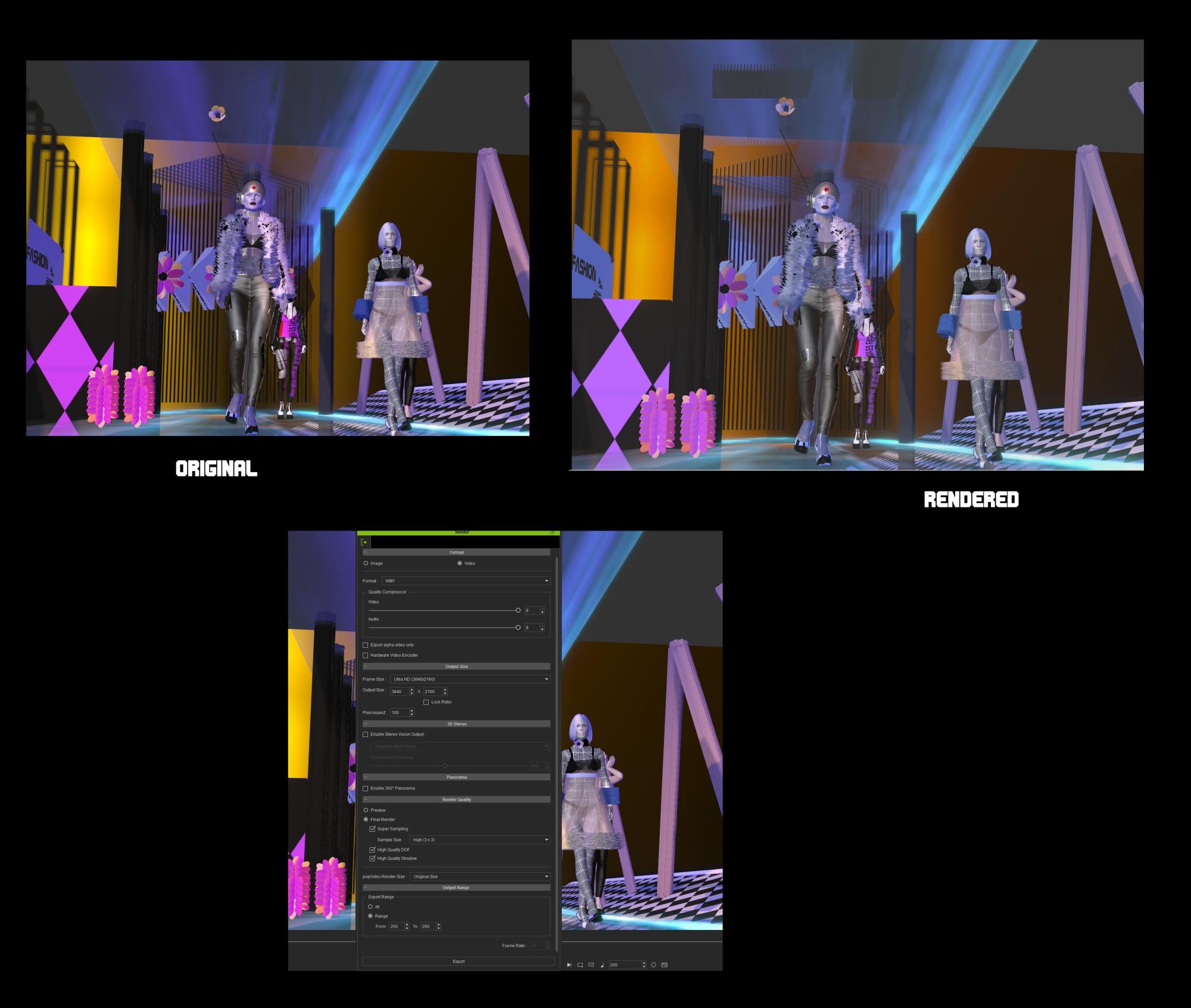
Iclone Video Render Quality: less Color intensity and Contrast

Posted By mayaenvogue2016 7 Years Ago
You don't have permission to rate!

Iclone Video Render Quality: less Color intensity and Contrast

Author
Message
mayaenvogue2016
mayaenvogue2016
Posted 7 Years Ago
View Quick Profile
Distinguished Member

Distinguished Member (1.3K reputation)Distinguished Member (1.3K reputation)Distinguished Member (1.3K reputation)Distinguished Member (1.3K reputation)Distinguished Member (1.3K reputation)Distinguished Member (1.3K reputation)Distinguished Member (1.3K reputation)Distinguished Member (1.3K reputation)Distinguished Member (1.3K reputation)

Group: Forum Members
Last Active: 2 Years Ago
Posts: 51, Visits: 216
Hi dear community,
can somebody suggest to me how I can improve the render quality in Iclone? Attached there are pics of what I see on my screen and how the rendered video screenshot looks like. It has clearly less color intensity and contrast,  although I have used the maximal possible parameter settings, as the third picture shows. My question is:
How can I achieve an identical or better color quality in a rendered video as displayed in the project itself or do I need a plug-in (Indigo, Iray)  and if yes, which is better??? Many thanks in advance for your suggestions.
P.S: Strangly, when I render only one image, then the quality is exactly the same as in the project. Only the rendered VIDEO shows such problems.
https://forum.reallusion.com/uploads/images/25c41204-84e2-4eca-817e-c451.jpg


Reading This Topic