|
By mayaenvogue2016 - 8 Years Ago
|
Hi dear community,
can somebody suggest to me how I can improve the render quality in Iclone? Attached there are pics of what I see on my screen and how the rendered video screenshot looks like. It has clearly less color intensity and contrast, although I have used the maximal possible parameter settings, as the third picture shows. My question is:
How can I achieve an identical or better color quality in a rendered video as displayed in the project itself or do I need a plug-in (Indigo, Iray) and if yes, which is better??? Many thanks in advance for your suggestions.
P.S: Strangly, when I render only one image, then the quality is exactly the same as in the project. Only the rendered VIDEO shows such problems.
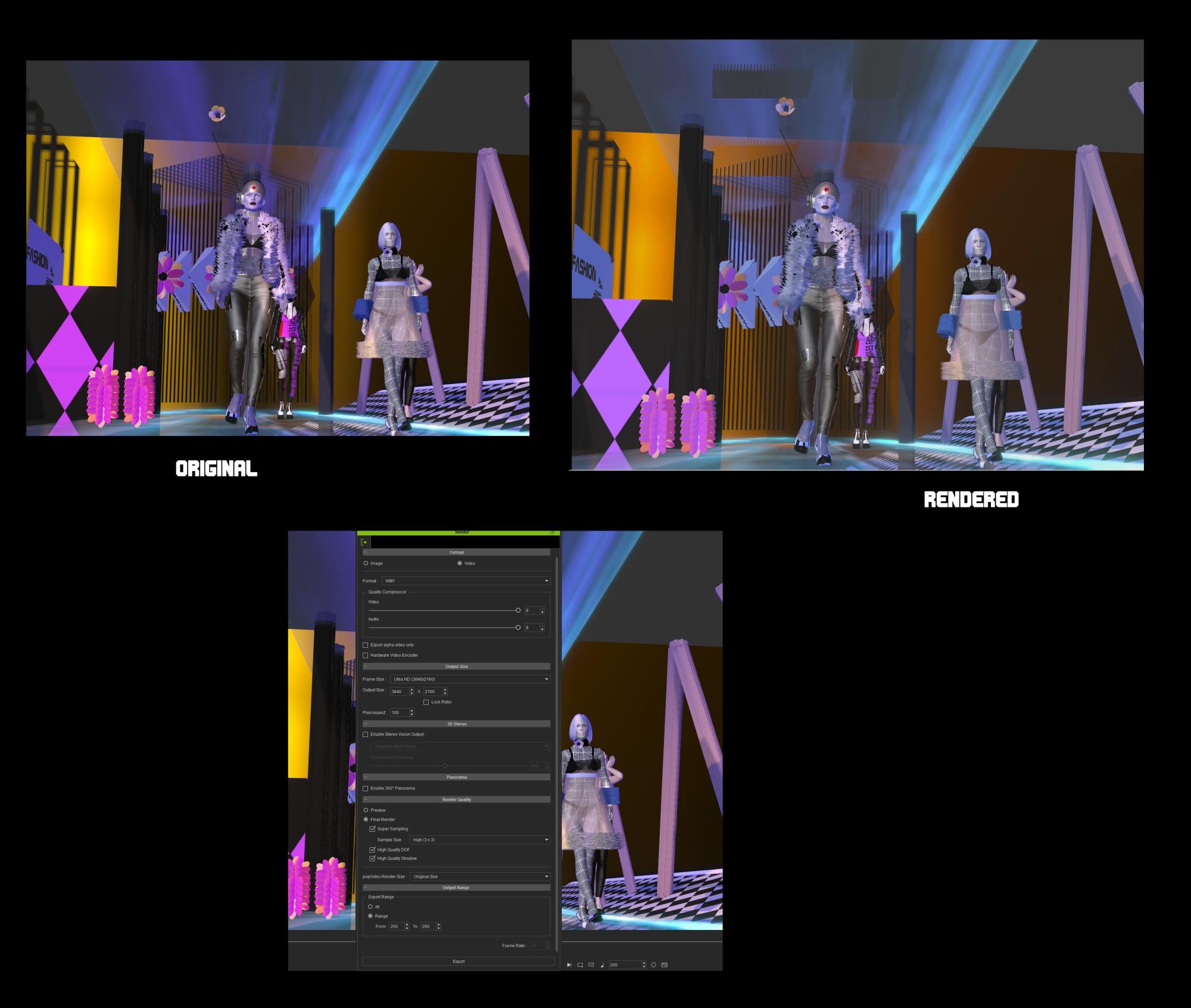
|
|
By mtakerkart - 8 Years Ago
|
Hi Maya ,
Probably it's a video codec issue. Best solution in the "Broadcast" field is to render images sequence and then in your Editor app export with better codec wich keep
colors and contrast.
|
|
By mayaenvogue2016 - 8 Years Ago
|
Hi mtakerkart, Thank you so much.. ..ai ai ai.... This is a typical beginner´s problem, who has never done it before.... Of course the issue is the video programm and NOT at all the renderer ...I have changed the parameters accordingly and it works, of course. Thank you again, wanted to rate this answer of yours with 5 stars but have not succeeded ...obviously, not knowing where first to click, sorry for this.
|
|
By mtakerkart - 8 Years Ago
|
|
You're welcome Maya. Don't worry about the 5 stars ;)
|
|
By animagic - 8 Years Ago
|
|
mtakerkart (8/26/2018)
You're welcome Maya. Don't worry about the 5 stars ;)
I added 5 so the average has gone up...:P It was a worthwhile answer after all.
|
|
By CtrlZ - 8 Years Ago
|
animagic (8/26/2018)
mtakerkart (8/26/2018)
You're welcome Maya. Don't worry about the 5 stars ;)I added 5 so the average has gone up...:P It was a worthwhile answer after all.
Ha Ha!:laugh: Did the same! Sometimes the trolls low ball the stars lol not in this case though!
|
|
By mayaenvogue2016 - 8 Years Ago
|
:) very nice of you, thanks for help!
|
|
By mayaenvogue2016 - 8 Years Ago
|
very nice ... thank you too for improving my mistake!
|
|
By 4413Media - 8 Years Ago
|
To get the best video quality, trust me on this one, but you are going to need a lot of storage.
TGA Image Sequence offers the best output for color correction and visuals in my opinion, but it carries a heavy burden.
A 4096 by 1700 image is 24 MBs per frame. A 10 minute project could add up to 1.2 TB of raw footage alone though.
Otherwise PNG image sequence would be a good second selection. WMV and Mp4 I find compresses way too much and you lose the quality.
|