|
Author
|
Message
|
|
Calseeor
|
Calseeor
Posted 8 Years Ago
|
|
Group: Forum Members
Last Active: 6 Years Ago
Posts: 2,
Visits: 24
|
Hello all, New to Reallusion and I have an issue with the hub. :( On my Windows 10 PC, the hub is semi-transparent and very unreadable (see screenshot). On my Surface Pro 4, the hub is the same but also so very very tiny. Enlarging text and interface components from within Windows 10, does not do anything for the hub. I've searched for answers but nothing has worked. Does anyone have any thoughts? 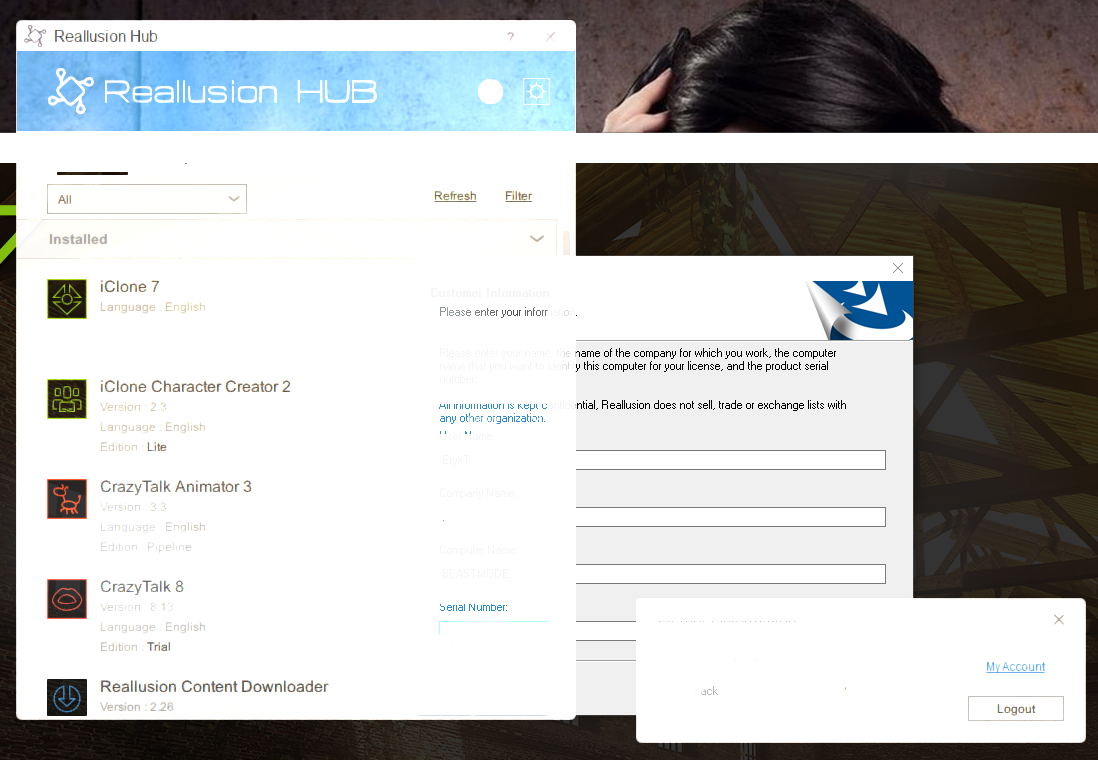 Regards, --Eryk
|
|
|
|
|
Peter (RL)
|
Peter (RL)
Posted 8 Years Ago
|
|
Group: Administrators
Last Active: 2 Years Ago
Posts: 23.1K,
Visits: 36.6K
|
For any issues with the Reallusion Hub, please do ensure you are using the latest version which is version 4.05. To ensure you are using the latest version, please close the Hub down by right clicking the icon in the Hidden Icons area of the Windows Task Bar and choose Quit. Then launch it again from the Start Menu and it should automatically begin updating to the latest version.
Peter
Forum Administrator www.reallusion.com
|
|
|
|
|
dpage
|
|
|
Group: Forum Members
Last Active: Last Year
Posts: 12,
Visits: 89
|
Having the exact same problem, on multiple Win 10 machines. :(
|
|
|
|
|
Dan@3DIM
|
Dan@3DIM
Posted 7 Years Ago
|
|
Group: Forum Members
Last Active: 2 Years Ago
Posts: 69,
Visits: 791
|
I've had enough with eye strain on this Hub. cant see anything in setting.
normally I just let Hub do automation update without need to see it. but days over days it start annoying me.
I try remove hub and reinstall it again, no luck.
your Hub webpage really need update so we can manually update on top of this corrupt one.
please.
|
|
|
|
|
Peter (RL)
|
Peter (RL)
Posted 7 Years Ago
|
|
Group: Administrators
Last Active: 2 Years Ago
Posts: 23.1K,
Visits: 36.6K
|
Dan@3DIM (2/14/2019)
I try remove hub and reinstall it again, no luck.
What are the problems you are having with the Hub? You should be able to remove the Hub by going to Start > Settings > Apps in Windows 10. Does this not work for you?
Peter
Forum Administrator www.reallusion.com
|
|
|
|
|
Dan@3DIM
|
Dan@3DIM
Posted 7 Years Ago
|
|
Group: Forum Members
Last Active: 2 Years Ago
Posts: 69,
Visits: 791
|
Peter (RL) (2/14/2019)
Dan@3DIM (2/14/2019)
I try remove hub and reinstall it again, no luck.
What are the problems you are having with the Hub? You should be able to remove the Hub by going to Start > Settings > Apps in Windows 10. Does this not work for you? This.  And I click setting 
|
|
|
|
|
Dan@3DIM
|
Dan@3DIM
Posted 7 Years Ago
|
|
Group: Forum Members
Last Active: 2 Years Ago
Posts: 69,
Visits: 791
|
 where is the button to update? lucky I know where to click.
|
|
|
|
|
dpage
|
|
|
Group: Forum Members
Last Active: Last Year
Posts: 12,
Visits: 89
|
I have the same issue with an unreadable HUB application, all windows generated by the app are only visible over pure black. As if on an additive blend mode, or that all text is 100% transparent cut out to the windows behind. Win 10 - Up to Date Hub Version 4.06.2619.1 Intel i7 - 5820 - 3.3 ghz 32 gig ram Nvidia GTX 1070 - Up to Date Drivers 
|
|
|
|
|
Edward (RL)
|
Edward (RL)
Posted 7 Years Ago
|
|
Group: Forum Members
Last Active: Last Year
Posts: 301,
Visits: 4.9K
|
Try turn off this 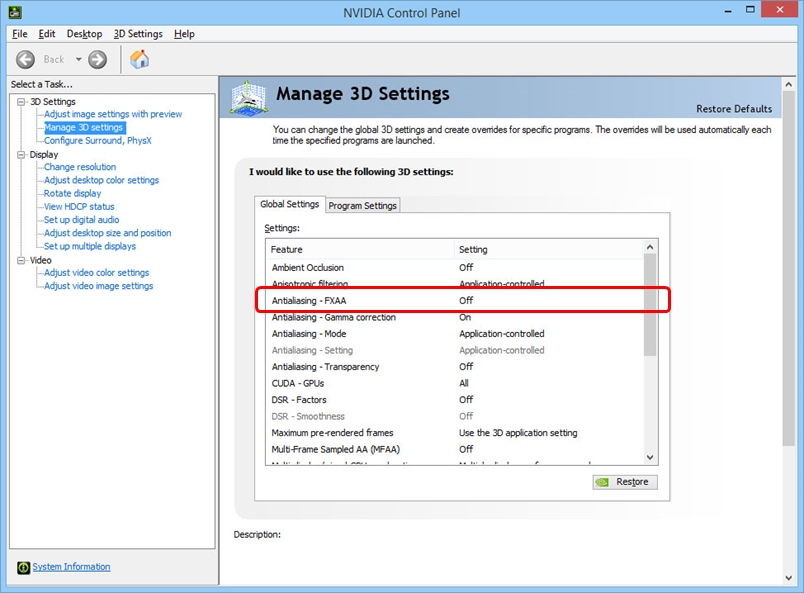
|
|
|
|
|
dpage
|
|
|
Group: Forum Members
Last Active: Last Year
Posts: 12,
Visits: 89
|
edh, I reset the 3d setting to default and relaunched the HUB, it fixed it!
Thank you
|
|
|
|