|
Author
|
Message
|
|
gkscoot
|
gkscoot
Posted 7 Years Ago
|
|
Group: Forum Members
Last Active: 7 Years Ago
Posts: 24,
Visits: 76
|
Hi,
I'm new too with the same concern. Another tip to add on to the work around about "find file" is to change the view of the folders to show Large Icons (on Windows, maybe Mac has the same?). This way at least when your in a likely folder you can just scan the thumbnail photos quickly.
|
|
|
|
|
steve_gill
|
steve_gill
Posted 7 Years Ago
|
|
Group: Forum Members
Last Active: 10 Months Ago
Posts: 33,
Visits: 318
|
Thanks Gary, the spreadsheet will be very useful!
Regards,
Steve
|
|
|
|
|
garylearntech
|
garylearntech
Posted 7 Years Ago
|
|
Group: Forum Members
Last Active: 2 Years Ago
Posts: 158,
Visits: 2.3K
|
The spreadsheet I mentioned in my previous post is now done - and available online. To make it easier to find, I have created a new post, which you'll find in the "Training - Tutorial, Hints & Tips" forum. https://forum.reallusion.com/371743/Searching-the-content-manager-Think-different…
---
Cartoon Animator 4 Pipeline (always the current production version, unless otherwise stated)
Mac mini M1, macOS Big Sur (11.6.5)
Signature data last updated 2022-05-15
|
|
|
|
|
garylearntech
|
garylearntech
Posted 7 Years Ago
|
|
Group: Forum Members
Last Active: 2 Years Ago
Posts: 158,
Visits: 2.3K
|
> What about reinstalling the items and then save the RLContentInstallLog in a location that is easier to remember A couple of days ago, I discovered a trick that would save reinstalling existing content. When you're installing Reallusion content, it looks as if a variation on the log file is produced and saved automatically to the Pack Cache folder. On a Mac install, the path is here: /Users/Shared/Reallusion/Template/CrazyTalk Animator 3 Template/Pack Cache
If you look back up this thread to the post by sjonesdc which contains a Windows screenshot, you can actually see the Pack Cache folder in the Step 3 column - about five or six lines above the highlighted Project folder. Cache files are normally disposable, but I don't know if that's the case here - so play safe. Do not modify the files in Pack Cache.What I have done is to copy each file out into another directory. Depending on your IT skills, you might want to rename each file. Currently there's no suffix indicating the file type, but inside, they're just raw text. So, for example, the recent Power Tools 5 install produced a file called "ACR300DIENUE00120171030001". Make a duplicate of this file elsewhere and just add ".txt" or ".text" to the end of this file name. The it should be easy to open it in a suitable text editor app. Here's several extracts from both this and another recent install: "FileName" : "Manequin_Lady3.ctprop", "InstallPath" : "props\\G3 Assemble Kits-Street Building Systems\\Street Elements\\Shop Items",
"FileName" : "Downtown.ctscene", "InstallPath" : "Scene\\G3 Assemble Kits-Street Building Systems",
"FileName" : "Street Artist_S.cttbactor", "InstallPath" : "Character\\G3 Elastic Folks-Occupations\\Occupation Body",
"FileName" : "Mime_Look.ctbmotion", "InstallPath" : "Motion\\G3 Human Motions-Occupation Animations\\Occupations\\Street Performer",
For each asset, the InstallPath line starts with the general object type: Character, Motion, Prop, Scene, etc. The next element(s) in the path show the hierarchy you'll have to navigate to find a given object. The screenshot below highlights the location of the "Manequin_Lady3" prop from the first example above. 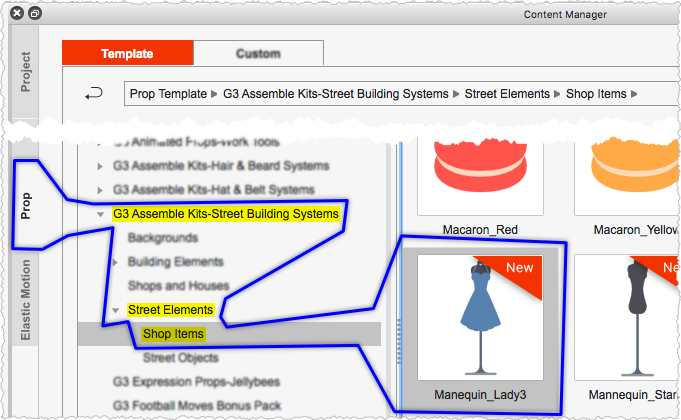 It might take a bit of work, but Steve Gill could potentially use this to go hunting for his "missing" content. Collect copies of each cache file together and Data Juggler could search for all occurrences of "walk" or "juggle", and so on. It's a bit cumbersome, but the data is there. At the risk of sounding like a geek :) I'm toying with importing my collection of files into, say, an Excel spreadsheet for easy access. Hmmm…
Cartoon Animator 4 Pipeline (always the current production version, unless otherwise stated)
Mac mini M1, macOS Big Sur (11.6.5)
Signature data last updated 2022-05-15
|
|
|
|
|
sjonesdc
|
sjonesdc
Posted 7 Years Ago
|
|
Group: Forum Members
Last Active: 2 Years Ago
Posts: 1.6K,
Visits: 9.6K
|
steve_gill (6/10/2018)
Thanks sjonesdc, but this was in my post " There are still props that are part of content I purchased that I'm still unable to find, even using Find File.".
= Steve
What about reinstalling the items and then save the RLContentInstallLog in a location that is easier to remember.
sjonesdc :hehe:
STILL LEARNING!!!

|
|
|
|
|
steve_gill
|
steve_gill
Posted 7 Years Ago
|
|
Group: Forum Members
Last Active: 10 Months Ago
Posts: 33,
Visits: 318
|
No problem Rampa. :-)
= Steve
|
|
|
|
|
steve_gill
|
steve_gill
Posted 7 Years Ago
|
|
Group: Forum Members
Last Active: 10 Months Ago
Posts: 33,
Visits: 318
|
Thanks sjonesdc, but this was in my post " There are still props that are part of content I purchased that I'm still unable to find, even using Find File.".
= Steve
|
|
|
|
|
Rampa
|
|
|
Group: Forum Members
Last Active: Last Week
Posts: 8.2K,
Visits: 62.6K
|
Sorry about that Steve!
That's what I get for just checking the latest posts. I posted up the iClone search unwittingly. :blush:
|
|
|
|
|
sjonesdc
|
sjonesdc
Posted 7 Years Ago
|
|
Group: Forum Members
Last Active: 2 Years Ago
Posts: 1.6K,
Visits: 9.6K
|
Here's how to search the Content Manager  Click the graphic to enlarge. Hope that helps!
sjonesdc :hehe:
STILL LEARNING!!!
|
|
|
|
|
steve_gill
|
steve_gill
Posted 7 Years Ago
|
|
Group: Forum Members
Last Active: 10 Months Ago
Posts: 33,
Visits: 318
|
Hi Rampa, My Content Manager doesn't look anything like yours. CTA3.22 Pipeline. = Steve 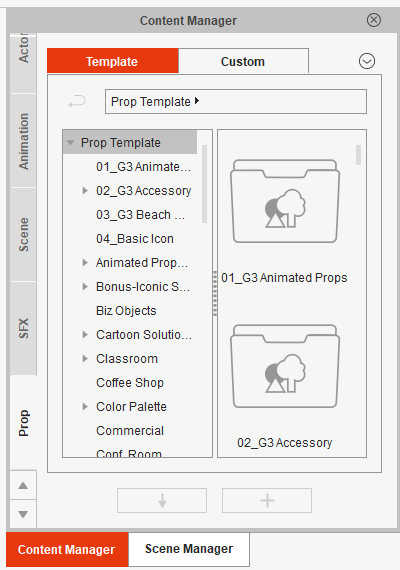
|
|
|
|