|
Author
|
Message
|
|
Peter Blood
|
Peter Blood
Posted 9 Years Ago
|
|
Group: Forum Members
Last Active: Last Year
Posts: 2.3K,
Visits: 9.4K
|
Hi guys: :)
Is there any way to turn .mtl files to .imtl files?
I have some props I want to download but, of course, they don't come with imtl files.
Can anyone help?
:cool: pete

http://www.youtube.com/user/peterblood50?feature=mhee
|
|
|
|
|
animagic
|
animagic
Posted 9 Years Ago
|
|
Group: Forum Members
Last Active: Last Month
Posts: 15.8K,
Visits: 31.4K
|
Are these .obj files? The .mtl file that goes with an .obj file specifies the mapping of the textures, which are in separate files. You should just be able to import via 3DXchange. Or do you mean something else? EDIT: Fixed typo...:blush:
|
|
|
|
|
Kelleytoons
|
Kelleytoons
Posted 9 Years Ago
|
|
Group: Forum Members
Last Active: 2 Years Ago
Posts: 9.2K,
Visits: 22.1K
|
(You wrote exactly what I was thinking, Ani, but I was afraid to type it -- I'm so sick right now I'm not sure I'm thinking straight. Sigh).
Alienware Aurora R16, Win 11, i9-149000KF, 3.20GHz CPU, 64GB RAM, RTX 4090 (24GB), Samsung 870 Pro 8TB, Gen3 MVNe M-2 SSD, 4TBx2, 39" Alienware Widescreen Monitor
Mike "ex-genius" Kelley
|
|
|
|
|
Peter Blood
|
Peter Blood
Posted 9 Years Ago
|
|
Group: Forum Members
Last Active: Last Year
Posts: 2.3K,
Visits: 9.4K
|
Thank you both for your quick responses. :)
When I download a prop from, say, CGshare or some such site, the zip file will include a diffuse, opacity, and bump file.
I can import the diffuse file merely by dragging the .jpg over the prop in 3dx6 but I can't place the other two channels.
They show the infamous circle with a line through it. I've tried making sure I was on the bump or opacity channel when
I drag the appropriate .jpg to the prop but it inserts them in the diffuse channel.
The only thing left in the .mtl file for the prop so I'm thinking maybe...that...one? But I can't import it as it is not an .imtl file.
Hope that helps and thanks again.
:cool: pete
http://www.youtube.com/user/peterblood50?feature=mhee
|
|
|
|
|
Kelleytoons
|
Kelleytoons
Posted 9 Years Ago
|
|
Group: Forum Members
Last Active: 2 Years Ago
Posts: 9.2K,
Visits: 22.1K
|
But that's not how you do it (not how you import other channels). The best/easiest is to just bring the prop into iClone and go to modify and under the texture tab select the texture you want for that prop and just drag and drop your texture into the appropriate channel map -- it will work (that's what I do all the time). You can, in XChange, go to the texture in the rollout on the right and doubleclick on the channel you want and direct to the right maps, but that's a bigger PITA, IMHO.
Alienware Aurora R16, Win 11, i9-149000KF, 3.20GHz CPU, 64GB RAM, RTX 4090 (24GB), Samsung 870 Pro 8TB, Gen3 MVNe M-2 SSD, 4TBx2, 39" Alienware Widescreen Monitor
Mike "ex-genius" Kelley
|
|
|
|
|
animagic
|
animagic
Posted 9 Years Ago
|
|
Group: Forum Members
Last Active: Last Month
Posts: 15.8K,
Visits: 31.4K
|
Hope you are feeling better, Kelley. I've had trouble with my right wrist, making typing difficult...
|
|
|
|
|
Kelleytoons
|
Kelleytoons
Posted 9 Years Ago
|
|
Group: Forum Members
Last Active: 2 Years Ago
Posts: 9.2K,
Visits: 22.1K
|
Thanks, Ani -- I'm just sick with a cold, the first one I've had in about two years, and it's kicking my butt (bad time of year to be ill, we still have company for the holidays). I'll recover (I hope -- at my age you never know when it's your last illness :>).
Alienware Aurora R16, Win 11, i9-149000KF, 3.20GHz CPU, 64GB RAM, RTX 4090 (24GB), Samsung 870 Pro 8TB, Gen3 MVNe M-2 SSD, 4TBx2, 39" Alienware Widescreen Monitor
Mike "ex-genius" Kelley
|
|
|
|
|
Peter Blood
|
Peter Blood
Posted 9 Years Ago
|
|
Group: Forum Members
Last Active: Last Year
Posts: 2.3K,
Visits: 9.4K
|
Kelly, animagic :)
I explained the situation all wrong.
I have a prop in 3dx6:
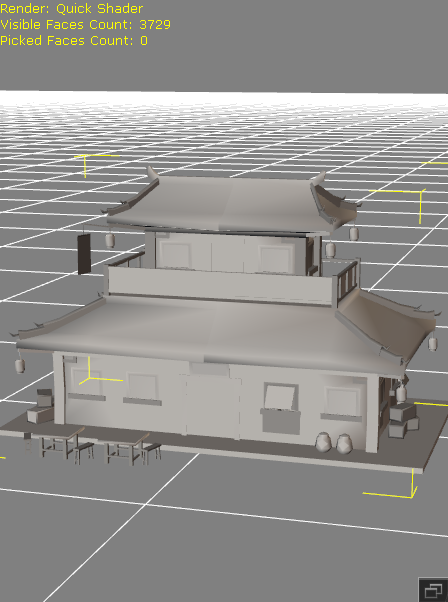
But in the file with the prop, there is only
123.max
Chinese House .mtl
and a MAX file in Chinese
I'm assuming the textures are in the .mtl file but I can't import it into 3dx6 because it's not an .imtl file. Can I convert or
am I SOL? Thanks again guys for your help.
:cool: pete
http://www.youtube.com/user/peterblood50?feature=mhee
|
|
|
|
|
animagic
|
animagic
Posted 9 Years Ago
|
|
Group: Forum Members
Last Active: Last Month
Posts: 15.8K,
Visits: 31.4K
|
An .mtl file does not contain textures only references to textures. MAX files are 3D Studio Max files and they cannot be converted unless you have 3D Studio Max. There are users here who have that (I think Kelley does) who may be able to help. Question: what did you actually load? Because MAX files cannot be imported.
|
|
|
|
|
Kelleytoons
|
Kelleytoons
Posted 9 Years Ago
|
|
Group: Forum Members
Last Active: 2 Years Ago
Posts: 9.2K,
Visits: 22.1K
|
Yup, as Ani explains. If you look at that MTL file (it's just a text file) you will see references to the various textures that are required. But they are not contained. They might be in the 3DS file (they might not) but if that's the case there are utilities out there that can convert a 3DS to an OBJ and preserve materials (my hunch is you just don't have any materials).
Alienware Aurora R16, Win 11, i9-149000KF, 3.20GHz CPU, 64GB RAM, RTX 4090 (24GB), Samsung 870 Pro 8TB, Gen3 MVNe M-2 SSD, 4TBx2, 39" Alienware Widescreen Monitor
Mike "ex-genius" Kelley
|
|
|
|