|
Author
|
Message
|
|
argus1000
|
argus1000
Posted 8 Years Ago
|
|
Group: Forum Members
Last Active: 4 Months Ago
Posts: 606,
Visits: 11.6K
|
Hi, I've been trying to load reasonable-size scenes in iClone 7, but with difficulty. This one scene takes place in a cafeteria with 3 CC characters and it takes fourteen (14) minutes to load! Its only 2.85 GB in size. And it's like that all down the line... you want to delete a character and it takes two (2) minutes. You spend half your time waiting for the computer to make it's calculations with iClone 7. And I have a double-socket Xeon CPU with 32 GB Ram an nVidia 1080 video card with 8 GB VRAM. Is that normal??? 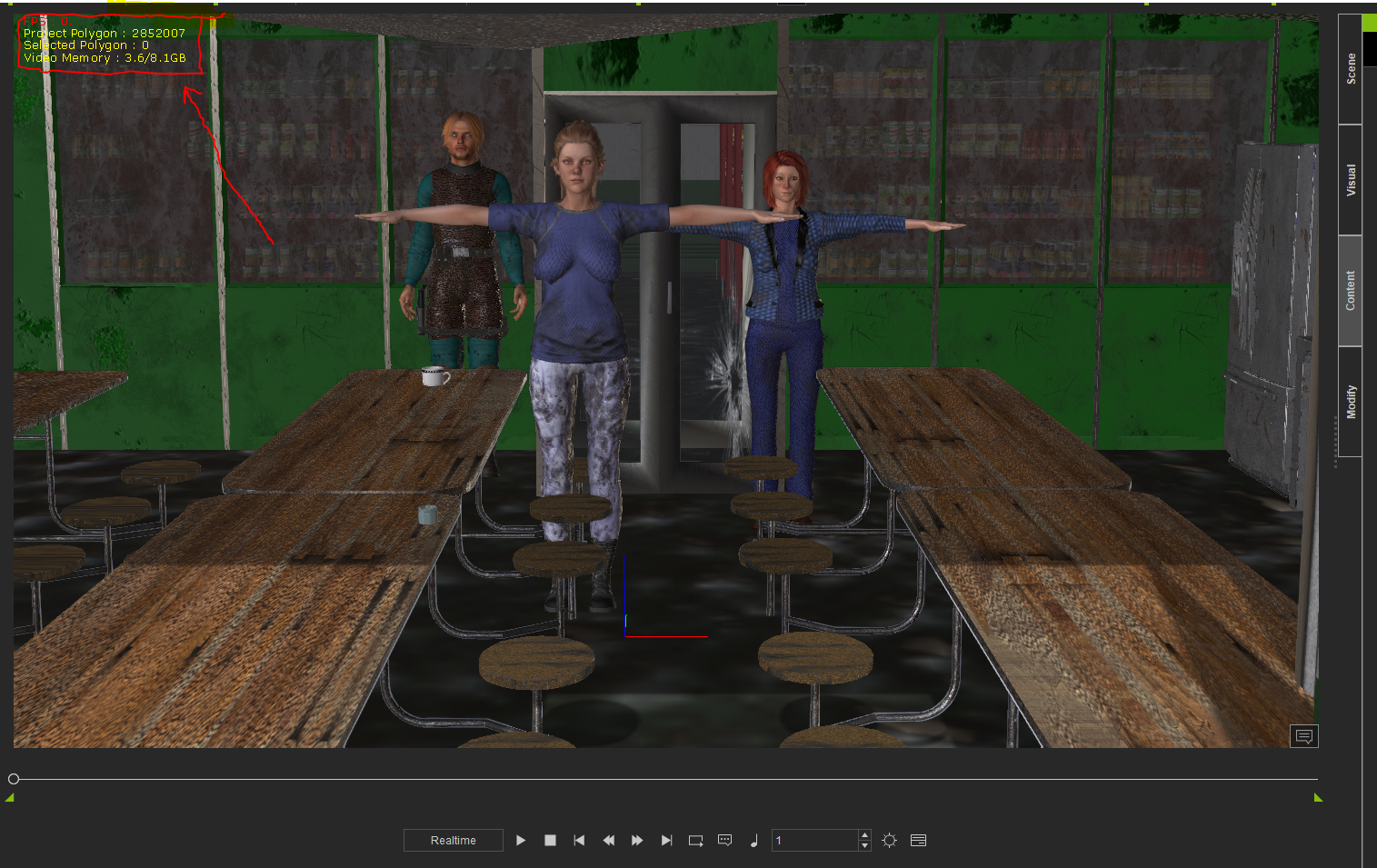 My latest movie THE GOLDEN MAN, and a few others: https://www.youtube.com/channel/UCIl1EqVCKitZzLqaNnLK0BA
|
|
|
|
|
4u2ges
|
4u2ges
Posted 8 Years Ago
|
|
Group: Forum Members
Last Active: 7 days ago
Posts: 5.3K,
Visits: 16.8K
|
Wow, 3Gb, I never had anything more than 700 Mb. Sorry to say that, but 3M polys are not exactly reasonable for the type of scene you have there (at least what is visible). That scene needs to be heavily optimized. Let's see. 3 characters should not take more than 200K. The rest of the scene mostly consists planes except for the round chairs, table support, some curvature on a fridge (rounding takes most polys). I would say the scene can surely be optimized to 500K tops and look the same. You would need to have a 3DXchange and any sort of 3D app (like Blender) which can decimate props. Just select each prop to see what takes most. BTW, did you get the scene from 3D warehouse? EDIT: Initially, I was under the impression those cans/bottles behind washed glass are just a picture. Are those real props??
|
|
|
|
|
Kelleytoons
|
Kelleytoons
Posted 8 Years Ago
|
|
Group: Forum Members
Last Active: Last Year
Posts: 9.2K,
Visits: 22.1K
|
Yeah, I'd also add that my gut tells me it's not faces but textures that are killing it. Make sure you don't have any 4K textures in there (very common if it comes from Daz -- you can, luckily, resample all of those and cut your stuff down by 1/4 or more -- anything more than 1K for an object is a wasted texture).
Alienware Aurora R16, Win 11, i9-149000KF, 3.20GHz CPU, 64GB RAM, RTX 4090 (24GB), Samsung 870 Pro 8TB, Gen3 MVNe M-2 SSD, 4TBx2, 39" Alienware Widescreen Monitor
Mike "ex-genius" Kelley
|
|
|
|
|
argus1000
|
argus1000
Posted 8 Years Ago
|
|
Group: Forum Members
Last Active: 4 Months Ago
Posts: 606,
Visits: 11.6K
|
No, I got the scene and most of the props from Daz. Some props are from 3D warehouse. The canned food at the back is from 3D warehouse too. They are real props. The display is replicated twenty (20) times. Maybe I should decimate them in Daz Studio before I export them? But what about the props from 3D warehouse? How can I decimate them? I have 3Dxchange 7 pipeline. The scene represents an old underground abandoned army bunker. Those people are refugees from a nuclear attack.
My latest movie THE GOLDEN MAN, and a few others: https://www.youtube.com/channel/UCIl1EqVCKitZzLqaNnLK0BA
|
|
|
|
|
Kelleytoons
|
Kelleytoons
Posted 8 Years Ago
|
|
Group: Forum Members
Last Active: Last Year
Posts: 9.2K,
Visits: 22.1K
|
Again, look to your textures -- odds are they are 4K (nearly all from Daz are nowadays). Just reduce them (you can do this automagically using Photoshop, and even in Daz somehow but I don't know how in Daz. I always use the process that's inside Photoshop to do the whole folder). That will most likely solve all your problems.
Alienware Aurora R16, Win 11, i9-149000KF, 3.20GHz CPU, 64GB RAM, RTX 4090 (24GB), Samsung 870 Pro 8TB, Gen3 MVNe M-2 SSD, 4TBx2, 39" Alienware Widescreen Monitor
Mike "ex-genius" Kelley
|
|
|
|
|
argus1000
|
argus1000
Posted 8 Years Ago
|
|
Group: Forum Members
Last Active: 4 Months Ago
Posts: 606,
Visits: 11.6K
|
Thanks, Kellytoons. Will do.
My latest movie THE GOLDEN MAN, and a few others: https://www.youtube.com/channel/UCIl1EqVCKitZzLqaNnLK0BA
|
|
|
|
|
stuckon3d
|
stuckon3d
Posted 8 Years Ago
|
|
Group: Forum Members
Last Active: Last Month
Posts: 1.8K,
Visits: 7.8K
|
i don't think is the texture, and while downsizing the texture will always help , you are only using 3 gigs of video ram. I think is the 40 copies of the shelves that is causing the problem. You should set dress to the shot. By that i mean only what is visible to the camera. It looks like you want to make it look like a supermarket aisles. so keep the first row as detail with cans and the rest simplify the heck out of. just show the side of the shelves with not can in them. Also did you remove the backside of the geometry after you imported models from 3dwarehouse? Hope this helps, Stuckon3d

Product Specialist
My iClone 7 gallery
My IMDB
|
|
|
|
|
4u2ges
|
4u2ges
Posted 8 Years Ago
|
|
Group: Forum Members
Last Active: 7 days ago
Posts: 5.3K,
Visits: 16.8K
|
Is this what you have replicated 40 times? https://3dwarehouse.sketchup.com/model/1661cf7c472b693b722461155cacc9e3/Canned-food-department-supermarketThat is a project killer! Did you at least remove backfaces in 3DXchange before exporting to iClone? (that is a most you can do without taking it the prop to 3rd party app). Those are behind a dirty glass window so I would not worry about the quality of the mesh, I would take it to Blender and decimated the hell out of it :). In non essential areas of the cafeteria I would even replace real props with just a picture of them over a single plain Yes, and watch the maps as KT suggested (though I cannot disagree more about <everything> must be below 1k). But again it depends on the environment and amount of closeup shots and the quality you wish to present in those closeups. For this bunker 1k is more than enough though.
OK, stuckon3D beats me by 14 seconds :D
|
|
|
|
|
argus1000
|
argus1000
Posted 8 Years Ago
|
|
Group: Forum Members
Last Active: 4 Months Ago
Posts: 606,
Visits: 11.6K
|
Hi stuckon3d, Sorry. I miscalculated. The display of canned food was replicated/duplicated only 20 times. I have enigmatic news though: after I deleted the displays (the simple fact of deleting them took five (FIVE!) minutes. See what I mean?), it went down to 1.15 GB, but it still took 11 minutes to re-load... Hi 4u2ges, I didn't erase the back faces. I will try again without back faces. Thanks. P.S.: After thinking a little bit ( yes it happens to me sometimes), I must tell you that I use a lot of "Super substance tools" to make my scene more in relief and dirty. That might be the culprit...
My latest movie THE GOLDEN MAN, and a few others: https://www.youtube.com/channel/UCIl1EqVCKitZzLqaNnLK0BA
|
|
|
|
|
Kelleytoons
|
Kelleytoons
Posted 8 Years Ago
|
|
Group: Forum Members
Last Active: Last Year
Posts: 9.2K,
Visits: 22.1K
|
I know others are poo-poohing the texture issue, but I've found it to be a REAL problem with load/manipulation times. Case in point -- a high-res automobile takes about four minutes to load into iClone. Same car exact car, retextured down to 1K (from 4K textures) loads in about 30 seconds. NOT a coincidence. Daz stuff is notorious for overly high textures -- and despite the 4guy (who knows far more than I do about iClone) saying it, I've never found you need more than 1K textures for anything other than faces. It's just WAY overkill (perhaps maybe a closeup of a label, but in that case you wouldn't do it in iClone even). Even a 1K texture tiled onto a surface looks great from even just a few feet away -- anything more is just crazy (because we're talking MOVING, not stills -- stills need higher textures but if you keep action going you should never even notice).
Alienware Aurora R16, Win 11, i9-149000KF, 3.20GHz CPU, 64GB RAM, RTX 4090 (24GB), Samsung 870 Pro 8TB, Gen3 MVNe M-2 SSD, 4TBx2, 39" Alienware Widescreen Monitor
Mike "ex-genius" Kelley
|
|
|
|