|
By argus1000 - 9 Years Ago
|
Hi,
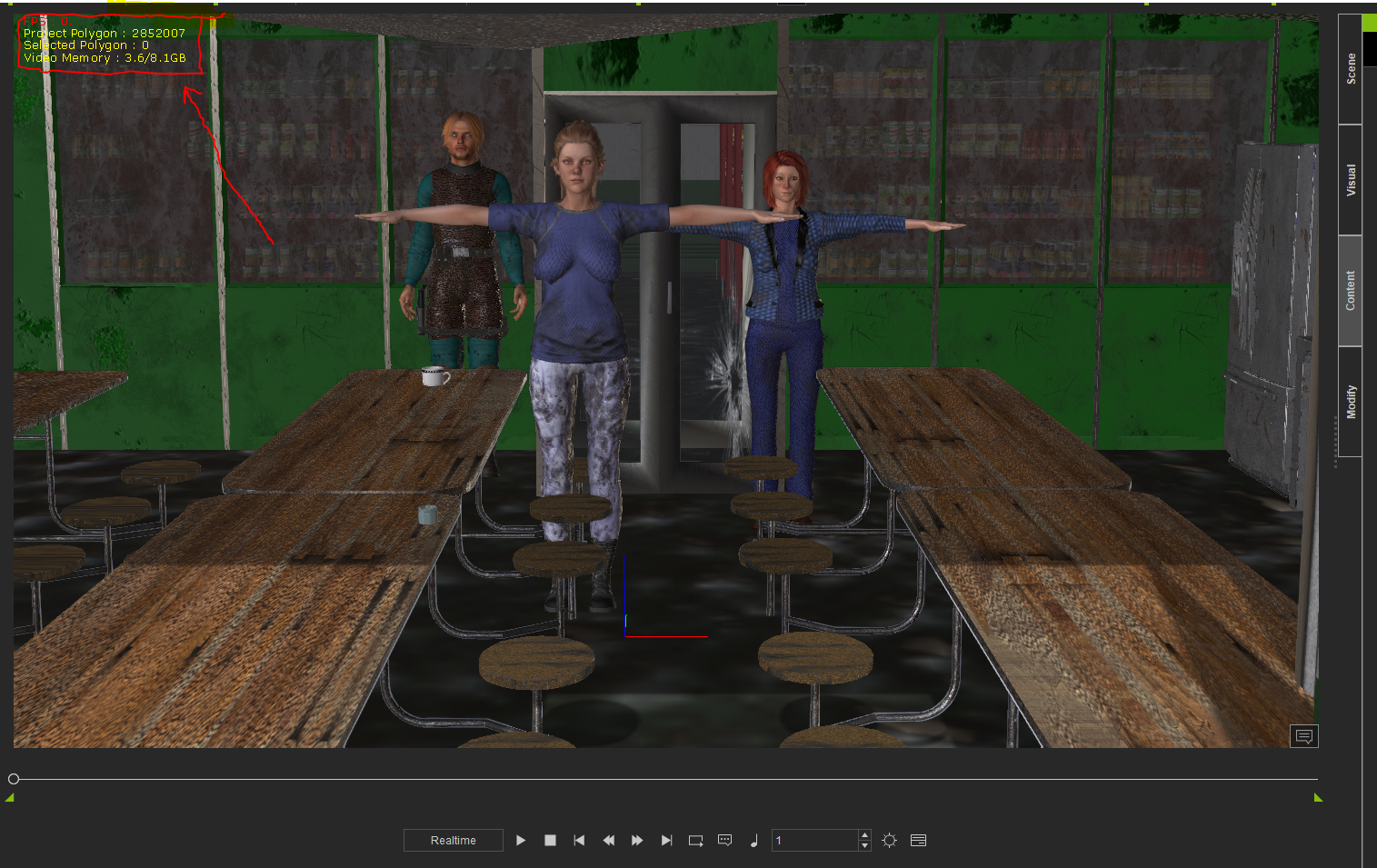
I've been trying to load reasonable-size scenes in iClone 7, but with difficulty. This one scene takes place in a cafeteria with 3 CC characters and it takes fourteen (14) minutes to load! Its only 2.85 GB in size. And it's like that all down the line... you want to delete a character and it takes two (2) minutes. You spend half your time waiting for the computer to make it's calculations with iClone 7.
And I have a double-socket Xeon CPU with 32 GB Ram an nVidia 1080 video card with 8 GB VRAM.
Is that normal???
|
|
By 4u2ges - 9 Years Ago
|
Wow, 3Gb, I never had anything more than 700 Mb. Sorry to say that, but 3M polys are not exactly reasonable for the type of scene you have there (at least what is visible). That scene needs to be heavily optimized. Let's see.
3 characters should not take more than 200K. The rest of the scene mostly consists planes except for the round chairs, table support, some curvature on a fridge (rounding takes most polys).
I would say the scene can surely be optimized to 500K tops and look the same. You would need to have a 3DXchange and any sort of 3D app (like Blender) which can decimate props.
Just select each prop to see what takes most. BTW, did you get the scene from 3D warehouse?
EDIT: Initially, I was under the impression those cans/bottles behind washed glass are just a picture. Are those real props??
|
|
By Kelleytoons - 9 Years Ago
|
|
Yeah, I'd also add that my gut tells me it's not faces but textures that are killing it. Make sure you don't have any 4K textures in there (very common if it comes from Daz -- you can, luckily, resample all of those and cut your stuff down by 1/4 or more -- anything more than 1K for an object is a wasted texture).
|
|
By argus1000 - 9 Years Ago
|
No, I got the scene and most of the props from Daz. Some props are from 3D warehouse. The canned food at the back is from 3D warehouse too. They are real props. The display is replicated twenty (20) times. Maybe I should decimate them in Daz Studio before I export them? But what about the props from 3D warehouse? How can I decimate them? I have 3Dxchange 7 pipeline.
The scene represents an old underground abandoned army bunker. Those people are refugees from a nuclear attack.
|
|
By Kelleytoons - 9 Years Ago
|
|
Again, look to your textures -- odds are they are 4K (nearly all from Daz are nowadays). Just reduce them (you can do this automagically using Photoshop, and even in Daz somehow but I don't know how in Daz. I always use the process that's inside Photoshop to do the whole folder). That will most likely solve all your problems.
|
|
By argus1000 - 9 Years Ago
|
Thanks, Kellytoons. Will do.
|
|
By stuckon3d - 9 Years Ago
|
i don't think is the texture, and while downsizing the texture will always help , you are only using 3 gigs of video ram. I think is the 40 copies of the shelves that is causing the problem. You should set dress to the shot. By that i mean only what is visible to the camera. It looks like you want to make it look like a supermarket aisles. so keep the first row as detail with cans and the rest simplify the heck out of. just show the side of the shelves with not can in them. Also did you remove the backside of the geometry after you imported models from 3dwarehouse?
Hope this helps,
Stuckon3d
|
|
By 4u2ges - 9 Years Ago
|
Is this what you have replicated 40 times? https://3dwarehouse.sketchup.com/model/1661cf7c472b693b722461155cacc9e3/Canned-food-department-supermarket
That is a project killer! Did you at least remove backfaces in 3DXchange before exporting to iClone? (that is a most you can do without taking it the prop to 3rd party app).
Those are behind a dirty glass window so I would not worry about the quality of the mesh, I would take it to Blender and decimated the hell out of it :).
In non essential areas of the cafeteria I would even replace real props with just a picture of them over a single plain
Yes, and watch the maps as KT suggested (though I cannot disagree more about <everything> must be below 1k).
But again it depends on the environment and amount of closeup shots and the quality you wish to present in those closeups.
For this bunker 1k is more than enough though.
OK, stuckon3D beats me by 14 seconds :D
|
|
By argus1000 - 9 Years Ago
|
Hi stuckon3d,
Sorry. I miscalculated. The display of canned food was replicated/duplicated only 20 times. I have enigmatic news though: after I deleted the displays (the simple fact of deleting them took five (FIVE!) minutes. See what I mean?), it went down to 1.15 GB, but it still took 11 minutes to re-load...
Hi 4u2ges,
I didn't erase the back faces. I will try again without back faces. Thanks.
P.S.: After thinking a little bit ( yes it happens to me sometimes), I must tell you that I use a lot of "Super substance tools" to make my scene more in relief and dirty. That might be the culprit...
|
|
By Kelleytoons - 9 Years Ago
|
I know others are poo-poohing the texture issue, but I've found it to be a REAL problem with load/manipulation times.
Case in point -- a high-res automobile takes about four minutes to load into iClone. Same car exact car, retextured down to 1K (from 4K textures) loads in about 30 seconds. NOT a coincidence.
Daz stuff is notorious for overly high textures -- and despite the 4guy (who knows far more than I do about iClone) saying it, I've never found you need more than 1K textures for anything other than faces. It's just WAY overkill (perhaps maybe a closeup of a label, but in that case you wouldn't do it in iClone even). Even a 1K texture tiled onto a surface looks great from even just a few feet away -- anything more is just crazy (because we're talking MOVING, not stills -- stills need higher textures but if you keep action going you should never even notice).
|
|
By argus1000 - 9 Years Ago
|
Hi Kellytoons,
I will start work on the textures tomorrow. I work only in the morning when I'm fresh and willing.
|
|
By Kelleytoons - 9 Years Ago
|
As an old man, I understand that perfectly <g>.
(Although with me it takes me around until after noon when I'm fresh enough :>).
|
|
By mtakerkart - 9 Years Ago
|
@Argus1000
If you use substance you MUST bake your texture (little red icon on texture thumbnail do not have to be there) to optimize your project.
If the substance is active it mean that you have dynamic textures (animatable) wich take all the ressources. When you duplicate object,
use the "pick material" tool to instantiate the texture to decrease draw call.
|
|
By 4u2ges - 9 Years Ago
|
Still 1.5 Gb after removing cans? OK. That is for tomorrow I guess.
Did you clone those tables as well?
Looks like the problem here not with the size but with quantity. You said it took 5 minutes to delete cans. You bet!
I just tested. Aside from polys, a single cans stock contains over 2000 images (you can look at the 3DXchange temp folder to count)!
I believe you have the same with everything cloned/replicated at the scene.
I can tell you how to deal with cans for now.
In 3DExchange:
1. Do Exclude skp back faces.
2. Hide them.
3. Select the root of the tree and click Merge identical. Now you would be down from 100's of materials/parts to about 25.
You can actually do the test. Bring unmodified cans prop to a new project, then try to delete it and clock it.
Then to the same for optimized. You would see a huge difference.
Some of the cans have flipped normals, meaning the front of the mesh would be transparent/invisible. You can actually use Flip Normals in 3DXechange on them, or enable 2-sided for the material.
In any case it is not much noticeable behind washed out glass.
Let us know.
|
|
By argus1000 - 9 Years Ago
|
Hi mtakerkart,
Yes, I didn't think about baking my substance textures (see, even though I saw the video about substance baking, I don't think all the time, that's why I need people like you). I will be baking and let you know.
|
|
By animagic - 9 Years Ago
|
|
There is also still a real-time texture size setting I believe. That will temporary lower the texture resolution and reduce the RAM requirements. For your final you can up it again. I've never worked in an animation studio, but my understanding is they do a lot with proxies (stand-ins) to get everything set up, placed, and animated. Only when that's done the high-res stuff is applied.
|
|
By 4u2ges - 9 Years Ago
|
I never bake substances and do not recommend it. Not sure about performance (never had any problems on mid sized projects), but baking substance creates PNG maps.
Which greatly affects a project size and probably performance (I do not have enough data to confirm the fact). And it grows with geometric progression as you increase substance resolution before the bake.
Example:
A project with 6 boxes - 6 different substances 2048x2048 applied - project size 1.2 MB
Same boxes with baked substance - project size 130 MB
Even on 515x512, the baked project would be twice as large as non-baked.
If someone has actually more testing data related to performance to present, I would like to hear it.
|
|
By justaviking - 9 Years Ago
|
About the bottles and cans... "how" the objects are duplicated will make a difference, too. They can be "unique" objects, or "instances" of the same one (which is much more efficient).
And, "a single cans stock contains over 2000 images." Whaaaat? That's insane!
Lastly, what are you using to measure your VRAM usage? Are you relying on iClone's reporting, or GPU-Z, or something else? Just curious.
|
|
By justaviking - 9 Years Ago
|
|
<<< oops... apparently I hit"reply" instead "edit"... cleared this one out, now >>>
|
|
By Delerna - 9 Years Ago
|
|
I've never found you need more than 1K textures for anything other than faces. It's just WAY overkill (perhaps maybe a closeup of a label, but in that case you wouldn't do it in iClone even). Even a 1K texture tiled onto a surface looks great from even just a few feet away -- anything more is just crazy (because we're talking MOVING, not stills -- stills need higher textures but if you keep action going you should never even notice).
Kellytoons has made a great and valid point here. I find in film making I only need 3D models where it matters and use 2D images where it doesn't because I just don't notice they are not 3D unless I look really closely which also means I am not watching the point of the video.
As an example. Those cans don't need to be 3D to look 3D. This is the sketchup cans shown ealier but I replaced the cans with 3 rectangles that has a transparency image of the cans so they kind of look 3D.
Add your messy glass and it will be less noticeable. I think this is good enough for the sceen but saves a lot of resources

Here is the image of the cans

|
|
By Kelleytoons - 9 Years Ago
|
That's very clever.
One of the things I was always amazed at when visiting the studio was seeing how lo-res all the stuff was on the set. Admittedly, that was back in the days before HD, but even with film (where the resolution was as much as HD, just with some grain involved) the actual sets were laughable up close. Labels on packages were so lo-res that folks would sneak in jokes that would make a maid blush even on G-rated movies.
When you do your closeups of your characters, the background will be out of focus anyway. Just think about what you really need to see, and spend your time on it. The rest is overkill.
|
|
By 4u2ges - 9 Years Ago
|
Yep, that is great idea! Not that I did not mention it in my second reply. 4guy is not that stubborn after all when it comes to photorealims. I do apply common sense... once in a while :P
|
|
By brand468 - 9 Years Ago
|
When using Daz, I can recomend this program.
https://www.daz3d.com/scene-optimizer Works well to reduce the size of an entire scene.
|
|
By Peter Blood - 9 Years Ago
|
Another idea is, if you need a 3d can for a medium shot, just use a cylinder prop (12 polys). Grab a Campbells soup wrapper or whatever
off Google images slap it on and bada-bing it looks like a 3d warehouse prop at a fraction of the cost.
You might also shoot the scene in two shots, a foreground and background shot and then combine them in your video editor. I do that
when I have to shoot on a set with a very large poly count. [Just watch your shadows. ;) ]
Just a couple of ideas.
:cool: pete
|
|
By argus1000 - 9 Years Ago
|

Thanks to all who have contributed.
I think the best idea comes from peterblood: to composite the actors over the background. Of course, I had thought of this technique before. I even used it in a sci-fi movie I did with Carrara. But that doesn't solve my original problem: the horrible amount time it takes to load/delete scenes in iClone 7.
I arranged the can displays with a minimun of polygons (only one row of cans), but I'm still inconsolable over the results. The cafeteria scene with the 3 actors amounts to 1.32 GB and takes 12 minutes to load/open. That is not right. I've had bigger scenes in Carrara that took much less time to load.
It looks like I'll have to re-start from scratch with the room as imported from Daz (only 79 MB) and optimize one added object at the time. That's going to take some time.
P.S.: Not one texture is over 1024X1024. The can textuires are 512X512
|
|
By justaviking - 9 Years Ago
|
|
Four thoughts...
a) I'm not saying I mistrust iClone's reporting, but could you try GPU-Z (it's free), and see if that reports similar results for the graphics card memory usage?
b) Looking at your image, especially when it's a nice full-screen picture, I do suspect you can probably get away with a simple "image on a plane" for the shelves with cans, as has been suggested. Keeping it a meter or two behind the dirty glass will still give a sense of depth as the camera moves. I don't think the "3D effect" on individual cans will be noticeable.
c) Are you using a traditional spinning hard disk drive (HDD) or a solid-state disk (SSD)? If HDD, have you defragmented it lately? That could be one of several contributors.
d) Would you be willing to share this scene with a couple people? Possibly upload it to a file-sharing site, and PM the link to a few people here. We could see if it loads better on our systems, helping identify what is scene-related and what is system-related. I, for one, would certainly be willing to run a few tests with you.
I admire your patience and determination in working on this issue. I hope you get it all figured out.
|
|
By argus1000 - 9 Years Ago
|
Hi justaviking,
a) I tried GPU-Z. It won't open. Says I didn't have permission.
b) Sure, I could put an image, but the would would only reduce to 1.15 GB and still would take 11 minutes to open/load.
c} I'm using one 225 GB SSD drive for my programs and two 1 TB HHD drives for my data. They're on automatic de-fragment. I just checked: they're 0% fragmented.
d) Yes. I would be interested in sharing. Maybe on my Google One Drive. I'll see to it now and I'll get back to you.
Thanks for the encouragement.
|
|
By Dr. Nemesis - 9 Years Ago
|
How did you get the scene down to 0.1GB of VRAM use in the last pic??
When I open an empty project in Iclone 7 I'm already at 0.6/0.7 !
|
|
By justaviking - 9 Years Ago
|
@Argus - Thanks for the reply.
Strange that you're having permissions issues with GPU-Z. I've only put it on a couple of machines, but never had an issue with it. My personal account is the primary (sometimes the only) account, so I have all admin privs.
It sounds like your disks are in good shape, to that eliminates something, which is progress. I did not think that was the sole culprit, but merely a contributor that might make a bad situation worse, but it's not a factor.
That will be great when you can share the project. I'll be happy to see what happens and report back.
|
|
By argus1000 - 9 Years Ago
|
|
Dr. Nemesis (11/6/2017)
How did you get the scene down to 0.1GB of VRAM use in the last pic??
Hell if I know...
|
|
By animagic - 9 Years Ago
|
|
I'm willing to help out as well by trying to load the project.
|
|
By Kelleytoons - 9 Years Ago
|
|
Dr. Nemesis (11/6/2017)
How did you get the scene down to 0.1GB of VRAM use in the last pic??
When I open an empty project in Iclone 7 I'm already at 0.6/0.7 !
Your "empty" project probably isn't -- go to the Scene and see what you have. If you are using iClone's default project, you have a Sky, some lights, and a shadow catcher at the minimum.
You can create a truly empty project yourself (delete all that stuff) and then save it as your default and it will be what you get every time you open up a new one (I have my own "empty" project set up for GI and other various things that are not set normally).
Oh, and I'll volunteer as well, although I suspect that Dennis and Ani are more than enough to find out what the issue is.
|
|
By argus1000 - 9 Years Ago
|
For those who want to download my project:
https://1drv.ms/u/s!AjQvqxI5STfijSXiy1yIXnkTRJd3
|
|
By justaviking - 9 Years Ago
|
Downloading...
I have a couple errands to run, so it might be a couple hours until I get any feedback to share with you.
This was too interesting. I did a quick "open-the-project" test. Now that I've done everything below, I better go to the grocery store so I can feed the family.
UPDATE:
Opening... Consumed GPU VRAM at the rate of nearly 1GB/minute for first 3 minutes... tapering off... At 4-minutes into it, using 3.5GB graphics memory, per GPU-Z.... still loading...
UPDATE:
At the 7 or 8 minute mark, I got this "Found 3 file load failed" error...

Now "Converting data"...
Graphics memory usage ~7.2 GB
iClone reports 1.6 of 8.1GB used. I don't believe it. I put more faith in GPU-Z (sorry, Reallusion).

LOADED... :) ... About 14 minutes... GPU-Z settled in at 6.4GB memory used, iClone reports 1.7GB.
Don't think it says much, but interesting observation... Both System Memory and Graphics Memory dipped after the project was fully loaded.

INTERIM CONCLUSION --- Your project really is "that big" which is why it takes nearly 15 minutes to load.
|
|
By argus1000 - 9 Years Ago
|
|
justaviking (11/6/2017)
- Your project really is "that big" which is why it takes nearly 15 minutes to load.
I don't understand all the technical details you give me, but one thing I understand: how can my project be 'that big" when it only has 3 characters, a few cans, 2 fridges, a few tables, 2 microwaves, a stove and a little silverware? It doesn't seem like a big scene to me...
|
|
By justaviking - 9 Years Ago
|
THE SHORT STORY: The items you have, though few in number, consume a huge amount of the memory on your graphics card.
The next step will be to identify specific culprits, and what can be done about it.
Stay tuned...
|
|
By animagic - 9 Years Ago
|
In my case the loading with quicker: it was done in 7 minutes. Could be a bit faster, because I also got the warning message and didn't click it right away. After I closed it the message the scene loaded immediately. I noticed that iClone was in Quick Mode so that may explain the faster loading.
My memory consumption is a bit different: almost 8 GB for the GPU and 2.3 GB as RAM. (I forgot to check what iClone reports.) None of this is exceptional for larger scenes. Like Dennis, I saw a gradual increase of GPU memory usage
I'm going to load again with High settings to see if that makes a difference. This time a saw the message right away and my load time was 6 minutes, so assume Quick Mode would be the same. In each my system load the project faster. I don't know why. I have a six-core processor, but I seems only one core is active.
GPU memory usage is more than 8 GB, although iClone only reports 6 GB. RAM usage is about 2.8 GB. The High setting needs more memory as expected, but it does not affect the load time. One thing I notice that towards the end the GPU memory increase became faster.
Which is all very exiting, but doesn't answer the question why the project takes so much time to load.
|
|
By justaviking - 9 Years Ago
|
Oh, I put the project file on a hard drive, not my SSD, so that might be a reason my load time was slower than Job's (if his is on an SSD). When I get back to my iClone computer, I might move it to the SSD. Then I'll start dissecting the project.
P.S
Interesting that Job and I are getting significant VRAM usage reports.
GPU-Z says there's a new version available. I doubt it will matter, but I'll update that, too, before I continue.
And... I'm on the latest "7" release. What is it... 7.0.2? I'll confirm that. too.
|
|
By animagic - 9 Years Ago
|
I tried to save some items out to test individually, but saving the guy (Gerard) crashed iClone. he is 260k with 50k for the hair and may be a good candidate for the long loading time. I just loaded the cans and they load very quickly by themselves. So the table and chairs.
I'm going to try again to just save the guy and also remove him form the project to see if that improves loading. More later.
|
|
By justaviking - 9 Years Ago
|
"A few cans" is a bit misleading.
I found about 150 props in the kitchen, lots and lots of them are on the shelves, I believe.
QUESTION: Will your characters be walking through the shelving area? Will they interact with any of the items on the shelf? Or will that area always be in the background?
On a similar vein... Is your fridge a major prop that will get a lot of close-ups of the interiror?
I counted about 95 textures for the fridge. Yipes!!!!!
This tall screenshot only shows about 40% of the textures (materials) for the fridge.

P.S.
It's been so long since I've had a watermark... Can't you render at all with the watermarks on? I thought it would, but with the watermarks visible, of course.
|
|
By 4u2ges - 9 Years Ago
|
I had a little time to spend checking this out. So just a brief summary.
Initial load time was 5:50 (iClone was already opened) so make it 6:00.
I had to take 2 girls out (they are the source of watermarks), after that load time is 5:20
Animagic is right, Gerald is causing a lot of problem there and is a major hiccup.
After taking him out, load time dropped to 2:20. Yes, saving him is impossible (iclone crashes on substance blend dll).
I believe substance over his cloth items was overused.
Other than that I see a lot of props with unnecessary high poly count. Take 26 plates in the kitchen - whopping 200K poly count! and so the rest.
Fridge -100K. and so on
The scene needs to be optimized from the ground up IMHO.
|
|
By justaviking - 9 Years Ago
|
@Argus,
Yeah, this scene is a tremendous amount of overkill for your purposes. And I think it's horribly inefficient, which compounds the problem.
All those "textures" add up, and so does the geometry upon which they reside.
A "drawer" inside your fridge, which I suspect we might never see, is a 1k texture.
If you like, I can explain a bit more about why that is excessive.
EDIT: Ah, I sort of cross-posted with 4u2ges. I had my post-editing session open while I was doing more research.
|
|
By Delerna - 9 Years Ago
|
I've been loading the project now for 45 minutes and its only 30% complete. Time for me to spend some money and build myself a new computer.
Although my computer works OK for my projects so far speeding it up will definitely make it more enjoyable.
Maybe I spend too much time modelling content and not enough using iClone for what I bought it for in the first place....making video's
Anyway, just to expand my earlier post about the image. It was not meant as the solution to your problem. I was just giving an example of what I, and others were talking about .
Use detail where it matters, simplify everything else as much as possible. The simpler you make the backgrounds the more resources you have to spend on the bits that matter.
hmmmmm 50 minutes now and still only 30%. I will leave it to the other guys
|
|
By 4u2ges - 9 Years Ago
|
|
justaviking (11/7/2017)
@Argus,
EDIT: Ah, I sort of cross-posted with 4u2ges. I had my post-editing session open while I was doing more research.
:) I did not have a chance to look closely at the textures, but yes there is a lot inside the fridge and around the kitchen.
But then again, I took whole scene into 3DX (less avatars), exported to fbx and looked into temp folder - only 455 images.
The largest scene I have created was 1.3M polys with 650MB project size. Overall images count was ~1000. with 4 avatars. Yet my project loads only 1:30
I have spend a week optimizing the scene though, but did not use much of the substance.
Anyhow, I cannot really advise on how to optimize the scene as I always use Blender for that and not much DAZ stuff. So you go ahead :D ...
|
|
By Delerna - 9 Years Ago
|
Totally agree with your point on blender. I have Daz and a fair bit of older content I bought when I was using Daz.
I don't bother with Daz anymore because I find Blender and iClone much better for what I want.
Others like bringing Daz content into iclone and I can understand that....just not my preference.
|
|
By justaviking - 9 Years Ago
|
I need to be clear; I am not being critical of you. This is a scene you got, and it's a learning experience.
I have enjoyed the little research project this evening. I will let others talk more about the characters in the scene.
I'll give one last example of what I am finding...
Here are 26 pates staked in two stacks. Literally, 26 individual plates. Each with nice 1k textures.
You can zoom way in and get a beautiful view of the two-apples logo on the plates.
Unless you plan to actually animate them for some reason, like a close-up of someone setting the table, that should be (at most), two cylinders, one for each stack, and a 512x512 texture at most. Even if you did the table-setting scene, you would still use the simplified version the rest of the time.
A word about texture size... (grossly simplified)...
A "1k texture" is 1024x024 pixels.
So a "1k" texture could fill a sizable portion your screen without any excessive pixilation.
Assume the stack of plates is in the background. How many pixels will they fill on your monitor? Maybe 50x100?
So actually a 212x212 texture might be sufficient for a cylinder that looks like a stack of plates.
That is only a 1/16th k texture.
So... each plate uses 16x more memory on your graphics card than what is probably needed for an entire stack of 16.
That means your plates are using up to 256 times more memory than necessary.

It's a nice logo, but unless you really need this much detail on all 26 plates, it's a lot of overkill...

|
|
By mtakerkart - 9 Years Ago
|
@Argus1000
Loded your project. As I said , bake all your texture. Your project can't run like this.
|
|
By Kelleytoons - 9 Years Ago
|
I knew Dennis and the others would nail this down, but just speaking from a more generalized standpoint (and to reemphasize what I was saying before):
I bring stuff in from Daz all the time -- great, great quality, and works well in iClone. But you need to know what you are doing. Invariably the textures are way too big, and you should resample before export (or before even loading into Daz -- you can use Photoshop for this automatically for the texture folders in Daz). This will drastically reduce the load times into 3DXChange, as well as make a very efficient scene in iClone.
Normally you don't need to decimate the scene, as *most* Daz stuff is pretty reasonable modeled. The exceptions (as noted here) are when you have a shitload of props, or if you duplicate them yourself. Use Ctrl-move to duplicate helps, but also just think about what you are doing and what will be seen and used. I don't find it to be particularly onerous or even time consuming to put together even fully propped Daz scenes as long as I know what the "cost" is (and I NEVER export from Daz more than I need -- only one plate and then I create the stack in iClone, for example).
And as others have noted, it's a great learning experience <g>.
|
|
By argus1000 - 9 Years Ago
|
|
4u2ges (11/7/2017)
I had a little time to spend checking this out. So just a brief summary.
Initial load time was 5:50 (iClone was already opened) so make it 6:00.
I had to take 2 girls out (they are the source of watermarks), after that load time is 5:20
Animagic is right, Gerald is causing a lot of problem there and is a major hiccup.
After taking him out, load time dropped to 2:20. Yes, saving him is impossible (iclone crashes on substance blend dll).
I believe substance over his cloth items was overused.
Other than that I see a lot of props with unnecessary high poly count. Take 26 plates in the kitchen - whopping 200K poly count! and so the rest.
Fridge -100K. and so on
The scene needs to be optimized from the ground up IMHO.
The watermarks you have is because I make my characters in Character Creator and I use the "Realistic humans 100" templates. When you use them in CC, which they are not a part of, you have to click "Content activation" under "Help" to eliminate the watermarks.
I have no problems with Gerard, but I'll check him out.
I gather you can load my scene pretty quickly because you have SSD drives. Am I right?
Being used to Carrara, I am not used to count my polygons. This is my first movie with iClone and I am shocked.
You are right. This scene needs to be redone from the ground up.
Thanks for your input.
|
|
By argus1000 - 9 Years Ago
|
|
justaviking (11/7/2017)
"
QUESTION: Will your characters be walking through the shelving area? Will they interact with any of the items on the shelf? Or will that area always be in the background?
On a similar vein... Is your fridge a major prop that will get a lot of close-ups of the interiror?
P.S.It's been so long since I've had a watermark... Can't you render at all with the watermarks on? I thought it would, but with the watermarks visible, of course.
I don't exactly know yet what will my characters do. I only have a general idea. The only thing I know is that they will be mostly sitting and talking. I know what they will say. At one point, one of them will retrieve something from the fridge.
Like I said in my previous post, the watermarks can be eliminated.
|
|
By argus1000 - 9 Years Ago
|
|
justaviking (11/7/2017)
@Argus,
Yeah, this scene is a tremendous amount of overkill for your purposes. And I think it's horribly inefficient, which compounds the problem.
.
Yes, like I said, it's my first movie with iClone. I'm learning (thanks to people like you). I'm learning the hard way.
P.S.: If you want to see my previous movies, type "argus1000bis" (no spaces) in Youtube's search engine. All my movies are there: "The gun", "Noah revisited", "Trance", etc...
|
|
By argus1000 - 9 Years Ago
|
|
justaviking (11/7/2017)
I need to be clear; I am not being critical of you. This is a scene you got, and it's a learning experience.
I have enjoyed the little research project this evening. I will let others talk more about the characters in the scene.
I will re-design the scene from the ground up and count my polygons, which I am not used to. Thanks for your time and precious input.
|
|
By argus1000 - 9 Years Ago
|
|
Kelleytoons (11/7/2017)
I knew Dennis and the others would nail this down, but just speaking from a more generalized standpoint (and to reemphasize what I was saying before):
I bring stuff in from Daz all the time -- great, great quality, and works well in iClone. But you need to know what you are doing. Invariably the textures are way too big, and you should resample before export (or before even loading into Daz -- you can use Photoshop for this automatically for the texture folders in Daz). This will drastically reduce the load times into 3DXChange, as well as make a very efficient scene in iClone.
Normally you don't need to decimate the scene, as *most* Daz stuff is pretty reasonable modeled. The exceptions (as noted here) are when you have a shitload of props, or if you duplicate them yourself. Use Ctrl-move to duplicate helps, but also just think about what you are doing and what will be seen and used. I don't find it to be particularly onerous or even time consuming to put together even fully propped Daz scenes as long as I know what the "cost" is (and I NEVER export from Daz more than I need -- only one plate and then I create the stack in iClone, for example).
And as others have noted, it's a great learning experience <g>.
I love Daz props. They have a lot of them and they are well designed. Maybe I should use their "scene optimizer" before exporting, as brand468 suggested (BTW, thanks) ? Thanks for your input, Kelleytoons.
|
|
By animagic - 9 Years Ago
|
|
One other tool in DAZ (it may need to be purchased) is the texture atlas, which is another way to optimize textures.
|
|
By justaviking - 9 Years Ago
|
|
animagic (11/7/2017)
One other tool in DAZ (it may need to be purchased) is the texture atlas, which is another way to optimize textures.
I'm familiar with the term "texture atlas," from hanging around the Substance Painter/Designer forum, but that's about as far as my knowledge of them goes. Does iClone play well with them?
|
|
By Kelleytoons - 9 Years Ago
|
Texture Atlas is now free with the newer Daz -- I tried it once, and it works well. Essentially it puts all your textures into one large map which you can optimize.
Personally I prefer reoptimizing myself using Photoshop but to each their own. The problem with Atlas is you end up with one giant texture, whereas with Photoshop you can optimize them separately (but it's not as self-contained, as you need to know what you are doing. I just point it towards my texture folders in Daz and let it do its thing automagically).
You can experiment each way to see what you like, but in any case it's almost a requirement as nearly all Daz stuff comes WAY overtextured (as noted here, even a 1K texture map on a small item is overkill, but often they provide 4K maps which is just crazy).
|
|
By 4u2ges - 9 Years Ago
|
I stand corrected here. Mtakerkart was right all along for this particular project.
@argus1000 You may or may not follow this, but we are all learning here one way or another.
And it is good to know what has happened so that next time you would not fall into the same trap.
First, you indeed need to bake all substances. As I mentioned before, I never do as it generates large PNG maps. Plus with
"live" substance there is an option to animate it. In your project however, you have an enormous amount of substances applied to props.
As part of the optimization, they need to be baked.
Baking can be done easily with a few clicks - select each one of the "root" objects and then Edit > Bake All Substance Textures (for each avatar and the Cafeteria root).
Now, the fun part. After baking substance textures and saving the project, the size of it would substantially GROW and SO DOES the load time!
Next, you need to actually delete all substances applied in materials. So you would need to activate it again with a check box and then click on delete icon to the right from the substance name.
Unfortunately, there is no way to delete all substances in one shot for a particular group of props. It has to be done for each and every sub-prop individually. In your case it would be very time consuming.
After all done, the size of the project would slightly go back down, but opening it would be a breeze.
Above does not undermine everything was said in the thread. You would still need to follow recommendations and optimize a project, or apply them to a new one.
Good Luck!
On the side note, it is still a bad idea on the iClone part to bake substance textures into PNGs. We should have a JPEG option with variable compression level.
|
|
By justaviking - 9 Years Ago
|
|
4u2ges (11/7/2017)
Unfortunately, there is no way to delete all substances in one shot for a particular group of props. It has to be done for each and every sub-prop individually. In your case it would be very time consuming.
Sounds like a job for a Python script, right KelleyToons? ;)
On the side note, it is still a bad idea on the iClone part to bake substance textures into PNGs. We should have a JPEG option with variable compression level.
Sounds like a great suggestion to put on FeedBack tracker, for both iClone and CC.
Could put is a "delete all substances" suggestion, too, per the first half of this post.
|
|
By 4u2ges - 9 Years Ago
|
I went ahead and deleted all substances after baking them (took less than 20 min actually).
Project size now stands at 930 MB (this is without 2 girls) but the load time dropped from 5:20 to 1:05.
VRAM utilization is slightly up - those PNGs though not that large in this case are still a downside.
Oh yes, once done I was able to save Gerald - He's fine now ;)
@justaviking Yes, it is a definite candidate for a feedback tracker. I'll put it in.
|
|
By argus1000 - 9 Years Ago
|
|
4u2ges (11/7/2017)
After This is done, the size of the project would slightly go back down, but opening it would be a breeze.
Aaaaaaaaaahhhhh!!! Music to my ears...
|
|
By argus1000 - 9 Years Ago
|
|
[b]4u2ges
Oh yes, once done I was able to save Gerald - He's fine now ;
Good! I was afraid you hurt my Gerard mortally... Now I can breathe!
|
|
By Delerna - 9 Years Ago
|
This has been a good thread to watch.
I have been shown a few things I need to consider and examine.
1 example :- jpeg and png. I need to check out what your saying. I use png a lot and maybe I shouldn't?
|
|
By justaviking - 9 Years Ago
|
|
Delerna (11/8/2017)
This has been a good thread to watch.
I have been shown a few things I need to consider and examine.
1 example :- jpeg and png. I need to check out what your saying. I use png a lot and maybe I shouldn't?
Open one of your PNG files (okay to use MS Paint).
SaveAs a JPG file.
Compare the sizes.
Then decide if the visual difference justifies the size difference.
Sometimes a PNG is required for various reasons (JPG files do not have an Alpha/Transparency layer, for example). But usually not worth the extra volume for my purposes.
ADDED:
Statistics for the 1920x1080 image I posted in the next post...
PNG size = 3,520 kb
JPG size = 612 kb
|
|
By justaviking - 9 Years Ago
|
I did a little test, for fun.
I made my own "stack of plates" prop.
It's a bit sloppy (my "plates" are not equally spaced, for example), but still didn't turn out too badly.
I based it on a "cylinder" prop in iClone, so it's quite faceted.
BEFORE:
One plate... 7,872 polygons... 1k texture
Stack of 16 plates... 125,952 polygons... 16k worth of textures
AFTER:
12 plates... 240 polygons... 0.25k texture
SUMMARY:
97% reduction in polygons
75% reduction in texture size
SUMMARY - CORRECTED: (I originally compared it to one plate, not a stack):
99.8% reduction in polygons
98% reduction in texture size
COMMENTARY:
It should have been 16 plates, not 12, but that's just the number of black bands I painted and does not change the statistics.
A cylinder with twice the number of polygons would look very good, and would still be a 99.6% reduction in polygons.
(I hope I did the math correctly.)
I think my overly low-quality stack of plates holds up pretty good next to the original at this distance.

|
|
By argus1000 - 9 Years Ago
|
|
justaviking (11/8/2017)
I
I think my overly low-quality stack of plates holds up pretty good next to the original at this distance.
Which stack is yours and which one is mine?
|
|
By justaviking - 9 Years Ago
|
argus1000 (11/8/2017)
justaviking (11/8/2017)
I think my overly low-quality stack of plates holds up pretty good next to the original at this distance.Which stack is yours and which one is mine?
Ha ha ha... That made my day. Thanks. :)
(Mine is on the left.)
|
|
By argus1000 - 9 Years Ago
|
|
justaviking (11/8/2017)
[quote]
(Mine is on the left)
BUT HOW DID YOU project a picture of the plates onto the cylinder?
|
|
By 4u2ges - 9 Years Ago
|
argus1000 (11/8/2017)
[b]4u2ges
Oh yes, once done I was able to save Gerald - He's fine now ; Good! I was afraid you hurt my Gerard mortally... Now I can breathe!
lol I was gonna since he kept crashing iClone. But then he eventually helped to identify the problem by crashing on the same "Faulting module name: substance_d3d11pc_blend.dll"
|
|
By animagic - 9 Years Ago
|
|
Delerna (11/8/2017)
This has been a good thread to watch.
I have been shown a few things I need to consider and examine.
1 example :- jpeg and png. I need to check out what your saying. I use png a lot and maybe I shouldn't?
I believe developers should provide PNG textures. Vit3D would agree with me. JPG has artifacts that are undesirable, especially when zooming in on details. So it should be left to the user to reduce or, ideally, a secondary set of textures should be provided. I see more PNG now from developers and I think that is a good thing. The problem with iClone is that it always seems to save as 32-bit PNG even if there is no need (such as with Diffuse maps or image sequences).
|
|
By 4u2ges - 9 Years Ago
|
|
Delerna (11/8/2017)
This has been a good thread to watch.
I have been shown a few things I need to consider and examine.
1 example :- jpeg and png. I need to check out what your saying. I use png a lot and maybe I shouldn't?
I love PNG format but it is tricky to use. It beats JPEG (in term of space saving), when it comes to flatly colored images or when limited number of colors are used.
It is good for B/W Opacity maps, when mesh needs to be sharply trimmed/cut. JPEGS (specially compressed) leave
ugly artifacts at the trim point and sometimes all over the trimmed area (black is getting washed with some shades of gray invisible to human eye).
The other area I would love to see PNG images, is blend maps. But iClone does not properly support/translate alpha channel (maybe another entry for feedback tracker).
EDIT: I agree with Aminagic PNG are much more sharper and clear, but again for the most non-essential, distant props we need to have a choice.
|
|
By justaviking - 9 Years Ago
|
argus1000 (11/8/2017)
justaviking (11/8/2017)
[quote]
(Mine is on the left) BUT HOW DID YOU project a picture of the plates onto the cylinder?
I will gladly answer that, but let me round up a couple references for you.
Meanwhile, while slowly waking up this morning, I thought about doing a "wireframe" comparison that would showcase the geometric (polygon) differences.

Regarding the png-v-jpg discussion... Yes, jpg can cause a lot of "banding," which I think tends to be even more visible in things like height maps. I guess I'm in the habit of converting png to jpg for things like posting this picture into the forum. I realize very few of us use dial-up modems anymore, but it's an old habit of compressing my images when I don't see much (if any) difference. But if I see any value in a "better" format, I have no hesitation in using it, even if it is larger.
|
|
By argus1000 - 9 Years Ago
|
|
justaviking (11/8/2017)
[quote]
Meanwhile, while slowly waking up this morning, I thought about doing a "wireframe" comparison that would showcase the geometric (polygon) differences.
.
justaviking,
I'm seeing the difference better now in the wireframe close-up. When I saw the (previous) medium size shot, I was in bed with my trusty Samsung 10 inch tablet. I couldn't tell the difference then. But on a big screen now, I can see a little difference in the medium shot. But it's not obvious. You have to look at it closely. But in the close-up, it's obvious. So I guess this technique doesn't apply when you do close-ups...
|
|
By justaviking - 9 Years Ago
|
"How do you project a picture of plates onto a cylinder?"
@Argus,
Ah, such a wonderful question.
The joy (and agony) of using iClone is there is always, always, always so much more to learn.
You soon understand why it takes teams of people to make "real" movies.
This is risky, doing this when I'm away from my iClone computer, but I will try to give you some step-by-step instructions that will allow you to experience the process without getting bogged down in the details.
This should only take you about 5 minutes to walk through, and if you've never done it before, it would be very illuminating. (Then add another hour for playing around with other shapes and stuff.)
STEP 0 - FUNDAMENTAL CONCEPT:
Keeping this simple, the "texture files" are a flattened, or unwrapped version of the surface of the prop.
For example, peel an orange, lay the peels flat on your table, and photograph it. Now you have a 2D picture of the skin that belongs to the 3D orange.
If you took a paper cylinder, cut it, and laid it out flat, that is the basic idea we'll work with here.
STEP 1 - PREPARE THE PROJECT:
> Start a new iClone project
> In the "props" area of your "content," add a 3D Cylinder
> Be sure the cylinder is selected (it should be, since you just added it)
> In the "Material" tab on the right-hand side of the screen, you will see the textures available...
-> Base Color, Normal, Metallic...(if PBR shader, otherwise you'll see Diffuse, Bump, Specular...)
-> I will assume PBR, thus "Base color," but this will work fine with Diffuse
STEP 2 - CREATE A STARTING POINT:
> Click on Base Color to be sure it is selected
-> It should have two circles and a rectangle, similar to my image at the bottom of this post
> Click the "Save" (floppy disk icon) below the textures to save it to a file
STEP 3 - ARTISTIC TALENT:
> Use something simple, like Microsoft Paint and EDIT the Base Color file you saved
> Draw something on the circles, like a happy face
> Draw some horizontal dark gray lines across the rectangle
> Save the file
STEP 4 - APPLY ARTWORK TO THE GEOMETRY:
> From a Windows Explorer window, DRAG your edited Base Color file onto the Base Color icon in iClone
> Viola!!!! You should now see something that almost looks like a stack of plates, with a smiley logo on the top plate
NOTES:
a) Different cylinders can be "unwrapped" differently, so the "Top" and "Bottom" circles may be different.
b) The process I outlined is not the "best" way to do this, but it should help you understand the basic concepts.
c) The texture maps are also called UV Maps. Why? The geometry is in 3D space, X, Y, and Z. So on these 2D texture maps, we don't want to call the horizontal and vertical axis X and Y because that might cause confusion, so they are called U (horizontal) and V (vertical) axis. That way we know we are talking about the 2D (UV) skin rather than the 3D (XYZ) model. Hey, that's the way programmers think.
d) ASK ABOUT THE "EDIT" BUTTON (Launch?) near the Save icon you used above. It can launch a tool like Photoshop or GIMP. That's still not the best way to do this, but it's better than what we did above.
e) There are many tools available to help with this, and some will allow you to paint directly on the 3D model and then will generate the 2D texture files for you.
r) There is much more to this topic. So much more. For example, I also painted a bump/normal map to help give the illusion of depth on the sides, between the plates.
Here is a hand-crafted example of a UV map for a cylinder:

|
|
By justaviking - 9 Years Ago
|
|
argus1000 (11/8/2017)
I'm seeing the difference better now in the wireframe close-up. When I saw the (previous) medium size shot, I was in bed with my trusty Samsung 10 inch tablet. I couldn't tell the difference then. But on a big screen now, I can see a little difference in the medium shot. But it's not obvious. You have to look at it closely. But in the close-up, it's obvious. So I guess this technique doesn't apply when you do close-ups...
Absolutely.
a) I purposely used a rather low-resolution texture map
b) My geometry is very low-poly, so you can see the facets (flat areas) when you get up close
c) I did not do a great job of "painting" on it
d) It is merely a visual approximation of a stack of plates.......
The question always is, "How much detail is needed?"
I suspect even my somewhat sloppy, overly-low-res stack of plates would probably be sufficient for any scene where they are in the background.
However, sometimes you need better quality. And sometimes you need a "Hero Prop" that will get a lot of close-ups and screen time. A knife laying on the counter, in the background, is nothing special. In some cases, it could even be painted (composited) onto the counter, complete with fake shadows, especially if you have a static camera angle. But if the detective picks it up, looks closely at it, and we seen an extreme close-up where we see the criminal's fingerprints on it, then you need to invest much more into that particular prop.
Welcome to 3D modeling, texturing, rendering, lighting, art direction, animation.... or as we call it, using iClone. ;)
|
|
By Kelleytoons - 9 Years Ago
|
Right, and I've mentioned it before in this thread, but nearly ANY prop you can think of, unless it's directly in your character's hands, will almost always be fine at low res. That's because, as you've already noted, you can't see much (if any) different in a long or even somewhat medium shot. As you move to close in, though, you will nearly ALWAYS be blurring out the background (this is such a standard technique that breaking it requires a VERY specific reason and will almost always be noticed, and not in a good way).
IOW, we blur our the backgrounds as we do our closeups of our characters because they, after all, are what is important. Having nice sharp props at close range is only useful when those props are going to be used in the action. Even if a character is eating, for example, you never see a closeup of their plates or food (it would fall apart in iClone anyway -- food is never very convincing animated). And their knife or fork? Unless they are using it to gesture (and even then) you don't need a "hero prop" as Dennis alludes to, because they will be in motion.
But don't let me convince you -- just watch any movie or television show, even in HD, for a few minutes and you'll see what I'm talking about. The only time you need a highly detailed prop is for a closeup for some significant reason (it's either a MacGuffin or it IS a crucial plot point information). The rest of the time you don't really care at all what they look like -- they will be blurred or so far away you couldn't tell the difference (and it IS eye-opening to be on the set of a film where the props are so lo-res they wouldn't fool a child -- but they do fool the camera).
|
|
By animagic - 9 Years Ago
|
|
If not already mentioned: don't forget the benefits of real-time smooth, which would make Viking's plates even look better (I think).
|
|
By argus1000 - 9 Years Ago
|
|
4u2ges (11/7/2017)
First, you indeed need to bake all substances.
I understand the need to bake all substances at the end, when you're sure they are definite. But in the meantime, when I'm working on my scene every day, applying modifications, I still have to cope with horrible waiting times for it to load...
|
|
By Delerna - 9 Years Ago
|
|
A knife laying on the counter, in the background, is nothing special. In some cases, it could even be painted (composited) onto the counter, complete with fake shadows, especially if you have a static camera angle. But if the detective picks it up, looks closely at it, and we seen an extreme close-up where we see the criminal's fingerprints on it, then you need to invest much more into that particular prop.
And just to bring in another point that has been discussed in another thread.
Note: This is probably overkill for something as simple as a knife, I'm just using it as an example for the point for consideration when making videos.
If you do have the detective picking up the knife to investigate it then that would be a very short amount of time compared to the rest of the video.
Having the knife modelled in high detail in the whole video is a higher amount resources consumed just so you can have that short bit where the detective picks it up.
So it might be worth considering creating 2 projects for the scene.
1 with the knife as an image and 1 with the knife as a model. Seeing as the examination of the knife would be a closeup then the scene would only need enough of the full sceen to fill what the camera sees while the detective picks it up, examines it and puts it down. This is one of the things I consider when breaking my video up into several projects and put their rendered video's together in my video editor. I use Hitfilm
|
|
By Delerna - 9 Years Ago
|
Another thing you might consider for the knife is in the project where he picks it up have the model invisible in the characters hand and the image of it visible on the table.
When the detective picks it up make the model visible and the image invisible. when he puts it back make the model invisible again and the texture visible.
That is something I learnt from warlord as a way to make it easier to animate a character picking something up
The point here is that way you can create a scene with simplified modelling texturing for use in all projects used to make your full video.
And then add the detailed item into the project where it is needed.
Also, the point behind why I am saying all of this is as examples of ways to make it so your project doesn't take 15 minutes to load
More importantly, animating everything in a single project can extremely irritate you when things start to go wrong
|
|
By argus1000 - 9 Years Ago
|
|
animagic (11/8/2017)
If not already mentioned: don't forget the benefits of real-time smooth, which would make Viking's plates even look better (I think).
Good idea. How about the Level of detail feature in the Preference section? Is that worth considering?

|
|
By justaviking - 9 Years Ago
|
+1 to Delerna's recent comments.
There can be many cases where you want both a low-quality and a high-quality prop, as he described. Of course, that's not always necessary. Having one or two high-quality props in your scene will probably not kill your PC, but as a general principle it is definitely something to keep in mind.
Similarly, you don't need to have a fully-furnished house in your scene at all times. Have a 3-sided exterior shell when you're shooting your character standing in the front yard. Have multiple interior sets, focusing on one room at a time. Et cetera, et cetera, et cetera.
|
|
By animagic - 9 Years Ago
|
argus1000 (11/8/2017)
animagic (11/8/2017)
If not already mentioned: don't forget the benefits of real-time smooth, which would make Viking's plates even look better (I think).Good idea. How about the Level of detail feature in the Preference section? Is that worth considering?
I haven't had much luck with LOD. It's for trees mainly, I believe, and if you zoom in slowly you get these very noticeable switch effects when iClone switches out one resolution for another. I've seen that in games and simulation programs too for large landscapes (so it's not just iClone), and it might be OK then, but it's not acceptable for film-making IMO.
|
|
By animagic - 9 Years Ago
|
But, but... It's all true and I agree, but sometimes I like to see the larger picture and will build a complete street or even block, for example. (Not with millions of polygons, though.)
Reason for me is that I don't always know exactly in advance what a scene will look like and then like to sort of wander my eye to get to that point.
|
|
By Delerna - 9 Years Ago
|
|
animagic (11/8/2017)
But, but... It's all true and I agree, but sometimes I like to see the larger picture and will build a complete street or even block, for example. (Not with millions of polygons, though.)
Reason for me is that I don't always know exactly in advance what a scene will look like and then like to sort of wander my eye to get to that point.
Yes, I do that too but generally I do it while experimenting with idea's I have.
But at some point I start to get things like long loading times, problems with animations etc etc.
Then I start to build my projects for the actual video.
I guess Ideally I should plan out my project before working on it but in reality I am mostly a dive in and create it person. "Fly by the seat of my pants" and adjust it to fix problems that arise.
Still, all points made here by everyone is valid and we each need to find our own way of working.......I think.
Listen to what others say and apply what makes sense to you.
|
|
By 4u2ges - 9 Years Ago
|
argus1000 (11/8/2017)
4u2ges (11/7/2017)
First, you indeed need to bake all substances.
I understand the need to bake all substances at the end, when you're sure they are definite. But in the meantime, when I'm working on my scene every day, applying modifications, I still have to cope with horrible waiting times for it to load...
Oh well, regretfully yes... and no if you come up with some sort of strategy/workflow. For instance work on the certain areas of the project, finish it before going to the next.
Like do walls, selling and floor first, save the room as a prop, bake/delete substances. Then move to the next area (work on avatars one at a time for instance)... and so on.
If at some point you did not like the way some area looks and need to tweak substance, bring saved props/avatar back, tweak substance, save again, bake/delete substances.
I understand it is also an overhead but there is no perfection in iClone so we need to deal it building our scenes the most efficient way possible without much hassle.
Like Delerna said: "I guess Ideally I should plan out my project before working on it but...." :hehe:
|
|
By argus1000 - 9 Years Ago
|
|
stuckon3d (11/5/2017)
i don't think is the texture, and while downsizing the texture will always help , you are only using 3 gigs of video ram. I think is the 40 copies of the shelves that is causing the problem. You should set dress to the shot. By that i mean only what is visible to the camera. It looks like you want to make it look like a supermarket aisles. so keep the first row as detail with cans and the rest simplify the heck out of. just show the side of the shelves with not can in them. Also did you remove the backside of the geometry after you imported models from 3dwarehouse?
It's funny. iClone, despite all its strenghts (and it has many), has not learned to replicate things (create instances); it seems it can only duplicate, not replicate. Replicating things doesn't use nearly as many resources as duplicating.
|
|
By Kelleytoons - 9 Years Ago
|
|
Instancing would be powerful in a whole lot of ways -- you could instance a light, and then just alter the parameters of one and they would ALL alter (so you could animate one light to animate them all -- blinking would be one good example). There are a ton of things I want to do with scripting that could all be handled if we had true instances of props and lighting (and avatars -- Sigh. Why the heck we can't instance an avatar is REALLY stupid, as making background characters would be trivial if we had this capability).
|
|
By justaviking - 9 Years Ago
|
I should look up the details... iClone can "instance" but it depends on how you made the copies.
I'll to update this post with details later.
PARTIAL UPDATE:
I thought the "mutli-duplicat" process, or something like that, would create instances.
This page in the iC7 Help Manual does not give any indication in that regard.
https://manual.reallusion.com/iClone_7/ENU/Pro/Default.htm#iClone_7/Pro_7.0/11_Set/Prop/Duplicating_Props.htm?Highlight=copy
I'll have to look more (or maybe someone else can chime in with a confident answer).
FINAL UPDATE:
I was right! :)
On the Help Manual page... at the VERY BOTTOM of the page, there is a "Note" but it is hidden. Click the "+" sign to open the note, and you will find this text:The duplicated props are all instances of the mother prop; they share one same material, which is capable of tremendously downsizing the project size.
|
|
By animagic - 9 Years Ago
|
|
Kelleytoons (11/10/2017)
Why the heck we can't instance an avatar is REALLY stupid, as making background characters would be trivial if we had this capability).
I don't think it's ever been requested, so there you go! Many things actually emerge because of users requesting them...:P I know we have been stupid for not requesting it...:unsure:
|
|
By Kelleytoons - 9 Years Ago
|
justaviking (11/11/2017)
I should look up the details... iClone can "instance" but it depends on how you made the copies. I'll to update this post with details later. PARTIAL UPDATE: I thought the "mutli-duplicat" process, or something like that, would create instances. This page in the iC7 Help Manual does not give any indication in that regard. https://manual.reallusion.com/iClone_7/ENU/Pro/Default.htm#iClone_7/Pro_7.0/11_Set/Prop/Duplicating_Props.htm?Highlight=copyI'll have to look more (or maybe someone else can chime in with a confident answer). FINAL UPDATE: I was right! :) On the Help Manual page... at the VERY BOTTOM of the page, there is a "Note" but it is hidden. Click the "+" sign to open the note, and you will find this text: The duplicated props are all instances of the mother prop; they share one same material, which is capable of tremendously downsizing the project size.
Dennis,
I know this -- but they aren't true instances, not the way most software treats an instance. In this, ahem, instance, the only thing that's really "instanced" is the texture maps (which is to say that only one copy is stored in memory). But it does not behave as an instance -- if you change the texture map on one object (even the "original") the other does not change. That's kind of the whole point of an instance -- it reflects changes from the master object across all (the same should be true if you scale it -- but obviously that doesn't apply as well).
Now, most software allows you to "break" the instance, but iClone doesn't respect it at all (again, except for the initial memory storage, which ain't all that useful). Plus we need instances for lights and FX -- that's what *really* gets powerful (and you'll really notice this once we have PopcornFX -- with instances you can create a small fire and then just place it around your set with all kinds of fires, and adjust them ALL with just one parm).
Some of this we can fake with scripting (and I will) but iClone really ought to have native instances available.
|
|
By Kelleytoons - 9 Years Ago
|
animagic (11/11/2017)
Kelleytoons (11/10/2017)
Why the heck we can't instance an avatar is REALLY stupid, as making background characters would be trivial if we had this capability).I don't think it's ever been requested, so there you go! Many things actually emerge because of users requesting them...:P I know we have been stupid for not requesting it...:unsure:
Part of the trouble with requesting this stuff is that iClone DOES appear to be considerate when they get a ton of user requests for things -- but most users (and I'm not including you here) are ignorant about what is really needed, so they don't necessarily see the benefits in some things unless they've been exposed to other software.
I can't believe, for example, that being able to duplicate and instance lights isn't already included -- this is a core, basic 3D function that no other 3D software I've used (and I've used most of them) would not have. Apparently folks are just fine with linking lights to dummy objects, and not having the ability to control them all with one parm. SMH. And the same goes for instancing avatars -- how could iClone not have this? How are folks fine with this? Crowds get talked about all the time, we all know how precious resources are, and no one has yet made the suggestion... OR MORE SIGNIFICANTLY.. made it one of the top priorities (because, as a software addition, it's trivial -- I could do it in an afternoon if I had the source code. Instancing is actually one of the easiest things of all to do, just requires a table of pointers and the rest is just the normal software).
I have no doubt whatsoever that any request I put in for this stuff would be so far below things like mirrors and whatever the du jour thing is now (the last time I looked at the list I had to laugh, as there were really no major improvements but just eye candy stuff) it wouldn't be funny. And RL would think "hmm, obviously we don't have to do THAT" and it would never get done.
But I will -- I'll go ahead and put it in and we'll see (I have zero doubt I won't live that long, but perhaps my grandchildren will enjoy the feature :>).
|
|
By argus1000 - 9 Years Ago
|
I'm used to using a replicator in another app. Let me assure you: if iClone had true replication, if they could create true instances, they wouldn't put it in a note at the very bottom of a page. They would devote a whole illustrated section to it on their website. Furthermore, they would send an assistant to the rooftop of their building, with a megaphone, to announce it to the world.
|
|
By justaviking - 9 Years Ago
|
Re Instancing...
@KelleyToons - Thanks for the clarification that iClone does not do true instances, not even in the best situation. Sharing textures helps, a little, but I fully understand your explanation and the point you're making.
Re Feature Requests...
On one hand, it is important for us to make our requests known. On the other hand, it is Reallusion's job to know the industry and hire experts who know the competitive landscape (both today, and where the industry is headed). They should give us some things we need, but don't think to ask for.
|
|
By animagic - 9 Years Ago
|
Having watched the development of iClone for over 11 years, you see sort of an organic development from simple to complex. It's not like, for example, Lightwave which seems to have been conceived as a full-fledged pro 3D program from the beginning.
So iClone has its quirks and omissions, but on the other hand the input from power users is appreciated, especially when you're in one of the beta programs.
|
|
By Kelleytoons - 9 Years Ago
|
I'm sure you're right -- heck, I've seen this myself even in just the couple of iterations I've been actually paying attention to (I had iClone 5 but never installed it, and I *think* I first bought iClone 3 -- either that or 4 -- and installed it once and never used it again). It kind of grew like Topsy, and it's a really sophisticated piece of software now that has some incredible holes in it that normally would not exist had it been positioned different originally.
I'm still hopeful -- REALLY hopeful -- that scripting will be the magic bullet to fill in these gaps. It can fake an awful lot of things, instancing being one of them (although it won't help with resources, which might be the real reason we should push for true instances). I've held off even trying to make suggestions once I learned we'd have scripting available, because my experience in the past with other software has been that I could more easily demonstrate the value of a feature if I first wrote it myself (I have contributed now features to a lot of programs, including such things as Max). Whether at this late stage of my life I can actually still program (or, more accurately, want to take the time to learn another language and jump into that rabbit hole again) is the only question I have, but if I can't do it others will go ahead and soon we won't be complaining but marveling at how fast the program is growing.
(But the length of time to even see Python in iClone is beginning to worry me -- if we do have to wait until 7.2, and if that isn't until later next year, I will be VERY disappointed).
|
|
By argus1000 - 9 Years Ago
|
Here an experiment. In Carrara, I first loaded a Daz character (18,000 polygons). It took only 20 seconds for the 164 MB scene to re-load and 3 seconds to render. (Pic 1) Then I replicated that figure into 10 instances. Basically, it took the same amount to time for the same scene scene to re-load and render (Pic 2).
Now I duplicated (not replicated) the figure 10 times. It took me 11 minutes to makes objects of those instances. Now the scene had grown to 1.27 GB! It took 11 MINUTES to re-load and a few seconds to render.
That's the enormous difference between duplicating and replicating. Replicating (making instances) saves a lot of resources and time.


|
|
By Kelleytoons - 9 Years Ago
|
So the "figure" was just a prop -- because there's no such thing as an avatar reference (even as poor as the references are in iClone).
Now imagine if you were trying to do this with avatars (you could bring almost any system down to a crawl).
|