Profile Picture

Converting to PBR Confusion

Posted By 4u2ges 8 Years Ago
You don't have permission to rate!
Author
Message
4u2ges
4u2ges
Posted 8 Years Ago
View Quick Profile
Distinguished Member

Distinguished Member (22.3K reputation)Distinguished Member (22.3K reputation)Distinguished Member (22.3K reputation)Distinguished Member (22.3K reputation)Distinguished Member (22.3K reputation)Distinguished Member (22.3K reputation)Distinguished Member (22.3K reputation)Distinguished Member (22.3K reputation)Distinguished Member (22.3K reputation)

Group: Forum Members
Last Active: Last Month
Posts: 5.3K, Visits: 16.8K
So the manual says:

Metallic - replaces the slot of Specular Channel
Roughness - replaces the slot of Reflection

Test result of conversion:

Roughness takes inverted Specular Channel (which is fine I can re-invert it and adjust as I wish)
Metallic takes nothing - just black
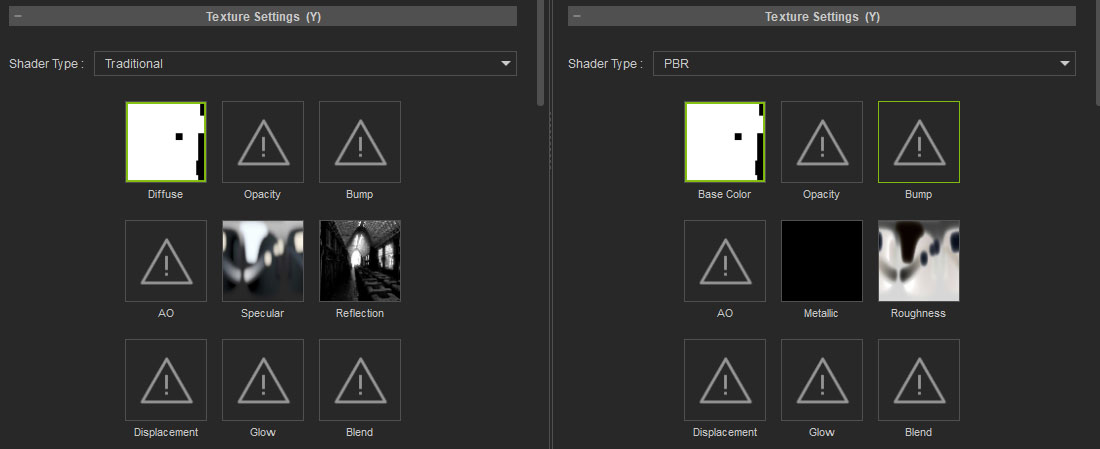
https://forum.reallusion.com/uploads/images/c1f949c4-3274-4261-bfc1-ed43.jpg
Why?
I can sure drop the maps manually after conversion, but it would be nice to have an automated conversion consistent with the manual.

On a positive note - Color Adjustment panel is great!


Reading This Topic