Profile Picture

Pop Video 3 (transparent background video)

Posted By l.cordelieres 9 Years Ago
You don't have permission to rate!
1
2

Author
Message
l.cordelieres
l.cordelieres
Posted 9 Years Ago
View Quick Profile
Veteran Member

Veteran Member (611 reputation)Veteran Member (611 reputation)Veteran Member (611 reputation)Veteran Member (611 reputation)Veteran Member (611 reputation)Veteran Member (611 reputation)Veteran Member (611 reputation)Veteran Member (611 reputation)Veteran Member (611 reputation)

Group: Forum Members
Last Active: 9 Years Ago
Posts: 9, Visits: 37
Hello there, i appreciate a lot your time to help me, thanks a lot.
I will send you the files in the next coming days if that's okay?

Unfortunelately, only get the trial version of hitfilm, nonethless, the steps you told me works and help me a lot, all is okay except the exportation :( (due to trial)

Once again thank you very much!
Kevin.S
Kevin.S
Posted 9 Years Ago
View Quick Profile
Distinguished Member

Distinguished Member (10.8K reputation)Distinguished Member (10.8K reputation)Distinguished Member (10.8K reputation)Distinguished Member (10.8K reputation)Distinguished Member (10.8K reputation)Distinguished Member (10.8K reputation)Distinguished Member (10.8K reputation)Distinguished Member (10.8K reputation)Distinguished Member (10.8K reputation)

Group: Forum Members
Last Active: 2 Years Ago
Posts: 1.2K, Visits: 71.8K
You can always send me the project file and I can try it for you privately and see whats going on...
animatemyart@gmail.com

If you have hitfilm bring your green screen into hitfilm via composite shot, add it to the timeline, then open effects tab, scroll down to keying, open keying and drag the filter called color difference key onto your green screen video. It will then get rid of the green and you will have a transparent video. Then export the video.

Just remember that when you play back the video in any player it will by default add a black background..making it look like you have a video with a black background when its actually transparent. It works like a transparent png file. the picture below has a transparent background and the color of the forum end up as the the background color. What ever color or picture is behind the picture is what will show threw the transparency. By default the background for transparent videos or pictures is going to be white or black.


Transparent png file...

https://forum.reallusion.com/uploads/images/70976635-2535-4e98-9cbf-efda.png


Freelance Artist Kevin.S


https://forum.reallusion.com/uploads/images/57cedd8e-58c4-42ce-b2f4-9646.png https://forum.reallusion.com/uploads/images/5a59e070-66a0-4914-b0a5-b2dc.png 

Email: animatemyart@gmail.com - Web Site:  www.animatemyart.com
l.cordelieres
l.cordelieres
Posted 9 Years Ago
View Quick Profile
Veteran Member

Veteran Member (611 reputation)Veteran Member (611 reputation)Veteran Member (611 reputation)Veteran Member (611 reputation)Veteran Member (611 reputation)Veteran Member (611 reputation)Veteran Member (611 reputation)Veteran Member (611 reputation)Veteran Member (611 reputation)

Group: Forum Members
Last Active: 9 Years Ago
Posts: 9, Visits: 37
Hello, to resume, i'm salaried in a society which developped an online software to create Serious Games so, the goal is to build by yourself your universe, with different plans, foreground, transparent video of an animated character (second plan), and the background. And when i import my transparent video into the software, my video get a background.... i do not know if my explanation gives you more details/help...
I have installed hitfilm to try the video, but when i import it does not works, i have a notification written "error"... 
If you tell me that if works in Hitfilm, that's a great new, but i would understand what's wrong with me, maybe a problem with the codecs???


Kevin.S
Kevin.S
Posted 9 Years Ago
View Quick Profile
Distinguished Member

Distinguished Member (10.8K reputation)Distinguished Member (10.8K reputation)Distinguished Member (10.8K reputation)Distinguished Member (10.8K reputation)Distinguished Member (10.8K reputation)Distinguished Member (10.8K reputation)Distinguished Member (10.8K reputation)Distinguished Member (10.8K reputation)Distinguished Member (10.8K reputation)

Group: Forum Members
Last Active: 2 Years Ago
Posts: 1.2K, Visits: 71.8K
the steps you are taking are correct

I to just tried what peter said and also get a dark screen when just playing the video back by its self. But when I import the video into another program
it dose show up as it should transparent. Have you tried to open the file in what ever other program you are using ? when I import it into hitfilm it comes out
transparent. How ever when I import it into iclone 6 the background is still there and not transparent. For iclone you will have to save it in popvideo format.

What other program are you using that you want to use the transparent video in if i may ask ?


Freelance Artist Kevin.S



https://forum.reallusion.com/uploads/images/57cedd8e-58c4-42ce-b2f4-9646.png https://forum.reallusion.com/uploads/images/5a59e070-66a0-4914-b0a5-b2dc.png 

Email: animatemyart@gmail.com - Web Site:  www.animatemyart.com
l.cordelieres
l.cordelieres
Posted 9 Years Ago
View Quick Profile
Veteran Member

Veteran Member (611 reputation)Veteran Member (611 reputation)Veteran Member (611 reputation)Veteran Member (611 reputation)Veteran Member (611 reputation)Veteran Member (611 reputation)Veteran Member (611 reputation)Veteran Member (611 reputation)Veteran Member (611 reputation)

Group: Forum Members
Last Active: 9 Years Ago
Posts: 9, Visits: 37
I'm sorry guys, but i get the same result :(
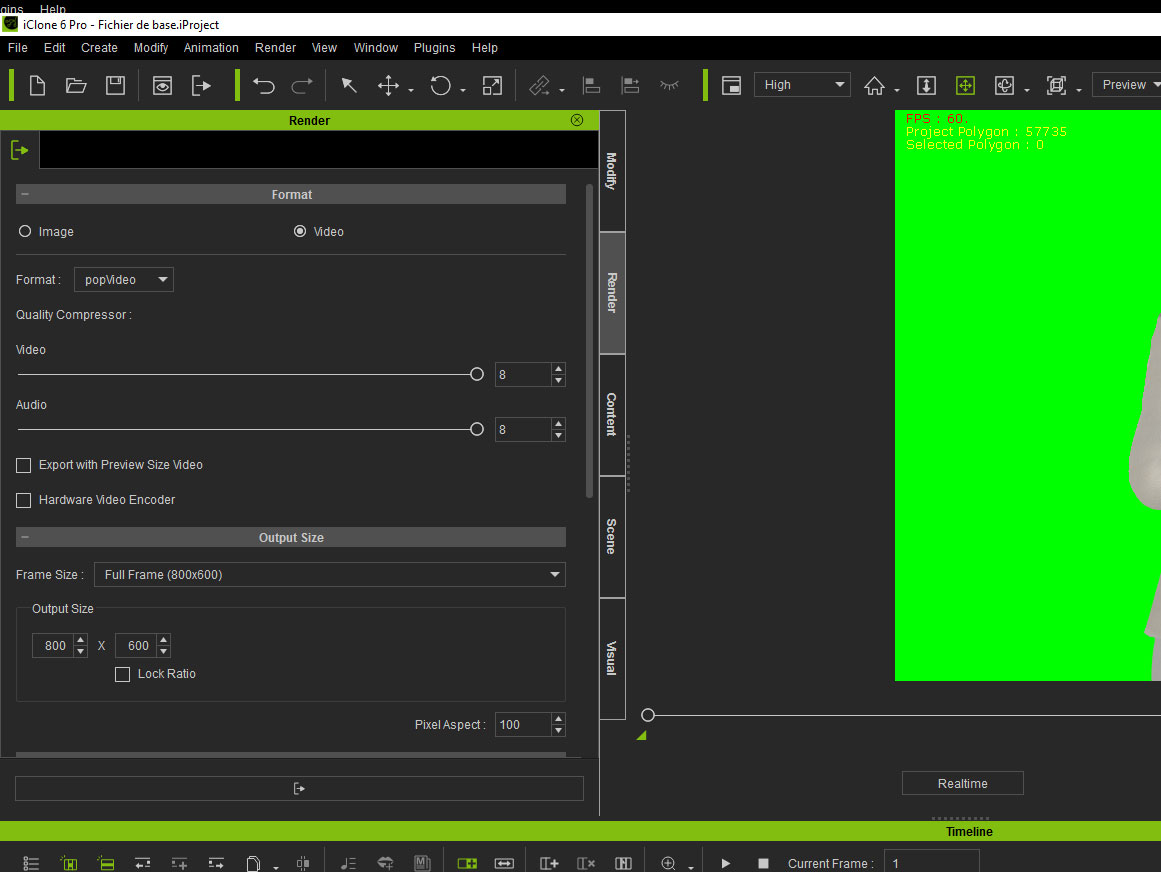
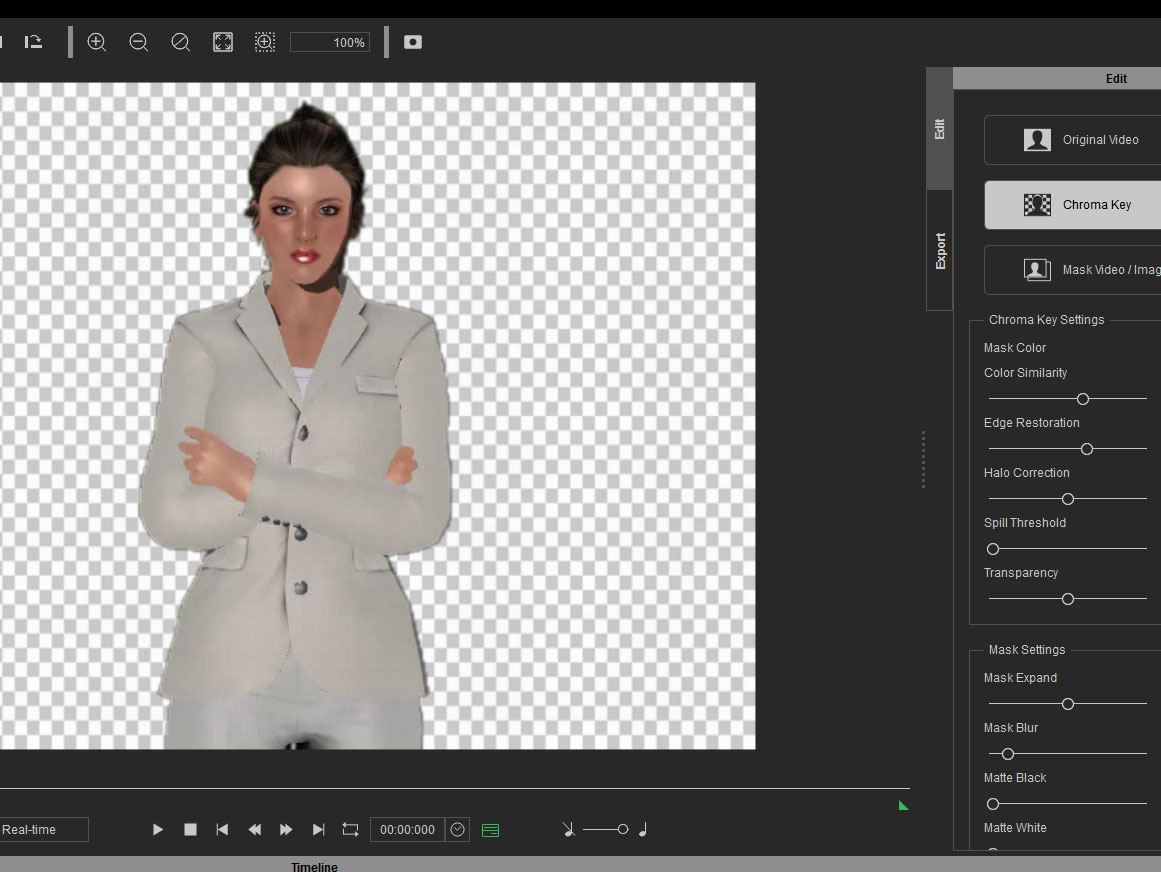
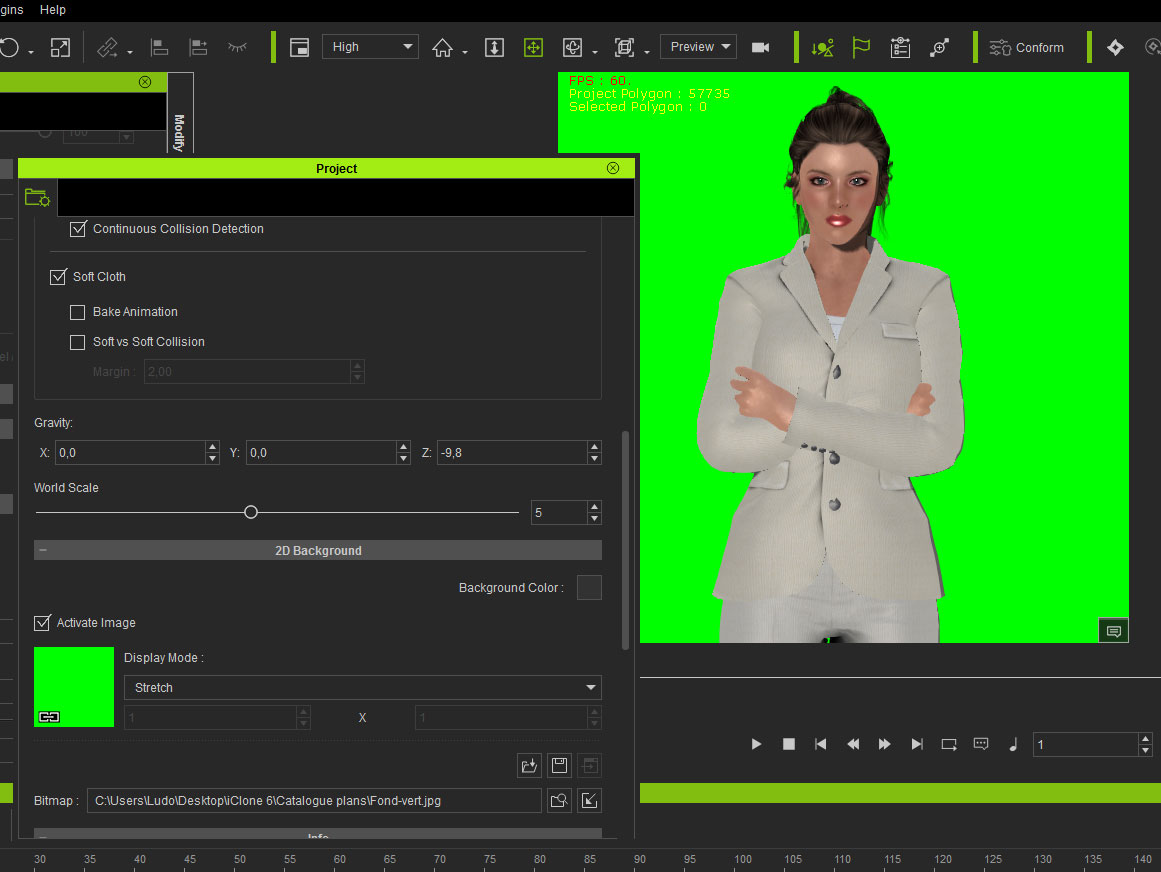
Here is how i do (please see in attached files.
Step-1: i create a green background in iClone to delete it easily in PopVideo (is that correct or stupid? Maybe i'm wrong for this part ?)
Step-2: i export my green background video from iClone in PopVideo format (i have also tried the others formats)
Step-3: in PopVideo, i import the video, use chromakey to delete the green.
Step-4: the green is no more, i can see that my video is transparents in PopVideo.
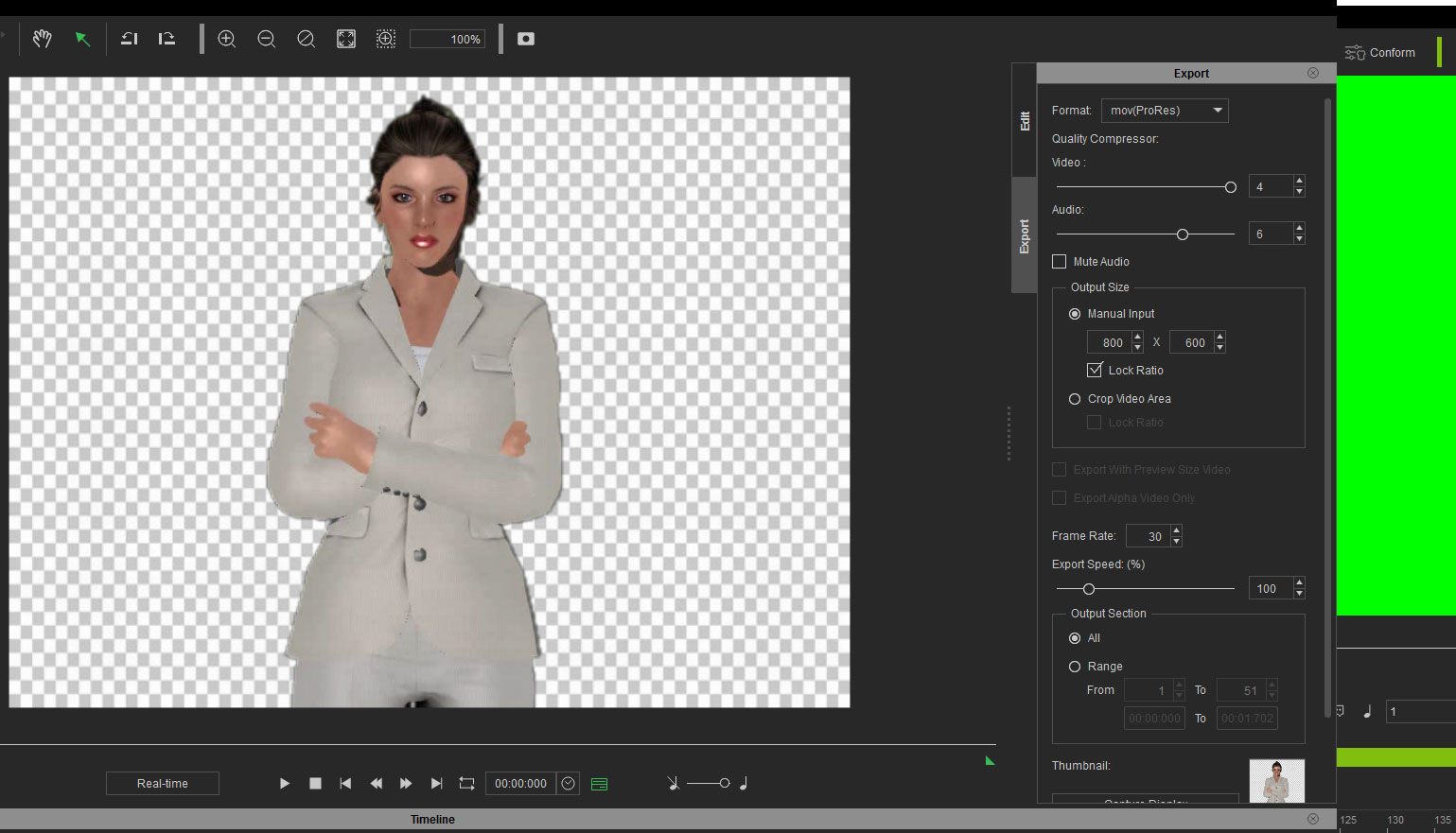
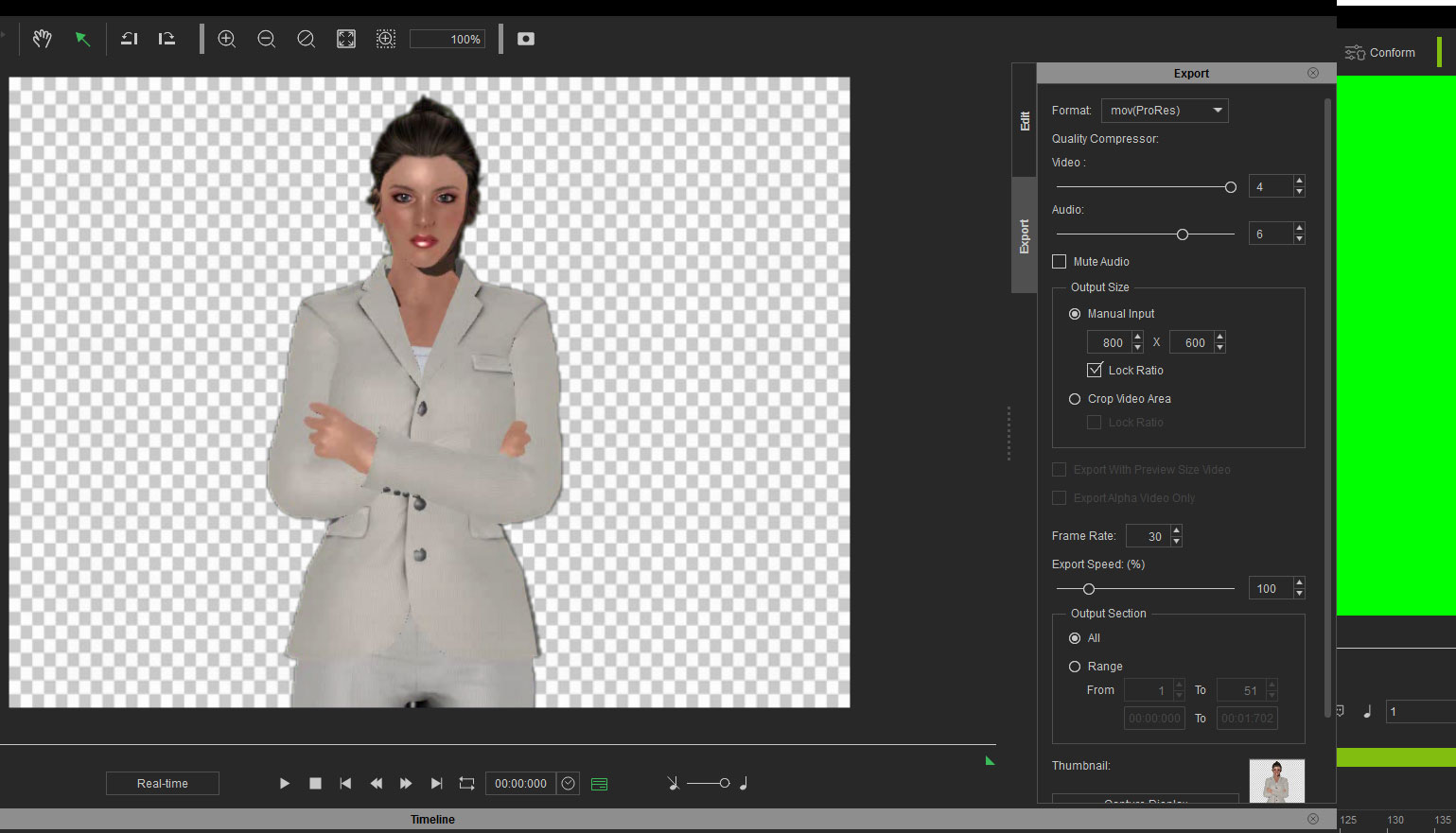
Step-5: i export as usual and as Peter told me to do, in mov(ProRes) 
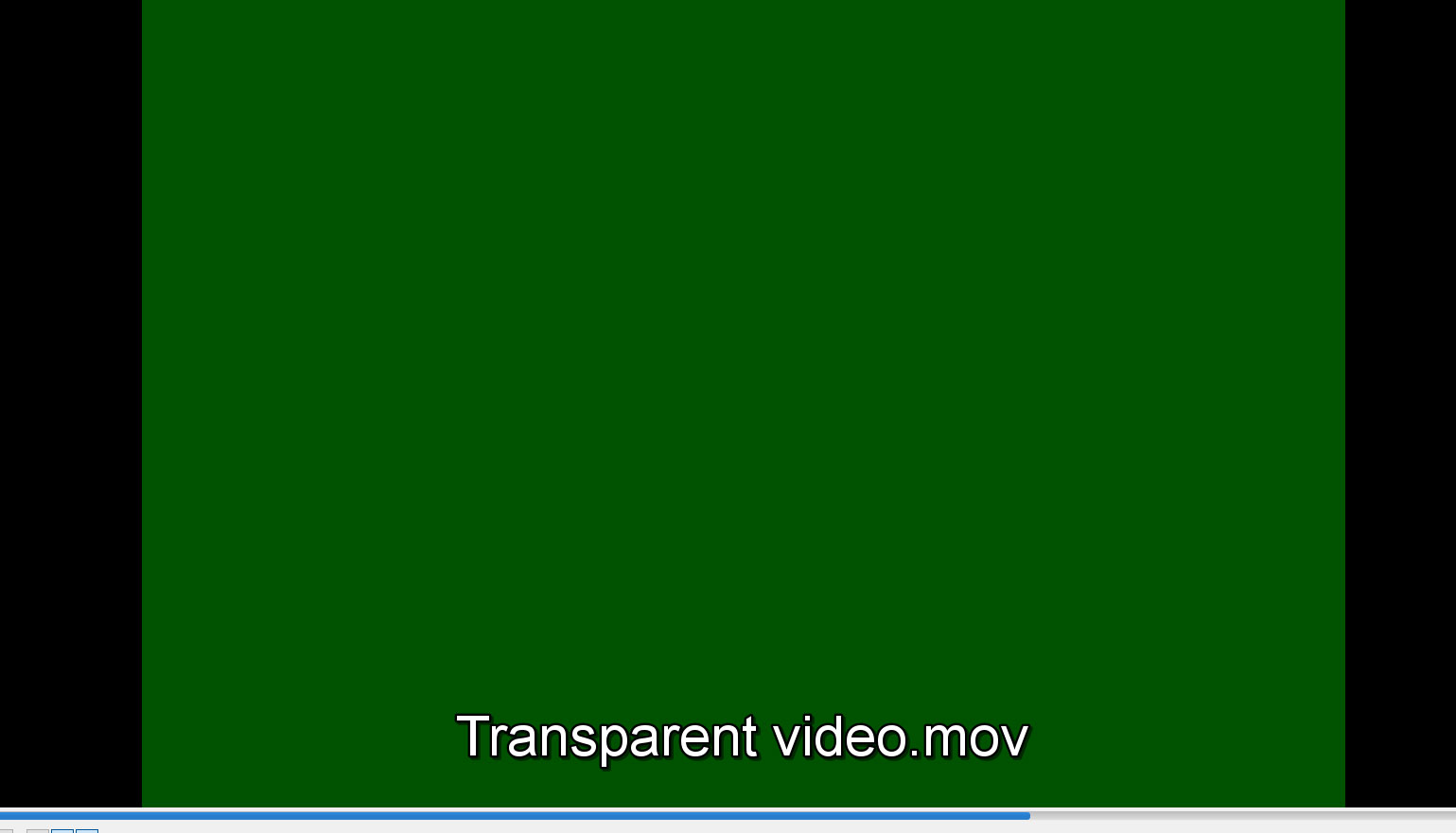
Step-6, i cannot see the video in VLC or other programs... i see a green screen.
And when this video is readable, the background is still here...

Sorry for the harassment but i really do not know what i'm doing bad.
https://forum.reallusion.com/uploads/images/b23ea90b-d7d2-4973-bde5-db96.jpghttps://forum.reallusion.com/uploads/images/c909bbb3-0691-4c29-895f-53ca.jpghttps://forum.reallusion.com/uploads/images/9400d088-6862-4382-a9e8-c1ea.jpghttps://forum.reallusion.com/uploads/images/3b33f608-8bd2-43e1-b5c2-7005.jpghttps://forum.reallusion.com/uploads/images/fce5afe7-ab7a-4acb-b1e9-260a.jpghttps://forum.reallusion.com/uploads/images/94726d53-bacb-4f91-83b1-f7e5.jpg
l.cordelieres
l.cordelieres
Posted 9 Years Ago
View Quick Profile
Veteran Member

Veteran Member (611 reputation)Veteran Member (611 reputation)Veteran Member (611 reputation)Veteran Member (611 reputation)Veteran Member (611 reputation)Veteran Member (611 reputation)Veteran Member (611 reputation)Veteran Member (611 reputation)Veteran Member (611 reputation)

Group: Forum Members
Last Active: 9 Years Ago
Posts: 9, Visits: 37
Hello there, Peter and Kevin thanks a lot for your help, appreciate.
I will retry and will keep you in touch quickly.
Peter (RL)
Peter (RL)
Posted 9 Years Ago
View Quick Profile
Distinguished Member

Distinguished Member (124.4K reputation)Distinguished Member (124.4K reputation)Distinguished Member (124.4K reputation)Distinguished Member (124.4K reputation)Distinguished Member (124.4K reputation)Distinguished Member (124.4K reputation)Distinguished Member (124.4K reputation)Distinguished Member (124.4K reputation)Distinguished Member (124.4K reputation)

Group: Administrators
Last Active: 2 Years Ago
Posts: 23.1K, Visits: 36.6K
l.cordelieres(1/16/2017)
Yes, thank you, it works now thanks to your help.
But i still do not understand why i cannot have a mov file with only animated character on a transparent background, to use it anywhere i want, on every backgrounds i want. (in others softwares for example).
Is it possible or am i dreaming? 
Thanks in advance!


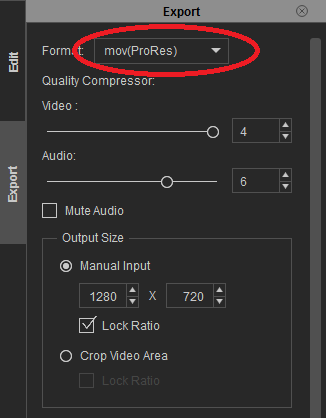
popVideo 3 will allow you to export to MOV format with a transparent background using the ProRes codec. Just remember to select the correct output option on the Export panel (see below). You can also find more information HERE.
https://forum.reallusion.com/uploads/images/89eb7148-5f05-4c11-88ec-a4a3.png


Peter
Forum Administrator

www.reallusion.com


Kevin.S
Kevin.S
Posted 9 Years Ago
View Quick Profile
Distinguished Member

Distinguished Member (10.8K reputation)Distinguished Member (10.8K reputation)Distinguished Member (10.8K reputation)Distinguished Member (10.8K reputation)Distinguished Member (10.8K reputation)Distinguished Member (10.8K reputation)Distinguished Member (10.8K reputation)Distinguished Member (10.8K reputation)Distinguished Member (10.8K reputation)

Group: Forum Members
Last Active: 2 Years Ago
Posts: 1.2K, Visits: 71.8K
l.cordelieres (1/16/2017)
Yes, thank you, it works now thanks to your help.
But i still do not understand why i cannot have a mov file with only animated character on a transparent background, to use it anywhere i want, on every backgrounds i want. (in others softwares for example).
Is it possible or am i dreaming? 
Thanks in advance!


I have not tried popvideo with many other programs other then iclone but you should be able to with other codec/ formats.
For more universal transparent videos I normally use hitfilm..


Freelance Artist Kevin.S


https://forum.reallusion.com/uploads/images/57cedd8e-58c4-42ce-b2f4-9646.png https://forum.reallusion.com/uploads/images/5a59e070-66a0-4914-b0a5-b2dc.png 

Email: animatemyart@gmail.com - Web Site:  www.animatemyart.com
l.cordelieres
l.cordelieres
Posted 9 Years Ago
View Quick Profile
Veteran Member

Veteran Member (611 reputation)Veteran Member (611 reputation)Veteran Member (611 reputation)Veteran Member (611 reputation)Veteran Member (611 reputation)Veteran Member (611 reputation)Veteran Member (611 reputation)Veteran Member (611 reputation)Veteran Member (611 reputation)

Group: Forum Members
Last Active: 9 Years Ago
Posts: 9, Visits: 37
Yes, thank you, it works now thanks to your help.
But i still do not understand why i cannot have a mov file with only animated character on a transparent background, to use it anywhere i want, on every backgrounds i want. (in others softwares for example).
Is it possible or am i dreaming? 
Thanks in advance!
Kevin.S
Kevin.S
Posted 9 Years Ago
View Quick Profile
Distinguished Member

Distinguished Member (10.8K reputation)Distinguished Member (10.8K reputation)Distinguished Member (10.8K reputation)Distinguished Member (10.8K reputation)Distinguished Member (10.8K reputation)Distinguished Member (10.8K reputation)Distinguished Member (10.8K reputation)Distinguished Member (10.8K reputation)Distinguished Member (10.8K reputation)

Group: Forum Members
Last Active: 2 Years Ago
Posts: 1.2K, Visits: 71.8K
l.cordelieres (1/16/2017)
Ok, my apologies, it is ok now in iClone.
But is there a way to export this video with a transparent background, in order to only have the character to be usable anywhere else ?


 You can export in different codecs / formats it really depends what other programs you are trying to use it with.


Freelance Artist Kevin.S


https://forum.reallusion.com/uploads/images/57cedd8e-58c4-42ce-b2f4-9646.png https://forum.reallusion.com/uploads/images/5a59e070-66a0-4914-b0a5-b2dc.png 

Email: animatemyart@gmail.com - Web Site:  www.animatemyart.com

1
2


Reading This Topic