|
Author
|
Message
|
|
dourvas
|
dourvas
Posted 9 Years Ago
|
|
Group: Forum Members
Last Active: 4 Years Ago
Posts: 36,
Visits: 164
|
Hello there. I have created a scene and i inserted a character i made with CC creator. When i try to access the character through timeline i can not find him at all! It exists in the track menu list but it never appears in the timeline! I also tried to right clikhim and follow the command "timeline". All i get is a project row but i can not see the motion and the tranform track. I tried to insert mason and cristian too but nothing! please check the picture 
|
|
|
|
|
Rampa
|
|
|
Group: Forum Members
Last Active: 2 days ago
Posts: 8.2K,
Visits: 62.6K
|
You need to enable the "Object Related Track" button. That will automatically show tracks when you select an avatar/object. The one to the left of that lets you select from a list as well, if you want. 
|
|
|
|
|
dourvas
|
dourvas
Posted 9 Years Ago
|
|
Group: Forum Members
Last Active: 4 Years Ago
Posts: 36,
Visits: 164
|
yes i know. in the list i can see him. And he is checked. I can not find him in the timeline.. 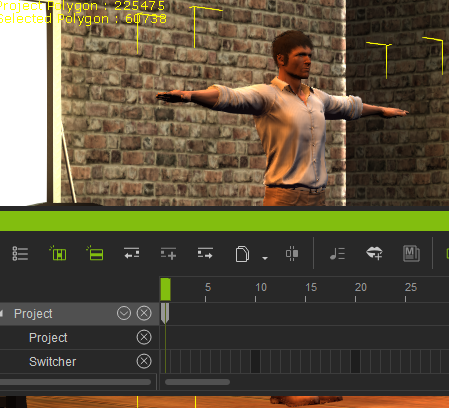 Remember i even right clicked him and select timeline but the result is the same
|
|
|
|
|
animagic
|
animagic
Posted 9 Years Ago
|
|
Group: Forum Members
Last Active: Last Month
Posts: 15.8K,
Visits: 31.4K
|
This is an issue that seral users have encountered. I provided RL with a project so hopefully there will be a fix soon.
|
|
|
|
|
dourvas
|
dourvas
Posted 9 Years Ago
|
|
Group: Forum Members
Last Active: 4 Years Ago
Posts: 36,
Visits: 164
|
What do u think i should do now?
|
|
|
|
|
dourvas
|
dourvas
Posted 9 Years Ago
|
|
Group: Forum Members
Last Active: 4 Years Ago
Posts: 36,
Visits: 164
|
ok allow me to clear it out.
There is no solution for my problem at the moment. I have to wait realusion to produce a patch or an update so i can work
Is that right?
for how long shall i wait?Is someting that RL is on to or it may never be fixed because there are small amount of users facing this problem?
HOw will i know that the problem has been fixed?
SOrry but i got scared! I can not work and i have a deadline!
|
|
|
|
|
animagic
|
animagic
Posted 9 Years Ago
|
|
Group: Forum Members
Last Active: Last Month
Posts: 15.8K,
Visits: 31.4K
|
dourvas (11/2/2016)
ok allow me to clear it out.
There is no solution for my problem at the moment. I have to wait realusion to produce a patch or an update so i can work
Is that right?
for how long shall i wait?Is someting that RL is on to or it may never be fixed because there are small amount of users facing this problem?
HOw will i know that the problem has been fixed?
SOrry but i got scared! I can not work and i have a deadline!
Peter (RL) has said that those affected should contact support using the support form: http://www.reallusion.com/CustomerSupport/UserEx/QForm.aspx and ask for the previous version of iClone to install. You will then get a download link for 6.51. Here is the link to his post: https://forum.reallusion.com/FindPost299366.aspx . I'm pretty certain they will be working on it, because it is a real problem even though only a few have reported it. This includes both new and long-time users so it's not a user error. There is an entry in the Feedback Tracker here: http://www.reallusion.com/FeedBackTracker/Issue/Timeline-acts-irrational where you can vote if it affects you.
|
|
|
|
|
workhorse
|
workhorse
Posted 9 Years Ago
|
|
Group: Forum Members
Last Active: 7 Years Ago
Posts: 31,
Visits: 116
|
This is not good as have a deadline for my work also and I just waited for the indigo plugin crash to be fixed ( which is now fixed ) . Finally with the indigo problem fixed I have been able to work overtime to catch up on the work I could not complete previously only to now be plagued with this timeline issue . I now cannot work once again nor reach my deadline . If I install the 6.51 version do I have uninstall this current version ? will this mean I have to reinstall all my content packs/indigo plugins etc... all over again or will the version 6.51 be installed as a separate version of iclone like the version 4 that i have ? Regards Workhorse p.s This is a serious pain in the A and makes me feel insecure about using the software as I do not know what bug I may encounter next after these ones are fixed. Please tell me it usually works fine and this does not always happen. I purchased all this software a few weeks ago and I am yet to be able to use any of it . Also I hope I don't lose my job over it as I pushed to use Iclone over other software my boss had recommended. We need this fixed asap Reallusion as you are costing me a lot of time stress and money which I do not have a lot of.
|
|
|
|
|
Rampa
|
|
|
Group: Forum Members
Last Active: 2 days ago
Posts: 8.2K,
Visits: 62.6K
|
I wonder if older avatars show up? Try using Chuck or Gwynn, the G5 avatars that ship with iC6. If they show up, you can animate with them as proxies that you then replace them with CC characters.
|
|
|
|
|
workhorse
|
workhorse
Posted 9 Years Ago
|
|
Group: Forum Members
Last Active: 7 Years Ago
Posts: 31,
Visits: 116
|
Older characters don't show up either .
|
|
|
|