Profile Picture

Not Getting Normal and other maps IN DACALS in CC 1.5.1913.1

Posted By rhtdv04 9 Years Ago
You don't have permission to rate!

Not Getting Normal and other maps IN DACALS in CC 1.5.1913.1

Author
Message
rhtdv04
rhtdv04
Posted 9 Years Ago
View Quick Profile
Senior Member

Senior Member (379 reputation)Senior Member (379 reputation)Senior Member (379 reputation)Senior Member (379 reputation)Senior Member (379 reputation)Senior Member (379 reputation)Senior Member (379 reputation)Senior Member (379 reputation)Senior Member (379 reputation)

Group: Forum Members
Last Active: 9 Years Ago
Posts: 2, Visits: 11
Hello Guys,

I am using Character Creator V 1.5.1913.1 on windows 8.1 with 4GB RAM, with 2 GB Graphics. 

I am facing an issue these days.
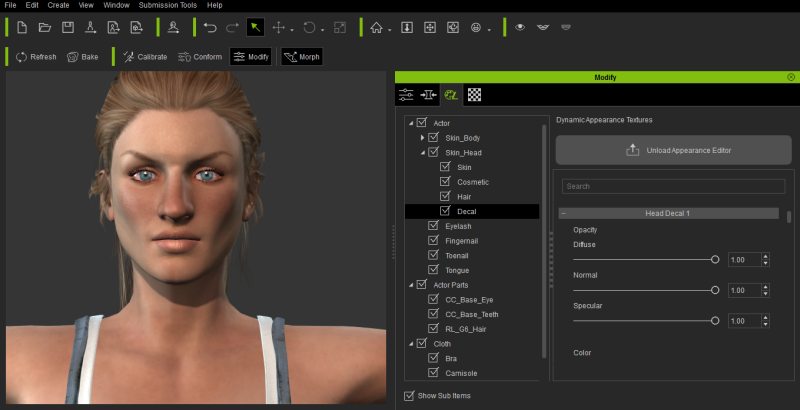
Issue :-  I am creating a character which has some cuts on his faces for that we have a nice tutorial, I was following that Character Creator to Unreal Part 1- Character Creation tutorial, In that we used some maps in the Decals (Modify Panel → Appearance → actor → Skin_Head → Decal), In the tutorial we have some fields for Input Maps (Like Normal, Diffuse and other) and respective settings, But in my Case I only got settings there is filed for inputting maps. 

Please let me know how to get it there. You see in the attached image. https://forum.reallusion.com/uploads/images/974b5c91-bbcd-48ed-864e-c185.png


Reading This Topic