Profile Picture

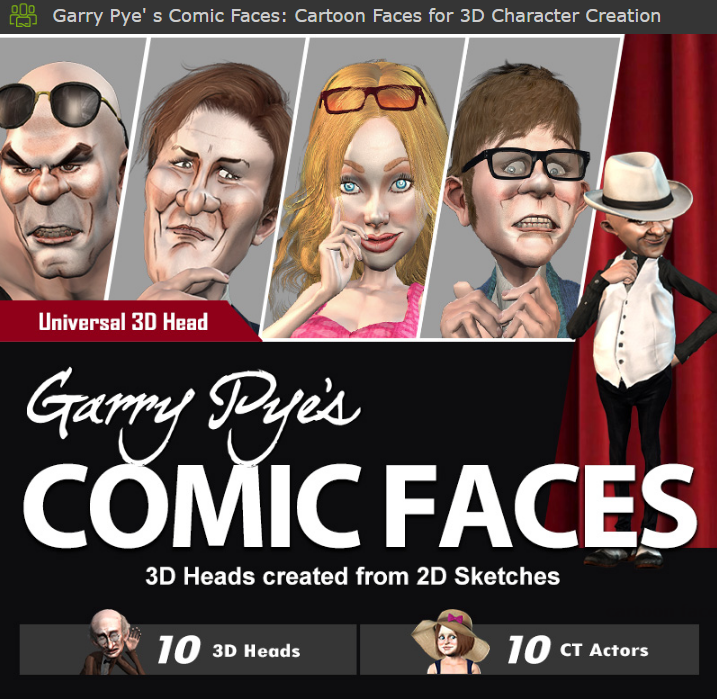
Garry Pye's Comic Faces (2016/06)

Posted By Miranda (RL) 10 Years Ago
Rated 5 stars based on 1 vote.
1
2

Author
Message
garrypye
garrypye
Posted 9 Years Ago
View Quick Profile
Distinguished Member

Distinguished Member (3.3K reputation)Distinguished Member (3.3K reputation)Distinguished Member (3.3K reputation)Distinguished Member (3.3K reputation)Distinguished Member (3.3K reputation)Distinguished Member (3.3K reputation)Distinguished Member (3.3K reputation)Distinguished Member (3.3K reputation)Distinguished Member (3.3K reputation)

Group: Forum Members
Last Active: Last Year
Posts: 211, Visits: 1.0K
Thanks for your message. Im afraid I only created the art for these characters, and Im not sure about all the technical side of them. If it helps, someone else on this thread wrote "I put mine in the "Shared" folder with the RLHeads folder, that way my OCD doesn't flip out if I can't find them! BigGrin  In Windows 10 you can right click on the folder and add it to the "Quick Access Menu", then it's always available in any folder you're in." I hope this helps. If not, contact me at garrypye@bigpond.net.au and I will try and find you a solution.


Garry Pye
www.facebook.com/garrypyeanimations?ref=bookmarks
digitallywired
digitallywired
Posted 9 Years Ago
View Quick Profile
Veteran Member

Veteran Member (640 reputation)Veteran Member (640 reputation)Veteran Member (640 reputation)Veteran Member (640 reputation)Veteran Member (640 reputation)Veteran Member (640 reputation)Veteran Member (640 reputation)Veteran Member (640 reputation)Veteran Member (640 reputation)

Group: Forum Members
Last Active: Last Year
Posts: 25, Visits: 209
Garry, love the art.  Trying to install now. What do I do with the OBJ Resource folder?
eternityblue
eternityblue
Posted 10 Years Ago
View Quick Profile
Distinguished Member

Distinguished Member (10.5K reputation)Distinguished Member (10.5K reputation)Distinguished Member (10.5K reputation)Distinguished Member (10.5K reputation)Distinguished Member (10.5K reputation)Distinguished Member (10.5K reputation)Distinguished Member (10.5K reputation)Distinguished Member (10.5K reputation)Distinguished Member (10.5K reputation)

Group: Forum Members
Last Active: Last Year
Posts: 769, Visits: 2.7K
Has there been some change to the CC base that is used with 1.52 now vs what these morphs were created with? Right now, when I apply the blink, the whole character moves down a slight amount, the belly button (At least on California Girl) disappears, and the breast shape seems to change a tiny bit.

~~~~~~~~~~~~~~~~~~


My system: i7 3770 Gtx1060 6GB


eternityblue
eternityblue
Posted 10 Years Ago
View Quick Profile
Distinguished Member

Distinguished Member (10.5K reputation)Distinguished Member (10.5K reputation)Distinguished Member (10.5K reputation)Distinguished Member (10.5K reputation)Distinguished Member (10.5K reputation)Distinguished Member (10.5K reputation)Distinguished Member (10.5K reputation)Distinguished Member (10.5K reputation)Distinguished Member (10.5K reputation)

Group: Forum Members
Last Active: Last Year
Posts: 769, Visits: 2.7K
I'm definitely going to pick these up sometime, but can anyone comment if the heads work ok without the hand drawn skins? Do you have to do the 3DXchange thing to fix the eyes for blinking on all the heads? Thanks in advance!

EDIT: I answered this in part myself: I can import only the morphs and they work fine with the default skins and morphs, it is really wonderful and a great value for the money, I hope people looking for morphs exclusively don't miss out on this because they aren't looking for the hand drawn faces, the heads themselves are more than worth it to me. I read through the process to fix the eyes and I can deal with that, though the first character I have tried so far Ogre didn't need it, so I've yet to do it myself. 

I did get a crash of CC when trying to change the skin after importing the Pyle skins with the morphs. I will submit a bug if it happens again. 

~~~~~~~~~~~~~~~~~~


My system: i7 3770 Gtx1060 6GB


j-wag
j-wag
Posted 10 Years Ago
View Quick Profile
Distinguished Member

Distinguished Member (2.4K reputation)Distinguished Member (2.4K reputation)Distinguished Member (2.4K reputation)Distinguished Member (2.4K reputation)Distinguished Member (2.4K reputation)Distinguished Member (2.4K reputation)Distinguished Member (2.4K reputation)Distinguished Member (2.4K reputation)Distinguished Member (2.4K reputation)

Group: Forum Members
Last Active: 2 Years Ago
Posts: 146, Visits: 523
They're awesome! Been having fun with them!
theschemer
theschemer
Posted 10 Years Ago
View Quick Profile
Distinguished Member

Distinguished Member (7.6K reputation)Distinguished Member (7.6K reputation)Distinguished Member (7.6K reputation)Distinguished Member (7.6K reputation)Distinguished Member (7.6K reputation)Distinguished Member (7.6K reputation)Distinguished Member (7.6K reputation)Distinguished Member (7.6K reputation)Distinguished Member (7.6K reputation)

Group: Forum Members
Last Active: 3 Years Ago
Posts: 1.4K, Visits: 2.9K
Snarp Farkle (6/21/2016)
theschemer (6/20/2016)
Just bought this a minute ago. Where is everyone putting the OBJ Resource Pack contents or where is the recommended place to store them for easy access?
Thanks,
TS


I put mine in the "Shared" folder with the RLHeads folder, that way my OCD doesn't flip out if I can't find them! :D 
In Windows 10 you can right click on the folder and add it to the "Quick Access Menu", then it's always available in any folder you're in.


Looks like a good place to me. Thanks. :) I am on Win7 yet but I made my own Quick Access "Folder" instead of the menu you are referring to. ;) But I put a copy into the shared folder with the RL Heads.
TS


Snarp Farkle
Snarp Farkle
Posted 10 Years Ago
View Quick Profile
Distinguished Member

Distinguished Member (5.2K reputation)Distinguished Member (5.2K reputation)Distinguished Member (5.2K reputation)Distinguished Member (5.2K reputation)Distinguished Member (5.2K reputation)Distinguished Member (5.2K reputation)Distinguished Member (5.2K reputation)Distinguished Member (5.2K reputation)Distinguished Member (5.2K reputation)

Group: Forum Members
Last Active: 2 Years Ago
Posts: 770, Visits: 3.6K
theschemer (6/20/2016)
Just bought this a minute ago. Where is everyone putting the OBJ Resource Pack contents or where is the recommended place to store them for easy access?
Thanks,
TS


I put mine in the "Shared" folder with the RLHeads folder, that way my OCD doesn't flip out if I can't find them! :D 
In Windows 10 you can right click on the folder and add it to the "Quick Access Menu", then it's always available in any folder you're in.


Dell XPS 8900, Intel(R) Core(TM) i7-6700 CPU @ 3.40GHz, 3408 Mhz, 4 Core(s), 8 Logical Processor(s), 16 GB RAM, - 4 GB GeForce GTX 745, NVIDIA compatible.
Acer Aspire V Nitro Laptop,  2.5GHz Intel Core i5-7300HQ processor with 6MB cache,  256GB solid state drive, 16GB Ram,  4 GB NVIDIA GeForce GTX 1050 Ti graphics.

theschemer
theschemer
Posted 10 Years Ago
View Quick Profile
Distinguished Member

Distinguished Member (7.6K reputation)Distinguished Member (7.6K reputation)Distinguished Member (7.6K reputation)Distinguished Member (7.6K reputation)Distinguished Member (7.6K reputation)Distinguished Member (7.6K reputation)Distinguished Member (7.6K reputation)Distinguished Member (7.6K reputation)Distinguished Member (7.6K reputation)

Group: Forum Members
Last Active: 3 Years Ago
Posts: 1.4K, Visits: 2.9K
Just bought this a minute ago. Where is everyone putting the OBJ Resource Pack contents or where is the recommended place to store them for easy access?
Thanks,
TS
Snarp Farkle
Snarp Farkle
Posted 10 Years Ago
View Quick Profile
Distinguished Member

Distinguished Member (5.2K reputation)Distinguished Member (5.2K reputation)Distinguished Member (5.2K reputation)Distinguished Member (5.2K reputation)Distinguished Member (5.2K reputation)Distinguished Member (5.2K reputation)Distinguished Member (5.2K reputation)Distinguished Member (5.2K reputation)Distinguished Member (5.2K reputation)

Group: Forum Members
Last Active: 2 Years Ago
Posts: 770, Visits: 3.6K
garrypye (6/19/2016)
Hey j-wag. These faces are designed to work only with the Character Creator base models. Sorry for the late reply. I didn't even realise this thread existed until now. I hope you like the comic faces I designed. Believe me when I say that it's when you put them in to Character Creator that they really shine. If you have any questions, don't hesitate to contact me at garrypye@bigpond.net.au


I used the heads on the default avatar, then used body sliders to create different characters.  You can also save the heads in iClone and use them on other CC characters you may have! :)

https://forum.reallusion.com/uploads/images/f89a729e-7cae-4592-83e5-c823.jpg

https://forum.reallusion.com/uploads/images/31afb5cd-d3d1-4248-a254-eec6.jpg

https://forum.reallusion.com/uploads/images/ab8a61a8-5603-4864-b564-bb52.jpg

https://forum.reallusion.com/uploads/images/5e688a13-2b88-42f9-aa0a-fbea.jpg

https://forum.reallusion.com/uploads/images/033275a4-2374-4ce0-9f7b-8882.jpg

https://forum.reallusion.com/uploads/images/057dbe01-e27b-43b1-a945-fa3f.jpg


Dell XPS 8900, Intel(R) Core(TM) i7-6700 CPU @ 3.40GHz, 3408 Mhz, 4 Core(s), 8 Logical Processor(s), 16 GB RAM, - 4 GB GeForce GTX 745, NVIDIA compatible.
Acer Aspire V Nitro Laptop,  2.5GHz Intel Core i5-7300HQ processor with 6MB cache,  256GB solid state drive, 16GB Ram,  4 GB NVIDIA GeForce GTX 1050 Ti graphics.

garrypye
garrypye
Posted 10 Years Ago
View Quick Profile
Distinguished Member

Distinguished Member (3.3K reputation)Distinguished Member (3.3K reputation)Distinguished Member (3.3K reputation)Distinguished Member (3.3K reputation)Distinguished Member (3.3K reputation)Distinguished Member (3.3K reputation)Distinguished Member (3.3K reputation)Distinguished Member (3.3K reputation)Distinguished Member (3.3K reputation)

Group: Forum Members
Last Active: Last Year
Posts: 211, Visits: 1.0K
Thanks for your feedback, TheOldBuffer. I'm genuinely pleased that you like this pack, and I'd love to think I could expand on it in the future.


Garry Pye
www.facebook.com/garrypyeanimations?ref=bookmarks

1
2


Reading This Topic