|
By Miranda (RL) - 10 Years Ago
|
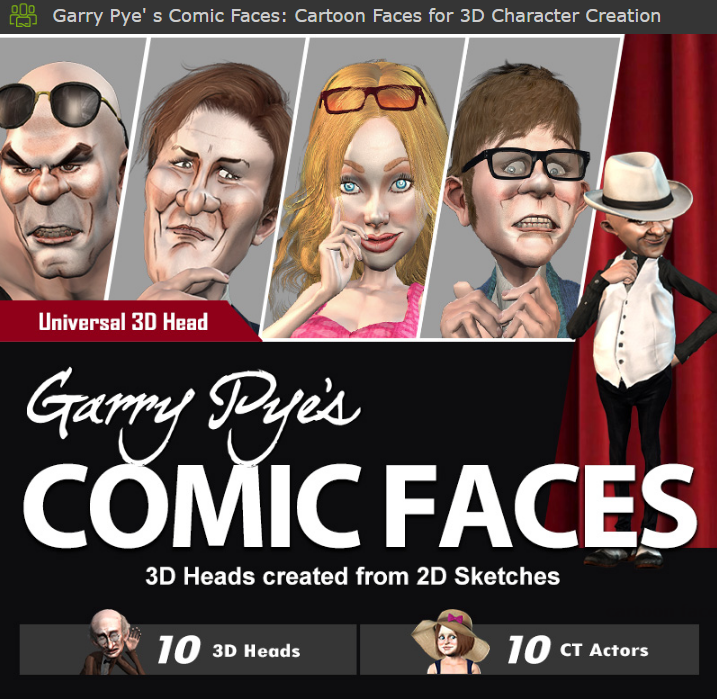
Reallusion is an expert at blurring the lines between reality and illusion, and now we have taken this a step further by introducing new content that was originally in 2D and then magically morphing it into workable, animatable 3D characters.
Reallusion proudly presents this revolutionary new content pack, from the creatively genius mind of Garry Pye, that demonstrates the latest novelty in transforming hand drawn strokes into full 3D Comic Heads. An amazing idea that will undoubtly open the border for cross 2D and 3D animation.
This unique 3D collection of Garry Pye's Comic Faces, can be used with CrazyTalk 8, Character Character and iClone 6 PRO -- allowing you to further modify their shape and facial features, combining them with stylized body morphs, outfits and accessories that are all ready to animate. Pack includes : - RLHead x10
- Bonus ctiModel x10
- OBJ Resource Files x10
To see a preview of all the RLHead and CT Actor included in this pack, also the character design ideas, please click HERE. File Size : 534 MB
Compatible with : - Character Creator 1.42
- iClone 6.42
- CrazyTalk 8.03
- 3DXchange 6.42 Pipeline if you want to export
|
|
By Snarp Farkle - 10 Years Ago
|
There isn't any link to this pack, is it available?
Found it HERE
|
|
By Miranda (RL) - 10 Years Ago
|
Snarp Farkle (6/2/2016)
There isn't any link to this pack, is it available? Found it HERE
Thanks Snarp Farkle!
|
|
By Kelleytoons - 10 Years Ago
|
|
Not to drift OT here, Miranda, but the issue with the eyes is one I've run across as well, and now that RL is selling *content* that has this problem perhaps it's something that could be considered to be on the list to "fix" in future editions of the products without us having to jump through hoops (since you now obviously have some good examples with which to work with to remove this issue).
|
|
By Miranda (RL) - 10 Years Ago
|
|
Kelleytoons (6/2/2016)
Not to drift OT here, Miranda, but the issue with the eyes is one I've run across as well, and now that RL is selling *content* that has this problem perhaps it's something that could be considered to be on the list to "fix" in future editions of the products without us having to jump through hoops (since you now obviously have some good examples with which to work with to remove this issue).
Hi Kelleytoons, thanks for your feedback. Eye blinking adjustment is on our wish list for CC. I understand that what you mentioned is not about a specific case, but the general rules. Thanks for your continuous feedback to make us improve in product design and product delivery. :)
|
|
By Snarp Farkle - 10 Years Ago
|
I think the Comic Faces are pretty cool! They morph very well with or without the comic skin, this was a good deal. :)
|
|
By pmaina - 10 Years Ago
|
|
Comic and toon packs really work well with iClone. Great content pack which is a future must-have for me. Unfortunately right now I want to do high realism VFX with the help of iClone so holding to see if the render improvements in 6.5 will open that door.
|
|
By j-wag - 10 Years Ago
|
|
Which characters can you apply them to? So far, I've only been able to apply the heads to "Christian" and "Natalie" and then send them to Character Creator. They don't seem to work on any other avatars...
|
|
By TheOldBuffer - 10 Years Ago
|
|
I purchased this pack the other day. They are excellent and look great. Please can we have more Gary !
|
|
By garrypye - 10 Years Ago
|
Hey j-wag. These faces are designed to work only with the Character Creator base models. Sorry for the late reply. I didn't even realise this thread existed until now. I hope you like the comic faces I designed. Believe me when I say that it's when you put them in to Character Creator that they really shine. If you have any questions, don't hesitate to contact me at garrypye@bigpond.net.au
|
|
By garrypye - 10 Years Ago
|
Thanks for your feedback, TheOldBuffer. I'm genuinely pleased that you like this pack, and I'd love to think I could expand on it in the future.
|
|
By Snarp Farkle - 10 Years Ago
|
garrypye (6/19/2016)
Hey j-wag. These faces are designed to work only with the Character Creator base models. Sorry for the late reply. I didn't even realise this thread existed until now. I hope you like the comic faces I designed. Believe me when I say that it's when you put them in to Character Creator that they really shine. If you have any questions, don't hesitate to contact me at garrypye@bigpond.net.au
I used the heads on the default avatar, then used body sliders to create different characters. You can also save the heads in iClone and use them on other CC characters you may have! :)
|
|
By theschemer - 10 Years Ago
|
Just bought this a minute ago. Where is everyone putting the OBJ Resource Pack contents or where is the recommended place to store them for easy access?
Thanks,
TS
|
|
By Snarp Farkle - 10 Years Ago
|
|
theschemer (6/20/2016)
Just bought this a minute ago. Where is everyone putting the OBJ Resource Pack contents or where is the recommended place to store them for easy access?
Thanks,
TS
I put mine in the "Shared" folder with the RLHeads folder, that way my OCD doesn't flip out if I can't find them! :D
In Windows 10 you can right click on the folder and add it to the "Quick Access Menu", then it's always available in any folder you're in.
|
|
By theschemer - 10 Years Ago
|
Snarp Farkle (6/21/2016)
theschemer (6/20/2016)
Just bought this a minute ago. Where is everyone putting the OBJ Resource Pack contents or where is the recommended place to store them for easy access?
Thanks,
TS I put mine in the "Shared" folder with the RLHeads folder, that way my OCD doesn't flip out if I can't find them! :D In Windows 10 you can right click on the folder and add it to the "Quick Access Menu", then it's always available in any folder you're in.
Looks like a good place to me. Thanks. :) I am on Win7 yet but I made my own Quick Access "Folder" instead of the menu you are referring to. ;) But I put a copy into the shared folder with the RL Heads.
TS
|
|
By j-wag - 10 Years Ago
|
|
They're awesome! Been having fun with them!
|
|
By eternityblue - 10 Years Ago
|
I'm definitely going to pick these up sometime, but can anyone comment if the heads work ok without the hand drawn skins? Do you have to do the 3DXchange thing to fix the eyes for blinking on all the heads? Thanks in advance!
EDIT: I answered this in part myself: I can import only the morphs and they work fine with the default skins and morphs, it is really wonderful and a great value for the money, I hope people looking for morphs exclusively don't miss out on this because they aren't looking for the hand drawn faces, the heads themselves are more than worth it to me. I read through the process to fix the eyes and I can deal with that, though the first character I have tried so far Ogre didn't need it, so I've yet to do it myself.
I did get a crash of CC when trying to change the skin after importing the Pyle skins with the morphs. I will submit a bug if it happens again.
|
|
By eternityblue - 10 Years Ago
|
|
Has there been some change to the CC base that is used with 1.52 now vs what these morphs were created with? Right now, when I apply the blink, the whole character moves down a slight amount, the belly button (At least on California Girl) disappears, and the breast shape seems to change a tiny bit.
|
|
By digitallywired - 9 Years Ago
|
|
Garry, love the art. Trying to install now. What do I do with the OBJ Resource folder?
|
|
By garrypye - 9 Years Ago
|
Thanks for your message. Im afraid I only created the art for these characters, and Im not sure about all the technical side of them. If it helps, someone else on this thread wrote "I put mine in the "Shared" folder with the RLHeads folder, that way my OCD doesn't flip out if I can't find them!  In Windows 10 you can right click on the folder and add it to the "Quick Access Menu", then it's always available in any folder you're in." I hope this helps. If not, contact me at garrypye@bigpond.net.au and I will try and find you a solution. In Windows 10 you can right click on the folder and add it to the "Quick Access Menu", then it's always available in any folder you're in." I hope this helps. If not, contact me at garrypye@bigpond.net.au and I will try and find you a solution.
|