Posted a new suggestion to the Feedback Tracker
Proposing Morph Tool + Create Custom Morph Slider as solution to inevitable realtime pokethrough issue
Do read and if it suits you please vote and comment (FT link at the bottom)
---begin copy----
POKETHROUGHS happen frequently when fitting, but esp DURING ANIMATION.
Typical clothed characters - Non-Standard/ Standard, hide inner mesh or not, will have
OVERLAPPED MESH AREA between clothing-skin or clothing-clothing LAYERS.
Overlapped layers frequently intersect from REALTIME deformation
- in tight-fit areas: shoulders, chest, back, upper arm, neck, abdomen...
- in loose physics-enabled areas: buttock thighs calves in tunics, trench coats, skirts...
- between its own necessary-2-sided mesh areas such as big lapels and folded sleeves
With CC and increasing interest in multi-layer clothing characters...
With arrival of increasingly pro-grade animators who import misc complex custom rigs...
REALTIME pokethroughs is a certainty, soon to escalate exponentially in iClone space.
Managing pokethroughs is fumbly enough - on a ONE frame ONE-pose doll's tiny bikini top...
Current iClone fix (for all pre-conformed clothing characters)
= Opacity map painting in EXTERNAL 2D app - multiple back & forth!
At best, tedious; at worst counter-intuitive.
Most iCloners aren't UV maestros - no clue where exactly to paint on a flat grey scale texture!
Even skilled users capable of guestimate-eyeballing find it a time-killer!
The far bigger issue:
Fixing MULTI pokethroughs on a MULTI-layer character through 10000+ frame animation...
Current iClone fix: EYEBALL IT (Them All)
1. Playback; diligently dart eyeballs left right everywhere on character multi-layer parts
2. if pokethrough spotted, camera adjust, HIDE THEM from camera view, frame by frame.
3. Or redo, re-record character motion. Then resume EYEBALL-IT from step 1.
Amazingly efficient solution for a giant time-devouring character animator headache?
Existing workarounds:
Tip1: action scenes: always allocate an hour or so per multi-layer character!
Tip2: camera avoid pokethrough-prone clothing zones! (top to bottom basically)
Tip3: avoid action scenes if main characters are clothed!Feasible (and ultra-modern) ???
;)Seriously...
Time for iClone to have a more direct, user-friendly, iteractive, INTUITIVE realtime pokethrough fix.BASIC MORPH TOOLCall it iMove brush, Displacer, iDeformer, something iClone-ish and fun.
*ref pic: Poser's famous and fabulous Morph Tool
(iClone already improved upon Poser's Walk/Talk Designer, next Morph Tool?)
Basic displacement options: size, fall-off radius, intensity.
Basic shapes: round, square.
Basic modes: Normals/ Screen Space.
On characters: morph Mirroring by Axis + by Material Group.
On clothing: Ignore Backface tick box for 2-sided clothing parts (lapels etc)
Visual feedback: two tones gradient - color-select (like Bone color) shall suffice.

To set various pokethroughs per scene object parts throughout Timeline:
Morph result save as
CREATE CUSTOM MORPH per iAvatar, iAccessories, iProp
+ Custom Morph Sliders (placed in Motion tab > NEW Animation Settings)
+ Custom Morph Motion can be keyed (to appropriate body/face/Animation key tracks)
+ Custom Morph Motion can be saved/collected as Clips and Add to Perform
*Clutter prevention:
Beyond a certain number of (say 3) Custom Morph sliders, Motion>Animation Settings could be made a Sub-Tab (like Reach Target)
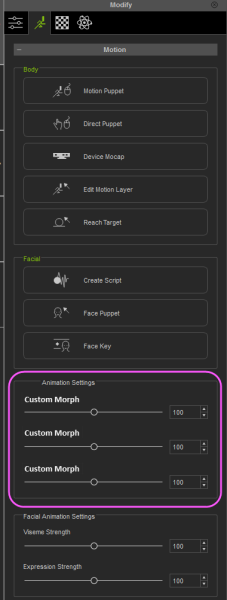
This Morph Tool is just a crude vertex displacement tool, not exactly modeling/sculpt tool
But it can still meet a few frequently-requested secondary animation needs in iClone:
...to deform simple objects (cushion dent, impacted soft metal door etc)
...to animate cartoony pulsating biceps or punched cheek etc
...to melt simple form like cheese, candle into a soft puddle, etc.
A simple morph tool will not only help reduce iClone dependency on external apps and saves precious time, it will make novice or pro iCloner's animation life a lot easier, not to mention so much more fun, creative and productive.
Thank you for your kind consideration.
---end copy----
If you find this suggestion useful, feel free to
Vote and COMMENT in the Feedback Trackerfeel free to add comments here too!
:)
>>> Indie Generalist modeler-rigger-animator <<< Hardware: AlienWare i7-HK 32G GTX1080 2T-SSDs BenqSW320 Wacom-Intuous 3Dconnexion ||| Software: IC6 Pipeline - CTA3 Pipeline - ATK2 - Indigo ||| Zbrush4R8. Blender 2.79. DazStudio 4.9. Carrara. Poser. Octane.