|
Author
|
Message
|
|
Colonel_Klink
|
Colonel_Klink
Posted 9 Years Ago
|
|
Group: Forum Members
Last Active: 3 days ago
Posts: 1.1K,
Visits: 7.7K
|
Still no resolution for this problem? I've now been caught out on one of my own compiled morphs and several of my characters will require this morph for export. Come on Reallusion, the not removing of morph references from a model that have had the morph removed, which requires the end user to require additonal purchases is a put off.
* * * * * * * * * * * * * * * * * *
See all my content in one place

Facebook Page: CWK3D Game and Film Content
Cancer Survivor - Retired Teacher - Geriatric Icloner still learning
Hardware: ZX80; Operating System- ZX80 Basic; CPU - ZX80 @ 3.25 MHz; Memory - 1KB; Hard Drive - N/A; Storage - Cassette; Monitor: Any old CRT TV
|
|
|
|
|
Colonel_Klink
|
Colonel_Klink
Posted 9 Years Ago
|
|
Group: Forum Members
Last Active: 3 days ago
Posts: 1.1K,
Visits: 7.7K
|
Hi Guys, sorry to resurrect an older post, but has this issue been rectified yet? Is there a workaround? I've been thinking of removing Essential Morphs from CC as I keep inadvertently forgetting to un-select Essentials while in CC. I've created a few characters which are in the marketplace and some of them have Essential Morphs as a derivative. I've take to develop my own set of morphs which I can apply to characters but still forget to un-tick essentials when I use the stock morphs. Bob
* * * * * * * * * * * * * * * * * *
See all my content in one place
Facebook Page: CWK3D Game and Film Content
Cancer Survivor - Retired Teacher - Geriatric Icloner still learning
Hardware: ZX80; Operating System- ZX80 Basic; CPU - ZX80 @ 3.25 MHz; Memory - 1KB; Hard Drive - N/A; Storage - Cassette; Monitor: Any old CRT TV
|
|
|
|
|
Alley
|
Alley
Posted 10 Years Ago
|
|
Group: Forum Members
Last Active: 3 Months Ago
Posts: 3.7K,
Visits: 12.8K
|
Yes I did write to Reallusion....they said if I had the original character or something but I think I must not have saved...I get side-tracked so often with other things, and it's all a learning experience. I must have somehow locked in that DRM and don't have anything saved from early enough that I can undo in any way.
Alley
|
|
|
|
|
justaviking
|
justaviking
Posted 10 Years Ago
|
|
Group: Forum Members
Last Active: 2 Years Ago
Posts: 8.2K,
Visits: 26.5K
|
Alley,
Have you tried contacting Support? I wonder what they'd have to say about it. Sounds like a product enhancement opportunity.
iClone 7... Character Creator... Substance Designer/Painter... Blender... Audacity...
Desktop (homebuilt) - Windows 10, Ryzen 9 3900x CPU, GTX 1080 GPU (8GB), 32GB RAM, Asus X570 Pro motherboard, 2TB SSD, terabytes of disk space, dual monitors.
Laptop - Windows 10, MSI GS63VR STEALTH-252, 16GB RAM, GTX 1060 (6GB), 256GB SSD and 1TB HDD
|
|
|
|
|
Alley
|
Alley
Posted 10 Years Ago
|
|
Group: Forum Members
Last Active: 3 Months Ago
Posts: 3.7K,
Visits: 12.8K
|
Wow, thank you rampa. I followed your instructions and I did get it to remove the morph from the list that way....and I saved the project again. However, when it's uploaded, the reference is still there.
I started this project a while ago...with many things in between and maybe I screwed up from the beginning, i.e. maybe even the character I started with that I changed in zbrush had this built in. I could have done some basic parameter changes in CC including the eye one from essential, then without saving, sent the nude character to iClone, then to 3dxchange, then exported the body as "Export Mesh" and done some changes in zbrush, then Replace Mesh and back to 3dxchange and back to iClone and back to CC. The very first saved project seems to have this "Heavy Eyelid" morph in it and removing it any way still does not seem to get rid of it. I guess chalk it up to a learning experience - this character is going to require the Essential Morphs Add-On pack I guess.
Wendy, thanks - I could try what you suggest.
Alley
|
|
|
|
|
wendyluvscatz
|
wendyluvscatz
Posted 10 Years Ago
|
|
Group: Forum Members
Last Active: 4 Months Ago
Posts: 2.5K,
Visits: 19.4K
|
I know a way that might work but prob should not share it as it might enable circumventing the essentials DRM
Not tried and is not my intention either.
Is something many do in DAZ studio or Poser and me if I want one morph slider and that is create a full body morph by exporting an obj then reimporting it as a morph target.
You can load morphs this way in the updated Character creator too now.
|
|
|
|
|
Rampa
|
Rampa
Posted 10 Years Ago
|
|
Group: Forum Members
Last Active: 2 Months Ago
Posts: 8.2K,
Visits: 62.6K
|
Here you go. I actually don't know if it works on a previously saved character, but it's worth a shot!
|
|
|
|
|
Rampa
|
Rampa
Posted 10 Years Ago
|
|
Group: Forum Members
Last Active: 2 Months Ago
Posts: 8.2K,
Visits: 62.6K
|
Oh! It's called "Currently Used". Sorry. It's at the top of the morph list. 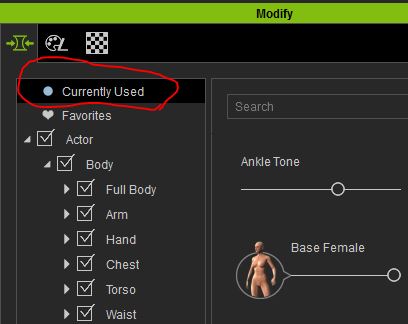
|
|
|
|
|
Alley
|
Alley
Posted 10 Years Ago
|
|
Group: Forum Members
Last Active: 3 Months Ago
Posts: 3.7K,
Visits: 12.8K
|
Okay, duh - where is the morphs used list?:blush:
NM, I think I found it....so with the character loaded and checking "Currently Used" - I did reset the "Eyelid Heavy" and it appeared to reset but it still retains the DRM I guess.
Alley
|
|
|
|
|
Rampa
|
Rampa
Posted 10 Years Ago
|
|
Group: Forum Members
Last Active: 2 Months Ago
Posts: 8.2K,
Visits: 62.6K
|
Alley, did it remove it from the morphs used list? I was able to remove any Essential morph I added. Maybe it holds the reference in the file even when the morph is actually removed from the list?
I only a tested a few times, and have never tried preparing a character for sale.
|
|
|
|