|
Author
|
Message
|
|
wires
|
wires
Posted 10 Years Ago
|
|
Group: Forum Members
Last Active: 6 days ago
Posts: 5.7K,
Visits: 26.5K
|
I took the liberty of using the photo from your post for testing. Here is a quick result: 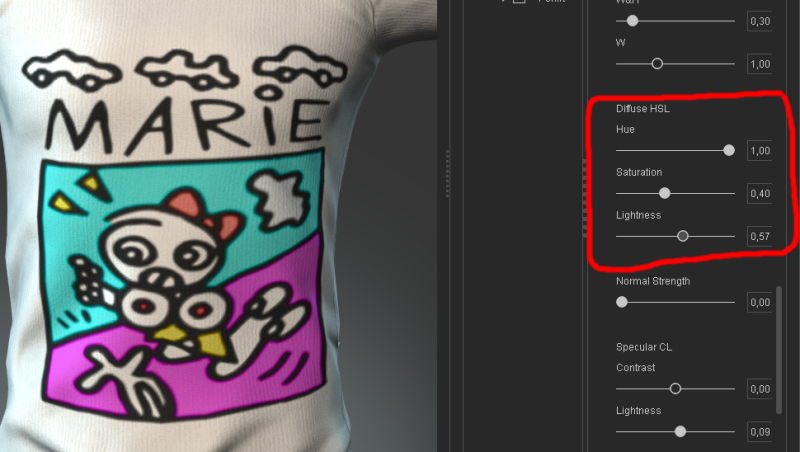 You need to adjust the sliders under Diffuse HSL until the image is as you want it.
Gerry
System: Win 10 Pro (21H2), Asus X99-E WS, CPU i7-5930K -3,5 GHz, 32 GB DDR4 2666-16 RAM, NVidia GTX 1080 Ti GPU - 11 GB VRAM(Driver Studio-536.99), Samsung 850 Pro 512 GB SSD, 6 TB HD storage.
|
|
|
|
|
Texel
|
Texel
Posted 10 Years Ago
|
|
Group: Forum Members
Last Active: 6 Years Ago
Posts: 5,
Visits: 40
|
So I purchased Essentials. Now I can apply my design on cloth. But instead of my design with briljant colors I get a transparent overprint. Sliders normal and normal strength are not working. What's wrong with me or my application? 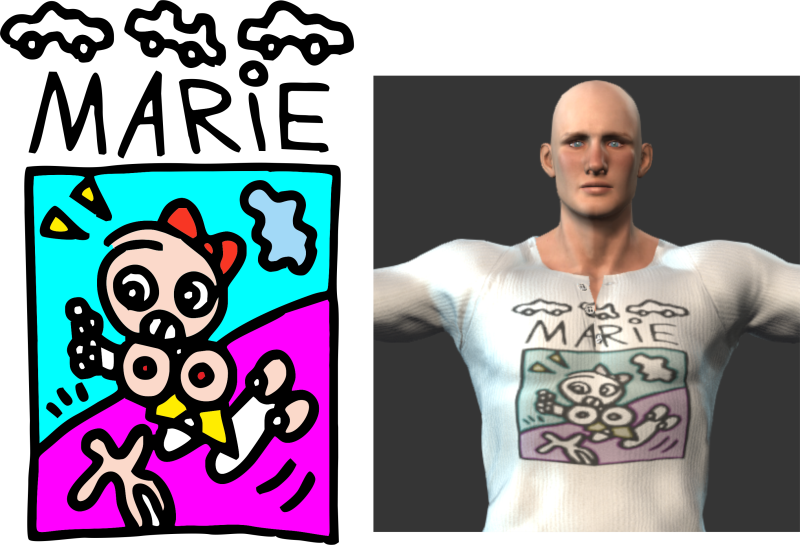
|
|
|
|
|
justaviking
|
justaviking
Posted 10 Years Ago
|
|
Group: Forum Members
Last Active: 2 Years Ago
Posts: 8.2K,
Visits: 26.5K
|
Thank you for the clarification, Rampa.
It's so hard to remember what is in the base product, what is premium functionality, and what is add-on content.
iClone 7... Character Creator... Substance Designer/Painter... Blender... Audacity...
Desktop (homebuilt) - Windows 10, Ryzen 9 3900x CPU, GTX 1080 GPU (8GB), 32GB RAM, Asus X570 Pro motherboard, 2TB SSD, terabytes of disk space, dual monitors.
Laptop - Windows 10, MSI GS63VR STEALTH-252, 16GB RAM, GTX 1060 (6GB), 256GB SSD and 1TB HDD
|
|
|
|
|
Rampa
|
Rampa
Posted 10 Years Ago
|
|
Group: Forum Members
Last Active: Last Month
Posts: 8.2K,
Visits: 62.6K
|
The custom decal option is only available if you have the "Essentials" pack for the character creator. If you plan to do a lot with iClone, it is well worth getting, as it also contains many more options for character customization.
|
|
|
|
|
justaviking
|
justaviking
Posted 10 Years Ago
|
|
Group: Forum Members
Last Active: 2 Years Ago
Posts: 8.2K,
Visits: 26.5K
|
Hopefully this picture helps. Use "Diffuse = Custom" to pick any picture you want. Then use "Type = Input" to apply it. (You'll probably want a transparent "alpha" background for the decal.) 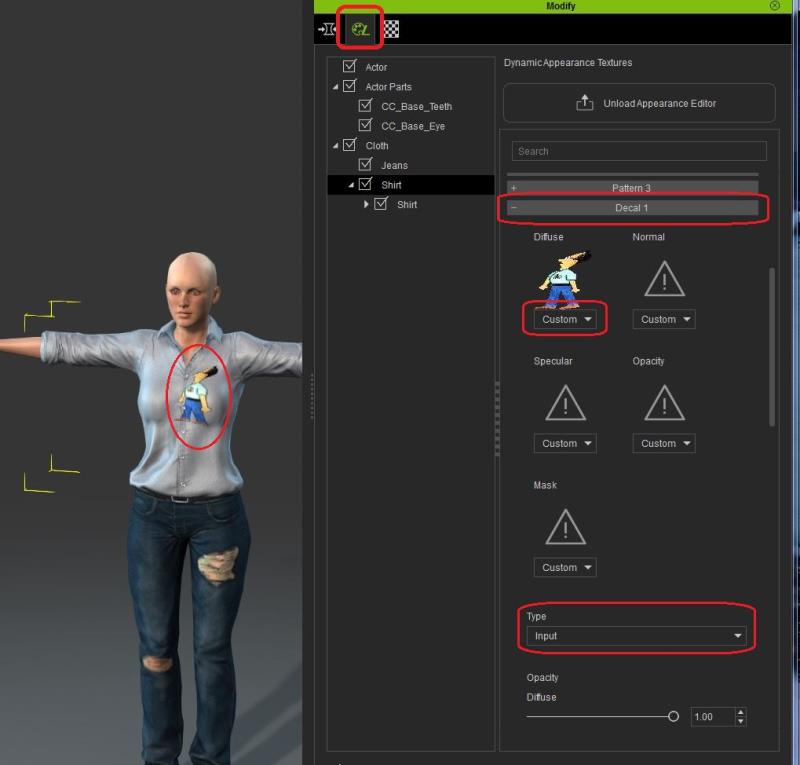
iClone 7... Character Creator... Substance Designer/Painter... Blender... Audacity...
Desktop (homebuilt) - Windows 10, Ryzen 9 3900x CPU, GTX 1080 GPU (8GB), 32GB RAM, Asus X570 Pro motherboard, 2TB SSD, terabytes of disk space, dual monitors.
Laptop - Windows 10, MSI GS63VR STEALTH-252, 16GB RAM, GTX 1060 (6GB), 256GB SSD and 1TB HDD
|
|
|
|
|
Texel
|
Texel
Posted 10 Years Ago
|
|
Group: Forum Members
Last Active: 6 Years Ago
Posts: 5,
Visits: 40
|
In decal 1 you have input, eagle, skull etc. Where can I find my own designs?
|
|
|
|
|
Kelleytoons
|
Kelleytoons
Posted 10 Years Ago
|
|
Group: Forum Members
Last Active: 2 Years Ago
Posts: 9.2K,
Visits: 22.1K
|
I'm not sure what you mean by "default decal files". In Character Creator the clothing articles have decal "materials" applied, at least in most of the items I looked at. There are different decals for different areas of the clothing (for the t-shirt decal 1 is the chest area). There are no decals normally applied to the blank t-shirt, so I don't understand what you are looking for.
Alienware Aurora R16, Win 11, i9-149000KF, 3.20GHz CPU, 64GB RAM, RTX 4090 (24GB), Samsung 870 Pro 8TB, Gen3 MVNe M-2 SSD, 4TBx2, 39" Alienware Widescreen Monitor
Mike "ex-genius" Kelley
|
|
|
|
|
Texel
|
Texel
Posted 10 Years Ago
|
|
Group: Forum Members
Last Active: 6 Years Ago
Posts: 5,
Visits: 40
|
But where do I find the default decal files?
|
|
|
|
|
Texel
|
Texel
Posted 10 Years Ago
|
|
Group: Forum Members
Last Active: 6 Years Ago
Posts: 5,
Visits: 40
|
Thank you. I used decal and it worked well.
|
|
|
|
|
Kelleytoons
|
Kelleytoons
Posted 10 Years Ago
|
|
Group: Forum Members
Last Active: 2 Years Ago
Posts: 9.2K,
Visits: 22.1K
|
Or just do it in CC (I did it in about 10 seconds). Use decal 1 for a t-shirt: 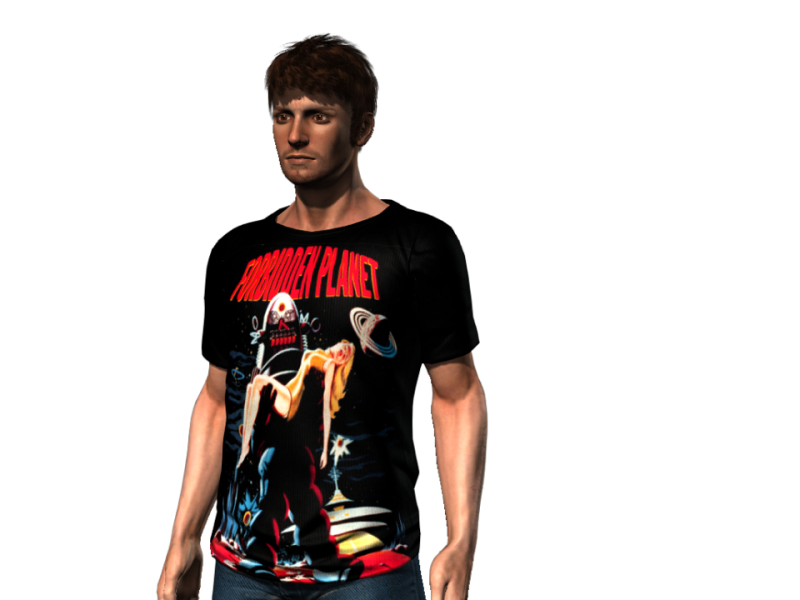
Alienware Aurora R16, Win 11, i9-149000KF, 3.20GHz CPU, 64GB RAM, RTX 4090 (24GB), Samsung 870 Pro 8TB, Gen3 MVNe M-2 SSD, 4TBx2, 39" Alienware Widescreen Monitor
Mike "ex-genius" Kelley
|
|
|
|