|
3doutlaw
|
3doutlaw
Posted 11 Years Ago
|
|
Group: Forum Members
Last Active: 2 Years Ago
Posts: 59,
Visits: 193
|
Thanks Rampa, your post got me thinking of what to look into, and though it was not what fixed it for me, it contributed to the path to success!!! Woohoo! :) Here is what fixed it: - I noticed that when importing Genesis, it did an auto-convert, so I went to find the profile it used for Genesis, and see if there were some settings I could tweak for the Gen4
- I found them here: C:\Program Files (x86)\Reallusion\iClone 3DXchange 6\3DX template\AutoConvertNonStd
- I copied "02_Daz4Genesis.3dxProfile" to my custom 3dxProfile area (where it is accessible from the "load" menu)
- For kicks, I applied it from there, just to make sure it works as expected (i.e. fingers broken), and it WORKED!!!! No issues.
I then retried the same FBX and used the drop-down "Daz4 Genesis", and the fingers broke. Then "Load"ed the one above, and works!
So, I then tried it for Aiko3, and it works fine as well.
It seems to point to an issue with the presets, but I've got a working solution, and am "not" a good persons to troubleshoot the differences.
|
|
3doutlaw
|
3doutlaw
Posted 11 Years Ago
|
|
Group: Forum Members
Last Active: 2 Years Ago
Posts: 59,
Visits: 193
|
So using Aiko3 in Daz, if you look at the picture, you can see the rotation orientation of the fingers. (on the left darker image is Daz, on the right lighter image is 3dX) When I save as FBX, and then open in 3dXchange, you can see the finger orientation it gets, which makes bending all wonky (its technical term for not working right) What can I do to make sure the rotation alignment matches the original figure? Is this an FBX export problem, something I can change in the FBX manually, or a 3dXchange issue? 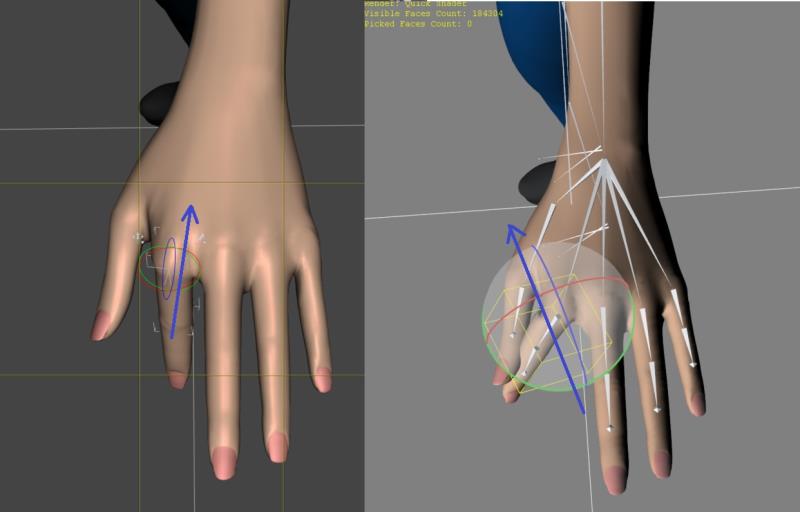
|