|
By 3doutlaw - 11 Years Ago
|
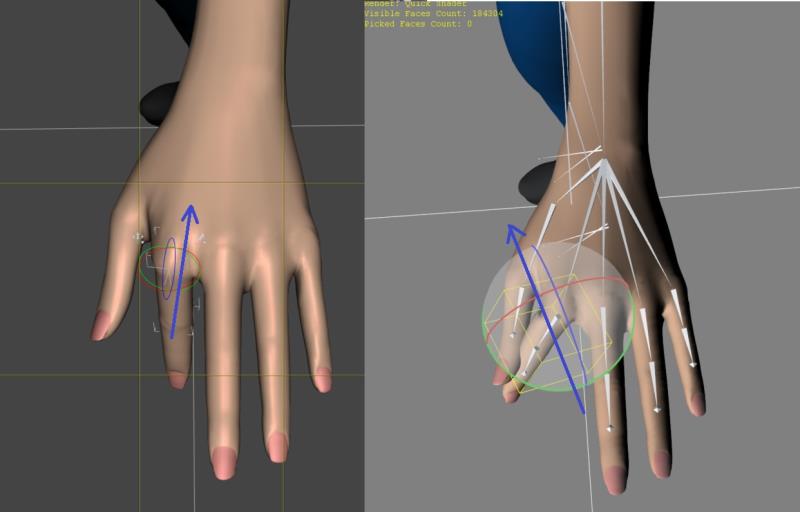
So using Aiko3 in Daz, if you look at the picture, you can see the rotation orientation of the fingers. (on the left darker image is Daz, on the right lighter image is 3dX)
When I save as FBX, and then open in 3dXchange, you can see the finger orientation it gets, which makes bending all wonky (its technical term for not working right)
What can I do to make sure the rotation alignment matches the original figure? Is this an FBX export problem, something I can change in the FBX manually, or a 3dXchange issue?
|
|
By 3doutlaw - 11 Years Ago
|
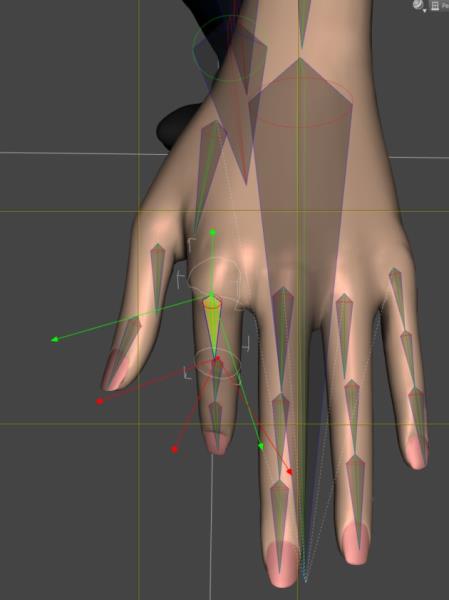
I may have found the issue, but I dont know how to fix it....if I bring up the Joint Editor in DS, I notice the axis for the finger are along the same lines that the FBX/3dXchange are using. (see pic) Issue is...I have no idea how to change them :(
|
|
By Cricky - 11 Years Ago
|
It's a fairly straight forward change in DAZ, but that may not be where the problem lies.
Take this 3DX profile for Aiko3 and see if it solves the problem.
If this doesn't work for you it is a Joint issue inside DAZ you have, and even after a few years I still don't encounter a DAZ issue.
I suspect it may be a profile issue you have in your personal settings of the 3dXchange profile you are using. It of course could be the DAZ settings you export, but as long as you followed the standard FBX protocols it would work.
Try loading her in a Standard DAZ T-Pose, which will straighten the fingers also.
This link is for 3dXchange5 but still works in 6. It also places her feet flat on the floor.
Temporary Download Link
3doutlaw (9/29/2015)
I may have found the issue, but I dont know how to fix it....if I bring up the Joint Editor in DS, I notice the axis for the finger are along the same lines that the FBX/3dXchange are using. (see pic) Issue is...I have no idea how to change them :(
|
|
By 3doutlaw - 11 Years Ago
|
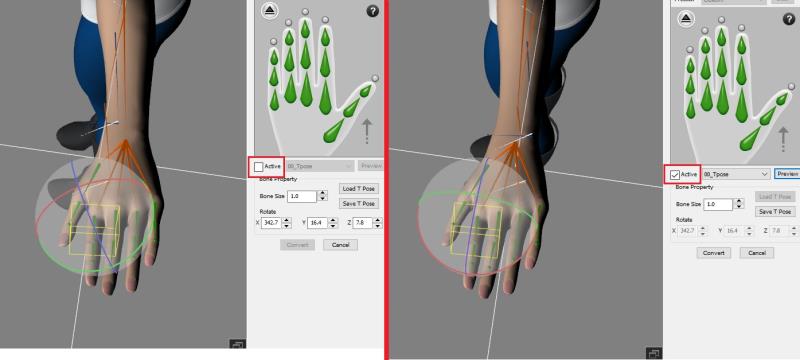
That seems to work, thanks! ...but it makes me confused??? If I load that profile, and have not checked the active box, the orientation looks like the left, but once I hit Active, it straightens right out??? What makes it do that?
|
|
By Cricky - 11 Years Ago
|
It works because the error is coming from the exported model out of DAZ. So essentially the bottom line is fix it inside DAZ before exporting it. Go to Joint Editor, and Align the bones.
3doutlaw (9/30/2015)
That seems to work, thanks! ...but it makes me confused??? If I load that profile, and have not checked the active box, the orientation looks like the left, but once I hit Active, it straightens right out??? What makes it do that?
It isn't DAZ itself, it is the Stance the model starts with in Frame Zero during export.
Frame Zero from DAZ, is the determining pose that 3dXchange reads on importing for iClone, so it only chews on what you feed it. Digestion results are the pose profile I sent you.
|
|
By Cricky - 11 Years Ago
|
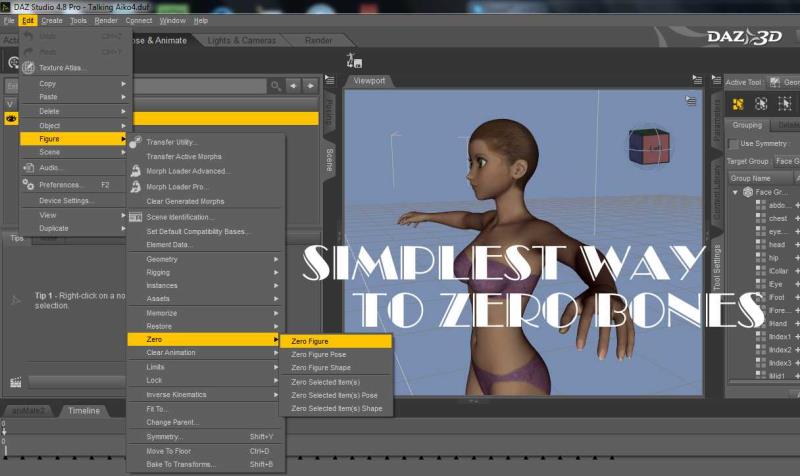
Thought I'd add this: If you ZERO the figure in Frame ZERO and then apply animation from Frame 01 - and on, the model export should be fine when it enters 3dXchange.
|
|
By 3doutlaw - 11 Years Ago
|
Yea something went wrong in the versions I have (DS 4.8.0.59, and latest 3dXchange 6). I can load Aiko3 base, zero figure, export to FBX using standard options.
Then load in 3dXchange, change to non-standard, apply the Daz Genesis profile, fix the mis-assigned spine bone, and run the finger calibration and this:
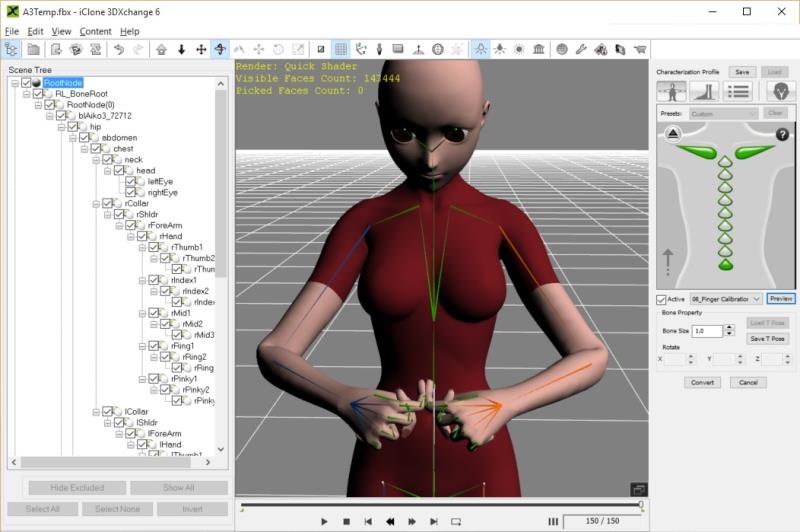
EDIT: ...and I just tried it with Align All Bones via the Joint editor prior to FBX export, and same results.
|
|
By aspin - 11 Years Ago
|
Those weird finger bedings happen with V4 as well.
|
|
By 3doutlaw - 11 Years Ago
|
OK, so a couple of questions:
1) Does RL look here for technical issues, or do we need to report them somewhere?
2) Are we able to download 3dXchange5? If so, does it install alongside 3dXChange6, or do we need to un-install/install
3) Does anyone have installed an older version of DS than 4.8, that can test an FBX export, into 3dXChange6? Be good to ID if its the DS export or the FBX import
|
|
By Cricky - 11 Years Ago
|
I am running DAZ 4.8.059 and DAZ 4.6 4.6.0.18 and both export fine for me. They also import fine into 3DXchange 5 and 6 (Both Pipeline versions).
Answer 01: Yes, I'm sure your questions and answers are being monitored, but a Support Ticket wouldn't hurt. https://www.reallusion.com/CustomerSupport/UserEx/QForm.aspx?lang=1
Answer 02: If you can find a download for 3DXchange 5, it will install alongside the other version without conflict ((AFAIK) = As Far As I Know)) .. I have at times 3 versions running.
Answer 03: Not sure if the first sentence (above) qualifies as an older DAZ Studio version of 4.9.059 , as I just recently installed it again, so hard to say without knowing your version.
3doutlaw (10/2/2015)
OK, so a couple of questions:
1) Does RL look here for technical issues, or do we need to report them somewhere?
2) Are we able to download 3dXchange5? If so, does it install alongside 3dXChange6, or do we need to un-install/install
3) Does anyone have installed an older version of DS than 4.8, that can test an FBX export, into 3dXChange6? Be good to ID if its the DS export or the FBX import
|
|
By 3doutlaw - 11 Years Ago
|
OK, so here are the steps I took:
1) Open Daz 4.8.0.59
2) Load V4 (I included base, morphs++, Aiko4 and Elite morphs...not sure if that matters)
3) Export FBX, standard options (see below)
4) Open 3dXchange v6.2.0828.1
5) Open the FBX
6) Convert to non-standard
7) Preset Daz4 Genesis
8) Fingers bent wonky...see below
 
|
|
By Cricky - 11 Years Ago
|
You do know Aiko is not Genesis, right? There is a Genesis version of Aiko, but it is primarily based on Poser. The model you show is Poser based.
3doutlaw (10/2/2015)
OK, so here are the steps I took: 1) Open Daz 4.8.0.59 2) Load V4 (I included base, morphs++, Aiko4 and Elite morphs...not sure if that matters) 3) Export FBX, standard options (see below) 4) Open 3dXchange v6.2.0828.1 5) Open the FBX 6) Convert to non-standard 7) Preset Daz4 Genesis 8) Fingers bent wonky...see below
|
|
By 3doutlaw - 11 Years Ago
|
Yes, Aiko3 is old school, so is V4. Genesis works fine for me. as does G2F, etc. I was using the V4 Genesis rig is just a convenience to not map all bones manually.
I would like to know how to get a profile like the one you posted. I tried all the suggestions and it does not work. Someone else even mentioned the V4 thing, and I figured that is more common so I would post the steps I am using for that.
Surely, someone has got V4's fingers working in iClone without having to bend them sideways in the t-pose so that they make a fist correctly. (which is the only way I could get A3 to work)
|
|
By Cricky - 11 Years Ago
|
I'm Throwing in the towel.
|
|
By 3doutlaw - 11 Years Ago
|
Can someone with 3dXchange 5 and Daz Studio try the steps above, and tell me if the fingers ends up bending wrong?
I've now tried DAZStudio 4.6, and I get the same results in 3dXchange 6. Wondering if it is the new 3dXchange that is the problem?
|
|
By 3doutlaw - 11 Years Ago
|
Forget it...I downloaded the iClone5 trial, and it has the same issue. >:(
I can't believe that for all the time iClone has been out that the hands of Gen4 and Gen3 daz characters have been wonky?
The only one i've seen work is the link that Cricky sent earlier in this thread, but I have no idea how to reproduce that? Very aggravating!
I've got so many good Poser type models I would like to use in iClone, but this makes the hands manual tweaks on every animation.
|
|
By Rampa - 11 Years Ago
|
|
I think it may just be you need to "zero-out" all the bones. Once the figure is in a T-pose, if there is a "zero joints" option in Poser or DAZ, that might do it. There is a "singularize pivots" in 3DX that you could try using before converting the figure to an avatar. I'm guessing that it is a "zero joints" tool, but don't know for sure.
|
|
By 3doutlaw - 11 Years Ago
|
Thanks Rampa, your post got me thinking of what to look into, and though it was not what fixed it for me, it contributed to the path to success!!! Woohoo! :)
Here is what fixed it:
- I noticed that when importing Genesis, it did an auto-convert, so I went to find the profile it used for Genesis, and see if there were some settings I could tweak for the Gen4
- I found them here: C:\Program Files (x86)\Reallusion\iClone 3DXchange 6\3DX template\AutoConvertNonStd
- I copied "02_Daz4Genesis.3dxProfile" to my custom 3dxProfile area (where it is accessible from the "load" menu)
- For kicks, I applied it from there, just to make sure it works as expected (i.e. fingers broken), and it WORKED!!!! No issues.
I then retried the same FBX and used the drop-down "Daz4 Genesis", and the fingers broke. Then "Load"ed the one above, and works!
So, I then tried it for Aiko3, and it works fine as well.
It seems to point to an issue with the presets, but I've got a working solution, and am "not" a good persons to troubleshoot the differences.
|
|
By TalonAnimations - 11 Years Ago
|
OK... Since the talk is about orientation, I am having a problem exporting a non-standard character out of 3DXchange 6.21 to FBX for Maya 64 bit.
When I export it with animations, it seems OK till I go to run the animations. The body mesh aligns along a different axis and the skeleton remains in the same axis as it is imported. The animation plays accordingly along the two separate axes.
What is the problem?
My Maya FBX version is 2015.
|