|
Author
|
Message
|
|
JC Weatherby
|
JC Weatherby
Posted 11 Years Ago
|
|
Group: Forum Members
Last Active: 3 Years Ago
Posts: 477,
Visits: 802
|
One of the main issues for character creators is how to get clothing you've made (modeled/built in other programs) onto your CC Characters. I call this "Conforming" clothing to the character. You can call it whatever you like. Like many of us, I'm crossing my fingers RL addresses this much-needed feature in a coming software update of iClone / Character Creator. But until then, here's a look at several methods employed by other software packages. (Feel free to try these at home!) :) In DAZ: DAZ has crafted a simple solution for getting clothes onto an avatar. Sadly it is not possible to do this with CC avatars, since DAZ does not readily import fully rigged FBX characters. In BLENDER: You can attempt the traditional method of parenting your clothing mesh to the skeleton rig, then transferring weights as shown in this video. I liken this to carving in stone, and would rather have my hair set on fire. :w00t:in 3DS MAX: This looks like one of the ways you can actually Conform clothing outside of iClone. Alas, a copy of 3DS Max (or Maya) will cost you $185.00 USD per month.
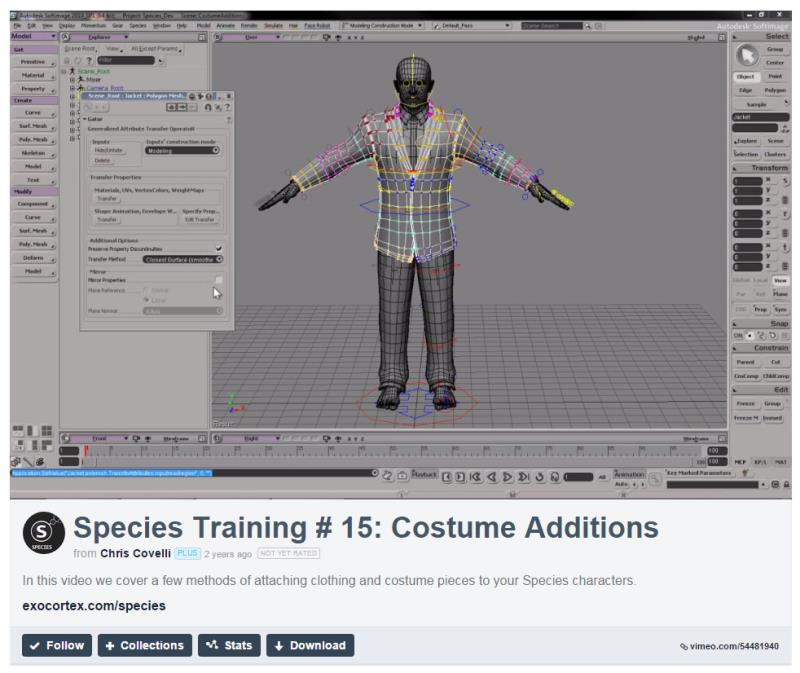
in SPECIES: Clara.io developer, Exocortex, has a proprietary character creation system called "Species," which costs $299.00 USD. Here's a look at how they do it:
So RL, I hope you're keeping track of this issue and working to give us a tool we can use really soon! Cheers!
|
|
|
|
|
urbanlamb
|
urbanlamb
Posted 11 Years Ago
|
|
Group: Forum Members
Last Active: 2 Years Ago
Posts: 1.2K,
Visits: 3.5K
|
JC Weatherby (9/17/2015)
In BLENDER: You can attempt the traditional method of parenting your clothing mesh to the skeleton rig, then transferring weights as shown in this video. I liken this to carving in stone, and would rather have my hair set on fire. :w00t:
So RL, I hope you're keeping track of this issue and working to give us a tool we can use really soon! Cheers!aah okay be careful with this guys tutorials I watched a couple the other day and his um methods are shall we say 'antiquated' I turned em off shaking my head... I was watching him model a character and was shall we say not impressed? I have not watched the clothing one but suffice it to say "its not that hard". He uses very old methods for character creation and seems to have not heard of a sculpting brush :P If you want up to date stuff try places like blender cookie or the blender cloud. When i see tutorials like the modelling one I watched with recent upload dates I think that they might secretly work for autodesk LOL (this is me being silly but it brings me a chuckle when i say this stuff in my head of course I think I am absolutely hilarious :D) edit: okay I watched half of the clothing tutorial and it seems accurate the scary thing is that he didnt know this before and has been giving tutorials on character creation so take this guy with a grain of salt but yeah is populate with empty groups using ctrl p and then either weight paint or use the vertex group weighting tool inside edit mode. It takes maybe 5 minutes at the most its actually pretty easy :)
~~~~~~~~~~~~~~~~~~~~~~~~~~~~~~~~~~~~~~~~~~~~~~~~~~~~~~~~
"You have brains in your head. You have feet in your shoes. You can steer yourself in any direction you choose. You're on your own, and you know what you know. And you are the guy who'll decide where to go."
Dr. Seuss
|
|
|
|
|
vidi
|
|
|
Group: Forum Members
Last Active: 2 Months Ago
Posts: 10.8K,
Visits: 40.2K
|
Sadly it is not possible to do this with CC avatars, since DAZ does not readily import fully rigged FBX characters Yes that would change everything . I can not see that max do an another or better job for 185 bucks :Whistling: , only you can imported it as fbx . :D
-------------------------------------------------------------------
liebe Grüße vidi
|
|
|
|
|
urbanlamb
|
urbanlamb
Posted 11 Years Ago
|
|
Group: Forum Members
Last Active: 2 Years Ago
Posts: 1.2K,
Visits: 3.5K
|
It was saving one step really but that is all I watched the entire thing its an automatic weighting on the upper half of the skeleton which its possible you could get away with using this option in blender but I dont trust it either in 3dsmax or blender (same mechanism really) anyhow to each his own if you want to pay 185 bucks a month to save like 4 keystrokes LOL. (tries not to enter autodesk rant mode).
~~~~~~~~~~~~~~~~~~~~~~~~~~~~~~~~~~~~~~~~~~~~~~~~~~~~~~~~
"You have brains in your head. You have feet in your shoes. You can steer yourself in any direction you choose. You're on your own, and you know what you know. And you are the guy who'll decide where to go."
Dr. Seuss
|
|
|
|
|
wendyluvscatz
|
wendyluvscatz
Posted 11 Years Ago
|
|
Group: Forum Members
Last Active: 4 Months Ago
Posts: 2.5K,
Visits: 19.4K
|
Carrara is affordable if you join the DAZ platinum club
In there you can confirm to pelvis and abdomen by selecting either and you mesh and going to animation tab at the top and attach skeleton.
The skeleton is these two paired rigs so clothes must be in tops and bottoms.
The only issue I found was re importing if you accept the dialogue 3Dxchange crashes So had to manually re target and set up in expression editor.
|
|
|
|
|
vidi
|
|
|
Group: Forum Members
Last Active: 2 Months Ago
Posts: 10.8K,
Visits: 40.2K
|
Wendy I have tested again after I read this . I have export with the Maya template now. The first test was The Unity template I did not think that makes a difference It Seems to work, except like you says, It Must Be splitted in Upper and Lower Dress I can not import more in 3D xchange for a final testing, but It seems to Work. You are a carrara Genius :)
-------------------------------------------------------------------
liebe Grüße vidi
|
|
|
|
|
JC Weatherby
|
JC Weatherby
Posted 11 Years Ago
|
|
Group: Forum Members
Last Active: 3 Years Ago
Posts: 477,
Visits: 802
|
I guess it's worth pointing out that the Carrara method requires another $170.00 purchase - just to get clothes on a CC Avatar. This is money that RL could... SHOULD.. capture for itself. Just give us the tools! Simple :)
Peter has commented that additional features would be coming in a future version. But I would like to see him comment again with more details on upcoming features.
|
|
|
|
|
vidi
|
|
|
Group: Forum Members
Last Active: 2 Months Ago
Posts: 10.8K,
Visits: 40.2K
|
The skeleton is these two paired rigs
Wendy get you it worked in 3D xchange if you RL_G6_Pelvis drag to RL_G6_Waist ? It seems now Carrara can attached the whole skeleton
Yes JC:)
I think also it is better to wait, then really what we tried all the time seems to me the complicated way to import a "DAZ Figure" . we will in this case not get changable dress for CC in , but only a bunch of work and mess
After attach the dress to the skeleton, you need weight it, and the weightbrush in Carrara is horrible.
Anyway I have Carrara and was curious, but it is not worth
-------------------------------------------------------------------
liebe Grüße vidi
|
|
|
|
|
Galfridus
|
Galfridus
Posted 11 Years Ago
|
|
Group: Forum Members
Last Active: 2 Years Ago
Posts: 727,
Visits: 2.2K
|
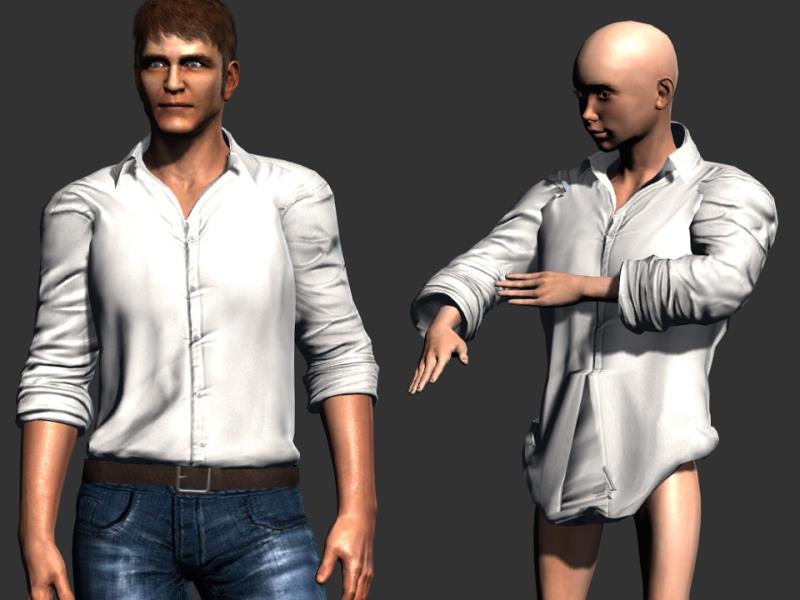 My very first simple, rough and ready attempt at conforming some clothing (Mason`s shirt) onto a CC avatar. Used 3DX6 pipeline to export Shirt mesh fbx and CC avatar fbx. Imported both fbx files into Akeytsu and selected Shirt mesh and aligned with avatar. In Akeytsu “Tree panel” dragged shirt into avatar hierarchy and applied “Bind skin”command. Exported fbx back into 3DX6 pipeline (it comes in as a prop) so then needed to convert to non-standard avatar to use in IC6. Numerous “weight issues” with the shirt but as you can see from the pic when the arms move so does the shirt sleeves. Despite the obvious flaws I consider this a personal minor success for just a few minutes exploritory work and perhaps worth further investigation by those more knowledgeable and experienced in such matters than myself. Geoff.
|
|
|
|
|
vidi
|
|
|
Group: Forum Members
Last Active: 2 Months Ago
Posts: 10.8K,
Visits: 40.2K
|
Hi Geoff great finding I have just tested and it works ! I had no Idea we could Bind a Mesh so easily in Akeytsu to another mesh . I don't why I have it tested too, This nice little App is realy great.
All what it needs the Weightbrush. the Dress Mesh needs some tweaks At the Moment it would to be fiddly to adjust the dress mesh without a Brush. Aurelien has say, for the next updates it is planned
In Akeytsu “Tree panel” dragged shirt into avatar hierarchy even that is not necessary select the the toplevel Node of the CC and the Dress mesh and Bind skin . Akeytsu do it automatically sorted in the Hierarchy
Once that thing on Steam I'll buy it definitely
useful would now be ,to have lock function for Nodes, I think I make a request. I must say it is realy a fun to see we all try to break the limits and I learn the possibilities of my tools better.
-------------------------------------------------------------------
liebe Grüße vidi
|
|
|
|