|
By JC Weatherby - 11 Years Ago
|
One of the main issues for character creators is how to get clothing you've made (modeled/built in other programs) onto your CC Characters. I call this "Conforming" clothing to the character. You can call it whatever you like. Like many of us, I'm crossing my fingers RL addresses this much-needed feature in a coming software update of iClone / Character Creator.
But until then, here's a look at several methods employed by other software packages. (Feel free to try these at home!) :)
In DAZ: DAZ has crafted a simple solution for getting clothes onto an avatar. Sadly it is not possible to do this with CC avatars, since DAZ does not readily import fully rigged FBX characters.
In BLENDER: You can attempt the traditional method of parenting your clothing mesh to the skeleton rig, then transferring weights as shown in this video. I liken this to carving in stone, and would rather have my hair set on fire. :w00t:
in 3DS MAX: This looks like one of the ways you can actually Conform clothing outside of iClone. Alas, a copy of 3DS Max (or Maya) will cost you $185.00 USD per month.
in SPECIES: Clara.io developer, Exocortex, has a proprietary character creation system called "Species," which costs $299.00 USD. Here's a look at how they do it:
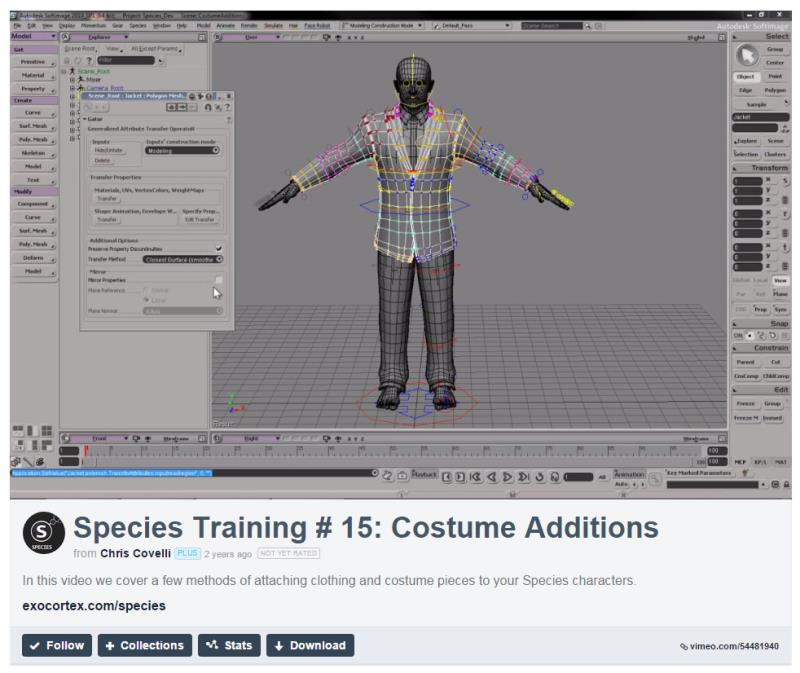
So RL, I hope you're keeping track of this issue and working to give us a tool we can use really soon! Cheers!
|
|
By urbanlamb - 11 Years Ago
|
|
JC Weatherby (9/17/2015)
In BLENDER: You can attempt the traditional method of parenting your clothing mesh to the skeleton rig, then transferring weights as shown in this video. I liken this to carving in stone, and would rather have my hair set on fire. :w00t:
So RL, I hope you're keeping track of this issue and working to give us a tool we can use really soon! Cheers!
aah okay be careful with this guys tutorials I watched a couple the other day and his um methods are shall we say 'antiquated' I turned em off shaking my head... I was watching him model a character and was shall we say not impressed? I have not watched the clothing one but suffice it to say "its not that hard". He uses very old methods for character creation and seems to have not heard of a sculpting brush :P
If you want up to date stuff try places like blender cookie or the blender cloud.
When i see tutorials like the modelling one I watched with recent upload dates I think that they might secretly work for autodesk LOL (this is me being silly but it brings me a chuckle when i say this stuff in my head of course I think I am absolutely hilarious :D)
edit: okay I watched half of the clothing tutorial and it seems accurate the scary thing is that he didnt know this before and has been giving tutorials on character creation so take this guy with a grain of salt but yeah is populate with empty groups using ctrl p and then either weight paint or use the vertex group weighting tool inside edit mode. It takes maybe 5 minutes at the most its actually pretty easy :)
|
|
By vidi - 11 Years Ago
|
|
Sadly it is not possible to do this with CC avatars, since DAZ does not readily import fully rigged FBX characters
Yes that would change everything . I can not see that max do an another or better job for 185 bucks :Whistling: , only you can imported it as fbx .:D
|
|
By urbanlamb - 11 Years Ago
|
|
It was saving one step really but that is all I watched the entire thing its an automatic weighting on the upper half of the skeleton which its possible you could get away with using this option in blender but I dont trust it either in 3dsmax or blender (same mechanism really) anyhow to each his own if you want to pay 185 bucks a month to save like 4 keystrokes LOL. (tries not to enter autodesk rant mode).
|
|
By wendyluvscatz - 11 Years Ago
|
Carrara is affordable if you join the DAZ platinum club
In there you can confirm to pelvis and abdomen by selecting either and you mesh and going to animation tab at the top and attach skeleton.
The skeleton is these two paired rigs so clothes must be in tops and bottoms.
The only issue I found was re importing if you accept the dialogue 3Dxchange crashes So had to manually re target and set up in expression editor.
|
|
By vidi - 11 Years Ago
|
Wendy I have tested again after I read this .
I have export with the Maya template now. The first test was The Unity template
I did not think that makes a difference
It Seems to work, except like you says, It Must Be splitted in Upper and Lower Dress
I can not import more in 3D xchange for a final testing, but It seems to Work.
You are a carrara Genius :)
|
|
By JC Weatherby - 11 Years Ago
|
I guess it's worth pointing out that the Carrara method requires another $170.00 purchase - just to get clothes on a CC Avatar. This is money that RL could... SHOULD.. capture for itself. Just give us the tools! Simple :)
Peter has commented that additional features would be coming in a future version. But I would like to see him comment again with more details on upcoming features.
|
|
By vidi - 11 Years Ago
|
|
The skeleton is these two paired rigs
Wendy get you it worked in 3D xchange if you RL_G6_Pelvis drag to RL_G6_Waist ? It seems now Carrara can attached the whole skeleton
Yes JC:)
I think also it is better to wait, then really what we tried all the time seems to me the complicated way to import a "DAZ Figure" . we will in this case not get changable dress for CC in , but only a bunch of work and mess
After attach the dress to the skeleton, you need weight it, and the weightbrush in Carrara is horrible.
Anyway I have Carrara and was curious, but it is not worth
|
|
By Galfridus - 11 Years Ago
|
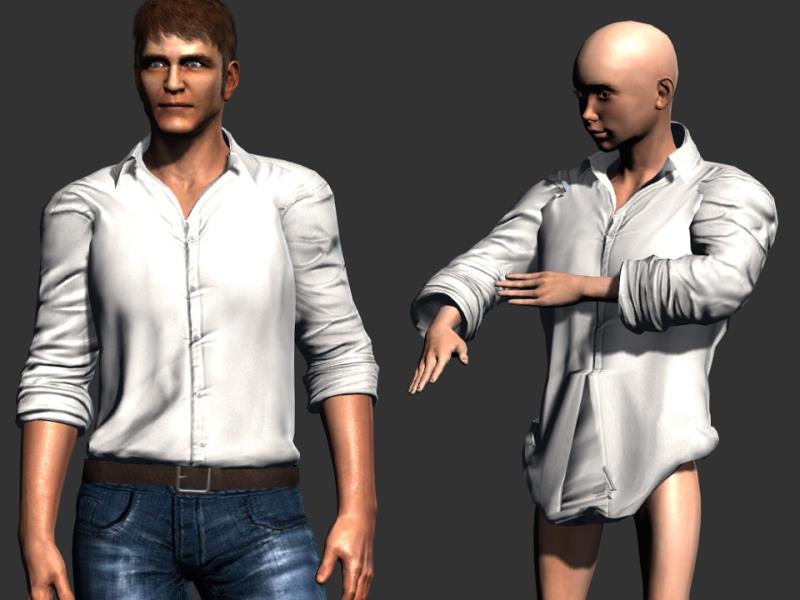
My very first simple, rough and ready attempt at conforming some clothing (Mason`s shirt) onto a CC avatar.
Used 3DX6 pipeline to export Shirt mesh fbx and CC avatar fbx.
Imported both fbx files into Akeytsu and selected Shirt mesh and aligned with avatar. In Akeytsu “Tree panel” dragged shirt into avatar hierarchy and applied “Bind skin”command.
Exported fbx back into 3DX6 pipeline (it comes in as a prop) so then needed to convert to non-standard avatar to use in IC6.
Numerous “weight issues” with the shirt but as you can see from the pic when the arms move so does the shirt sleeves.
Despite the obvious flaws I consider this a personal minor success for just a few minutes exploritory work and perhaps worth further investigation by those more knowledgeable and experienced in such matters than myself.
Geoff.
|
|
By vidi - 11 Years Ago
|
|
Hi Geoff great finding I have just tested and it works ! I had no Idea we could Bind a Mesh so easily in Akeytsu to another mesh . I don't why I have it tested too, This nice little App is realy great.
All what it needs the Weightbrush. the Dress Mesh needs some tweaks At the Moment it would to be fiddly to adjust the dress mesh without a Brush. Aurelien has say, for the next updates it is planned
In Akeytsu “Tree panel” dragged shirt into avatar hierarchy even that is not necessary select the the toplevel Node of the CC and the Dress mesh and Bind skin . Akeytsu do it automatically sorted in the Hierarchy
Once that thing on Steam I'll buy it definitely
useful would now be ,to have lock function for Nodes, I think I make a request. I must say it is realy a fun to see we all try to break the limits and I learn the possibilities of my tools better.
|
|
By JC Weatherby - 11 Years Ago
|
|
sw00000p (9/18/2015)
Sigh! Why struggle with crappy tools? Use Maya LT and be done with it!:Wow:
@Swoop - could you enlighten us on this? I can't find any good info about how to Conform clothing using Maya LT.
Here are a couple of Maya-related Forum Discussions going back to 2014:
How can you rig/skin swappable clothing?
Clothing a model in Maya LT?
Here is a video tutorial about Conforming Maya's "nCloth." -- But this is for Maya, not Maya LT.
|
|
By urbanlamb - 11 Years Ago
|
JC Weatherby (9/19/2015)
sw00000p (9/18/2015)
Sigh! Why struggle with crappy tools? Use Maya LT and be done with it!:Wow:@Swoop - could you enlighten us on this? I can't find any good info about how to Conform clothing using Maya LT. I see no video tutorials. Here are a couple of Maya-related Forum Discussions going back to 2014: How can you rig/skin swappable clothing?
Clothing a model in Maya LT?
If you read the other thread we were talking about this in you will see that someone already tried and ran into a problem that made the program worthless LOL
|
|
By JC Weatherby - 11 Years Ago
|
|
@Urbanlamb - Good reminder! Thanks! :)
|
|
By vidi - 11 Years Ago
|
|
that made the program worthless LOL
Yes, the crappy Tool by all *LOL*:D
|
|
By Galfridus - 11 Years Ago
|
Hello Vidi
Thank you for your kind words of help and encouragement regarding my first conforming clothes experiment in Akeytsu.
I feel sure that most are hoping the CC creator pipeline version will include something similar to the Akeytsu “Bind skin”command to streamline the process for us even further.
Still patiently waiting conformation of such "details" from RL.:Whistling:
Geoff.
|
|
By vidi - 11 Years Ago
|
Hi Geoff :)
I get a response from Akeytsu team
Yes, we could think about a lock (or freeze) to avoid to change by accident weights on additional meshes. A lock that would even lock skin mesh vertices selection too in case you work with vertices.
That and a weightbrush, will then be easier to conform a new mesh to a Character. :D So we Have a Plan B, if the CC Pipeline not so is the way we expect.
Of all Programms what I have testet so far, seems to me is Akeytsu the best .
|
|
By JC Weatherby - 11 Years Ago
|
Galfridus (9/19/2015)
Hello Vidi Thank you for your kind words of help and encouragement regarding my first conforming clothes experiment in Akeytsu. I feel sure that most are hoping the CC creator pipeline version will include something similar to the Akeytsu “Bind skin”command to streamline the process for us even further. Still patiently waiting conformation of such "details" from RL. :Whistling:Geoff.
Here! Here! :D
@Vidi & Galfridus - Thank you both!
|
|
By JC Weatherby - 11 Years Ago
|
Here's PART 1 of the SKINNING tutorials for AKEYTSU: For those of you just tuning in, Akeytsu is a new program dedicated to Character Rigging and Keyframe Animation. They've reimagined the rigging process, and have developed a new animation workflow. The current version of the program is targeted at game developers, and the roadmap extends to television and movies. This video mentions there are some weight mapping features not yet available, but all the basic stuff is there. The Akeytsu "Indie" license costs just $79.00 USD.
|
|
By JC Weatherby - 11 Years Ago
|
Recently Adobe bought MIXAMO, a character creation, rigging and animation platform. I'm busy this week, but perhaps someone will have time to see if there's a decent Conforming workflow.
Read my UPDATE to this post.
|
|
By mtakerkart - 11 Years Ago
|
@JC
I use Fuse and there's conforming issues with extreme morph , very fat character for exemple.
But did you notice there's a 3dxchange patch today:
https://forum.reallusion.com/FindPost254936.aspx
it fix the keeping clothes deformation in iclone!!!! wonderfull feature isn't ??

|
|
By ToKoMotion - 11 Years Ago
|
|
mtakerkart (9/22/2015)
...
it fix the keeping clothes deformation in iclone!!!! wonderfull feature isn't ??
...
Just read your post and saw this. That´s fantastic, already downloaded and will test it now:). thanks for the hint!!!
|
|
By Rampa - 11 Years Ago
|
mtakerkart (9/22/2015)
@JC I use Fuse and there's conforming issues with extreme morph , very fat character for exemple. But did you notice there's a 3dxchange patch today: https://forum.reallusion.com/FindPost254936.aspxit fix the keeping clothes deformation in iclone!!!! wonderfull feature isn't ??
I wonder if buttoning the coats will be to much distortion of the mesh? This is cool though. Puffy sleeves, riding pants, different wrinkle patterns, etc.
Might just have to upgrade my 3DX5 pretty soon.
|
|
By mtakerkart - 11 Years Ago
|
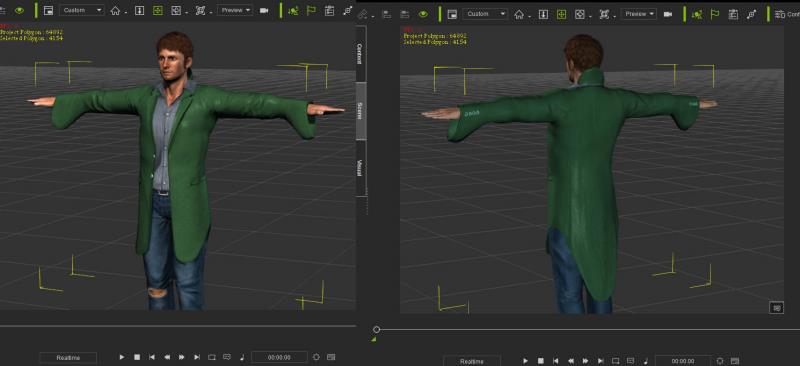
this is a rought Blazzer reshapping. Just have to rework the physic weightmap and We're in buisness!
|
|
By JC Weatherby - 11 Years Ago
|
@ Rampa - thanks for the heads up!
In that thread I saw this:
Fixed: After using the “replace mesh” in 3DXchange to create a custom mesh for CC Character’s clothing, bringing it back to iClone will only display the original unaltered mesh.
It gave me hope that possibly the Replace Mesh command could be used to conform a custom mesh. But it doesn't work: "Please make sure that the mesh you wish to replace has the same number of vertices as the selected mesh."

Morphing objects outside of iClone is useful in certain instances, but it doesn't enable conforming our own custom-made clothing.
|
|
By mtakerkart - 11 Years Ago
|
|
It gave me hope that possibly the Replace Mesh command could be used to conform a custom mesh.
I think since the release of the free CC version it's clear that we can't import custom mesh-cloth with the ''Auto-conform" like DAZ. The rumour said
may be in the CC pipeline version. The ''replace mesh'' I know since years has always been: never change the vertices number. But who knows ;-)
|
|
By Bellatrix - 11 Years Ago
|
|
mtakerkart (9/23/2015)
The ''replace mesh'' I know since years has always been: never change the vertices number. But who knows ;-)
I'm hoping for both the 'replace mesh' and 'create new CC part' feature WITHIN IClone.
Imagine this:
Replace mesh means creating new morph, using same clothing mesh.
No need to save a new file. One shirt = multiple looks.
Create new CC part means = iClone is so smart...
will know you want to create an entirely new clothing item
when your exported mesh returns with new vertices numbers!
No harm dreaming... :)
Meanwhile just patched 3DX to 6.21.
Did a round of test.
Purposely stretched and shrink shirt
then in iClone, manually refit my new metrosexual 'Slim Fit' :)
to get a feel of iClone's version of 'Conform' (Daz Smooth Modifier + SubD).
Not bad... But collar bit shows self-collision issue.
And the buttons no doubt needs RIGID conform to normals (which I've proposed already in CC wishlist thread)

|
|
By redrubyslippers - 11 Years Ago
|
heres a mesh i created ...with the help from here..the mesh is nowhere near the poly count of the original... but i did use max
|
|
By mtakerkart - 11 Years Ago
|
This is a CC with lot of modified clothes. The problem now is the collision between clothes.....If someone have a tip ?The green one is the Blazer CC deformed in Sculptris, anyway with the new patch it's cool!
|
|
By Rampa - 11 Years Ago
|
Looks like a Harkonnen!
In the project tab in the physics settings section, you can enable soft-to-soft collision and the margin. Don't set it to high, or you'll get a wiggly mess.
In you want to see a fun hair effect, load up the long physics hair (Heidi's) and set the the soft-to-soft margin at 3 or so. ;)
|
|
By mtakerkart - 11 Years Ago
|
|
Thanks Rampa. It works better but it's little bit odd. But I prefer floating clothes vs cross clothes ;-)
|
|
By JC Weatherby - 11 Years Ago
|
|
rampa (9/24/2015)
Looks like a Harkonnen!
@Rampa - nice connecting of dots! I do wish we'd get a new DUNE for TV as awesome as Game of Thrones.
|
|
By JC Weatherby - 11 Years Ago
|
MIXAMO Update:
The GOOD: Mixamo/Fuse (the Mixamo Character Creator) looks like another great Character Creator - like DAZ - that gives you FULL CREATIVE CONTROL over the final look of your character, enabling you to use other applications to create your own clothing and accessories, then put those on your character in Fuse.
The BAD: Mixamo DOES NOT look like a good 3rd party round-trip extension for iClone Character Creator avatars, as you can't import FBX into the Mixamo character creator, "FUSE." You also can't import CC-exported OBJ base meshes because they don't match the geometry of the FUSE base meshes.
|
|
By AverageJoe - 11 Years Ago
|
|
I really like Fuse, and find it a bit more versatile than the CC. That's not to say the CC is bad, it's just... lacking (IMO). And Fuse has way more hair styles and clothing available. The clothing itself is modifiable via texture and fabrics, not as extensively as CC, but enough to get something unique out of it. It's been about a year since I last tried to get a Fuse character into iClone (ver 5) but I remember the facial being a fairly big PITA. Also the character import, something usually went wrong. Eventually I just stopped trying because it was more work and effort than I want to do. I'm more interested in making movies than I am modeling, rigging, texturing, re-targeting, etc... My hope some day is to have a really extensive character creations system, with a large variety of hair and clothing styles that doesn;t require oodles and oodles of 3D type work to get into an animation application, and do some animating and story telling.
|
|
By JC Weatherby - 11 Years Ago
|
|
wizaerd (9/24/2015)
...It's been about a year since I last tried to get a Fuse character into iClone (ver 5) but I remember the facial being a fairly big PITA. Also the character import, something usually went wrong. Eventually I just stopped trying because it was more work and effort than I want to do. I'm more interested in making movies than I am modeling, rigging, texturing, re-targeting, etc... My hope some day is to have a really extensive character creations system, with a large variety of hair and clothing styles that doesn;t require oodles and oodles of 3D type work to get into an animation application, and do some animating and story telling.
Face rigging with Fuse > Mixamo Auto Rigger > 3DX6 appears to be D.O.A. Even though I could set "Enable Facial Morphs" in the Auto Rigger, I was not able to do any *facial animation* in Mixamo, and what I got in 3DX6 was a list of morphs in the Expression Editor that did not animate when I tried it in iClone. I probably need some more training on using Facial Morphs in iClone, but like you I think this is just too much PITA. :)
I'll say it again, RL needs to focus on building us a more comprehensive set of tools that gives character creators more creative control and reduces the need to rely on 3rd party (non RL) programs. To borrow a line from "The Martian," I've been trying to "Frankenstein the s**t out of this! (character creation)" since the beginning of iClone 6 - and it's gotten really f**king old! That it takes A YEAR (or longer?) for RL to get us a full-featured character creator is just ridiculous.
|
|
By AverageJoe - 11 Years Ago
|
JC Weatherby (9/24/2015)
Face rigging with Fuse > Mixamo Auto Rigger > 3DX6 appears to be D.O.A. Even though I could set "Enable Facial Morphs" in the Auto Rigger, I was not able to do any *facial animation* in Mixamo, and what I got in 3DX6 was a list of morphs in the Expression Editor that did not animate when I tried it in iClone. I probably need some more training on using Facial Morphs in iClone, but like you I think this is just too much PITA. :)
mtakerkart, another user here says it is possible, although I've not seen how...
I'll say it again, RL needs to focus on building us a more comprehensive set of tools that gives character creators more creative control and reduces the need to rely on 3rd party (non RL) programs. To borrow a line from "The Martian," I've been trying to "Frankenstein the s**t out of this! (character creation)" since the beginning of iClone 6 - and it's gotten really f**king old! That it takes A YEAR (or longer?) for RL to get us a full-featured character creator is just ridiculous.
I couldn't agree more. I've been saying this for a long time as well. Not only will it take a year, but there'll be a cost eventually as well.
|
|
By mtakerkart - 11 Years Ago
|
Ok guys... Again my veeeery old tutorial how to set expression WORKING in iclone. I think you forget to enable the "auto keyframe" button before moving expressions slider... It starts at 5:00
This features is awsome because you can make in a very easy way particular viseme of each personality. An old character said an "O" differently as a kid or bad guy or scary guy. I'm talking about a specific neutral personality. Did you notice that aaaall Iclone character talk with the same robotic-neutral-dead face??? because Iclone propose us a default viseme but could be personalize very easily. I think new people today diving in Iclone, wants make advance feature very quick, it's like a persone diving today in Photoshop CC but with the knowledge of Photoshop 2.0.... And about time waiting, I wait for this kind of tool since 1986..............................
|
|
By JC Weatherby - 11 Years Ago
|
|
@mtakerkart -- Thanks for sharing your tutorial. I guess the dumb question of the day is why bother to create the morphs in the source program (Quidam, in this case) if you're just going to have to redo them manually in 3DX Expression Editor? Does the Expression Editor use the morphs as a reference?
|
|
By JC Weatherby - 11 Years Ago
|
|
JC Weatherby (9/24/2015)
... That it takes A YEAR (or longer?) for RL to get us a full-featured character creator is just ridiculous.
I started this thread talking about how to Conform clothing we make ourselves onto CC-created avatars in iClone or 3DX or Character Creator. Take your pick. It doesn't really matter.
The obvious question about this feature that no one has asked is this:
All of the clothes available in Character Creator are already Conformed/rigged to the CC base meshes. So WE CAN INFER RL has an automated process for Conforming Clothing. IF SO, WHY NOT INCLUDE IT IN CHARACTER CREATOR SO WE CAN CONFORM OUR OWN CLOTHES? WHY NOT INCLUDE IT IN THE INITIAL RELEASE? WHY MAKE US W-A-I-T FOR IT? I would really like an answer to that question.
|
|
By mtakerkart - 11 Years Ago
|
|
Does the Expression Editor use the morphs as a reference?
As I said , this tutorial is from 2013!! no fuse , no character creation outside iclone ,only 8 lights, no Heightmap terrain!!!! can you imagine??
So the only free way I found to make my own character is to use Quidam , make my facial blendshape and import it in 3dxchange 5.
Today Fuse character have all facial blenshape, you only have to set in the expression editor working in Iclone.
I shared this video just to show you how to, but not to explain how to make facial morph. ;-)
|
|
By JC Weatherby - 11 Years Ago
|
mtakerkart (9/24/2015)
Does the Expression Editor use the morphs as a reference?
As I said , this tutorial is from 2013!! no fuse , no character creation outside iclone ,only 8 lights, no Heightmap terrain!!!! can you imagine??
So the only free way I found to make my own character is to use Quidam , make my facial blendshape and import it in 3dxchange 5.
Today Fuse character have all facial blenshape, you only have to set in the expression editor working in Iclone.
I shared this video just to show you how to, but not to explain how to make facial morph. ;-)
@Mtakerkart - What is the purpose of the blendshape (coming from Blender or Quidam or Fuse or whatever) if we have to make the facial expression in the 3DX Expression Editor?
(I'll admit this is kind of a moot point for me. I don't really like the look of the characters coming out of Fuse. I'm likely to stick with DAZ, if I can't find a *pain free* way to roundtrip a CC avatar in order to do custom clothes).
|
|
By mtakerkart - 11 Years Ago
|
|
what I got in 3DX6 was a list of morphs in the Expression Editor that did not animate when I tried it in iClone
May be I did'nt understand because english is not my mother langage but I wanted to help you to make it works in iclone.
Sorry , I was outside the track... :blush:
|
|
By JC Weatherby - 11 Years Ago
|
mtakerkart (9/24/2015)
what I got in 3DX6 was a list of morphs in the Expression Editor that did not animate when I tried it in iClone
May be I did'nt understand because english is not my mother langage but I wanted to help you to make it works in iclone.
Sorry , I was outside the track... :blush:
No worries :) I really appreciate our comments / work / input.
|
|
By JIX - 11 Years Ago
|
JC Weatherby (9/24/2015)
JC Weatherby (9/24/2015)
... That it takes A YEAR (or longer?) for RL to get us a full-featured character creator is just ridiculous.I started this thread talking about how to Conform clothing we make ourselves onto CC-created avatars in iClone or 3DX or Character Creator. Take your pick. It doesn't really matter. The obvious question about this feature that no one has asked is this: All of the clothes available in Character Creator are already Conformed/rigged to the CC base meshes. So WE CAN INFER RL has an automated process for Conforming Clothing. IF SO, WHY NOT INCLUDE IT IN CHARACTER CREATOR SO WE CAN CONFORM OUR OWN CLOTHES? WHY NOT INCLUDE IT IN THE INITIAL RELEASE? WHY MAKE US W-A-I-T FOR IT? I would really like an answer to that question.
Well, according to RL we will get that option. The only question is when we will get it.
I do understand that a small dev team can´t deliver all at once, but on the other hand we are living in a fast-paced world. I also feel like in a constant waiting loop, because I´m always waiting for some upcoming features and some of them are really essential, I guess.
Anyways ... trying to bring out the best of the tools, I already have at my fingertips and to go in for meditation. ;)
|
|
By JC Weatherby - 11 Years Ago
|
JJJAM (9/24/2015)Well, according to RL we will get that option. The only question is when we will get it.
I do understand that a small dev team can´t deliver all at once, but on the other hand we are living in a fast-paced world. I also feel like in a constant waiting loop, because I´m always waiting for some upcoming features and some of them are really essential, I guess.
Anyways ... trying to bring out the best of the tools, I already have at my fingertips and to go in for meditation. ;)
I have yet to see confirmation we'll get this feature. All Peter says is there are "additional / upcoming features." I don't know if it's possible to be any more vague.
At the very least we should have new clothing packs available for purchase by now. A good artist can make a complete outfit in less than a day. It doesn't take a full in-house team. New clothing packs could go a long way - and provide RL with additional revenue - during this *waiting period*.
|
|
By wendyluvscatz - 11 Years Ago
|
JC Weatherby (9/24/2015)
JJJAM (9/24/2015)Well, according to RL we will get that option. The only question is when we will get it.
I do understand that a small dev team can´t deliver all at once, but on the other hand we are living in a fast-paced world. I also feel like in a constant waiting loop, because I´m always waiting for some upcoming features and some of them are really essential, I guess.
Anyways ... trying to bring out the best of the tools, I already have at my fingertips and to go in for meditation. ;) At the very least we should have new clothing packs available for purchase by now. A good artist can make a complete outfit in less than a day. It doesn't take a full in-house team. New clothing packs could go a long way - and provide RL with additional revenue - during this *waiting period*.
Um how do you know this? Most artists I know post works in progress for weeks before they release an outfit, if one could whip em up in a day we'd all be doing it.
|
|
By JC Weatherby - 11 Years Ago
|
@wendyluvscatz - It may take a non-professional working in off hours weeks to make an outfit. But seriously it does not take that long to make an outfit:
This outfit took me about a week. It was the first full outfit I've ever made. The hat and the boots took about an hour each to model. And I'm far from expert. The biggest time suck was figuring out the the DAZ Transfer Utility and getting the finished character through 3DX. Then I had to really learn UVs in Blender, because up to that point I hadn't done my homework. But now that I'm through that learning curve I could get this done in probably a day or 2.

Making clothes is really just modelling. So if you can model, you can make clothes. It's not a big deal. You just have to have time.
Someone used to doing this for a living, with enough experience, can crank this stuff out fast. So yes, a day for an outfit should not be impossible.
|
|
By JIX - 11 Years Ago
|
JC Weatherby (9/24/2015)
JJJAM (9/24/2015)Well, according to RL we will get that option. The only question is when we will get it.
I do understand that a small dev team can´t deliver all at once, but on the other hand we are living in a fast-paced world. I also feel like in a constant waiting loop, because I´m always waiting for some upcoming features and some of them are really essential, I guess.
Anyways ... trying to bring out the best of the tools, I already have at my fingertips and to go in for meditation. ;) I have yet to see confirmation we'll get this feature. All Peter says is there are "additional / upcoming features." I don't know if it's possible to be any more vague. At the very least we should have new clothing packs available for purchase by now. A good artist can make a complete outfit in less than a day. It doesn't take a full in-house team. New clothing packs could go a long way - and provide RL with additional revenue - during this *waiting period*.
True, but this is a must-have feature to unlock the full potential of CC.
I also don´t understand at all, why they are not offering much more clothing, hair, accessories, whatever packs (even for all kind of different genres) right away. I don´t think it takes weeks to make some basic stuff like suits or jumpsuits for instance.
The limitations of the real world brought me to the virtual world and I have to admit, that I still feel boxed in my artistic freedom sometimes. Can you please fix this, RL?! ;)
|
|
By CaseClosed - 11 Years Ago
|
|
I have yet to see confirmation we'll get this feature. All Peter says is there are "additional / upcoming features." I don't know if it's possible to be any more vague.
At the very least we should have new clothing packs available for purchase by now. A good artist can make a complete outfit in less than a day. It doesn't take a full in-house team. New clothing packs could go a long way - and provide RL with additional revenue - during this *waiting period*.
Waiting for others to make the exact outfit you want is insane. The output of different clothing will be too slow. Clothing options are like character options... they are infinite. Reallusion needs to create software for designing outfits. This is how they will make money because the software can be updated every year. Clothes are infinite, so there will always be new features to add. This is software we need now.
|
|
By AverageJoe - 11 Years Ago
|
|
mtakerkart (9/24/2015)
Ok guys... Again my veeeery old tutorial how to set expression WORKING in iclone. I think you forget to enable the "auto keyframe" button before moving expressions slider... It starts at 5:00
This features is awsome because you can make in a very easy way particular viseme of each personality. An old character said an "O" differently as a kid or bad guy or scary guy. I'm talking about a specific neutral personality. Did you notice that aaaall Iclone character talk with the same robotic-neutral-dead face??? because Iclone propose us a default viseme but could be personalize very easily. I think new people today diving in Iclone, wants make advance feature very quick, it's like a persone diving today in Photoshop CC but with the knowledge of Photoshop 2.0.... And about time waiting, I wait for this kind of tool since 1986..............................
I imported a Fuse character I created when I got home from work, and I was completely unable to do anything with the eyes or the mouth. I chose to enable facial blendshapes from within Mixamo before downloading, but it made no difference. Unable to anything with the eye & mouth, which makes imported characters less than useful, unless they're a background character only.
|
|
By mtakerkart - 11 Years Ago
|
@wizaerd
Hope this helps:
|
|
By AverageJoe - 11 Years Ago
|
|
mtakerkart (9/25/2015)
@wizaerd
Hope this helps:
Thank you, that helped considerably. Of course, I'm not looking forward to defining all the visemes, but at least I got the eyes working, and most of the major mouth movements. I'm pleasantly surprised at how well the character actually looks. Thanx again...
|
|
By wendyluvscatz - 11 Years Ago
|
yeah sucks eggs
|
|
By AverageJoe - 11 Years Ago
|
|
wendyluvscatz (9/25/2015)
yeah sucks eggs
I liked the name of the video... and honestly Wendy, I don't think I've ever been that bored... :D Having to do this tedious, meticulous work is the exact reason I started using iClone in the first place, so I wouldn't have to do that...
|
|
By Rampa - 11 Years Ago
|
The male and female clothing in Fuse is rather specific, I discovered. Male clothing has far fewer polys in the chest, and so does not fit the females very well. The dresses do not work well with physics because of the way they are modeled. The mesh is fine on the outside, but has a very low polygon cone on the inside that basically stops any movement. A trip through Blender could fix that.
Fuse is aimed at games, and so is pretty low resolution. The bodies seem pretty good if you adjust the proportions to be more "beautiful" (purely subjective). I like Makehuman much better (also purely subjective ;) ), even lacking much clothing.
The blendshapes they give you are great, and include all the muscle morphs. You kind of need to create your own visemes from what is there, but it's pretty easy. The new CC blendshapes don't seem to include specific visemes anymore either. They're just combos of the mouth-muscle shapes.
|
|
By AverageJoe - 11 Years Ago
|
|
Anyone know what is up with Fuse character eyelashes? All I get is black solid ridges, and no actual "lash"...
|
|
By Rampa - 11 Years Ago
|
|
wizaerd (9/25/2015)
Anyone know what is up with Fuse character eyelashes? All I get is black solid ridges, and no actual "lash"...
I ran into that too. Try this, it worked for me.
Double click the opacity channel and load the "body diffuse". It'll load the transparency. Hair is similar, but the hair file instead. The opacity is combined with the diffuse.
I bet there is a setting in the Fuse preferences for separate opacity maps, but have not checked yet.
|
|
By Ardent Enterprise - 11 Years Ago
|
Good max reference video ... thanks
|
|
By JC Weatherby - 11 Years Ago
|
Whew! I think we may have a solution here within iClone, that's been under my nose the whole time, I'm just finding out about it via this Tutorial from Kai,
In the video, Kai references "DummyBone.iprop" - which comes with iClone. This prop contains the entire bone structure for a rigged character. So, instead of merging the DummyBone to a sphrere, as shown in the video, you could attach/merge it to a prop version of a CC character exported from your modeler of choice. Granted if you are working with Maya or 3DS Max, you won't need this technique, but it could be useful if you're using Blender.
So for instance, Rather than skinning and weightmapping clothes in Blender, I could:
1. Model my clothes onto a CC-created avatar, which I've exported as .obj from 3DX.
2. Export the avatar and the clothes together as OBJ, and bring that into iClone as a prop via 3DX.
3. MERGE the DummyBone.iprop with the avatar prop
4. Press "Edit in 3DXchange" in iClone.
5. Convert to NonStandard Character in 3DX
6. Map the bones, finish the conversion
7. Return finished/rigged character to iClone
I haven't tried this yet. But I will later this week and report back.
|
|
By vidi - 11 Years Ago
|
|
It will not work as you expect it
Remember attach a static mesh to a Bone is not the same, like as bind mesh to a bone. No weights means the mesh can not bend. You can not transfer the weight, with this the methode seen in the video.
|
|
By urbanlamb - 11 Years Ago
|
|
JC Weatherby (10/5/2015)
Whew! I think we may have a solution here within iClone, that's been under my nose the whole time, I'm just finding out about it via this Tutorial from Kai,
<snip>
In the video, Kai references "DummyBone.iprop" - which comes with iClone. This prop contains the entire bone structure for a rigged character. So, instead of merging the DummyBone to a sphrere, as shown in the video, you could attach/merge it to a prop version of a CC character exported from your modeler of choice. Granted if you are working with Maya or 3DS Max, you won't need this technique, but it could be useful if you're using Blender.
So for instance, Rather than skinning and weightmapping clothes in Blender, I could:
<snip>
I haven't tried this yet. But I will later this week and report back.
yeah this dummy prop does not work for things like character clothing or things that need to be weighted to a character bone or set of bones already in existence. This solution is for specific circumstances where you need to fool iclone into thinking something is a character even though its a prop. It doesnt actually use those bones they just sit there invisible to the eye inside iclone. :)
In order for clothing to work with characters and move with them it needs to be associated with it properly even older clothing needs to be associated with the actual character skeleton. No matter blender or 3dsmax or anything else the procedure will be the same you will need to spend time to weight it to the character skeleton in use.
|