Profile Picture

DAZ G2 to IClone 6: Rigging Issue

Posted By JC Weatherby 11 Years Ago
You don't have permission to rate!
Author
Message
JC Weatherby
JC Weatherby
Posted 11 Years Ago
View Quick Profile
Distinguished Member

Distinguished Member (6.8K reputation)Distinguished Member (6.8K reputation)Distinguished Member (6.8K reputation)Distinguished Member (6.8K reputation)Distinguished Member (6.8K reputation)Distinguished Member (6.8K reputation)Distinguished Member (6.8K reputation)Distinguished Member (6.8K reputation)Distinguished Member (6.8K reputation)

Group: Forum Members
Last Active: 3 Years Ago
Posts: 477, Visits: 802
https://www.youtube.com/watch?v=LNwviifhxEY

This handy tutorial explains how to convert STANDARD (out-of-the-box, unmorphed, uncomstomized)  DAZ G2 characters to iClone-friendly avatars.   But when exporting a morphed character I encountered this problem in 3DX 5:
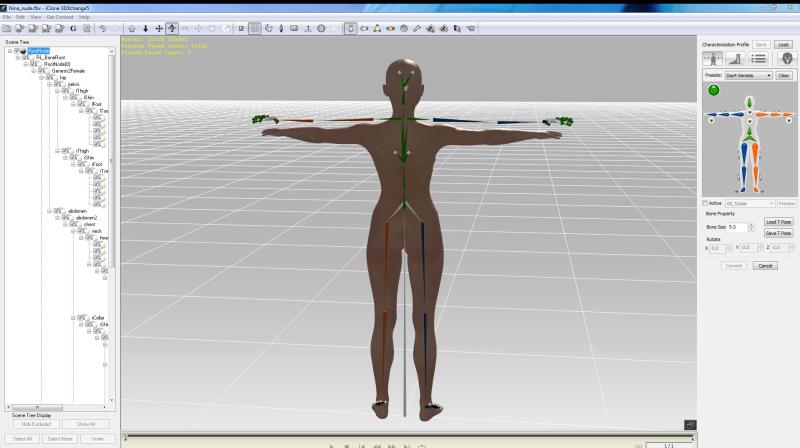
https://forum.reallusion.com/uploads/images/bed357d8-b041-44ce-a791-c025.jpg

DAZ / ICLONE  has not remapped the bones to my customized / morphed - shorter than DAZ standard - character mesh.  Solution: Just move the bones into place... no, all I can do in 3DX is rotate the bones.  Any DAZ experts out there who can tell me how to correct this?

Thanks :)  


Reading This Topic