|
Author
|
Message
|
|
Soya_RL
|
Soya_RL
Posted 11 Years Ago
|
|
Group: Forum Members
Last Active: 2 Years Ago
Posts: 269,
Visits: 1.4K
|
animagic (1/15/2015)
soyasu (1/15/2015)
Dear Agonos,
The Glare Type of HDR, Effect of Vertical Flare and Horizontal Flare, the verticle and horizontal is opposite. RL knows about this issue and is working on it. ;)
SoyaHi Soya, Thanks for keeping on top of everything and reporting back! :D Is RLalso working on the HDR problem that I reported (and another member as well), where the HDR effect is only showing in one direction? 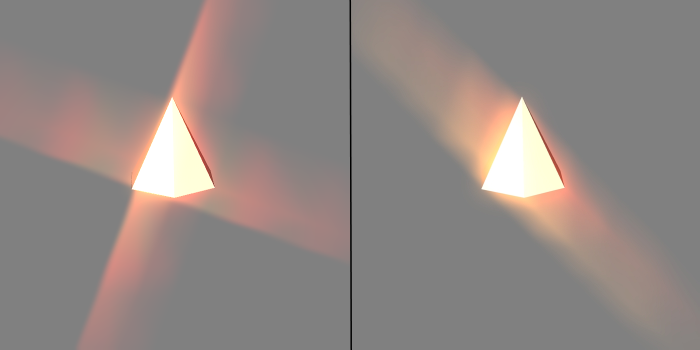 The image on the left shows the Spectral Cross correctly in iClone 5. However, in iClone 6 one direction is missing (image on the right). This happens with a GTX 980 and has also been reported for a GTX 970. It may be related to Maxwell cards, because other cards don't have this problem. Dear animagic, Thank you for reporting this issue. I have noticed it, and have reported to RD. ;) Soya
|
|
|
|
|
Soya_RL
|
Soya_RL
Posted 11 Years Ago
|
|
Group: Forum Members
Last Active: 2 Years Ago
Posts: 269,
Visits: 1.4K
|
Cricky (1/14/2015)
Time Line Switcher does not match when the name is changed in the Scene. This makes it difficult to follow a Switch for timing purposes. The scene has a specific Camera chosen (BROWN) with the shortcut used to get there. The Cameras were named and then locked. The Switcher was then employed to change as the scene progresses, but after review the names of the cameras are retaining the name of the camera as it was added instead of picking up on the name change to identify what it is. The camera names could be anything the user desires such as; (Head) (Panning) (Grin) (Back of Head) (Follow Up Stairs) (Etc.), but not easy to figure out if the time line does not match the scene for the Switcher.
Dear Cricky , Thank you for telling us. This is a bug. I have reported to RD. ;) Soya
|
|
|
|
|
Soya_RL
|
Soya_RL
Posted 11 Years Ago
|
|
Group: Forum Members
Last Active: 2 Years Ago
Posts: 269,
Visits: 1.4K
|
Jen Arrow (1/14/2015)
Hi Sovasu,
THX for the reply but why the SpeedTree Letters disappear In the background when the Level of Detail is checked and the Quality is set on Max ?
The other trees don't disappear !!!
In the version 6.00 all trees showing well with the same settings!
Waiting for an explanation...Dear Jen Arrow, If you check "Tree Billboard" in Advanced in Preference, and zoom way out. SpeedTree will become Billboard, but it's not disappeared. Just doesn't have details. Check LOD. This will not affect much of the trees in close range, only to the trees in long range. :) Soya
|
|
|
|
|
animagic
|
animagic
Posted 11 Years Ago
|
|
Group: Forum Members
Last Active: Last Month
Posts: 15.8K,
Visits: 31.4K
|
soyasu (1/15/2015)
Dear Agonos,
The Glare Type of HDR, Effect of Vertical Flare and Horizontal Flare, the verticle and horizontal is opposite. RL knows about this issue and is working on it. ;)
SoyaHi Soya, Thanks for keeping on top of everything and reporting back! :D Is RL also working on the HDR problem that I reported (and another member as well), where the HDR effect is only showing in one direction?
The image on the left shows the Spectral Cross correctly in iClone 5. However, in iClone 6 one direction is missing (image on the right). This happens with a GTX 980 and has also been reported for a GTX 970. It may be related to Maxwell cards, because other cards don't have this problem.
|
|
|
|
|
Soya_RL
|
Soya_RL
Posted 11 Years Ago
|
|
Group: Forum Members
Last Active: 2 Years Ago
Posts: 269,
Visits: 1.4K
|
redrubyslippers (1/13/2015)
well so much for that, i downloaded the patch and the indigo update and installed them , much to my better judgement, it went through its paces and lo and behold went to the drm(why the hell is it doing this)check .. it crashes every time when its checking..hmmm,, so and excuse me RL fuck it , i uninstalled the bugger and installed the original copy which IS STABLE I knew deep down that it would cause problems with the update....so no joy for me and i cannot be bothered with reporting it, im tired of it now.Dear redrubyslippers, There was a known issue. You must patch both iClone v6.01 and Indigo Plug-in v1.01. Otherwise, when you launch iClone6 DRM check will popoup and it will crash. Are you sure you finished patching Indigo Plug-in? If you did patch both, what exactly did you do to make DRM Check popoup? ;) Soya
|
|
|
|
|
Soya_RL
|
Soya_RL
Posted 11 Years Ago
|
|
Group: Forum Members
Last Active: 2 Years Ago
Posts: 269,
Visits: 1.4K
|
Agonos (1/13/2015)
Peter (RL) (1/13/2015)
The G6 characters are currently non-standard characters so "Create Face" won't work for Mason and Heidi. You can however use this feature with the G5 characters Chuck and Gwynn.
We will be updating the G6 avatars in a future patch to add extra functionality. :)Hi, Thank you Peter. But concern the problem "Glare", do you have any information to give us? Do you have at least one "clue" ? I also have a software crash "IC6" to 40/50% when I use the rendering "INDIGO" in a complete scene. whilst my scene is short, just with an avatar dancing and without decor. Other people they have this problem? Windows 8.1 (X64) Intel Core i5 4670K 3.40 GHz Socket: Socket 1150 LGA Mother card MSI Z87-G45 GAMING (MS-7821) 1.0 14 Go DDR3 GPU NVIDIA GeForce GTX 770 Dear Agonos, The Glare Type of HDR, Effect of Vertical Flare and Horizontal Flare, the verticle and horizontal is opposite. RL knows about this issue and is working on it. ;) Soya
|
|
|
|
|
justaviking
|
justaviking
Posted 11 Years Ago
|
|
Group: Forum Members
Last Active: 2 Years Ago
Posts: 8.2K,
Visits: 26.5K
|
Cricky (1/14/2015)
Time Line Switcher does not match when the name is changed in the Scene. This makes it difficult to follow a Switch for timing purposes.
The scene has a specific Camera chosen (BROWN) with the shortcut used to get there. The Cameras were named and then locked. The Switcher was then employed to change as the scene progresses, but after review the names of the cameras are retaining the name of the camera as it was added instead of picking up on the name change to identify what it is.
The camera names could be anything the user desires such as; (Head) (Panning) (Grin) (Back of Head) (Follow Up Stairs) (Etc.), but not easy to figure out if the time line does not match the scene for the Switcher.
Excellent example. I agree. Thanks for reporting it and providing a clear example.
iClone 7... Character Creator... Substance Designer/Painter... Blender... Audacity...
Desktop (homebuilt) - Windows 10, Ryzen 9 3900x CPU, GTX 1080 GPU (8GB), 32GB RAM, Asus X570 Pro motherboard, 2TB SSD, terabytes of disk space, dual monitors.
Laptop - Windows 10, MSI GS63VR STEALTH-252, 16GB RAM, GTX 1060 (6GB), 256GB SSD and 1TB HDD
|
|
|
|
|
KenCoon
|
KenCoon
Posted 11 Years Ago
|
|
Group: Forum Members
Last Active: 7 Years Ago
Posts: 687,
Visits: 18.4K
|
I FEEL STUPID.
The content was there all the time. I had to click the first one ( which I did) but when nothing showed up on the right of it I assumed there was nothing there.
This morning I moved the content tab over and things began to move down the screen. The content is there but difficult to find on my 18 inch screen.
I may have to switch monitors with my son.
Sorry for all the confusion.
Ken:)
|
|
|
|
|
madicloner
|
madicloner
Posted 11 Years Ago
|
|
Group: Forum Members
Last Active: 10 Years Ago
Posts: 109,
Visits: 181
|
This is only conditional an issue - but we need it badly, if the physX and clothes should work right: We need collision soft vs soft. That is even more important than the selfmesh as collision mesh, because without it, nearly every wide cloth is "ugly" clipping through the different cloth "layers".
|
|
|
|
|
Cricky
|
Cricky
Posted 11 Years Ago
|
|
Group: Forum Members
Last Active: 4 Years Ago
Posts: 2.8K,
Visits: 13.8K
|
Time Line Switcher does not match when the name is changed in the Scene. This makes it difficult to follow a Switch for timing purposes. The scene has a specific Camera chosen (BROWN) with the shortcut used to get there. The Cameras were named and then locked. The Switcher was then employed to change as the scene progresses, but after review the names of the cameras are retaining the name of the camera as it was added instead of picking up on the name change to identify what it is. The camera names could be anything the user desires such as; (Head) (Panning) (Grin) (Back of Head) (Follow Up Stairs) (Etc.), but not easy to figure out if the time line does not match the scene for the Switcher.
SKYPE ID: rc.650
http://city.reallusion.com/store/ModuleExpand.aspx?id=GS634545170497417354&mdid=18866
http://city.reallusion.com/ContentTag.aspx?tagname=Cricky&AuthorID=20081020688550191201#]Reallusion Store Content
" If I had Alzheimer's (Old Timers), would I know it? "
|
|
|
|