|
Author
|
Message
|
|
action_2009
|
action_2009
Posted 8 Years Ago
|
|
Group: Forum Members
Last Active: 5 Years Ago
Posts: 2.6K,
Visits: 24.6K
|
Hi Wil There used to be a Prop for iClone 5 (mirrorplain) that also works in iClone6. 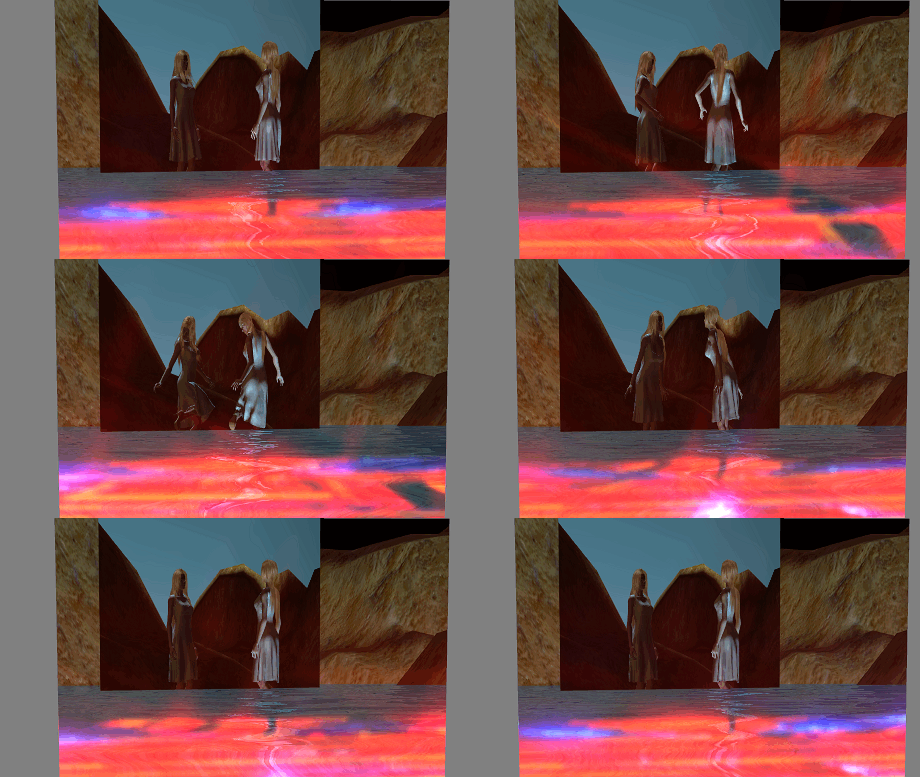 Mirroplain Mirroplain
Give it a try.
Meine Homepage
Mein Videokanal
|
|
|
|
|
animagic
|
animagic
Posted 10 Years Ago
|
|
Group: Forum Members
Last Active: 4 Months Ago
Posts: 15.8K,
Visits: 31.4K
|
gurgen_06 (5/17/2016)
So? Any other solution out there since last year (except rotating everything by 90 degrees, but water) ?
No, but I entered a feature request in the Feedback Tracker that you can vote for. Please vote! We want it to be Assigned, not just Active! Link: http://www.reallusion.com/FeedBackTracker/Issue/Add-a-functioning-mirror.
|
|
|
|
|
4u2ges
|
4u2ges
Posted 10 Years Ago
|
|
Group: Forum Members
Last Active: 2 Weeks Ago
Posts: 5.3K,
Visits: 16.8K
|
So? Any other solution out there since last year (except rotating everything by 90 degrees, but water) ?
|
|
|
|
|
mark
|
|
|
Group: Forum Members
Last Active: 2 Years Ago
Posts: 4.9K,
Visits: 16.7K
|
SO PLEEEEEEEEASE SHOW ME!!! I'm too simple to understand. Do you even have a recent copy of iClone swope? iClone "Reflection" does not work correctly on a flat plane! The reflection is "enlarged and pixilated". Only "Water" works "somewhat" correctly but it cannot be rotated perpendicular to the ground. At this point in time only a "curved" prop can create a "kinda" useable reflection surface. PLEASE prove me wrong!!!!;)

Click here to go to my YouTube Channel filled with iClone Tutes and Silly Stuff
Visit ANIMATED PROJECTIONS Powered by iCLONE
Intel Core i7 3960X @ 3300MHz Overclocked to 4999.7 MHz Sandy Bridge 24.0GB DDR3 @ 833MHz Graphic Display HP ZR30w
GeForce GTX 980Ti 6GB Microsoft Windows 7 Professional 64-bit SP1 ASUSTeK COMPUTER INC. P9X79 WS (LGA2011)
|
|
|
|
|
theschemer
|
theschemer
Posted 11 Years Ago
|
|
Group: Forum Members
Last Active: 3 Years Ago
Posts: 1.4K,
Visits: 2.9K
|
You are welcome. Glad I could help. Better in iClone 5 than in neither. :D
TS
|
|
|
|
|
william.carey30
|
william.carey30
Posted 11 Years Ago
|
|
Group: Forum Members
Last Active: 3 Years Ago
Posts: 186,
Visits: 606
|
Thanks, Schemer! I love the mirror prop (see attached). The only negative thing, I have to say about it, is that it doesn't reflect shadows (also, too bad it doesn't work in 6, but I'm using 5 anyway). Bill Carey
|
|
|
|
|
animagic
|
animagic
Posted 11 Years Ago
|
|
Group: Forum Members
Last Active: 4 Months Ago
Posts: 15.8K,
Visits: 31.4K
|
mark (1/16/2015)
Yep! I've been asking for one since iC4!!!:w00t:I think it's one of the most ignored feature requests...:crying: It's not for lack of trying...:P
|
|
|
|
|
mark
|
|
|
Group: Forum Members
Last Active: 2 Years Ago
Posts: 4.9K,
Visits: 16.7K
|
Yep! I've been asking for one since iC4!!!:w00t:
Click here to go to my YouTube Channel filled with iClone Tutes and Silly Stuff
Visit ANIMATED PROJECTIONS Powered by iCLONE
Intel Core i7 3960X @ 3300MHz Overclocked to 4999.7 MHz Sandy Bridge 24.0GB DDR3 @ 833MHz Graphic Display HP ZR30w
GeForce GTX 980Ti 6GB Microsoft Windows 7 Professional 64-bit SP1 ASUSTeK COMPUTER INC. P9X79 WS (LGA2011)
|
|
|
|
|
williamv59
|
williamv59
Posted 11 Years Ago
|
|
Group: Forum Members
Last Active: 11 Years Ago
Posts: 5,
Visits: 163
|
Ok thank you for the detailed instructions but it is not really what I am after as you have said you need to create a video and then reverse it so that you have 2 movements going on at the same time.
What I am after in Icone 6 is a proper functioning mirror as used in Iclone 5 and hopefully Realussion will include this in an update.
Come on people in Iclone 6 - You Can Do It !!!
Regards
Williamv
|
|
|
|
|
pinguintje
|
pinguintje
Posted 11 Years Ago
|
|
Group: Forum Members
Last Active: 3 Years Ago
Posts: 834,
Visits: 1.1K
|
@williamv
As you know mirrors don't work in iClone6. Mark has made a good tute.:):):)
I'll try to explain (in my best Dutch-English) how to make a substitute mirror.
-Launch iClone5 (32bit)
-Hide grid (Ctrl+g)
-Disable shadow
-add Gwynn
-add motion "posing in front of mirror" (=511 frames)
-export the popVideo
-select in modify panel:
.iClone popVideo
.video quality:8
.outputsize 500x1000
.framerate=30
.outputrange: 1-511 (=motion lenght)
-Save the popVideo on your disk
-Launch iClone6
-add Gwynn
-add motion "posing in front of mirror" (in frame 1)
-add a Mirror (I took the one of Granny J-Mirror ornate gold)
- I scaled the mirror to :X=100 Y=182,8 Z=241
-import the popVideo in frame 1(find file on your disk and drag with Ctrl in iClone)
-turn the popVideo 180 degr. (Z=180)
-scale the popVideo as needed (I scaled in this case to 65%)
-place the popvideo just behind the mirror
-add Box01 (prop). I scaled it X=143 Y=3,7 Z=220,2
-add the material Glass02 on this box
-place the box behind the mirror and the popVideo
-copy Box01, remove textures and set diffuse and ambient color to RGB 100-100-100
-place this box after the first box
Now it should work.
This is an example, you can do it as you want.
Best Regards,
Arie
|
|
|
|