|
Author
|
Message
|
|
Rampa
|
Rampa
Posted 10 Years Ago
|
|
Group: Forum Members
Last Active: 2 Months Ago
Posts: 8.2K,
Visits: 62.6K
|
Of course I tried everything else I could think of first! ;) Spent hours on it, just to end up with that ridiculously simple solution.
|
|
|
|
|
RobertoColombo
|
RobertoColombo
Posted 10 Years Ago
|
|
Group: Forum Members
Last Active: 5 Years Ago
Posts: 1.6K,
Visits: 3.0K
|
Great Rampa!!!
Thanks a lot for finding the solution.
I wonder how did you find it.... it is so illogical that everything works as before only because the main folder is named "Base xxx"...
Incredible that you fund it! But, after all... you are Rampa... and here the community knows very well how far can you go when you start looking for a solution :)
Cheers
Roberto
My PC:
OS: Windows 10 Pro English 64-bit / CPU: Intel i7-9700 3.6GHz / MB: ASUS ROG Strix Z390 RAM: 32GB DDR4 2.6GHz / HD: 2TB+3TB / SSD: 2x512GB Samsung 860 EVO + 1x2TB Samsung
VB: Palit GTX2080 TI GamingPro 11GB / AB: embedded in the MB and VB (audio from the MOTU M4 I/F) / DirectX: 12
|
|
|
|
|
Rampa
|
Rampa
Posted 10 Years Ago
|
|
Group: Forum Members
Last Active: 2 Months Ago
Posts: 8.2K,
Visits: 62.6K
|
I found the solution to this not working in iC6! :) Just put "Base (space) your name" as the new folder name. Everything after that works the same as before. You can name the folders inside different names as well. But don't be confused by the names not showing up in the left-hand panel in the MoPup, because those are those BMP pictures, and would need to edited to whatever name you want. 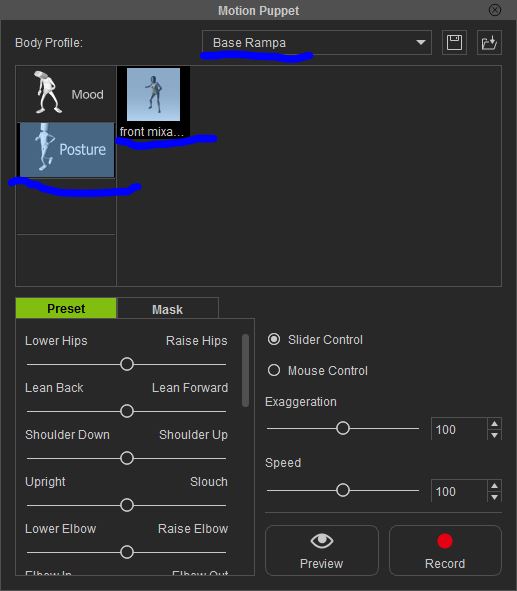
|
|
|
|
|
RobertoColombo
|
RobertoColombo
Posted 11 Years Ago
|
|
Group: Forum Members
Last Active: 5 Years Ago
Posts: 1.6K,
Visits: 3.0K
|
Hi RL community,
I come back to this old topic because I experienced something different with IC6.3 Pro and I would like to know if others have the same problem.
Here is the sequence of steps that I did, both for iClone 5 Pro and iClone6 Pro:
1. Copy the whole "Base Motion" directory (which resides in the iClone Template\Preset directory) => this generate another directory name "Base Motion - Copy"
2. Rename "Base Motion - Copy" into some other name, e.g. "Test Motion"
3. Open iClone
4. Load Chuck
5. Open the Motion Puppet tool
...and here is the problem:
A) in iClone 5 Pro, I can see the "Test Motion" group (in the Combo Box) and the sub-groups Idle, Mood, Move, Talk and the animation files
B) in iClone6 Pro, I can see the "Test Motion" group (in the Combo Box) but there are neither icons for the sub-groups Idle, Mood, Move, Talk nor animation file icons
Can somebody kindly check this ?
Thanks
Cheers
Roberto
My PC:
OS: Windows 10 Pro English 64-bit / CPU: Intel i7-9700 3.6GHz / MB: ASUS ROG Strix Z390 RAM: 32GB DDR4 2.6GHz / HD: 2TB+3TB / SSD: 2x512GB Samsung 860 EVO + 1x2TB Samsung
VB: Palit GTX2080 TI GamingPro 11GB / AB: embedded in the MB and VB (audio from the MOTU M4 I/F) / DirectX: 12
|
|
|
|
|
bfirst786+Realillusion
|
bfirst786+Realillusion
Posted 12 Years Ago
|
|
Group: Forum Members
Last Active: 5 Years Ago
Posts: 1,
Visits: 67
|
AWESOME JOB! thank you. I was losing my mind.
Note you don't need to have the "Idle" "Move" etc., sub-folders. But you DO need to have a sub-folder INSIDE the new one you put into the "Preset" folder.
|
|
|
|
|
msjaebea
|
msjaebea
Posted 13 Years Ago
|
|
Group: Forum Members
Last Active: 5 Years Ago
Posts: 34,
Visits: 242
|
I am going to add a bit of info here from my findings. Only iMotions will work for this. I ran into some older motions, .vns. They will not work. It was suggested that I turn that .vns motion into a custom motion and I did that. iClone makes it an iMotion at that point and it can then be used in puppet.
|
|
|
|
|
msjaebea
|
msjaebea
Posted 13 Years Ago
|
|
Group: Forum Members
Last Active: 5 Years Ago
Posts: 34,
Visits: 242
|
Thanks everyone for this thread! Was playing with Motion Puppet tonight when the thought came that I wanted to use more motions but there weren't any. I decided to search before I posted the question and here it was!! Going for it now!!! :D :D
|
|
|
|
|
Asamadi
|
Asamadi
Posted 13 Years Ago
|
|
Group: Forum Members
Last Active: Last Year
Posts: 29,
Visits: 179
|
Great stuff thx allot
|
|
|
|
|
RobertoColombo
|
RobertoColombo
Posted 13 Years Ago
|
|
Group: Forum Members
Last Active: 5 Years Ago
Posts: 1.6K,
Visits: 3.0K
|
Actually, the idea to have a simple tool that help to add dozens of movie file into the puppet is not that bad...
Then, I agree on the fact that Swooop hates the push buttons... :D
I will not mention this heretical word any more... promised... :Whistling:
My PC:
OS: Windows 10 Pro English 64-bit / CPU: Intel i7-9700 3.6GHz / MB: ASUS ROG Strix Z390 RAM: 32GB DDR4 2.6GHz / HD: 2TB+3TB / SSD: 2x512GB Samsung 860 EVO + 1x2TB Samsung
VB: Palit GTX2080 TI GamingPro 11GB / AB: embedded in the MB and VB (audio from the MOTU M4 I/F) / DirectX: 12
|
|
|
|
|
Sen
|
|
|
Group: Forum Members
Last Active: Last Year
Posts: 2.8K,
Visits: 28.5K
|
thank :P a "pun" , ah ! yes I find a good translation :D . I understand now :P members wish always one push button :crying: . Me , I need to learn English with a one push button :hehe:

 
CGTRADER
|
|
|
|