|
By AutoDidact - 5 Years Ago
|
|
This is why we do not need unity or UE4. realtime Screen space global illumination !!! I spent the summer of 2020 in self imposed isolation(avoiding covid-19) and migrating from my old iclone 6.5 3DX -Daz studio-Maxon C4D pipeline, to my new Iclone7.x-CC3-Blender pipeline. The latest version of Blender 2.9 also has object based motion blur for the realtime EEVEE engine and with the new SSGI node emmissive shaders now cast their own light on to other scene objects. CC3 or 3DX pipeline users can export animated Characters as FBX to Blender with Imotion/Imotion+ data for rendering. I am planning a weekly web series based in the 343 industries "HALOL" universe once I get all of my assets built.
|
|
By AutoDidact - 5 Years Ago
|
Some test shots from my series
|
|
By AutoDidact - 5 Years Ago
|
|
|
|
By AutoDidact - 5 Years Ago
|
|
|
|
By AutoDidact - 5 Years Ago
|
|
|
|
By animagic - 5 Years Ago
|
I look forward to your tutorials.
In your experience, how much effort is needed to convert the Digital Human Shader into Blender/EEVEE, as well as the iClone PBR shaders in general?
Also, does Blender make use of RTX? I just saw the announcement of the new RTX 3000 series, which will be pretty amazing.
|
|
By Pollux - 5 Years Ago
|
Hi,
I have the same Questions.... Thanks
animagic (9/2/2020)
I look forward to your tutorials.
In your experience, how much effort is needed to convert the Digital Human Shader into Blender/EEVEE, as well as the iClone PBR shaders in general?
Also, does Blender make use of RTX? I just saw the announcement of the new RTX 3000 series, which will be pretty amazing.
|
|
By animagic - 5 Years Ago
|
|
animagic (9/2/2020)
Also, does Blender make use of RTX? I just saw the announcement of the new RTX 3000 series, which will be pretty amazing.
This I can answer: RTX is actually required for some Blender features.
|
|
By AutoDidact - 5 Years Ago
|
|
On the matter of the digital human shaders. When blender imports your animated FBX CC3 characters it automaticly creates a blender native shader node tree with principled Shader and the exported texture maps applied. However you will have to plugin the CC3 scatter masks into the Blender principled subsurface shader port and adjust as needed for proper for SSS distribution. You will also have top plugin in the micro normal roughness maps into the normal node that Blender creates as well. I use Blender to create all of my clothing & environmental sets/props so using Blender as the final render environment for importing my pre-animated CC3 Avatars is preferable over trying to move everything into one of the game engines.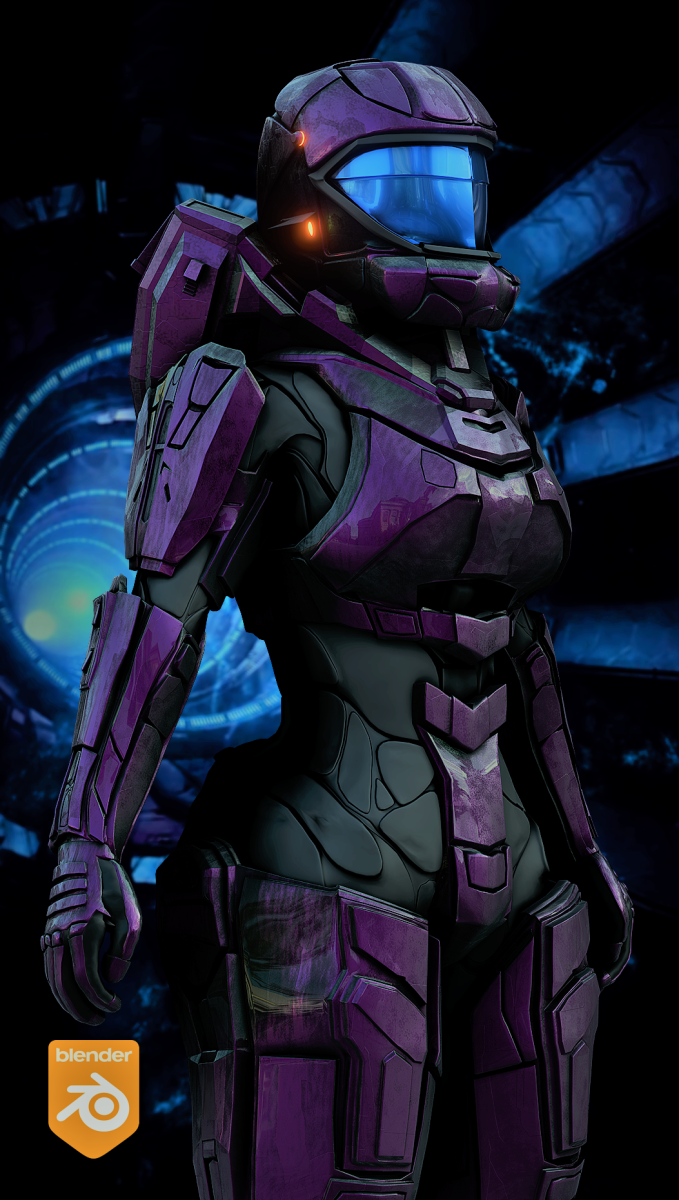
|
|
By TonyDPrime - 5 Years Ago
|
AutoDidact (9/2/2020)
This is why we do not need unity or UE4.
Now, this really depends what kind of look you want though. Because if you want the UE4 look, you are not getting it here in Blender.
The stylized stuff with Halo looks absolutely breathtaking and beautiful. But it is stylized, which I recognize is faithful to the actual game.
The picture of the character I would dare say looks worse than iClone or UE4, as far as photo-realistic goes. It looks like a glowy-fake SSS, the lashes look toonish. I wonder what hair looks like...
Now stylized, it does look cool, as a fan of Halo I LOVE this.
I am sure the engine is way better at handling environments than iClone can, which is a gigantically huge win for Blender.
PS - I hate Blender.
|
|
By jlittle - 5 Years Ago
|
Just found out that Pixar's Renderman rendering software is will be available for use in blender and is FREE for non-commerical usage!
Jeff
P.S. a live stream demo is now going on HERE.
Update: Blender Bridge Beta later this year, release early 2021.
|
|
By AutoDidact - 5 Years Ago
|
|
[b]TonyDPrime (9/3/2020)[/
PS - I hate Blender.
Well if you "Hate Blender" you are posting in the wrong thread.🙄 so as our Ilustrious Kellytoons would say :"Thanks for playing"
|
|
By animagic - 5 Years Ago
|
|
Indeed, I believe it is good and should be encouraged to learn about different technical approaches. Hate has no place here...
|
|
By TonyDPrime - 5 Years Ago
|
|
animagic (9/3/2020)
Indeed, I believe it is good and should be encouraged to learn about different technical approaches. Hate has no place here...
If you did not read my post, I praised his work.
And, in fact, I hate the engine itself - Blender.
BUT! from
https://forum.reallusion.com/435804/For-interested-for-Unreal-and-Iclone-together-
as AutoDidact would say, with regard to another's work:
AutoDidact (2/14/2020)
Athos, You are right in one aspect. some people are just tossing a bikini girl into UE4 and standing her in a big forest and expect us to be amazed at how "Smooth" UE4 pans the camera around that big forest or jungle with ease. But this is not a shortcoming of the unreal engine that people use it in this way.
Or as you might say, with regards to Blender:
animagic (2/15/2020)
I'm using iClone despite lack of mirrors and motion blur...:unsure: It should be possible just to talk about Unreal and the benefits of that pipeline over perhaps Blender and Eevee and what have you.I suggest as I did before to move over to the https://forum.reallusion.com/iClone/Training-Tutorials-Hints-and-Tips sub-forum as it is more focused.
|
|
By AutoDidact - 5 Years Ago
|
|
Blender is not an "engine"
it is a full professional 3DCC application Like Maya or Max.
I am content creator/animated filmaker ,
https://www.blendernation.com/2020/04/29/behind-the-scenes-sci-fi-armor/
Blender enables me to to avoid the costs of Buying Daz/ iclone clothing &prop
content, paying rapacious export license fees,
as well as have access to three internal render options
EEVEE( realtime)
Cycles( branched pathtracing)
and radeon prorender(pathtracing) all with support for AMD hardware enabling user to avoid the "NVIDIA tax".
( and soon renderman it seems)
You are free to hate whatever makes you feel validated😌
but obviously no one in this BLENDER discussion thread, cares about your hate.🙄
|
|
By TonyDPrime - 5 Years Ago
|
AutoDidact (9/4/2020)
Blender is not an "engine"
it is a full professional 3DCC application Like Maya or Max.
I am content creator/animated filmaker ,
https://www.blendernation.com/2020/04/29/behind-the-scenes-sci-fi-armor/
Blender enables me to to avoid the costs of Buying Daz/ iclone clothing &prop
content, paying rapacious export license fees,
as well as have access to three internal render options
EEVEE( realtime)
Cycles( branched pathtracing)
and radeon prorender(pathtracing) all with support for AMD hardware enabling user to avoid the "NVIDIA tax".
( and soon renderman it seems)
You are free to hate whatever makes you feel validated😌
but obviously no one in this BLENDER discussion thread, cares about your hate.🙄
The title of this thread directly is comparing use of Blender to Unity and UE4. Also, I have tried and used Blender, so I am a Blender user.
But back to my hatred - the reason why I hate it is because of what I view as the clunky and cumbersome UI.
In fact our illustrious Kelleytoons uses a purchased mod-UI for Blender, as is shown in his videos involving Blender. He does not uses standard Blender UI-layout.
Now, I do think the updates look really awesome. Kind of related, Kai was asked in one of the recent RL webinars if RL has an AutoSetup script from CC3 to Blender.
He actually replied "There should be one", or something to that effect. He then said there was no plan in the pipeline, but mentioned if anyone knows Python that would be a good script in iClone to make, a CC3 to Blender exporter.
|
|
By AutoDidact - 5 Years Ago
|
"But back to my hatred- the reason why I hate ...blah blah blah" We understand TonyDprime.. you are full of HATE. What we dont understand is why you think we are interested in reading about your HATE.🤔
|
|
By TonyDPrime - 5 Years Ago
|
AutoDidact (9/4/2020)
"But back to my hatred- the reason why I hate ...blah blah blah" We understand TonyDprime.. you are full of HATE. What we dont understand is why you think we are interested in reading about your HATE.🤔
Now this part I do find fascinating, the reason why I think you are interested is that you and Animagic both pointed it out. So that's 2 people interested.
You seem very concerned with the fact that I hate blender. Because it got a "+2", not a "0".
Now, consider that you will probably have read any number of posts involving dislike, annoyance, frustration, or negative interaction with iClone, CC3, and its parts.
Would this mean that the user LOVES iClone in those instances? No, certainly not. They may even....hate it...in those instances....Or, they may love it, but hate it simultaneously.
Or hate that they love it, which really amounts to hate that one 'needs' it.
In any event, could you imagine that I then went and said "You shouldn't be in this thread...What makes you think anyone cares, Thanks for playing."
If somebody said, "I hate UE4" or "I hate iClone", I would not internally process as my own hate, nor that the person hates "me"......Ahhhhh....wait
One could use it and have HATE involving Blender, in a different way...maybe not hate a part of it, such as its UI, but more existentially like hate that Blender will be **compared** to UE4.
It would be like your identity, as a Blender user, needing to measure up to UE4. And one may hate that comparison, as it is painful being compared.
I cite this reference, from that same post I referenced above:
AutoDidact (2/15/2020)
ccCreator (2/15/2020)
Charly ~ Sorry to see your attempt to start another thread about process got taken over again with the versus arguments. Great to see you stay in a positive place about it though. I hope you don't get discouraged though as you are helping people learn the process better. Best wishes.Reallusion has fomented this interest in UE4, as well as other external rendering options ,every since they created the 3DXchange app. it is part of their BUSINESS MODEL to appeal to people who use other applications for final render environments. Both of Charly Rama's threads are about using the Reallusion product the way Reallusion intends them to be used. in this case Via Reallusion's Autosetup option instead of Reallusion's FREE live link plugin option it is quite interesting that people do not have this emotional, defensive reaction when users (in the parlance of the urban vernacular )"Diss" the native Reallusion Characters &marketplace content vendors with long threads and even video tutorials on how to import subjectively "Better looking" or CHEAPER models& props from Sketchfab,3D warehouse or Daz etc.🤑 But when a person makes a satirical cartoon about something that is absolutely objectively true, regarding a long standing limitation of the Iclone render engine, he is considered to have placed his use of these forums in great peril.🙄 Apologies to Charly Rama for further derailing his technical process thread thread.😇
With the title saying "We Dont Need", it would be plausible that there was some hate that the need existed, or was perceived to have existed.
In my own case, I find it a very interesting claim. For someone to say "We don't need UE4" means that UE4's results can be replicated by Blender. In looking at the trailers it does not appear to be the case, which leads me as a user of both to say "I still would need UE4 to have it look like UE4".
You see, this thread's title is not "Look at the new stuff in Blender"....it is what it says "Attention Blender Users (Me)...We Dont Need Unity or UE4".
If you do not want to read that, that is your privilege to not. But consider someone else, who visits the forums and uses both. They may be interested to see such a different point of view, and not a xenophobic "only-praise-blender-or-be-banished" messaging.
|
|
By charly Rama - 5 Years Ago
|
Hello guys, just to say, sometimes the word "hate" is used with some relativity. Manytime I use UE4 I say "I hate UE4;I hate UE4 because sometimes, as I say, it gives me headaches. But I so love the results , after some GURU here helped me, I continue to use it and even I don't say it but I love UE4 :D (thanks Bassline :) ) That's why I say relativity :) In anycase guys, I think we all love Iclone that's why we are all here, and the goal is to help each over (UE fana or blendr fana or unity fana...)
Peace
|
|
By AutoDidact - 5 Years Ago
|
|
One of the advantages of exporting to Blender
in addition to a fluid engine(and many other VFX )
https://youtu.be/fLzNDuBnRIE
is the ability to add hair that moves with
deformation such as beards.
A CC3 Character exports to FBX in Blender with ALL of his/her facial
morphs already set up as animatable Blendshapes( see lower right)
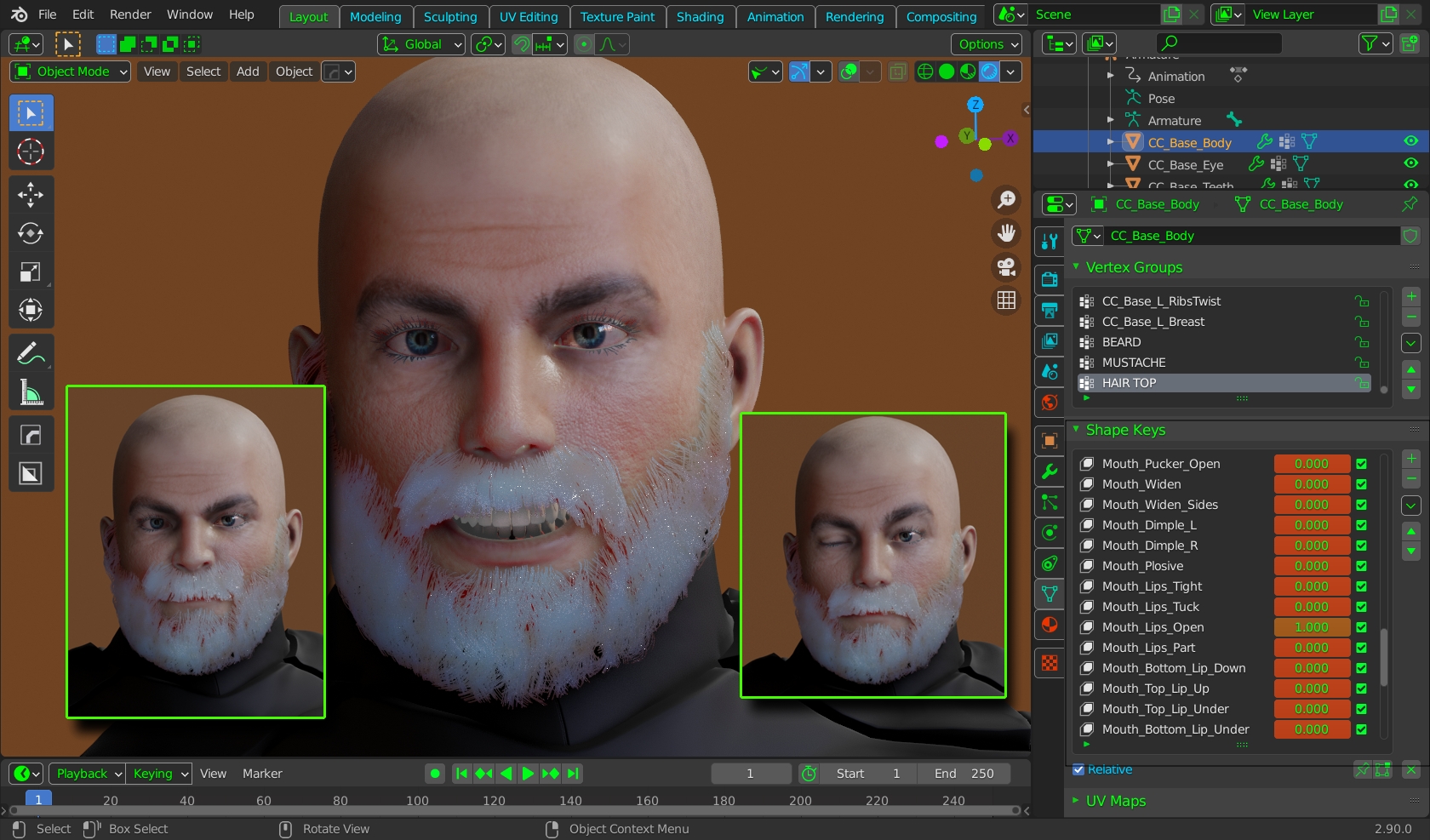
Blender has native motion tracking that works with video marker from any type of camera
not just Iphones.
People ,in the past have, created facial mocap with complicated face bone rigs using the motion tracking system in blender
but as Blender is Python based it is only a matter of time before some clever programmer ties a video to the CC3 facial
Blendshapes for FREE facial mocap in Blender using any camera..
|
|
By AutoDidact - 5 Years Ago
|
|
charly Rama (9/4/2020)
Hello guys, just to say, sometimes the word "hate" is used with some relativity. Manytime I use UE4 I say "I hate UE4;I hate UE4 because sometimes, as I say, it gives me headaches. But I so love the results , after some GURU here helped me, I continue to use it and even I don't say it but I love UE4 :D (thanks Bassline :) ) That's why I say relativity :) In anycase guys, I think we all love Iclone that's why we are all here, and the goal is to help each over (UE fana or blendr fana or unity fana...)
Peace
Hi Charly.. Well said. 👍
|
|
By AutoDidact - 5 Years Ago
|
|
For Job and others ,with open minds, who may wish to tinker. here are my Blender 2.9 import settings for a CC3 Character exported using the Blender preset from CC3 pipeline the scale is not set in stone as it is based on matching my props and sets. A possible caveat. facial animation using Mike kellys EXCELLENT !!Papagayo script wont transfer to Blender but regular facial animation with imported audio scripts and Face puppet /face key comes in fine. I cannot comment on the Iphone based facial mocap system as I dont have it This has nothing to with Mike's Py script and is likely a Iclone /CC3 bug Not a show stopper As I personally like our native Phoneme editor& Face Puppet/key system coming off of a Six year dialog heavy project with the dismal options I had in Daz studio.
|
|
By TonyDPrime - 5 Years Ago
|
AutoDidact-
I am mega lost with this, I have little knowledge here - 0.01%, if that...
I do not understand, I export from CC3 with the Blender profile:

And then in Blender 2.9 I get this. I don't see any materials on the character there. Did I do something wrong, or do you see something:

And then, when I go to render, I get this:

What I know for 100% certainty is that I must be missing something!
Can you or somebody guide me here, maybe another user might want to try but doesn't know the correct way yet. :blush:
|
|
By animagic - 5 Years Ago
|
I'm glad we are back to the technicalities... In the end the goal is to find tools that help you with your story-telling. Looks could be stylized, ultra-realistic or anything in between. So I think it all depends.
For my latest movie I used the iClone native renderer, which worked quite nicely for me. But it is always good to learn about other options.
|
|
By AutoDidact - 5 Years Ago
|
|
Tony, Your viewport shading mode is on solid( no textures displayed) Like in iclone when you go to absolute minimum display and you get white figures objects Click the little globe on the right in my attiched pic to switch to shaded mode fair warning you will get a HORRIBLE looking shiny default texture as the Blender principled to it best guess as how you want your specular and roughness. There is not any straight conversion of the DHS unless you are using a specific Bridge built by RL like the Live link. All three of Blender render engines are deeply rooted in its node based system and learning it is frankly a Must if you plan to use Blender for anything remotely serious. Also you can only render from a camera Veiwpoint so you are going to have to frame your camera in front of your subject just like in the real world.
|
|
By AutoDidact - 5 Years Ago
|
|
|
|
By TonyDPrime - 5 Years Ago
|
Okay, cool!
(1) So when on the Tab at top "Layout", it has different view modes, and you select them from those 4 sphere icons upper-right

(2) You will notice that the lashes are blocky, don't worry about that....
At the top is a Tab called "Shading", when you select that you can now see the node graph (workspace for linked material nodes.)
Then there is something called Scene on right, and under there there are icons you can pick.
The second one is the magic! - Render Properties...in there you can select the render engine (Here I picked GPU Cycles)
.

Q1: AutoDidact - is Cycles Multi-GPU? Also, is this the one that is RTX enabled, as in am I using the RTX Cycles?
(3) Once you change it to Cycles, and then go back to Layout, it renders it! Lashes look like they should.

Q2: AutoDidact - Thx for the video! Do you know a good one for mechanical setup of lighting and adding lights? (Something more focused on functional mechanics of how you do it in Blender, as opposed to lighting advice.)
*AutoDidact and Animagic are correct - Once noobs like me can get a character in and have it set up properly, then we can start contributing with our experimenting :D
|
|
By animagic - 5 Years Ago
|
I am a noob myself. I found a simple introductory course to Blender, so I now I know how to navigate the interface. Once you master that, things become easier:
Next is understanding the shaders. If I render in eevee, the eyes are black so an adjustment is needed. It's the same with the eye lashes, but I sort of remembered that.
EDIT: Link to wrong video...:blush:
|
|
By TonyDPrime - 5 Years Ago
|
You are right, this is a caveat - if you render with Eevee, you get this:
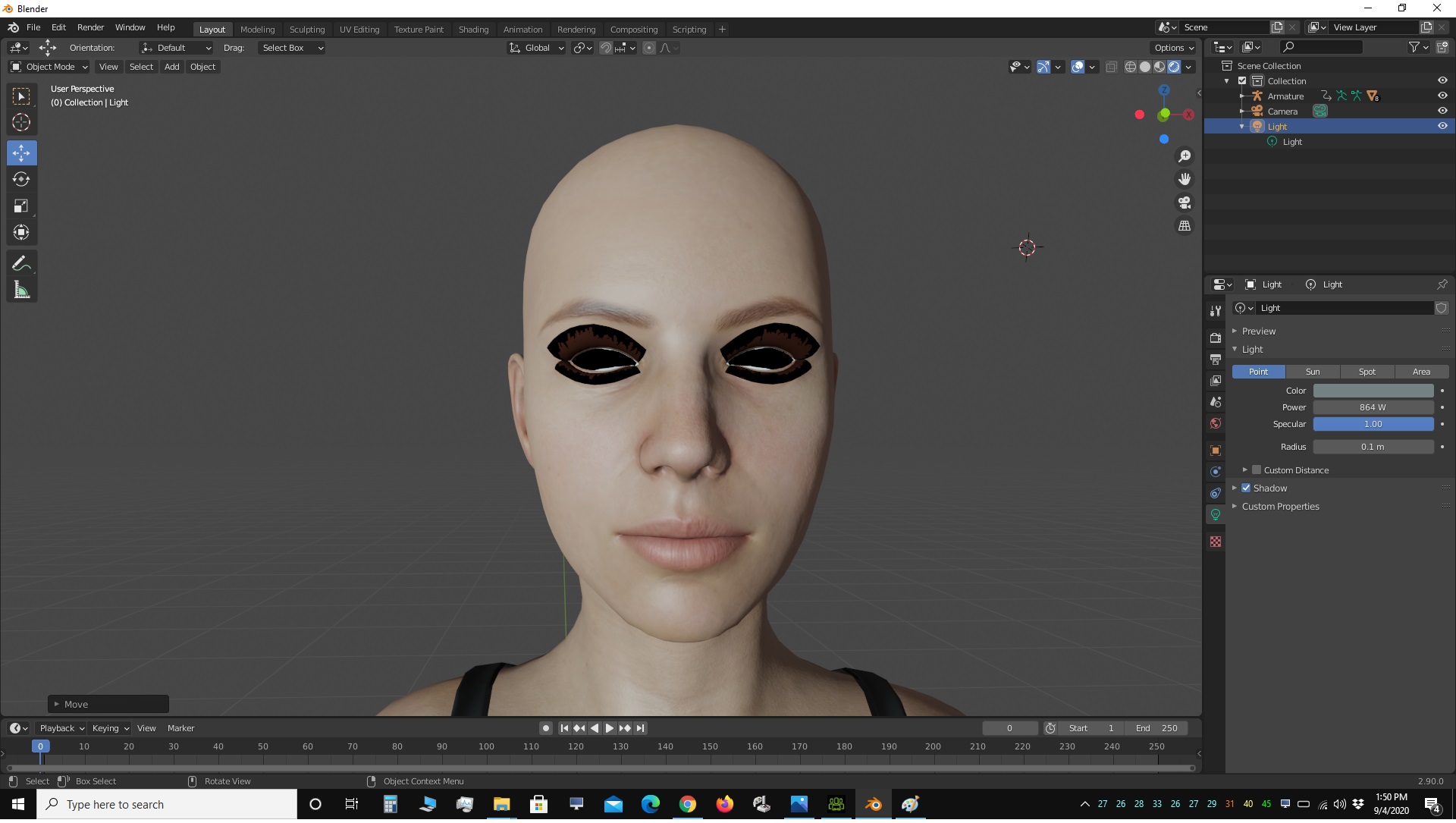
Go in that Shading Tab, and in the Scene Menu (called "Scene Collection" in Blender), there is a thing called Armature. Expand on this out until you find the CC3 model, and then find the red Beachball looking icon that says Eyelash. Then on that icon-driven Menu thing below the Scene Collection, select that Red Beachball again, and then scroll down on that until you find a thing called Settings. Then in Blend and Shadow mode you select "Alpha Hashed"...
EYELASHES!
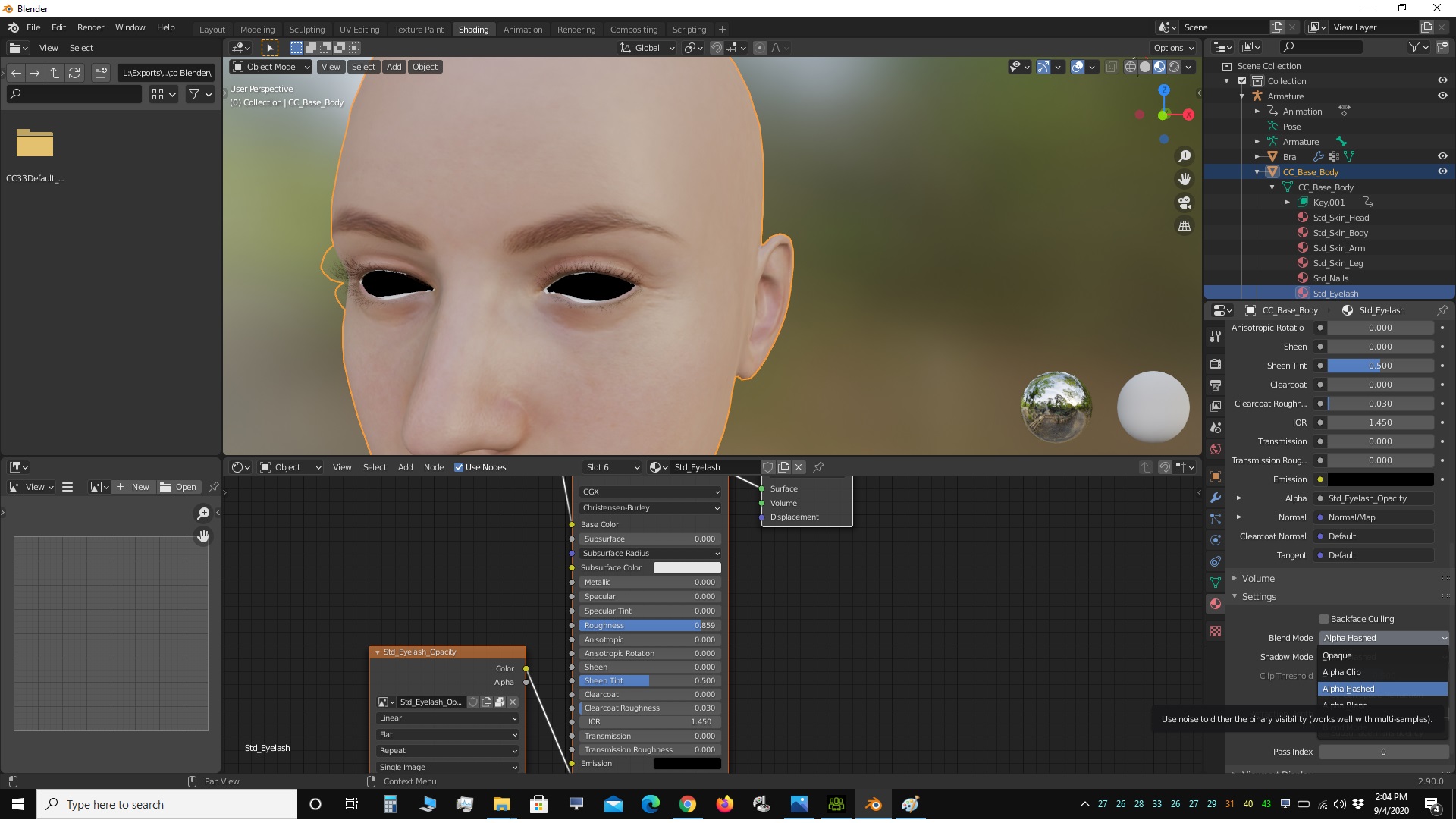
Look! also you can go back to the Layout tab, and that Scene-Material Red-Beachball stuff is all there too. So you can navigate the materials from the Layout tab without going back and forth

|
|
By TonyDPrime - 5 Years Ago
|
Animagic -
Do the same for the Occlusion L & R, this will the show the eyes so they are not black.
Then on the Cornea L&R you can leave as Opaque, and then set the Specular at 1 and lower the roughness to something like 0.1, and then you get the reflection on the cornea if the light is positioned right. You can select the light and then move it around with the Transform gizmo I have highlighted all the way on the left.

Now, I don't know if this (1) is bypassing Occlusion or not, and also I do not see that (2) the eyes are refracted like in iClone.
With the Auto Setup the DHShader of iClone can be transferred to UE4, thus giving you the refraction also in UE4. Here it will need to be arranged via some special shading arrangement,.
But for now, at least this gets us normal looking eyes.
|
|
By AutoDidact - 5 Years Ago
|
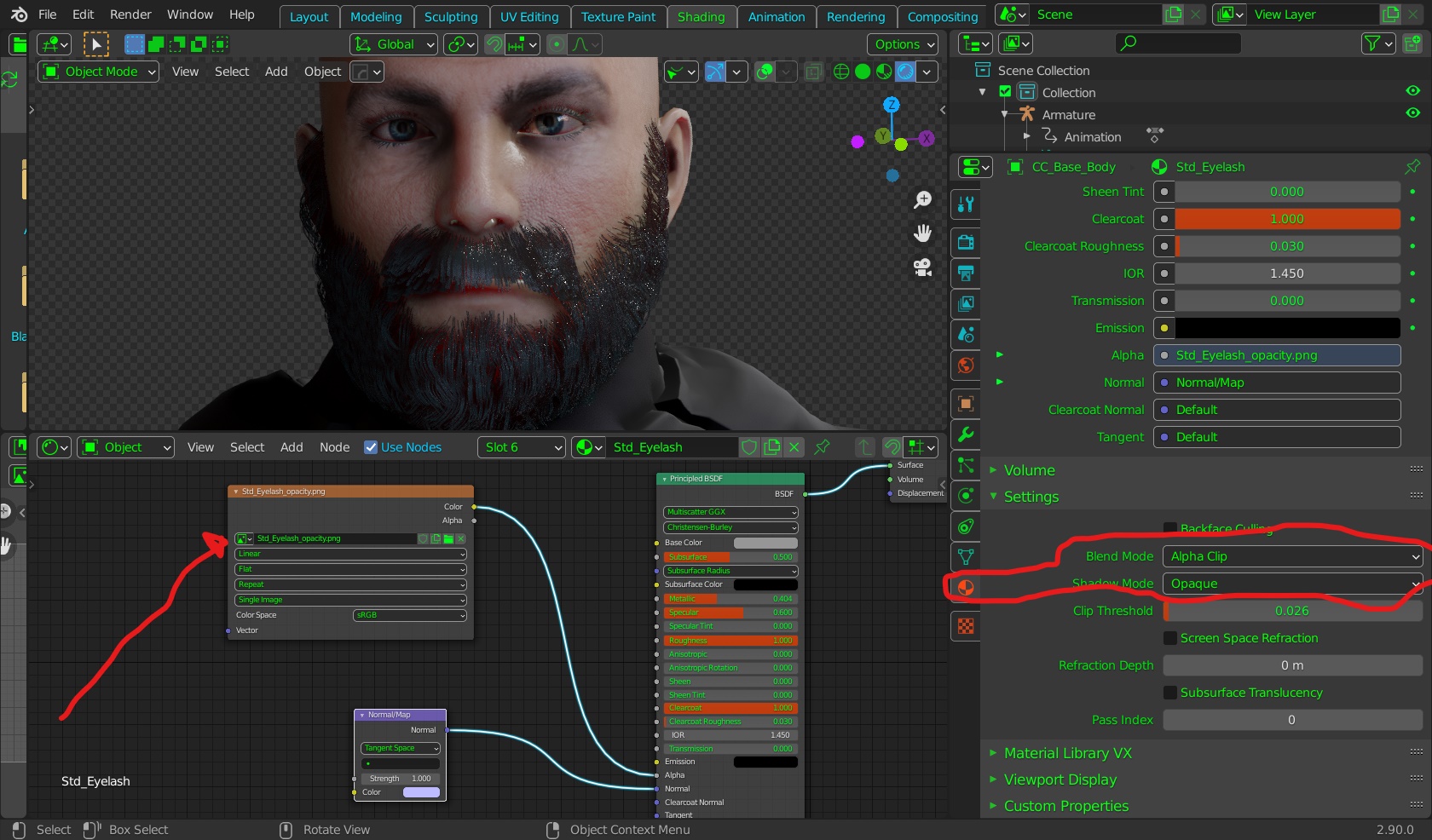 I dont have an RTX card, but I understand that Blender will "see" RTX cardS I dont have an RTX card, but I understand that Blender will "see" RTX cardS(for cycles only) if you have one. A quick not on the eyelashes imported from the CC3 bases. in my experience FBX exporters can "miss" things in regard to texture maps. but the principled shader is pretty good at finding where to plugin image maps. Like Daz and most everyone else,Eye lashes are "cut out" by opacity maps howwever in my experience the principle shader "guesses" wrong and laods the DIFFUSE map for both the base color and opacity hence the "solid eyelashes. My advice is to know where you CC3 base texturees are located C:\Users\Public\Documents\Reallusion\Shared Templates\Digital_Human_Shader_Resource as you will have to plugin a few maps manually (See pic) also change the Blend mode of eyelashes to "Alpha clip" (again see pic) Here is a vid for basic lighting set up for new users
.Also My advice is to get the free Easy HDRI Addon if you ownn some nice HDRI files already.
|
|
By TonyDPrime - 5 Years Ago
|
@AutoDidact - Okay, will do! Also, are you using the Occlusion material channel for your character, it looks like he has it on his eyes.
For Noobs, in Layout -
-to add a light you select the light in the scene and then right-click Duplicate Object, or Shift-D.
-to Transform the coordinates you can use the gizmos on the left or you can Select the Orange Box icon in that Tool Menu thing
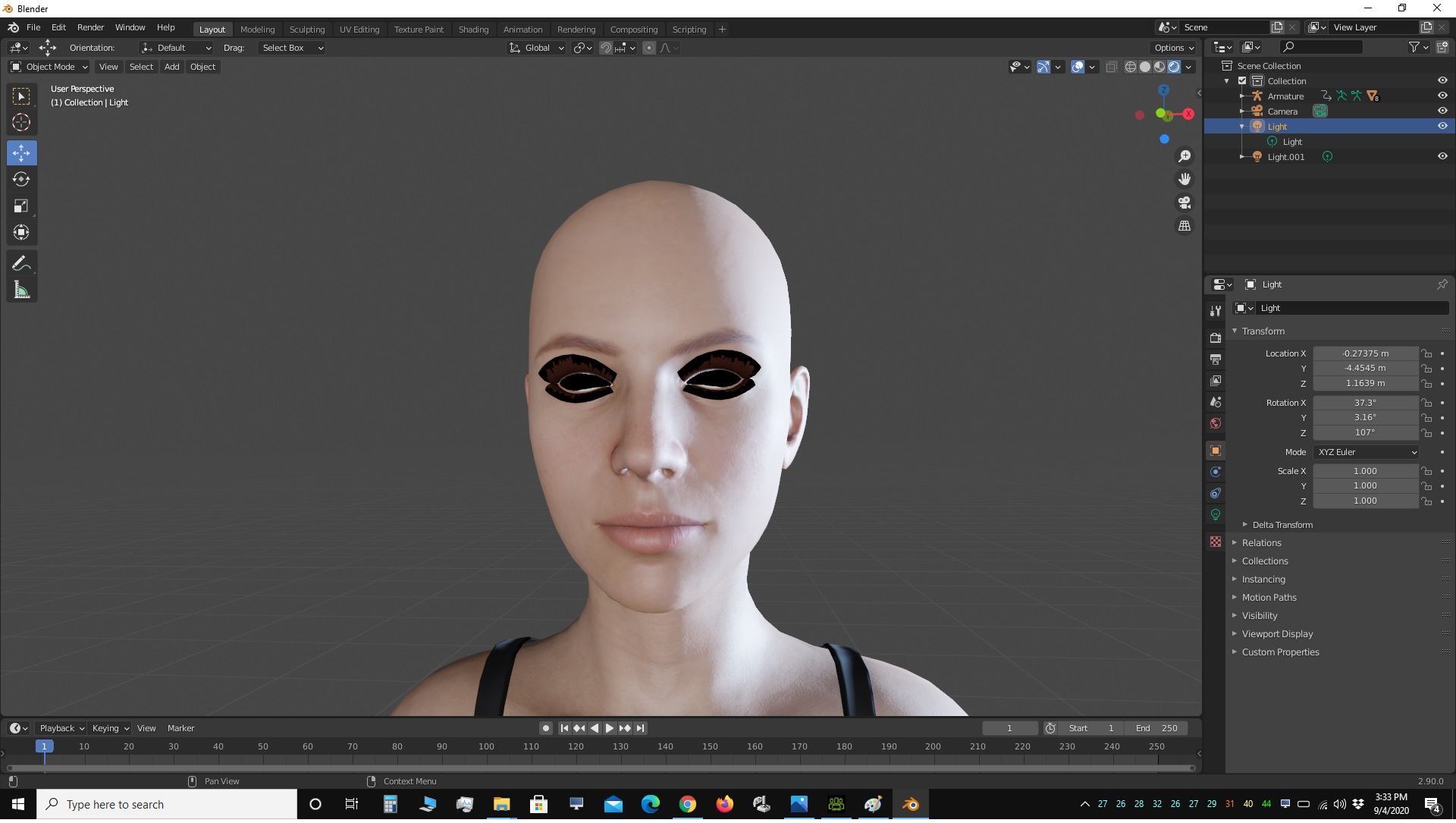
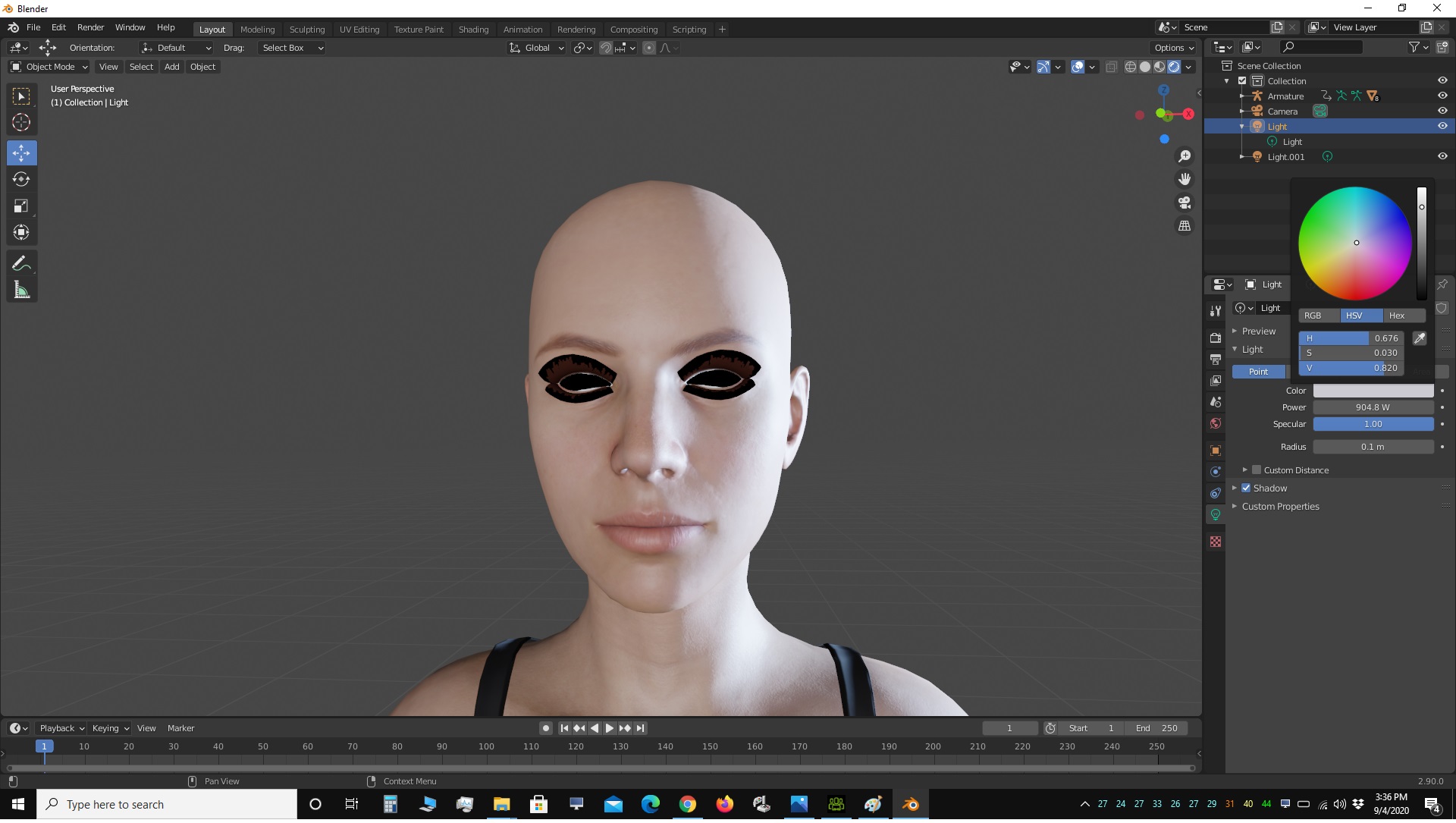
-to Change the light color like Modify in iClone, you select the Green Lightbulb icon in that Tool Menu thing
|
|
By animagic - 5 Years Ago
|
I had to attend to our visitor and eat lunch, so I've been away, but I did find that changing the Blend Mode does the trick for blackness.
Not knowing, I selected "Alpha Hashed", which seems to work also. What is the difference between these various Alpha options?
|
|
By StyleMarshal - 5 Years Ago
|
@Tony , you also can insert the Blender Octane Plugin , to make use of the massive Titan horsepower you have :-)
- And you know the Octane Shaders in your sleep...
|
|
By TonyDPrime - 5 Years Ago
|
Okay, using Cycles with 6 Pascal Titan X and my Titan Xp it moves slow. But with my one Titan RTX and my Titan XP......Whoooo!!!!
It actually is better to have less GPU and at that, an RTX...it really is much faster.
Cycles 5 seconds @ 1,000 spx
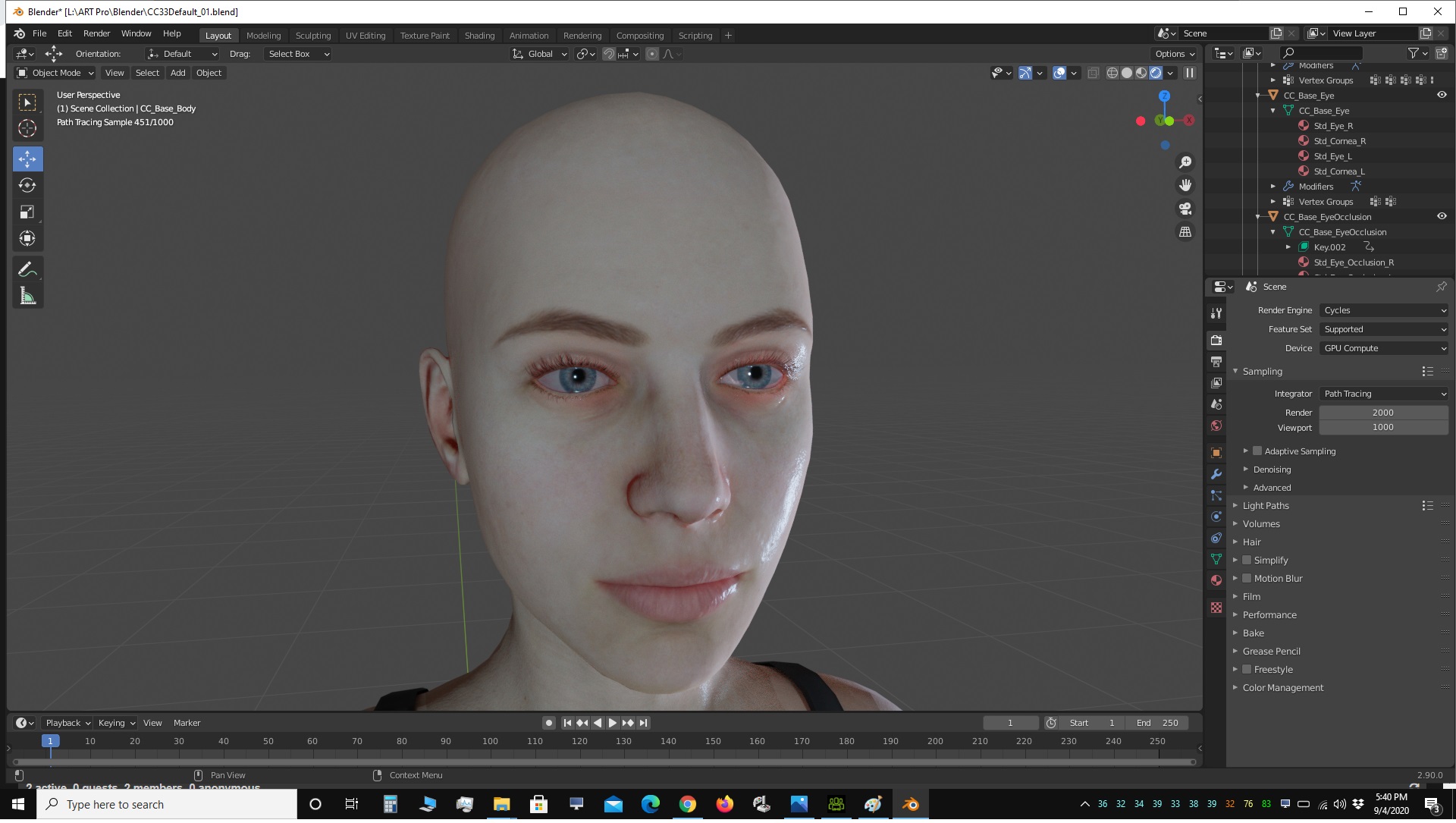
Eevee (Realtime)

It is similar to Octane though, with how it shades.
@AutoDidact - I see what you are dealing with now.
1 - the Subsurface is seriously intense, like you have to add just a smidge, but I feel like I want to crank it, but then it gets too strong on the edges. I think a mask would help, I don't know how to ad a mask into a node yet.
2 - There is no General Opacity slider for each material, so you are left with concocting your own Alpha material. For something like the occlusion, it is not so obvious what you need to do because there are just so many variables. My noob head can't figure it out yet!
I have not tried an HDRI yet, I want to see how that works.
PS - I LOVE Blender :kiss:
|
|
By TonyDPrime - 5 Years Ago
|
|
Bassline303 (9/4/2020)
@Tony , you also can insert the Blender Octane Plugin , to make use of the massive Titan horsepower you have :-)
- And you know the Octane Shaders in your sleep...
Oh yeah...you're right! I would have to see how the plugin converts materials, though.
1% on Blender for you!
|
|
By TonyDPrime - 5 Years Ago
|
For Tearline you want to use Cross-Hashed too. If you adjust the roughness it is like CC3's Detail slider.
@Animagic - I do not know yet what the difference is between the Alpha modes Alpha-Hashed and Alpha-Clip...They kind of seem to do almost the same thing, right?
|
|
By 4u2ges - 5 Years Ago
|
PS - I LOVE Blender 
Oh, really?? That's too sharp of a 180 degrees turn for one Blender session. Watch it for skids...
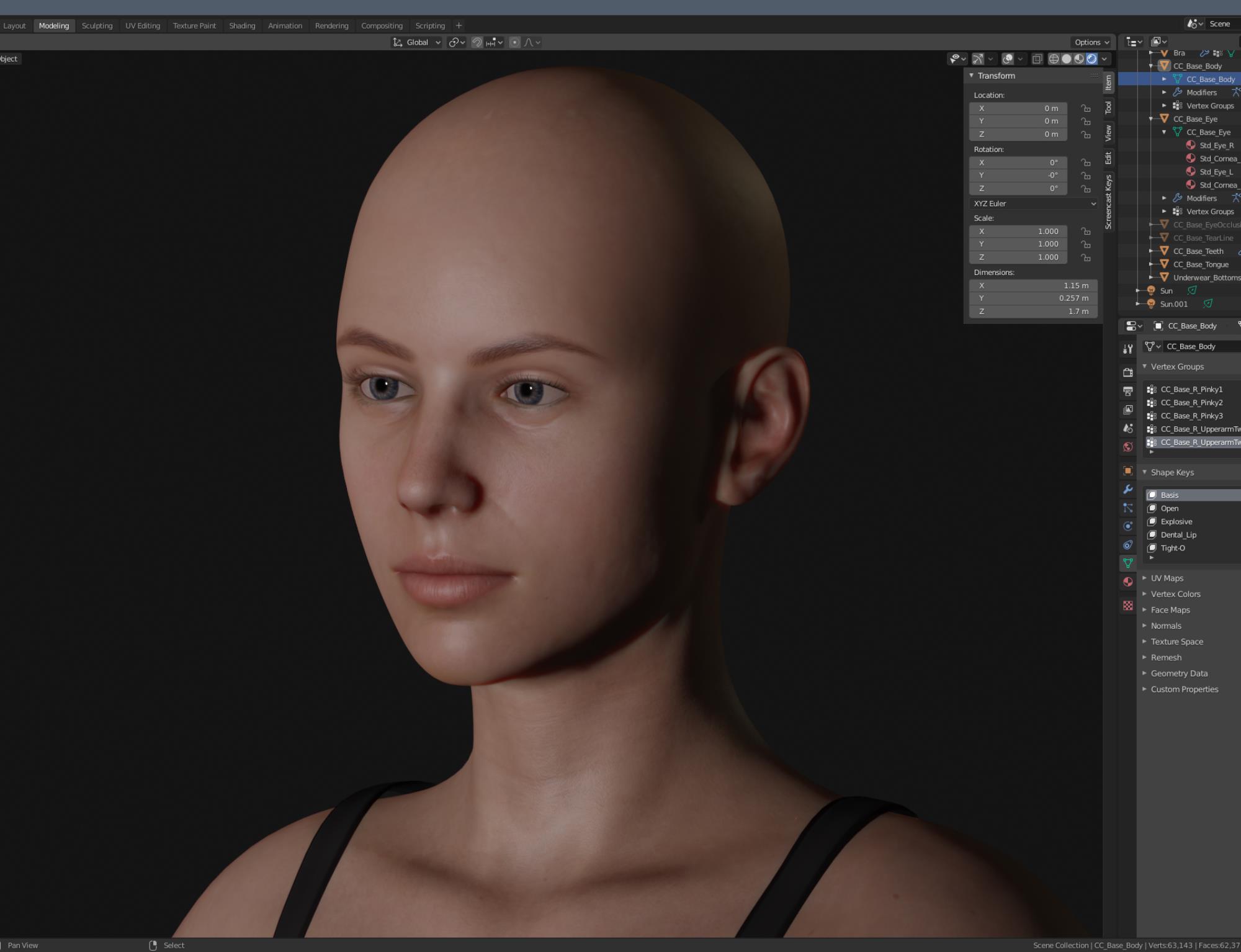
I generally think It might be a good idea if someone develops a Python bridge for shaders convention and animations.
But I certainly do not want for RL to get involved. They are already spread too thin.
Personally, I almost never use Blender for anything other than modeling.
It might be a challenge to manually convert shaders. Just a little workout :)
|
|
By TonyDPrime - 5 Years Ago
|
Now at least when I see pictures of the UI I have some tiny semblance of what it is...
I think every Noob needs to post a render of CC3 default in Blender as an offering to the Blender gods!
|
|
By TonyDPrime - 5 Years Ago
|
4u2ges (9/4/2020)
PS - I LOVE Blender
Oh, really?? That's too sharp of a 180 degrees turn for one Blender session. Watch it for skids...
I generally think It might be a good idea if someone develops a Python bridge for shaders convention and animations.
But I certainly do not want for RL to get involved. They are already spread too thin.
Personally, I almost never use Blender for anything other than modeling.
It might be a challenge to manually convert shaders. Just a little workout :)
Nice!
|
|
By AutoDidact - 5 Years Ago
|
|
@Tony and Job, Full disclosure I wont pretent to know what the difference is between alpha clipped and alpha hashed but it does no seem to matter as long as you plugin your correct CC3 opacity map into the alpha port on the principled shader for the lashes Also although, I love Cycles for the fire and smoke simulation, all of my setups are adjusted for the fastest renders in EEVEE Also TonyD, the SSS applied globally is very easy to "wax out" your skin texture details so a scatter mask is crucial to distribute the effect and you should lower those default SSS scale values. and I am not sure how the CC3 eye layers are built but I did apply SS to the " whites" of the eyes so they were no so flat white.
|
|
By ckalan1 - 5 Years Ago
|
This might be a bit off the main subject. But, I have been trying to get the iClone rig to import with fk/ik so the bones don't come apart at the joints. Have you been able to make the iClone rigging work properly in Blender?
I have no problem importing iClone or CC3 FBX into Blender with the animation intact but if I try to adjust anything it is quite difficult.
Do you know how to make this work?
|
|
By AutoDidact - 5 Years Ago
|
|
A demonstration of the importance of using SSS scatter masks. ( EVEE ENGINE) This is one of my custom CC3 Characters wearing one of my custom bespoke clothing peices and "night out on the town" make-up.😘 Note how we have a subtle SSS faceskin effect in the top image while retaining the nice dark eye brows and mascara makeup😊 On the bottum image I have unplugged the Scatter mask and left the global SSS for the head skin intact and you can see her fancy makeup is all washed out by the "glowing candle wax" effect of SSS without controlled distribution.😒 BTW those is scatter masks are automatic in Iclone as a feature of the DHS system.
|
|
By TonyDPrime - 5 Years Ago
|
@AD -
Yeah, with the SSS I will have to bring in a mask - although I have no idea how to bring in a texture exactly, a Material node seems to allow selection of only some of the textures imported. So my workaround would be to bring a mask using an Environment Texture node, which will allow me to select the actual folder. I find the Eye Occlusion completely baffling, because the mesh is there, but it is not interacting with the scene at all. I do not know how to raise or lower the Base Amount if you will, of a texture, I think I would have to apply a strength Node to Multiply it against. In Unreal this is what you would do, in iClone and Octane it has a built in channel for this.
Like you mention with the eye it seems you kind of have to develop your own shader workarounds to accomplish what you can in iClone. In Unreal you have it done for you with the Auto Setup, so it would GREATLY benefit as 4u2ges says that RL would bring one in.
Also, with this paradigm, I can see the strength will not be so much duplicating what iClone can do, but exploiting all of the FX that Blender has. It kind of is like a C4D. Like if you wanted an environment in iClone with all of these lights and stuff, it would be a nightmare. But here in Blender it seems well-suited to have such an environment with lights and crazy FX everywhere.
@ Noobs
- Here is an HDRI node setup so you can apply an HDRI to your scene:
-Notice in the Node Graph I have it selected to "WORLD" instead of "OBJECT"
-Then you have to Add in 2 Nodes, a (1) Vector>Mapping Node and a (2) Texture>Texture Coordinate Node
-Arrange it like so:

Now you can select an HDRI in the Tool Menu with the Red Globe icon (not the Red BeachBall icon, which is for Material)

Set the Scale to 100, it is defaulted to 0, or 1. Then use the Rotation Axis and Strength, to make it like iClone has it.
A couple of notes:
-If you want to disconnect a node, in Unreal you use "Break Links", here you select the node and use Alt-D on the keyboard.
-The Tool Menu on the Right, with the colored icons on the right, is how you do a lot of the iClone stuff. As of this point in my knowledge here are some useful ones:
(1) The TV is Render Properties and lets you switch between Eevee and Cycles in Layout Tab on top
(2) The Red Globe is World Properties and where you can access and adjust HDRI
(3) The Orange Box with a broken-outline around it is a Transform tool, that lets you Transform X-Y-Z stuff for whatever you have selected in your scene
(4) The Red BeachBall is where you adjust your materials
Also, I think back to yesterday when I knew nothing and this is what I wish I could have told myself:
(1) 2 Tabs at top matter right now - LAYOUT and SHADING. Layout is what you see in th scene. Shading is where you arrange the nodes, like in Unreal when you click on the material and it opens up the Node Editor for the material.
(2) To adjust a head material in iClone, you select the avatar in Scene and then go to Modify panel to adjust the material. In Blender you have to Go to Upper right, and expand out in Scene Collection > Collection> Armature> CC Base Body> STD Skin Head, and select the STD Skin Head. Once Highlighted per your selection by mouse clicking that item, you then go to the Tool icons on the mid right of the screen, specifically the Red Beachball one, and then you can adjust things.
Why didn't I tell myself this yesterday, it would have been so much easier :angry:
|
|
By AutoDidact - 5 Years Ago
|
|
, ckalan1 (9/5/2020)
This might be a bit off the main subject. But, I have been trying to get the iClone rig to import with fk/ik so the bones don't come apart at the joints. Have you been able to make the iClone rigging work properly in Blender?
I have no problem importing iClone or CC3 FBX into Blender with the animation intact but if I try to adjust anything it is quite difficult.
Do you know how to make this work?
Hi I try to perfect my animation or poses before sending it to Blender like you I do not see an easy way to re-pose/animate a CCS figure imported VIA FBX. The Blender Devs apparently prefer you use the native riggin system "rigify however itis not very user friendly IMHO so I have no experiece with it perhaps others with more knowlwedge could chime in on this aspect
|
|
By animagic - 5 Years Ago
|
I have a very noob question I am embarrassed to ask...:blush: Is there the equivalent of a Home button in Blender?
Yesterday I lost the focus on my character and was not able to find her again. There were options to do that (I forgot the name), but they didn't work.
|
|
By AutoDidact - 5 Years Ago
|
|
@TonyD, I have sorted out the eye textures .
when you select "CC3 base eye" in the Scene manager ( AKA outliner)
you see FOUR textures
the ones marked Std_Eye_R ..and ..Std_Eye_L are effectivley redundant
there is a normal map plugged into for the blood vessels but who really want bumps
on the whites of the character eyes??
the ones marked Std_Cornea_R & Std_Cornea_L are where you need to make your
Adjustments (specular etc)
Also if indeed you have located the CCS Scattermask Just load them into an image texture node
and change the mode to NON COLOR
and plug it into the subsurface port just as I have done here with my Dark bearded guy (see pic)

And trust me make !!your life alot easier and install the "easy HDRI" Addon.. it is free
|
|
By AutoDidact - 5 Years Ago
|
|
animagic (9/5/2020)
I have a very noob question I am embarrassed to ask...:blush: Is there the equivalent of a Home button in Blender?
Yesterday I lost the focus on my character and was not able to find her again. There were options to do that (I forgot the name), but they didn't work.
Job,Dont be embarrassed!! asking helps us all . there was a time when I could not figure out how to select and delete that Default cube in blender!!!😩 Select view -frame all( see pic)
|
|
By animagic - 5 Years Ago
|
A super-fast introduction from Kai (RL) on how to change texturing of a CC character in Blender, especially hair and clothing:
It's for Blender 2.79b, but probably still relevant. On tip is to set your renderer to Cycles while importing for the textures to be applied. I don't know if that's still relevant.
|
|
By MIDI3D - 5 Years Ago
|
|
Here's another link that has been beneficial to me for the past few months in regards to CC3/Iclone to Blender. https://www.youtube.com/watch?v=OkbzAUJgi34&t=1072s It may be of some use to others as well, I hope. Although in the title it says Alembic, most of what is covered can be applied to the texturing aspect of the current CC3+ FBX characters except for the tear. . .and it's geared more towards EEVEE. I haven't tried it with Cycles.
|
|
By MIDI3D - 5 Years Ago
|
|
Here's tutorial 1 if anybody cares to see it, but tutorial 2 is the most important one. (I think). https://www.youtube.com/watch?v=TexaaHhWFfE
|
|
By TonyDPrime - 5 Years Ago
|
I will SAY that if anyone has an RTX card, Cycles is a very good opportunity to see your card floor it with rendering. Now, it is not realtime, but it is way faster than a non RTX card in say Octane or with Iray.
In fact, I could see bringing a character from iClone to Blender as a quite industrious way of getting good Ray-traced renders. With Octane you would have a lot more work to do.
@AD - Thx! I actually added in a Gamma node to allow me to adjust it. I have the Radius all set to 1, so that can further tweak if wanted.
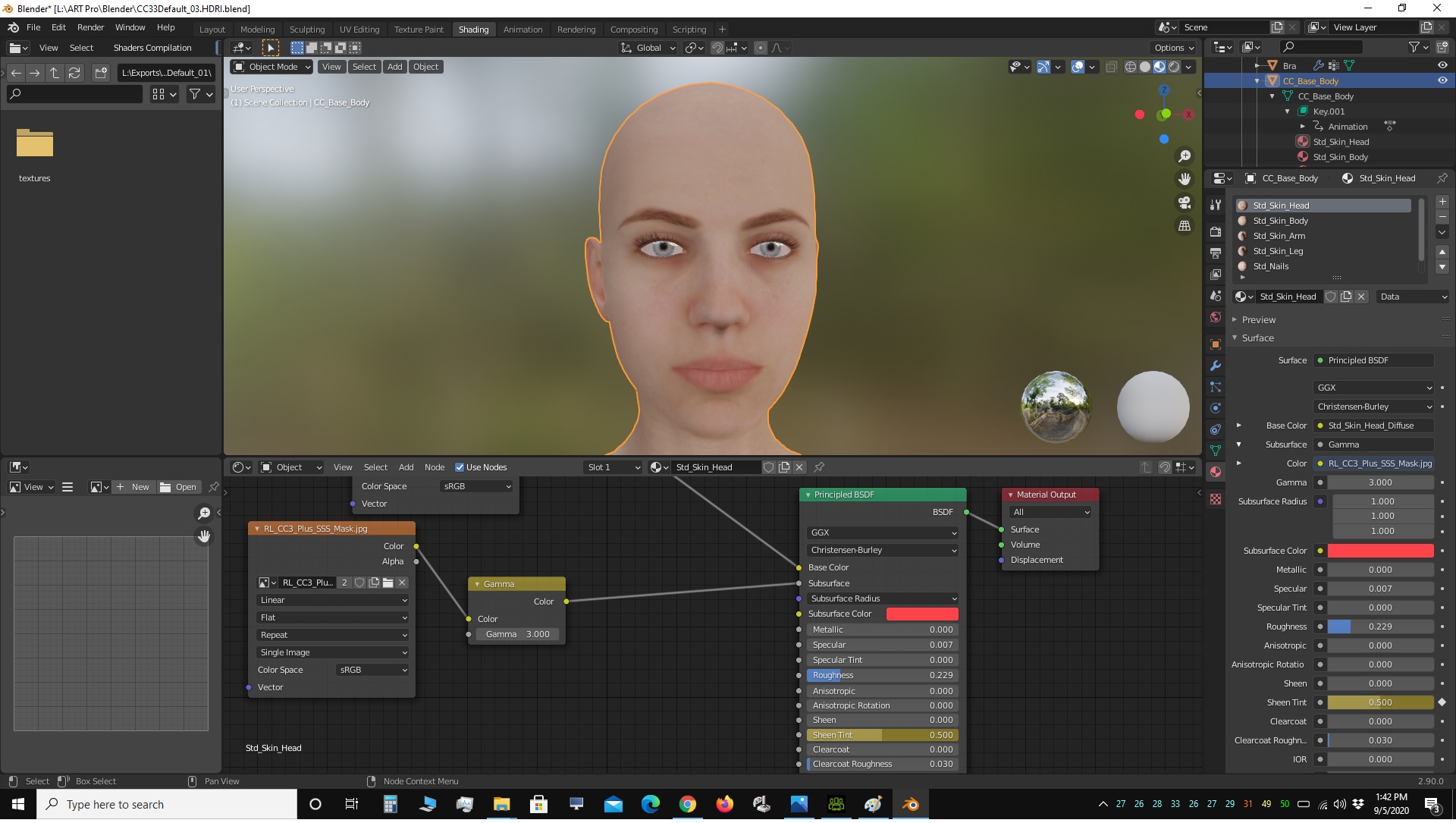
But those eyes are driving me CRAZY. I want to get that occlusion in there :cool:
|
|
By 4u2ges - 5 Years Ago
|
@MIDI3D
Yes, Mark (illusionLab) made a good tutorial for exporting and re-importing Alembic into Blender.
I don't think however it worth the effort to loose materials just to get a soft cloth/hair animation.
Thought I have a limited experience with Blender Physics engine, IMO It'd be easier to export FBX, tweak the existed materials and use Blender native physics engine to work out soft cloth.
Specially that it's whole lot more powerful that iClone real-time physics engine. It should be easier than building all materials from the scratch for each character you import.
|
|
By 3dtester - 5 Years Ago
|
I find it ridiculous that RL offers this for some DCC softwares:
https://www.reallusion.com/de/iclone/alembic/
...but not for Blender, UE and Unity.
Why? Python coders and C++ developers please explain.
|
|
By animagic - 5 Years Ago
|
Alembic is a generic format so you can import it into anything that supports Alembic. It's a point-cache format, so basically it recreates the mesh. There are no bones or anything, so nothing application-specific.
The one down-side is that Alembic files are not textured, so they need to be retextured n the target application. They are also enormous in size, so not very practical for complete scenes.
It was introduced in iClone 6.5, so the applications mentioned were the most relevant at the time. But it works for others as well, I have tested it.
|
|
By animagic - 5 Years Ago
|
I was trying to import an FBX with animation and import it into Blender, but it doesn't like it. I get a log error file, but it's not very helpful...:unsure:
Traceback (most recent call last): File "C:\Program Files\Blender Foundation\Blender 2.90\2.90\scripts\addons\io_scene_fbx\__init__.py", line 216, in execute if import_fbx.load(self, context, filepath=path, **keywords) == {'FINISHED'}: File "C:\Program Files\Blender Foundation\Blender 2.90\2.90\scripts\addons\io_scene_fbx\import_fbx.py", line 2592, in load _(); del _ File "C:\Program Files\Blender Foundation\Blender 2.90\2.90\scripts\addons\io_scene_fbx\import_fbx.py", line 2591, in _ fbx_item[1] = blen_read_geom(fbx_tmpl, fbx_obj, settings) File "C:\Program Files\Blender Foundation\Blender 2.90\2.90\scripts\addons\io_scene_fbx\import_fbx.py", line 1288, in blen_read_geom blen_read_geom_layer_uv(fbx_obj, mesh) File "C:\Program Files\Blender Foundation\Blender 2.90\2.90\scripts\addons\io_scene_fbx\import_fbx.py", line 1063, in blen_read_geom_layer_uv 2, 2, layer_id, File "C:\Program Files\Blender Foundation\Blender 2.90\2.90\scripts\addons\io_scene_fbx\import_fbx.py", line 983, in blen_read_geom_array_mapped_polyloop blen_data, blen_attr, fbx_layer_data, stride, item_size, descr, xform) File "C:\Program Files\Blender Foundation\Blender 2.90\2.90\scripts\addons\io_scene_fbx\import_fbx.py", line 838, in blen_read_geom_array_setattr _process(blen_data, blen_attr, fbx_data, xform, item_size, blen_idx, fbx_idx) File "C:\Program Files\Blender Foundation\Blender 2.90\2.90\scripts\addons\io_scene_fbx\import_fbx.py", line 833, in _process setattr(blen_data[blen_idx], blen_attr, fbx_data[fbx_idx:fbx_idx + item_size]) ValueError: bpy_struct: item.attr = val: sequences of dimension 0 should contain 2 items, not 0
location: <unknown location>:-1
Are there things to be aware of when exporting animation? I'm using the Blender profile. I have FPS at 60, should it be 30? Are there specific Blender import settings?
I will try to import without animation and see if that goes.
|
|
By 3dtester - 5 Years Ago
|
animagic (9/5/2020)
Alembic is a generic format so you can import it into anything that supports Alembic. It's a point-cache format, so basically it recreates the mesh. There are no bones or anything, so nothing application-specific. The one down-side is that Alembic files are not textured, so they need to be retextured n the target application. They are also enormous in size, so not very practical for complete scenes. It was introduced in iClone 6.5, so the applications mentioned were the most relevant at the time. But it works for others as well, I have tested it.
Animagic, i basically knew that.
But the point is, that there are no tools that do the work of retexturing (e.g. find and assign the textures automagically).
This work is been done with scripts which RL provides for some DCC.
Alembic is a quick and easy way to transfer complete scenes and animations and there need to be scripts & plug-ins that do the work.
It would be that simple to have a complete scene from iClone appearing in UE for example, with all the textures, with just a few mouse-clicks.
I know that a point cache is merely static but if you need flexible props you can add them as .fbx.
It could be that simple...
But i am not a Python coder or C++ programmer.
|
|
By animagic - 5 Years Ago
|
|
OK, it must something else, because I can't import without animation either. This is with iClone so I'm going to try and do this with the same character from CC.
|
|
By 3dtester - 5 Years Ago
|
I'm curious how this goes.
I really like the option of different render engines in Blender.
And working with free software feels good (love the GIMP) :)
|
|
By animagic - 5 Years Ago
|
|
animagic (9/5/2020)
OK, it must something else, because I can't import without animation either. This is with iClone so I'm going to try and do this with the same character from CC.
The issue was with the specific character used (or his clothing). Replacing him resolved the problem.
More specifically, it was the biker vest...:crazy:
|
|
By TonyDPrime - 5 Years Ago
|
A Crude working Occlusion!
Use Alpha Blend, not Alpha Hashed, for Occlusion. Alpha Hashed makes it gritty, whereas Alpha Blend makes it smooth and solid-ish.
Add in a RGB node for the Base color of the Occlusion, and then an Invert, a Gamma, and a Bright-Contrast to adjust the size, fade and opacity.

Save and use this image for the Occlusion's Alpha Texture, in my pic it is called "BlenderOpacityMask":

Eh?
EH!!!!?? :alien:
|
|
By AutoDidact - 5 Years Ago
|
|
4u2ges (9/5/2020)
@MIDI3D
Yes, Mark (illusionLab) made a good tutorial for exporting and re-importing Alembic into Blender.
I don't think however it worth the effort to loose materials just to get a soft cloth/hair animation.
Thought I have a limited experience with Blender Physics engine, IMO It'd be easier to export FBX, tweak the existed materials and use Blender native physics engine to work out soft cloth.
Specially that it's whole lot more powerful that iClone real-time physics engine. It should be easier than building all materials from the scratch for each character you import.
I agree After reading your post I exported a CC3 girl and included the default calibration animation option from CC3 In Blender I quickly modeled a very primitive "gown" from a cube and subdivided it applied a cloth modifier with the "leather" preset and here are some frames indeed ..Blenders cloth dynamics will work fine on animated CC3 actors brought in via FBX 😁
|
|
By 4u2ges - 5 Years Ago
|
You beat me on that one AutoDidact and you are fast too :)
I wanted to show some dress physics as a prove of concept in Blender, but had to leave for shopping.
Looks good and the concept proved!
|
|
By AutoDidact - 5 Years Ago
|
TonyDPrime (9/5/2020)
A Crude working Occlusion! Use Alpha Blend, not Alpha Hashed, for Occlusion. Alpha Hashed makes it gritty, whereas Alpha Blend makes it smooth and solid-ish. Add in a RGB node for the Base color of the Occlusion, and then an Invert, a Gamma, and a Bright-Contrast to adjust the size, fade and opacity. Save and use this image for the Occlusion's Alpha Texture, in my pic it is called "BlenderOpacityMask": Eh? EH!!!!?? :alien:
@Tony are you sure you have Ambient occlusion turned on in the little digital SLR camera render setting tab on the right?? also I was able to get a decent Occlussion look on the Dark bearded guy by adding some SSS to the Eye texture as well.
|
|
By jlittle - 5 Years Ago
|
|
animagic (9/5/2020)
I have a very noob question I am embarrassed to ask...:blush: Is there the equivalent of a Home button in Blender?
Yesterday I lost the focus on my character and was not able to find her again. There were options to do that (I forgot the name), but they didn't work.
You can also press the period key (in object mode) on the number keypad (NUM .) which will center the selected object in the view.
Jeff
|
|
By animagic - 5 Years Ago
|
Well, you are all moving fast!!! :w00t: Meanwhile, I am confronted with mysteries like these..:unsure:

The body texture disappeared from the body and somehow ended up on the head! :sick:
I will get there eventually, but first I need to simply become more familiar with how Blender does things and where to look. I'm afraid iClone/CC has spoiled me...:P
|
|
By 4u2ges - 5 Years Ago
|
Job, for now always export to a separate folder from CC or iClone for each export. Texture is getting pulled from a different folder and that what's causing this.
https://forum.reallusion.com/455571/Weird-CC-Export-Issue
|
|
By MIDI3D - 5 Years Ago
|
|
I agree with both of you. (4u2ges and AutoDidact). My post was meant as a simple contribution to those who might want to take advantage of an older, but yet still useful tutorial that has some texture mapping tips. I've moved on from that workflow since then. I just briefly used it because I couldn't get my custom made Marvelous Designer content into Iclone via Alembic import. Now my method is very similar to the one that AutoDidact just showcased with the exception of that I use MD for cloth instead of Blender. I haven't tried doing cloth simulation in Blender yet, but I don't feel the need to at this time because I've gotten pretty comfortable and somewhat accomplished with MD over the past 2 and a half years. No need for weight mapping and no poke through issues like in Iclone.
|
|
By 4u2ges - 5 Years Ago
|
|
I couldn't get my custom made Marvelous Designer content into Iclone via Alembic import.
I got to ask. How do you intend to use MD simulation in iClone? I keep hearing it, but do not really understand.
Is it for animated characters? Or just static pose renders? Could you elaborate intended workflow please?
|
|
By AutoDidact - 5 Years Ago
|
|
Re: Alembic;
Just wanted to comment that I had orginally decided on an Alembic based pipeline
using Iclone 6.5 pipeline and Blender after finishing "Galactus Rising"( 6 year project..Arrghh!!)
and dunmping Daz studio & MAxon C4D for Blender.
The Advantage of using RL's alembic with Blender is that Blender STREAMS THE ABC CACHE DATA!!! not import it
so you dont get massive/crippling scene file bloat from those HUGE ABC files that can be as large as 70 gigs
for a single figure moving for 300 frames.
Additionally you can Set up materials once and then overwrite the previous ABC cache file with a new animation
and blender will update it keeping your material set up as long as you dont change the Character vertex count in Iclone
by changing clothes or hair etc which would need a new Alembic file..
So why have I switched from Alembic to FBX??
Well I upgraded from 6.5 pipeline during the %50 Off
Covid-19 relief sale last june but could only afford Iclone 7.x base
with CC3 pipeline as I also bought a new beefy Ryzen system.
So no Alemebic export with my current version of Iclone basic.
I still have 6.5 pipeline on my 4 year old PC, but I was using Daz figures
imported the old PITA way Via 3DX
The "Halo officer ranks" video I posted earlier was Alembic from Iclone to Blender as well as this
"British party girl on BBC" animation.
https://youtu.be/M-rYN7P7pEA
|
|
By MIDI3D - 5 Years Ago
|
|
Yes.@4u2ges. Most of my designed clothing is two layered robe-tunic kind of stuff. I export my animated characters from Daz in the old days, and CC3 now to Marvelous Designer via Alembic , FBX, or OBJ export. I then create the clothing to fit the character and simulate. Upon completion, I export the cloth only as an Alembic file, or as an OBJ sequence. At that point, I import the non-clothed but animated character into my program of choice. (Cinema 4D, Blender, UE4, Max, etc.). Then I import the MD clothing which snaps to the character like a hand in a glove. I add the textures to the cloth, and that's about it.
|
|
By TonyDPrime - 5 Years Ago
|
AutoDidact (9/5/2020)
TonyDPrime (9/5/2020)
A Crude working Occlusion!
Eh?
EH!!!!?? :alien:@Tony are you sure you have Ambient occlusion turned on in the little digital SLR camera render setting tab on the right?? also I was able to get a decent Occlussion look on the Dark bearded guy by adding some SSS to the Eye texture as well.
LOL - You know what, I have NO idea what that means! You have to remember I am Noobing my way through.
Oh wait, just to address what you said, this was not for (1) AO, or "Ambient Occlusion", it was for the (2) eye-occlusion mesh and material, introduced with the Tearline in CC3.
Now, I understand the SSS part you said you had, but I don't know the SLR camera part....as a matter of fact, I know Absolute-0 when it comes to cameras in Blender.
But, I am also not sure where AO is now that you say that.
Is SLR an icon, or do you mean the eyeballs to hide or show an item in scene? Or is this something else.
Sorry for all the Noob-Q's!
|
|
By 4u2ges - 5 Years Ago
|
@AutoDidact
I am sure you have your reasons for posting 720p. I am on the other hand want to see more details :)
@MIDI3D
Thanks, I got it. So all the simulations for all animations you are making in MD instead of iClone. I can understand the reason. Saves so much frustration, specially for robe type cloth.
Now we need to push RL to include the cloth as a target for Alembic import (Python at least). I just do not see the reason why it can be imported to accessory and not to cloth.
|
|
By 4u2ges - 5 Years Ago
|
Anyhow, my first Blender animation render (thanks to AutoDidact for pushing)
I did not concentrate on materials other than alpha and was mostly trying dress simulation. Dress came out a little wobbly, but that just inappropriate settings.
Still there is a lot of manual work would involve for creating a decent scenes and animations.
What I love about the workflow is, that if I see a little inconsistency I can edit/fix whatever I need to on the fly, without the need to send somewhere else.
|
|
By TonyDPrime - 5 Years Ago
|
AutoDidact (9/5/2020)
I agree After reading your post I exported a CC3 girl and included the default calibration animation option from CC3 In Blender I quickly modeled a very primitive "gown" from a cube and subdivided it applied a cloth modifier with the "leather" preset and here are some frames indeed ..Blenders cloth dynamics will work fine on animated CC3 actors brought in via FBX 😁
Wait, does Blender have draped clothing physics over a mesh? :blink:
And where did 4u2ges go shopping? :blink::blink:
|
|
By 4u2ges - 5 Years Ago
|
Wait, does Blender have draped clothing physics over a mesh? 
lol, yes! Whole more advanced than iClone.
And where did 4u2ges go shopping?
I was pushed out of the house to get some groceries.
|
|
By MIDI3D - 5 Years Ago
|
|
@4u2ges. You are welcome!:)...and yes, I agree that we need to nudge RL a little. Unfortunately, I've been trying to do just that for the past 3 years along with Willpower and others without success. While it won't hurt to continue to do so, I'm not expecting much.
|
|
By AutoDidact - 5 Years Ago
|
|
@Tony turn on viewport Ambient occlusion and screen space relections for a much better look.
|
|
By 4u2ges - 5 Years Ago
|
|
MIDI3D (9/5/2020)
@4u2ges. You are welcome!:)...and yes, I agree that we need to nudge RL a little. Unfortunately, I've been trying to do just that for the past 3 years along with Willpower and others without success. While it won't hurt to continue to do so, I'm not expecting much.
But according to your workflow, given soft cloth gets entire animation from MD, I suppose you may use it as a prop and just apply alembic via Python (it's working fine for props).
You would not be able to attach that cloth to a character, but given its position at frame 0 is properly tweaked, it should follow character perfectly. It's not ideal, but sill might just work.
|
|
By MIDI3D - 5 Years Ago
|
|
Thanks for that tip! I don't exactly know what I will have to do to be able to take advantage of it because I don't know anything about python. Still, I am willing to learn whatever I can.
|
|
By TonyDPrime - 5 Years Ago
|
AutoDidact (9/6/2020)
@Tony turn on viewport Ambient occlusion and screen space relections for a much better look.
THX!
|
|
By 4u2ges - 5 Years Ago
|
|
MIDI3D (9/6/2020)
Thanks for that tip! I don't exactly know what I will have to do to be able to take advantage of it because I don't know anything about python. Still, I am willing to learn whatever I can.
I do not know Python that much either. But this is very simple: https://forum.reallusion.com/451005/iClone-v77-Alembic-Import#bm451054
And this one I just made in under 15 minutes with mini-tut from above:
Noteworthy: Above is an iClone to iClone Export/Import Alembic.
Going through external app (MD) might cause some problems if Animation and Alembic Imports/Exports have even a tiny mismatch.
Given latest iClone/CC export problems, it's hard to vouch for successful outcome, yet it worth to try.
|
|
By MIDI3D - 5 Years Ago
|
|
@4u2ges I have been using this tutorial for a while off and on to get my MD stuff into iClone and UE4. https://www.youtube.com/watch?v=8MmYIgtc5R4&t=1845s The tutorial alone is over 34 minutes and he goes fast! If I stop just short of getting my clothing to UE4, it works out very nicely for use in Iclone. The process for me though takes several hours for 15 second segments of animation. I'm quite sure that this is not a good use of my time! The reason that I continue to do it, albeit on a limited basis is because once it's done, it's both permanent and reusable. At that point, all that I have to do is swap out the dialog. I have about 30 of these segments done, of course using 30 different mocaps, so after the fact, I'm in a good spot for now. My characters look so much better staying in the family coming from CC3 to Iclone, than exporting to 3rd party software with maybe the exception of UE4. It also helps with maintaining a consistent look of my characters. Anyway, I now limit myself to using this technique to only a couple of times a week, but the results are always worth it. Without expecting you to watch the video, the most tedious part of the process is almost like frame by frame keyframe animation. On good days, I can do 2 to 4 frames at a time. To make more sense out of that, you would have to watch the video, but I just thought that I would pass this along to you and also to thank you again for presenting me with a possible alternative.
|
|
By MIDI3D - 5 Years Ago
|
|
Thank you! I will give it a try! :)
|
|
By MIDI3D - 5 Years Ago
|
I do not know Python that much either. But this is very simple: https://forum.reallusion.com/451005/iClone-v77-Alembic-Import#bm451054
And this one I just made in under 15 minutes with mini-tut from above:
@4u2ges
Very nice simulation by the way! If I somehow manage to get this far, my next potential conquest would be to get it to recognize and simulate 2 garments at the same time.
Regardless of my outcome, this is very worthwhile and promising! I look forward to any future developments. It would be nice if RL took this a step forward and made it into a plugin.
I know, not likely and probably not worth it for them. Just wishful thinking again on my part.
|
|
By 4u2ges - 5 Years Ago
|
I actually watched it to the part where the guy is doing Morphs. Gosh this is so much work morphing every other frame.
I'm sure you may figure out the alembic import and it's going to be heck of a lot faster workflow.
BTW, I forgot all about inheritance. Watching the video refreshed my memory :)
So yes, I also attached dress prop to the bone root of the character and disabled inheritance.
After that it is attached as an accessory and it's only following alembic animation perfectly.
I have MD (Steam version). And I have a huge garments pack I bought a long time go.
Brought couple of items in iClone, but need to master skills and try Alembic simulation at some point.
|
|
By TonyDPrime - 5 Years Ago
|
MIDI3D (9/6/2020)
I do not know Python that much either. But this is very simple: https://forum.reallusion.com/451005/iClone-v77-Alembic-Import#bm451054And this one I just made in under 15 minutes with mini-tut from above:@4u2ges Very nice simulation by the way! If I somehow manage to get this far, my next potential conquest would be to get it to recognize and simulate 2 garments at the same time. Regardless of my outcome, this is very worthwhile and promising! I look forward to any future developments. It would be nice if RL took this a step forward and made it into a plugin. I know, not likely and probably not worth it for them. Just wishful thinking again on my part.
What am I missing here, cant you weight map the outfit in CC3, simulate it in iClone, and then Alembic it out? Or is there something more to the story with this?
I did these a while back:
|
|
By 4u2ges - 5 Years Ago
|
|
What am I missing here, cant you weight map the outfit in CC3, simulate it in iClone, and then Alembic it out? Or is there something more to the story with this?
I have seen them. Nicely done Tony.
But see, this is very simple item to simulate. There is no problem to do it in iClone.
Try to do a cloak, robe, or worth yet a burka for instance in iClone. And you'd find out how hard it is to weight it to bones and design a right physics map and naturally simulate it with limited iClone Physics.
That is why people are sticking with MD, where whole body is a collision shape and poke through never occurs (or easily fixed with a few clicks).
It is not a real-time and takes longer to simulate, but once it is done, the result is outstanding. You would not be ashamed to take it to any Engine.
|
|
By 4u2ges - 5 Years Ago
|
So I did a little more experimenting with Importing cloth/hair simulation into Blender.
If your are happy with iClone simulation and wish to bring it to Blender, you may use a *hybrid mode*.
That is:
* Export everything as FBX from iClone
* Export soft cloth items as Alembic
* Import FBX and import Alembic files to Blender. For Alembic files during Import set the scale to 0.01 (or you could scale it down in Blender after the import).
* Hide or delete soft cloth items imported as FBX
* For Alembic Imported cloth in Mesh Sequence Cache modifier set Frame Offset to 1 (there is 1 frame discrepancy between FBX and Alembic animations).
If cloth item has multiple materials, multiple objects would be created, but Frame Offset can be set for any object and it would be in effect for all objects from the same .abc

* Create materials for Alembic imported cloth
Obvious advantage, you only have to create materials for animated cloth and just tweak the rest of the materials imported via FBX.

|
|
By MIDI3D - 5 Years Ago
|
I actually watched it to the part where the guy is doing Morphs. Gosh this is so much work morphing every other frame.
I'm sure you may figure out the alembic import and it's going to be heck of a lot faster workflow.
@4u2ges
I appreciate you getting as far as you did with that tutorial. So you know what I'm up against!..and you have to know that I also must be crazy for doing it that way
from time to time.:) The main reason is that the results are flawless first time , every time, and that I can get 2 layered simultaneous cloth simulations into Iclone.
I'm still interested in the alternative.
|
|
By MIDI3D - 5 Years Ago
|
@4u2ges
The process that you posted for Alembic import to Blender is almost spot on with how I've been getting my characters into Blender for the past 14 months. Also,
Daz Studio does a much more accurate job of cloth simulation than Iclone as well with their dforce clothing. The extra added bonus for me is that they have some complex sophisticated
multi-layered clothing that my skillset does not allow me to create. So I simulate in Daz and port it to Blender, Cinema 4D, and UE4.
|
|
By MIDI3D - 5 Years Ago
|
@TonyDPrime
The response from 4u2ges was as good of an answer that I could give you. The only thing that I would add as it pertains to me is having the ability to accurately simulate
2 layered clothing and at the same time without having to overlap or add another simulation.
|
|
By AutoDidact - 5 Years Ago
|
|
I have not much experimented with Blenders cloth cloth system as my focus
is more on Sci-fi,future tech genre but as I model all of own clothing
for CC3 I can see that making purpose built dynamic garments for use on CC3 Characters in
Blender will be the way to go.
Another reason some of us choose to look outside of Iclone for rendering
is for large expansive outdoor environments That have a "believable" sense of infinate scale
UE4 /Unity Excels at this But Blender can achieve such environments also
While 2.9 has a new & decent global Sky system
I really prefer this Paid Addon Called Physical starlight & Atmosphere
which gives Blender that look of the Eon vue software.
https://youtu.be/A7io8CoExH0
|
|
By AutoDidact - 5 Years Ago
|
Some silly fun. 😆
|
|
By TonyDPrime - 5 Years Ago
|
|
MIDI3D (9/6/2020)
@TonyDPrime
The response from 4u2ges was as good of an answer that I could give you. The only thing that I would add as it pertains to me is having the ability to accurately simulate
2 layered clothing and at the same time without having to overlap or add another simulation.
Oh...I gotcha, it was an alternative method which works for a longer cloak, but just so happened to be demonstrated with a shorter dress.
MIDI3D - can you try the proof of concept he did with the short one using a long one, and show us the result? Try it with the longest you can think of! :P
|
|
By TonyDPrime - 5 Years Ago
|
Okay, the moment of truth for me - HAIR in Blender.
It is like UE4, kind of M'eh compared to iClone, but good enough. I know you can fashion strand hair in Blender, but this is with Daz-type card hair.
If you apply any specularity-roughness, it looks really bad, like plastic. It does not handle light reflection well at all, not like iClone can.
But this is a trade off for engine performance, because iClone will chug with hair, whereas this thing does not.
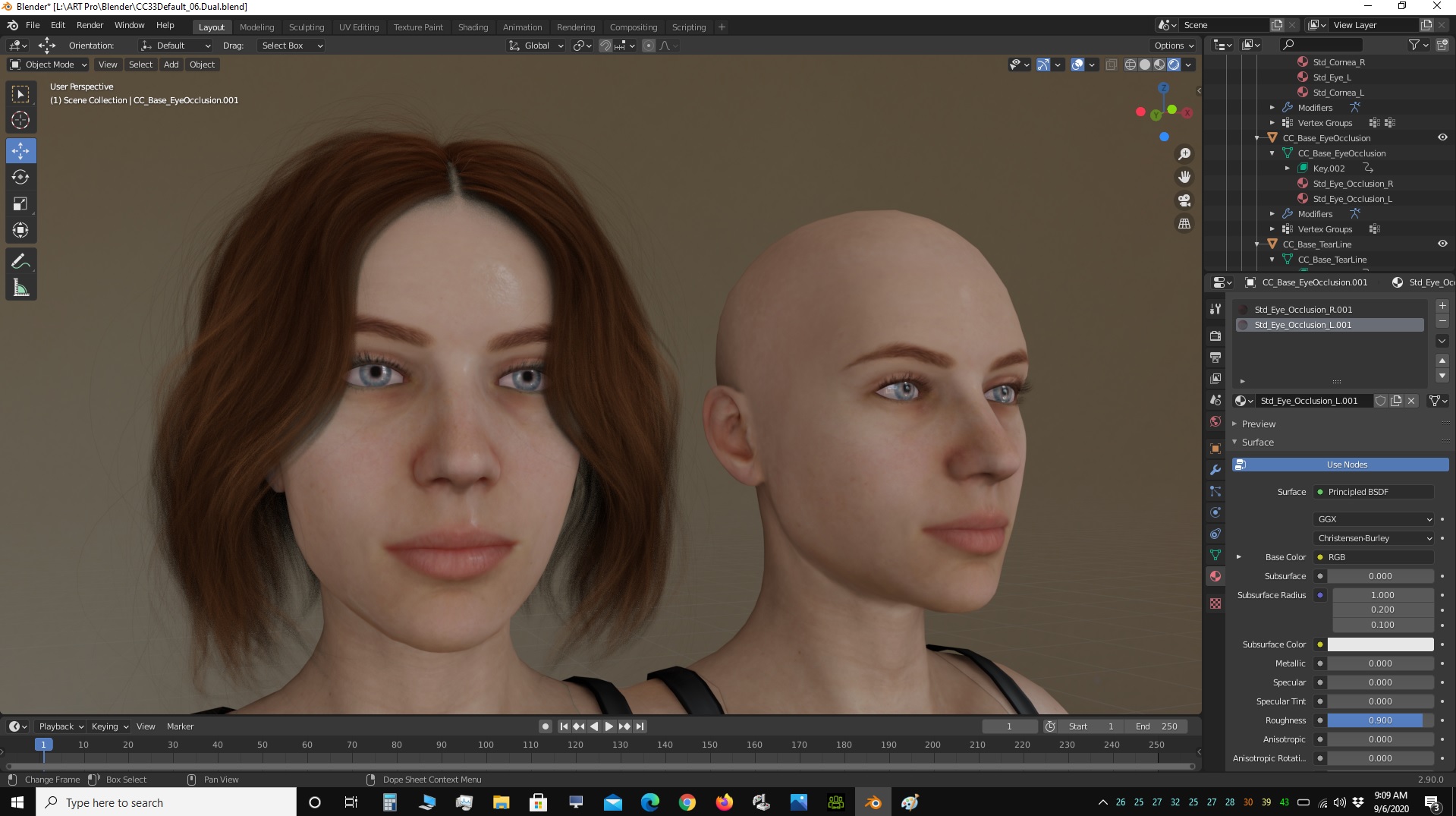
The journey continues...
|
|
By TonyDPrime - 5 Years Ago
|
|
AutoDidact (9/6/2020)
Some silly fun. 😆
Awesome!
|
|
By AutoDidact - 5 Years Ago
|
|
I have found that the Quality of the Daz transmapped/card hairs vary wildy depending on the product creator. As you said, most look good in Iclone but sort of fail in other engines. I plan to learn the advanced feature of Blenders spline base hair system as it is not really that hardware intensive until you activate dynamics to animate the hair and the "quick fur" preset option is pretty easy for animals like this hivewire Gorilla morph for the CC3 Avatars.
|
|
By TonyDPrime - 5 Years Ago
|
AD - thanks again for your guidance!
You know how in iClone we can save a character "as-is" in Content, and then import that character into another scene, with all of the materials as set up - Is there anything like that in Blender?
In UE4, you can save as an asset and then import it into another project, or in Octane you save as a scene, and then node link just the geometry you wanted in the new scene, bypassing the lighting and environment of the old one. Both allow you to save a character with all its materials already set-up into another scene.
How do I get the avatar as I have in my scene into another scene without having to re-craft all of the material set-up, or how do people accomplish that?
|
|
By AutoDidact - 5 Years Ago
|
|
Yes !!! Blender has an excellent system for this called "appending" you can harvest objects Material setups or entire collections I have a lot of complex node based procedural sci fi metals that I plan to use in my HALO series that I Append from saved .blend files. this video explains the process it is literally drag and drop from windows explorer just like dragging Avatars or Imotion clip into Iclone.
|
|
By ultimativity - 5 Years Ago
|
Outstanding. Looking forward to the series
|
|
By AutoDidact - 5 Years Ago
|
|
ultimativity (9/7/2020)
Outstanding. Looking forward to the series
Thanks!! I am very excited and enjoying building the Character assets,props& sets for the weeky series of 3-5 minute shorts rendered in Blenders realtime EEVEE engine. Here are some of the Spartan Armors I have developed for the Characters, all CC3 based of course.

 
|
|
By TonyDPrime - 5 Years Ago
|
AutoDidact (9/7/2020)
ultimativity (9/7/2020)
Outstanding. Looking forward to the series
Thanks!! I am very excited and enjoying building the Character assets,props& sets for the weeky series of 3-5 minute shorts rendered in Blenders realtime EEVEE engine. Here are some of the Spartan Armors I have developed for the Characters, all CC3 based of course.
AD - Thx for the Append info! These characters look awesome. How long fan of Halo?
|
|
By TonyDPrime - 5 Years Ago
|
I still have no idea how to add in camera or Render. Every time I select Render I get the blank grid, and cameras I did not look into yet.
UI stuff :doze:Journey continues....

|
|
By TonyDPrime - 5 Years Ago
|
Finally!
F$@&!......
What a nightmare this thing is to render. Absolutely counter intuitive and horrible. I put this right up there with UE4, which perhaps is the Champion of the most HORRIBLE Punishing Counter-Intuitive Camera-to-Render paradigm.
One you know it, sure, it is easy enough.
But why so counter intuitive...WHHHYYYYYYYY.....RL does this right, what you see is what you get. So easy....it makes being a first timer FUN.
But here, and in UE4, it's like, "You want to see something nice?"
NO!....
First you have to figure out "X & Y" for X+ Y/2x * square root of YX(y-x) / X.

|
|
By AutoDidact - 5 Years Ago
|
|
@Tony Actually I have never even played HALO or even owned a game console. But I am A huge fan of the universe of HALO lore as it is Great Future tech sci fi of the type I love Everything from the precursers to the Ancient Human Galactic Empire to the Forerunners makes for some great sci fi stories. I have ALL of the films both 343 industries official, and Fan made cut scene films. In My planned series "HALO Reclaimer" the Spartans have Established a new totalitarian Spartan Empire and reclaimed&rebuilt the ancient human Emperial Captitol on Charham Harkore and assumed the 'Mantle of responsibilty as Ruler/Caretakers of the Galaxy.

All remaining discovered forerunner technology is now under control of the New Spartan empirial Ecumen and it is a major crime for anyone other than spartans to access any undisoverd forerunner tech.
|
|
By animagic - 5 Years Ago
|
I believe Blender used to be all keyboard-controlled, so we've made some progress...:P
I understand your impatience, Tony, but it helps to watch some basic tutorials. I agree, though, iClone has made us spoiled.
|
|
By AutoDidact - 5 Years Ago
|
|
.,camera s.
|
|
By 4u2ges - 5 Years Ago
|
Stop complaining Tony! :laugh: Job is right. We got spoiled by iClone.
Here is some stuff which suits best for your case. What you see in viewport is sort of equivalent of iClone preview camera.
Split screen, hit 0 on keypad to see where the camera is pointing to on one of the panes - this is a camera view.
Move camera to the best location for observing the object.
Place cursor on the character, set pivot point to cursor.
Now when you rotate camera by Z it would revolve around the object.
To render select Render Image from menu.
Guess you figured most of it...

....OR... go to View >Viewport Render image (sort of equivalent of iClone Preview render)
|
|
By 4u2ges - 5 Years Ago
|
Dup.
|
|
By AutoDidact - 5 Years Ago
|
Test flight
|
|
By TonyDPrime - 5 Years Ago
|
4u2ges (9/7/2020)
Stop complaining Tony! :laugh: Job is right. We got spoiled by iClone. Here is some stuff which suits best for your case. What you see in viewport is sort of equivalent of iClone preview camera. Split screen, hit 0 on keypad to see where the camera is pointing to on one of the panes - this is a camera view. Move camera to the best location for observing the object. Place cursor on the character, set pivot point to cursor. Now when you rotate camera by Z it would revolve around the object. To render select Render Image from menu. Guess you figured most of it... ....OR... go to View >Viewport Render image (sort of equivalent of iClone Preview render)
Nice! thank you...I figured out most of this but did not know I could get a multi view this way. :Wow:
|
|
By 4u2ges - 5 Years Ago
|
Hypothetically speaking (since I have not done animations and shading in Blender).
Lets say I setup the scene in iClone, animated characters and imported to Blender.
Worked out materials and shaders.
Then at some point I want to tweak animation and I prefer to do in iClone.
How hard would it be to *update* animation in Blender without the need to transfer characters all over again and work on materials?
Would new collections append *thing* allow to transfer animation only and apply to existed characters (I see *Action* in the list with the same icon as Animation)?
|
|
By TonyDPrime - 5 Years Ago
|
|
4u2ges (9/8/2020)
Hypothetically speaking (since I have not done animations and shading in Blender).
Lets say I setup the scene in iClone, animated characters and imported to Blender.
Worked out materials and shaders.
Then at some point I want to tweak animation and I prefer to do in iClone.
How hard would it be to *update* animation in Blender without the need to transfer characters all over again and work on materials?
Would new collections append *thing* allow to transfer animation only and apply to existed characters (I see *Action* in the list with the same icon as Animation)?
The Append feature from what I am seeing online makes it look like you should be able to transfer only materials, but so far I myself have just appended a whole Object (Mesh + Material).
AutoDidact will have to fill us in.
In the meantime, a Bikini girl in Forest in Blender!

And, with a special guest-

|
|
By TonyDPrime - 5 Years Ago
|
4U2Ges - I just did it, you can with materials:
You File>Append and select the materials you want to bring in, and then next when you go by the Node graph, you click on the little B&W Beachball next to the current material name above of the Node graph, it will open a drop down and let you apply any of the materials you had Appended in to replace the current material with.
So, a workaround could at least be to FBX in the new mesh with animation and just replace the materials via Append.
|
|
By AutoDidact - 5 Years Ago
|
|
100% Correct. 👍
|
|
By TonyDPrime - 5 Years Ago
|
|
AutoDidact (9/8/2020)
100% Correct. 👍
Can you append an animation as long as the bones and skeleton match, and the blendshapes match? Like, when you made and animated Galactus, did you apply new animations to the same Galactus mesh via append, you know?
(In Unreal it will let you do this, but sometimes you have to be careful with the shape, I find you can't apply any motion to any avatar otherwise it gets weird with eyes and teeth. But with the same avatar you can apply many motions onto an avatar asset.)
Speaking of Unreal, and Blender, look at this!
|
|
By 4u2ges - 5 Years Ago
|
Sorry folks, that is still much work. Fully clothed character may have dozens of materials.
But I am getting old and keep forgetting things. There is a data transfer option inside Blender - Ctrl+L
I used to transfer morphs with it from one character to another. If memory serves me right (:)), it also transfers animation.
I'll try it tonight.
|
|
By AutoDidact - 5 Years Ago
|
|
Character animation retargeting is on of the areas where the Blender Devs have dropped the ball sadly.😪 That is the only thing I will miss about my old 3DX-BVH-Daz Studio pipeline. The ability to remove All previous animation from a Daz figure and simply import a new Iclone generated BVH from 3DX and carry on. There are some third party "Solutions" from people like ROKOKO and others for retargeting in blender but IMHO they are ALL very limited.🙄 So yeah Appending materials is the way to go right now and make sure you pay attention to the material names and dont change the names . your "CC3 base Face" ,that you tweaked to perfection, will get copy called "CC3 base Face-1". For your new import you can select an replace the newly imported "CC3 base Face-1" with the original "CC3 base Face" with one click of the mouse. obviously this could be Show stopper for people who plan to bring in mutliple character and entire sets.😤 In my case I will be building My own sets props and my actors will be dressed from head to toe so it wont be so labor intensive for me...YMMV I wish someone would make a script that forced Blender to recognize upon import and Say: "the following material names already exist in this collection..replace with new or retain Current??🤗..PLEASE!!!
|
|
By AutoDidact - 5 Years Ago
|
TonyDPrime (9/8/2020)
AutoDidact (9/8/2020)
100% Correct. 👍Can you append an animation as long as the bones and skeleton match, and the blendshapes match? Like, when you made and animated Galactus, did you apply new animations to the same Galactus mesh via append, you know? (In Unreal it will let you do this, but sometimes you have to be careful with the shape, I find you can't apply any motion to any avatar otherwise it gets weird with eyes and teeth. But with the same avatar you can apply many motions onto an avatar asset.)
"Galactus Rising" Was not rendered in Blender but my old Maxon C4D program.. I used Iclone 3DX to retarget Imotion to Daz figures and exported them to C4D via .obj/MDD MDD is the old newtek mesh cache format the preceeded Alembic in that case I updated the animation by Selecting a new .MDD file in C4D
|
|
By TonyDPrime - 5 Years Ago
|
Transferring materials this way, through Append, is actually pretty fast. It is annoying to go through each one, but it takes but a couple of minutes, if that.
One time, though, for some reason Blender started freezing when I reassigned an eye material through Append and then began relocating the eyes to the top of the head, no idea why.
So I closed out the scene and then started the scene again, and then it worked fine, no issues. I am finding Blender very stable. That is, unless I start jumping between Eevee and Cycles, it does not like that.
On that note, I am now finding that even the mighty Cycles on RTX struggles with big scenes with multiple light sources, much like Octane. It gets to a point where there is no more advantage, it is too slow and chuggy, so I am focusing on the realtime Eevee, which is more consistent actually with light to material, and in some instances matches Cycles almost identically.
|
|
By TonyDPrime - 5 Years Ago
|
Here is Eevee

Here is Cycles ( 1 minute 500 s/px)

Barely noticeable at all.
|
|
By animagic - 5 Years Ago
|
|
The main difference I see is that Cycles has a bit more Ambient Occlusion. Skin looks the same in both cases.
|
|
By AutoDidact - 5 Years Ago
|
|
UPDATE!!!. Found a basic retargeter for body motion But cant figure out Root locomotion transfer but technically you could do that in Blender for most walks /runs Get it FREE here I am 99.9 percent certain that facial animation can be replaced by copying and pasting facial blend shape keys in the powerful blender dope sheet( Efforting that now)😰 BAD NEWS!!! if you have ever manually bone mapped a custom imported Character rig in 3DX you know how tedious it can be and the CC3 figures have 106 bones to match!!!!😡 GOOD NEWS!!...I have already done the work and saved a CC3 bone map profile that others can reload for instant retarget of basic body motion.🤗 get it here: Install free Add-on and save preferences. press N key to open tool shelf on right of viewport and select the animation retargeter Select your nicely textured figure in the outliner/scene manager as the target and use the little "eye dropper" to select the new animation "source" imported armature with unrefined textures and load the profile I have provided.
|
|
By AutoDidact - 5 Years Ago
|
|
Replacement of Facial animation via copy & paste inthe Blender dopesheet..CONFIRMED! now to sort out the missing root locomotion issues!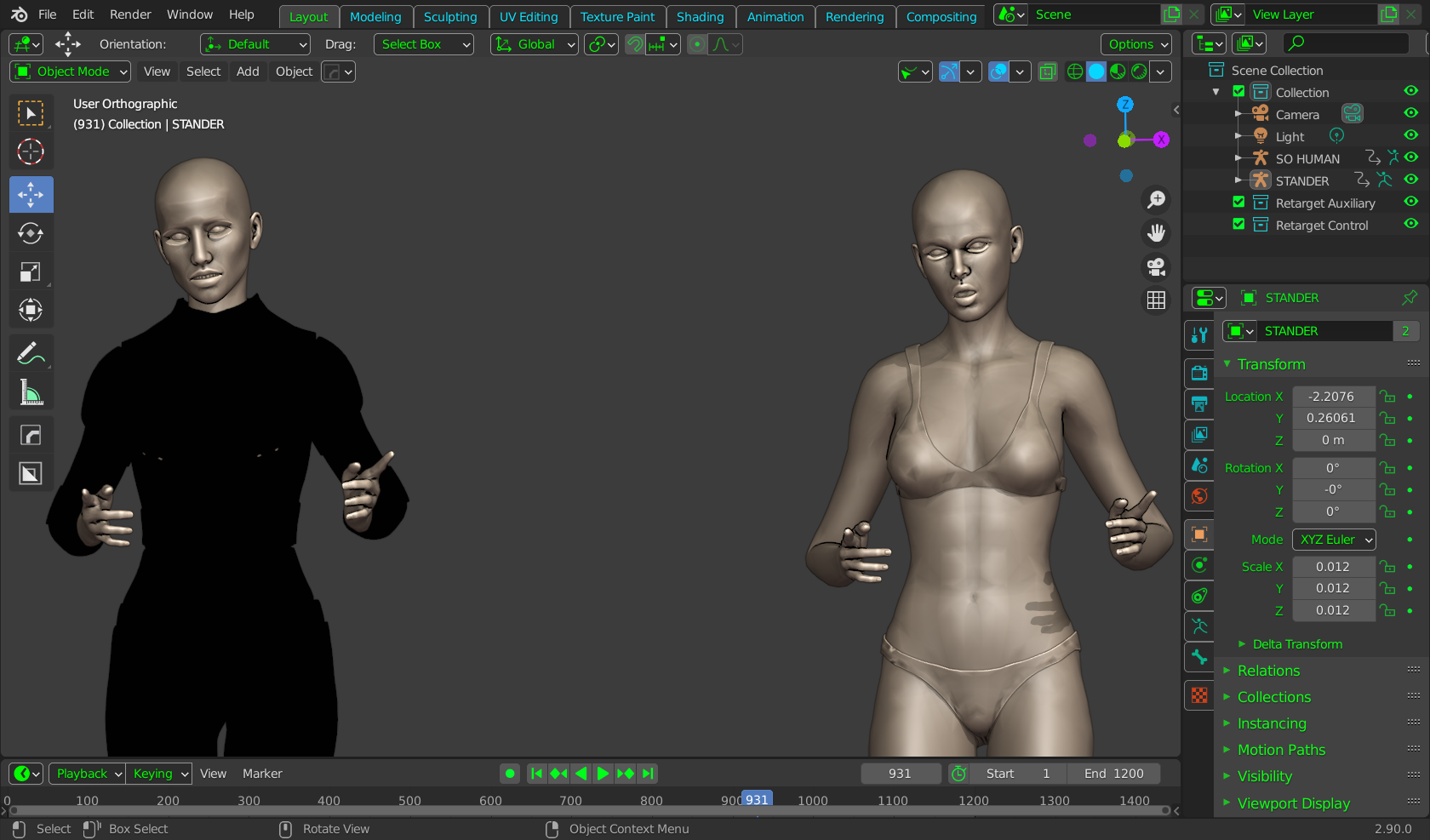
|
|
By TonyDPrime - 5 Years Ago
|
AutoDidact (9/8/2020)
Replacement of Facial animation via copy & paste inthe Blender dopesheet..CONFIRMED! now to sort out the missing root locomotion issues!
Wow, thank you for this! Did you just find this out or was this something that you had previously known but just attempted.
In any event, that saves everyone a ton of time! I hope this gives 4u2ges some options now. Will you be using this as well?
THX!
|
|
By 4u2ges - 5 Years Ago
|
Thanks for the effort AD! I will try it out later on.
But I think the Object Data Transfer is easier, at least for the materials and morphs part.
The bones animation is not getting transferred, but I remember I did it somehow in Blender 2.79 (and it worked at least for the pose).
I'll will try testing more later on tonight or tomorrow. But for now this very quick test with material and facial transfer.
Material is most important. If it's quick enough, it would be just character with new animation replacement instead of animation transfer.
|
|
By 4u2ges - 5 Years Ago
|
lol... Have to select Armatures of course for animations transfer (armatures have to be identical).
|
|
By 4u2ges - 5 Years Ago
|
OK it worked just fine.
Even if I delete the source later on, the target would keep replicated animation.
|
|
By AutoDidact - 5 Years Ago
|
|
Excellent !!! well that settles it then. The last major bottlneck in my new Iclone/CC3/ Blender pipeline is resolved And morph based facial animation can be transferred/replaced via copy and paste in the dope sheet . I feel like I am dreaming 😁 who would have thought there could be such a tight integration of /CC3 and a full 3DCC like Blender!!
|
|
By ckalan1 - 5 Years Ago
|
Hello,
Please explain the purpose of CC3 bone map and how it works.
I have been trying to figure out how to make CC3 rigs work in blender so I would tweek the animation without distorting the mesh.
Thanks,
Craig
|
|
By AutoDidact - 5 Years Ago
|
|
ckalan1 (9/9/2020)
Hello,
Please explain the purpose of CC3 bone map and how it works.
I have been trying to figure out how to make CC3 rigs work in blender so I would tweek the animation without distorting the mesh.
Thanks,
Craig
Hi if you insist on manipulating Character motion in Blender it is recommended that you Convert thier rigging to the native "Rigify" format for manaul animation in Blender I personally find it extremely unintuitive compared to Iclone and would much rather make my adjustments in Iclone and retarget the new motion via the Data transfer feature Demostrated by 4U2ges. 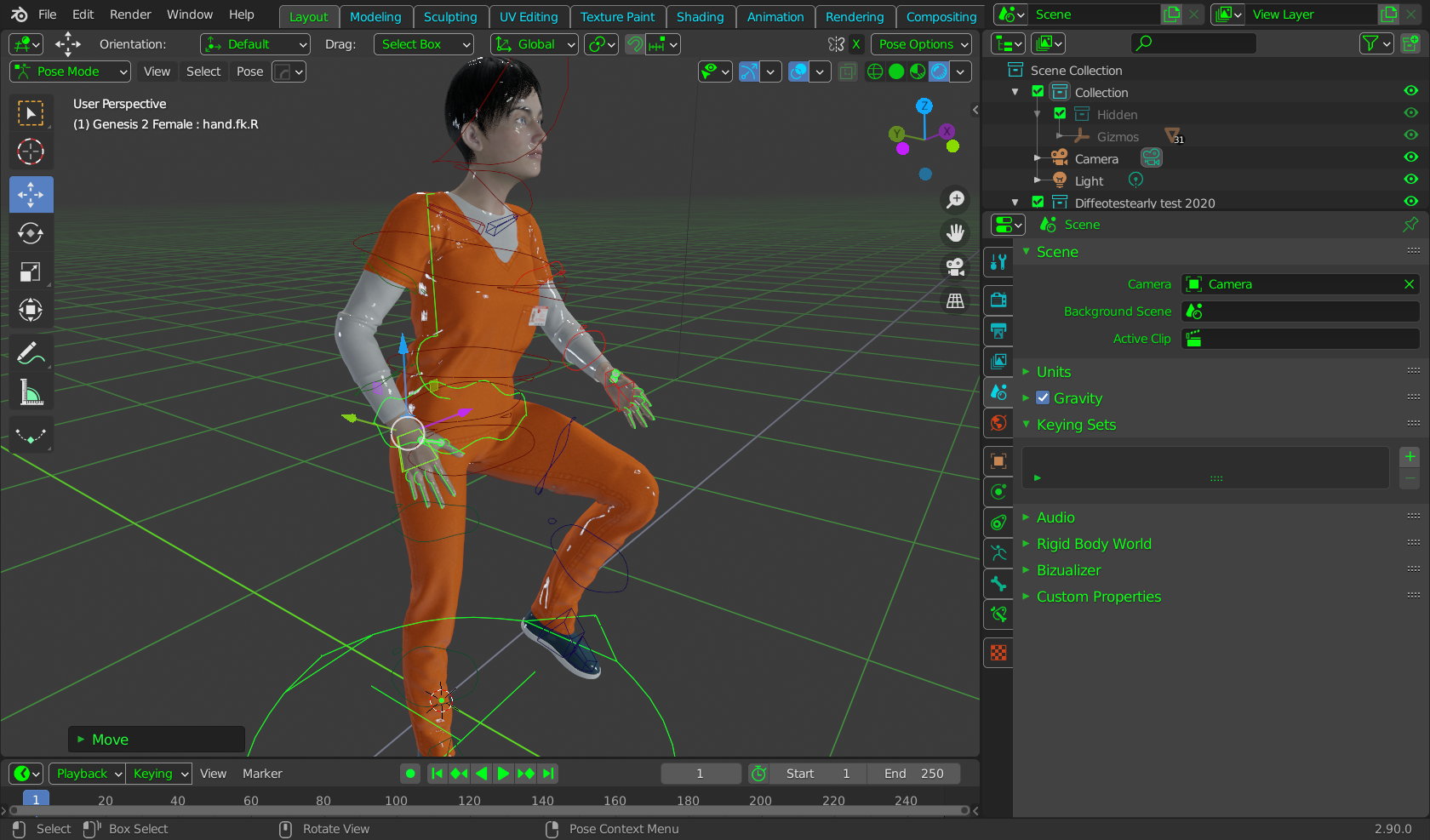
|
|
By 4u2ges - 5 Years Ago
|
+1
I tried Rigify once and I would not want any of it in my workflow :hehe:
|
|
By AutoDidact - 5 Years Ago
|
4u2ges (9/10/2020)
+1
I tried Rigify once and I would not want any of it in my workflow :hehe:
Indeed ,as I said earlier, this is one of the areas where the Blender devs seem to be stuck in the past. They seem to still beleive that Character animation should be done manually for the most part, but the trend today is clearly moving towards automated solutions BTW thanks again Sir!!! for sharing the info about animation Data transfer.👍 In all of my many desparate seaches for "retargeting character motion in Blender",I have never found any references to control+L and I consider myself a master of" Goggle-fu"😭
I even tried it with two Daz genesis figures exported as FBX ( one with animation)
from Daz studio and it worked. I tried to tell the Daz users about it in the new Blender forum on the Daz site but Daz quickly deleted my thread because I dared to mention that I use CC3 with Blender instead of their Character software.🙄 So glad RL lets us have adult discussions and share knowledge over here without a paranoid atmosphere about other software. 😌
|
|
By 4u2ges - 5 Years Ago
|
Sure thing AutoDidact.
I bump into this routine a while ago when I needed to transfer blend shapes from one object to another.
It was something of DAZ, where I had to import/export/modify it and all morphs were gone.
Eventually I was able to restore them this way and bring to iClone.
And yes, this is one area where I truly appreciate open mind of RL.
We can discuss anything and everything 3D.
Maybe because RL software is sort of unique on the market in its versatility.
OK, let me go rant a bit now in another thread :laugh:
|
|
By animagic - 5 Years Ago
|
I would thank you guys for your contributions and AD for starting this thread. :D
It has inspired me to FINALLY become serious about learning Blender. I've got a couple of Udemy courses (bought when they were on sale), so I'm studying...:unsure:
|
|
By jlittle - 5 Years Ago
|
A couple of good YT channels for Blender tuts, info, etc that I have found useful:
Blender Guru
Grant Abbitt
Josh Gambrell
CG Cookie
I also highly recommend the Hard Ops & Box Cutter add-on.
Jeff
|
|
By AutoDidact - 5 Years Ago
|
|
@Job I am pleased this thread has been helpful.😊 Blender (Post version 2.8 and up) has truly become a game changer for myself and many others. My migration to Blender in April from an ancient (11year old) version of Maxon C4D after finishing My movie ,has been seamless The Game dev company Ubisoft has adopted Blender as their main content creation tool and many major companies such as Microsoft and Epic games(of Unreal fame) have joined the Blender Foundation as Patron level supporters so its future development is secure. @Jlittle indeed, I have the Hard ops/boxcutter bundle which I imagine that I will be using alot more now that the character transfer aspect of my new pipeline is settled and I can move onto building My sets & Props for my HALO series.
|
|
By AutoDidact - 5 Years Ago
|
|
Hi this is just a quick follow-up on the matter of retargeting in Blender using CC3 Characters from CC3 pipeline.....it gets even BETTER!!!😃 Below is a copy & paste from a recent post over on the BlenderArtist forums >>>Quote<<<<< "This will only work if the rigs are exactly the same. Bone names etc all have to be exactly the same. Here are the steps (Blender 2.8 and 2.9): Open Blend file you want to copy the animation to. Go to File > Append. Navigate to the file you want to copy the animation from. Double click into the Action folder. Select the Action that is the name of the animation you want to copy. Then click Append. You’ll notice after clicking Append that the window closes and it appears nothing happened. Clarification on that is below. In the dropdown in the top left corner of the Dope Sheet select Action Editor. If you are in Object mode select the rig. If you are in Pose mode you don’t have to do anything. And proceed to the next step. After selecting Action Editor, to the right there will be a second dropdown. Open that and you’ll see the Actions listed there that is the animation you are wanting to copy. Select that and BAM! Your character should snap into position of the first frame of that animation. Note: after doing the above change Action Editor back to Dope Sheet to ensure you can see the keyframes copied." >>end quote<< What this mean is that we can create libraries of saved motions created with bare bones unmorphed base Avatars saved as.Blend files and import MULTIPLE MOTIONS into your current Blender project without even importing the other FBX figure!!! Your saved, named motions can be stored in the action editor to pick from them in a drop down list and apply them to any selected Avatar that is in pose mode in the scene. just as we pick from& apply different motion files in Iclone. As I noted earlier in the thread, Facial animation imports Blender as animated shape keys. these keys can be imported into &stored the action editor via the shape key editor as well I have been testing this since sunrise ths morning . This weekend ,I may try to record a Video tutorial on this process including more details on importing Audio based lipsync& Face puppet animation from Iclone with this method. Cheers
|
|
By 4u2ges - 5 Years Ago
|
That is nice! I guess my last question here https://forum.reallusion.com/FindPost457065.aspx is now answered :)
|
|
By AutoDidact - 5 Years Ago
|
You were definately on the right track.😁 I am beginning to see the true power & complexity of Blenders professional animation system for both large team collaborations as well as single operators like Myself.🤩 Sunday I will record a video detailing how you can send a BATCH of imotions with one figure export from CC3 Pipeline. Once you import that one single avatar every motion you attached during the export from CC3 will be stored in the Blender "Action editor" for you to pick from and apply instantly & at will to any CC3 rig in the scene after you have appended the actions from the saved .blend file with the imported CC3 Avatar Again this works for both body and Facial animation.... Stay tuned🤗
|
|
By Paul R. - 5 Years Ago
|
Hi everyone,
I don't come often on this forum but this thread is great.
I massively use Blender. And I massively use CC3/iClone with Blender.
Here is my latest project (with Headshot & Skingen):


And a short animation:
The 3 renders are performed with Blender, I don't use iClone render, I don't really like it. You can get more samples on my ArtStation account: https://www.artstation.com/rootbsd
If you are interested by my workflow or if you have questions, I would be happy to share my experience.
I also have a couple of Blender python scripts to help me...
P.
|
|
By AutoDidact - 5 Years Ago
|
|
Hi Welcome to the thread! nice cloth effects on the coat & neck tie.👍 I have nearly finished the complete tutorial on importing/storing & retargeting body and face motion data in the Blender action& Face key editor. I have decided to render some fully textured sample clips of the motions in the context of a full action scene/environment so the final video should be uploaded by Noon on Monday.
|
|
By Paul R. - 5 Years Ago
|
The clothes are created and animated with Marvelous Designer. I think it's the best tool when you want to deal with cloth physics.
I'm looking forward to see you video. Will you cover CC3 morphing inside Blender in Sculpt mode?
P.
|
|
By AutoDidact - 5 Years Ago
|
|
This particular video will focus on the transfer of motion data from Iclone to
Blender.
I am a former Daz content content developer who now makes my own
clothing for the CC3 bases and props& sets in Blender of course.
I have huge library of custom moprhed genesis 1-2 figures in Daz studio
that I have yet to convert using the transformer tool in CC3 pipeline so I
doubt I will ever do any custom sculpting on the CC3 bases anytime soon.
All of the outfits in this look dev compilation are my custom clothing outfits
for the CC3 bases and the space craft was modeled in Blender of course. https://youtu.be/ZBjH4J-dNXo
|
|
By Paul R. - 5 Years Ago
|
Awesome.
Maybe I'll do a short video about CC3 morphing creation with Blender and the multires modifie. And how to bake normal map based on the sculpt.
P.
|
|
By AutoDidact - 5 Years Ago
|
|
Here we are Gentlemen. A basic overview of importing Characters from CC3 to Blender 2.9 and Motion transfer to CC3 Characters previously imported to Blender
|
|
By Paul R. - 5 Years Ago
|
Great approach I don't really have the same than you. But with your way to do you have the capability to manage a dataset of actions. And I like it.
P.
|
|
By AutoDidact - 5 Years Ago
|
|
Thanks, it takes some time & knowledge of Blenders material nodes to get decent looking skin ,with SSS, on CC3 imported Avatars. With this pipeline I only have to do that work once for my imported Characters and can replace the animation as much as I want after that with new imports to the action editor Also IMHO it is worth your time to learn the Blenders curve editor for adjusting your figure animation in Blender as it is much more robust than the paid Iclone curved editor plugin and (unlike Iclone's native curve editor) Blender supports the CC3 facial animation data for optional editing in Blender.
|
|
By StyleMarshal - 5 Years Ago
|
Don't know if its true ...


|
|
By AutoDidact - 5 Years Ago
|
|
The engineers at NVIDIA are earning thier salaries it seems.😄
|
|
By AutoDidact - 5 Years Ago
|
My recent environment built in Blender
|
|
By AutoDidact - 5 Years Ago
|
A still with a CC3 Avatar. 
|
|
By AutoDidact - 5 Years Ago
|
What my next animated project will look like.

|
|
By mikahawkins - 5 Years Ago
|
|
So you didn't used unity at all? And how does your engine better than unity?
|
|
By animagic - 5 Years Ago
|
|
mikahawkins (10/10/2020)
So you didn't used unity at all? And how does your engine better than unity?
Working in Blender is more straightforward if you are used to a regular 3D application. So that is one advantage I see.
|
|
By AutoDidact - 5 Years Ago
|
mikahawkins (10/10/2020)
So you didn't used unity at all? And how does your engine better than unity?
Hi Like any render engine, Unity and UE4 are only as good as the content you import into them. I am a 3D content creator who uses Blender for 3D modeling. I do not buy stuff from content stores only to pay additional export fees etc, to use them. YMMV ,but in my particular case ,it makes ZERO sense for me to create a complex models/environments based on the Look dev/lighting/materials/cameras of the realtime EEVEE engine or the branched path tracing Cycles engine in Blender. and export them to Iclone & then over to a game engine to render and adapt/replace all of my materials to look correct in another engine. And since the Blender "Action editor" can import& store unlimited body& facial motion clips from CC3, using my Iclone animated actors in Blender is the better option for me.
|
|
By AutoDidact - 5 Years Ago
|
Another example of look of my current animation project with Iclone& Blender. 😊
|
|
By Paul R. - 5 Years Ago
|
Short animation of a CC3 character with Blender Eevee:
P.
|
|
By AutoDidact - 5 Years Ago
|
|
Very nice! 👍
|
|
By Procrastinator - 5 Years Ago
|
|
Paul R. (10/30/2020)
Short animation of a CC3 character with Blender Eevee:
P.
nice! how much time do you used for rendering this video using Eevee?
|
|
By AutoDidact - 5 Years Ago
|
EEVEE outdoor lighting options
|