|
By Illustrator Cathy - 14 Years Ago
|
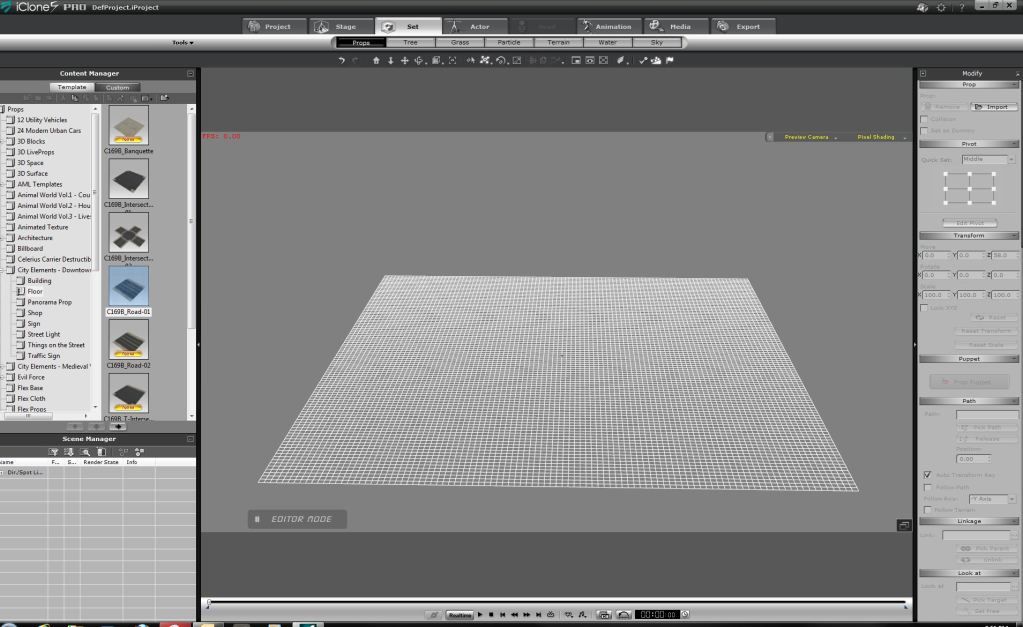
Here is a question I have never asked before. Does the iClone World end with the end of the grid? So if I wanted to build a really, really large scene - would I have to keep it in the grid? (and scale my content down)
This is something I have always wondered about. Appreciate any answers you have.
Cathy :hehe:
|
|
By animatom - 14 Years Ago
|
Of course that world does not end with the end of the grid.
Grid is just orientation helper.
|
|
By colour - 14 Years Ago
|
|
The Grid is always there, with the option of having it visible/invisible. Creating a big Scene is a combination of Grid size & spacing & different Camera angles. But you need to have all Props on the Grid. Otherwise it would be impossible to place them correctly in their relative positions. If you set the Grid at the bottom of the Viewport, with a combination of Orbit & Zoom (Like my Screenshot to be added) in Preview Camera, temporarily selecting that as Camera 1 & then Locking it, you can gradually build-up your Scene in Preview Camera Mode, switching between Camera 1 to check/re-check the desired result. I've Selected 200 for Grid Size & Spacing. The Preview Camera Angle saved as Camera 1, is pretty good for most Scene setting. To test; Drop the Deckhouse Prop with Snap To Grid Selected & any Character, into the Scene. Scaling-down 3D Scenes, Terrains & building Props to 50%, would reduce the overall size. However all other non-building Props Characters would need to be Scaled-down by whatever % you use for Buildings. A complete Medieval Village from the Medieval Village pack would be a good example. The best Tutorial I've seen & learned by heart & now do without thinking about it, is Stuckon3D's paid-for Introduction to iClone4 Class, where he lays-out some of the Props from the Suburbs in Winter Pack. You need to scroll through the Video to approx the last 30 minutes, maybe longer. Ther'e shorter Free 3 separate Tuts of his, where he builds a castle. Part 1 Free intriduction Cless to iClone4 has the Grid, I think. 2nd 1 is in the Wiki. 1st, possibly not, since it's not free. 
|
|
By RB3006 - 14 Years Ago
|
|
You must only take a prop and move it over the end of the grip ...:w00t:
|
|
By moviemaker100 - 14 Years Ago
|
@Anim8torCathy
Only a small hint:
Before you think of mega worlds, better be aware of the fact, that ic has a mega problem with masses of avatars and so on.
20 "polyfat" daz-avatars and about 20 moving props like avatars makes working with ic for me impossible.
On other machines, ic will only crash with that much content inside.
Ic likes even to crash, if other user put in only 20 "normal-poly" avatars.
So: For sure, you can make mega worlds in ic. There is only the question, if you can work with an extremly slow ic or "handle" the crashes of ic......
|
|
By rampart - 14 Years Ago
|
|
So is this what you are saying? Clipping planes and depth of field adjustment are meaningless, if you create a prop or something beyong those distances? The iclone will render it, even when it cannot be seen. So the trick is to be extremely careful and not create anything you don't need where you need it? There is no way the application does away with anything entered anywhere in the project unless you delete it. The program would render into infinity if you poke something into the project far beyond seeing it. There is no pre-set cutoff distance for the program accepting or rendering any object in a project. This is the way I am understanding this. This is not argument or complaint. If this or part of it is wrong, please correct it. Thanks
|
|
By Illustrator Cathy - 14 Years Ago
|
|
Thank you guys! This has been really helpful. Cathy :hehe:
|
|
By animatom - 14 Years Ago
|
swoooooooooooooooooooooooooooooooooop, I think that clipping-planes provides exactly that; with two parameters, near and far, you define the render-able range of a camera.
This is one sentence from iClone help: "It is highly recommended to decrease this value (of clipping distance) if your scene is not so wide since increasing the Far value can also increase the load of the system."
If it's effect loading of the system, it probably effect render time also.
As I said, I think.
|
|
By colour - 14 Years Ago
|
|
1) If the camera doesn't see it, don't include it. 2) If the Camera does see it & your Timeline is overloaded, select another Camera Angle where ut isn't seen & Delete it. I have a curent problem with Crowd Peeps in a Grandstand. 500Mb so-far with Grandstand a 10th full. iClone can't handle them together with the other Props, Avatars, etc., so i've got tricky foot-work to do with a limited number of Peeps & Camera Angles, giving the impresssion that the Grandstand is full-up. See Screenshot, but with Peeps now Deleted. (to be added). 
|
|
By Emerald Animation (formerly reelcheapfilms) - 14 Years Ago
|
I have experimented with finding the size of the IClone world. At normal size, where a male avatar is about 1.8 meters tall, then the camera can see about a kilometer in any direction. Of course, you can scale down your avatars, props, etc. accordingly and thereby increase the apparent size of the world.
The other comments you've read are accurate -- beyond a certain distance, it's best to use panoramic props. Or better, if your camera won't be moving much during a shot, you might try rendering your background first as an image, then use a billboard with the image when you shoot the foreground action, similar to a matte painting in real life. This approach will be less successful and will need some modification if the camera is going to move during the shot, due to the effects of parallax.
|
|
By twilit.tera - 14 Years Ago
|
Hmm.
Colour, I have a similar scene to the one you describe in a future film. I was thinking of rendering out a pop video (if I've got my terms correct) of about 8 or ten people at a time, maybe a few different configurations, then filling my stands with the 2d crowds. They're going to be in the background, and It's possible I could use depth of focus to make them even less distinct, if the 2d effect is less than acceptable.
Is there a particular reason why I would not want to use this technique? (I bow to your superior knowledge) ;)
|
|
By Emerald Animation (formerly reelcheapfilms) - 14 Years Ago
|
Actually, tera, popVideo is the best way to go to make crowds, especially if they are going to be in the background and your camera isn't going to be moving much, because of the parallax problem is discussed above.
And you are right that you want multiple configurations of your crowd -- mix up the placement of the avatars, the colors of their clothes, and their movement. You also need to make sure the end position of each avatar exactly matches the beginning position, otherwise when the popVideo loops back to the beginning there will be a noticeable jump.
Last year I had started on a tutorial showing how to create crowds using popVideo and discussing all these pitfalls, but never got around to finishing it. Looks like I need to dust off my footage and try again.
|
|
By martok2112 - 14 Years Ago
|
Heh heh....there have been times, when working with my "avatar-scaled" ships (like the Galactica...herself, about a 2km long starship) where parts of the ship would disappear in the background, as if actually going beyond the boundaries of the iClone "world", so any shots I do with a "life-sized" battlestar, or similar ship, would have to be done fairly closely.
Thankfully, that's why I've made several scale versions of such ships. :)
|
|
By moviemaker100 - 14 Years Ago
|
|
reelcheapfilms (9/14/2012)
Actually, tera, popVideo is the best way to go to make crowds, ..Partly.
Recently I saw a good movie with a "crowd" of riders out of popvid.
No good.
There was no doubt that they were just 2d.
For ME that was quite disturbing.
Popvideo is very limited. You are only "allowed" to have it as 2d animated background.
No, IMHO take props that look like avatars or really avatars and shrink textures in 3dx down to 256x256.
Or take low poly avatars from f.e. games or any other models. There are around a lot, on the 3d sites.
And of course - use the 4gb patch to get more memory for iClone.
|
|
By Popeye - 14 Years Ago
|
|
Two of best solutions I have seen so far are these Warlord https://forum.reallusion.com/Topic125810-37-1.aspx?Highlight=crowd Bigboss https://forum.reallusion.com/Topic132979-37-1.aspx?Highlight=crowd Both Warlord and Bigboss have did work in this area. Well worth a look. Good stuff!!
|
|
By moviemaker100 - 14 Years Ago
|
@Popeye
As I told. Use lowpoly props (game avatars and props are lowpoly, too) with 256x256 textures that look like avatars.
That´s what bigbos has done.
The solution of warlord is very limited. Only good for shoots very far away.
But both is better than the extremly milited pop-video, for sure. ;)
|
|
By rampart - 14 Years Ago
|
|
What about this one... it is on sale right now half off. http://www.reallusion.com/ContentStore/csproduct.aspx?contentid=g2cCitizenExtras No seriously, I'm interested to read what you think about it. I am looking for a decent render - on some avatars I can motion that are graphic efficient.
|
|
By animagic - 14 Years Ago
|
|
It's very easy to find the end of iClone's world. Try entering the maximum values for the X and Y offset, I believe it's limited to +/-99,999. As these are centimeters, you are limited to 4 square kilometers. From a game perspective, that's a small world, isn't it?
|
|
By Illustrator Cathy - 14 Years Ago
|
As far as I'm concerned it ends with the grid.
Cathy :hehe:

|
|
By animagic - 14 Years Ago
|
|
Anim8torCathy (9/15/2012)
As far as I'm concerned it ends with the grid.
Cathy :hehe:But what if you switch off the grid... or are off the grid? :P
|
|
By Illustrator Cathy - 14 Years Ago
|
Oh honey! I've been OFF THE GRID all my life! :w00t:
Cathy :hehe:
|