|
Author
|
Message
|
|
mark
|
|
|
Group: Forum Members
Last Active: 2 Years Ago
Posts: 4.9K,
Visits: 16.7K
|
This was the age old "Particle-Opacity" problem, I think, when I first started playing with iClone many years ago. I never found a solution then but maybe there is one now? I have positioned the Popcorn "smoke effect" directly in front of the avatar's face ( at some point I want him to blow a puff of smoke). No matter the camera angle it always looks like the smoke is coming from behind the avatar. For me it was the old "particle-opacity-issue". I guess I can render an Alpha pass (.png sequence) of just the smoke and composite in post but still wondering if there is something I'm doing wrong and maybe there is a way to get the smoke "in front" of my avatar by adjusting a render/display setting?

Click here to go to my YouTube Channel filled with iClone Tutes and Silly Stuff
Visit ANIMATED PROJECTIONS Powered by iCLONE
Intel Core i7 3960X @ 3300MHz Overclocked to 4999.7 MHz Sandy Bridge 24.0GB DDR3 @ 833MHz Graphic Display HP ZR30w
GeForce GTX 980Ti 6GB Microsoft Windows 7 Professional 64-bit SP1 ASUSTeK COMPUTER INC. P9X79 WS (LGA2011)
|
|
|
|
|
4u2ges
|
4u2ges
Posted 2 Years Ago
|
|
Group: Forum Members
Last Active: Last Month
Posts: 5.3K,
Visits: 16.8K
|
It might be the same source of the problem we had with FX intersection with objects having opacity less than 100, but it's a bit different. For whatever reason FX which is close (a couple of inches) to any object, looses its Emit Brightness. This is regardless of the object opacity, scene lights or any other FX settings. If you move the FX far enough from the object it would restore its original brightness being in front of it. I did not find any solution to this behavior (other than boosting Emit Brightness, which results in overly bright FX outside of the intersected area at the viewport). As you said, the best would be to render the FX separately and compose in NLE.
|
|
|
|
|
K_Digital
|
K_Digital
Posted 2 Years Ago
|
|
Group: Forum Members
Last Active: Last Year
Posts: 327,
Visits: 1.4K
|
This must be an effect specific bug . "Small Smoke" doesnt show this behave but i am not shure if this can be used for your purpose. EDIT: I put a Note on the Tracker , https://www.reallusion.com/FeedBackTracker/Issue/Several-Fx-Effects-not-rendering-properly-in-place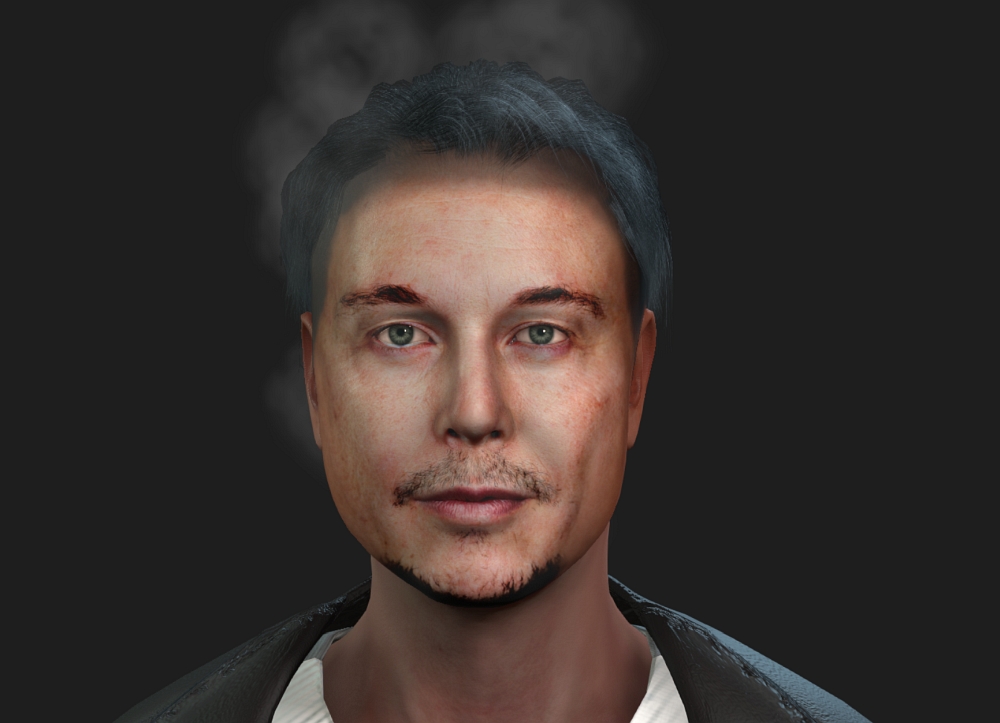 Edit 2: One hour later on anew session this did not happen (Dry Ice and Cigarette Smoke) , wierd ! 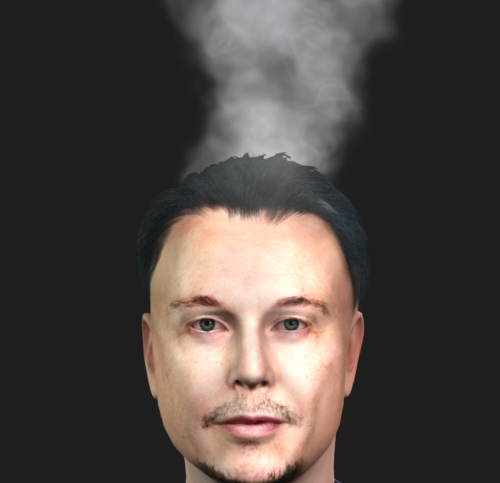
|
|
|
|
|
mark
|
|
|
Group: Forum Members
Last Active: 2 Years Ago
Posts: 4.9K,
Visits: 16.7K
|
Thanks all for checking. Looks like it's just one of those things we have to deal with...as I say, I noticed this with the old Legacy particles years ago. Well, we got "Mirrors" so maybe there's still hope :P
What the hey, a little compositing never hurt anyone:D
Click here to go to my YouTube Channel filled with iClone Tutes and Silly Stuff
Visit ANIMATED PROJECTIONS Powered by iCLONE
Intel Core i7 3960X @ 3300MHz Overclocked to 4999.7 MHz Sandy Bridge 24.0GB DDR3 @ 833MHz Graphic Display HP ZR30w
GeForce GTX 980Ti 6GB Microsoft Windows 7 Professional 64-bit SP1 ASUSTeK COMPUTER INC. P9X79 WS (LGA2011)
|
|
|
|
|
BiggsTrek
|
BiggsTrek
Posted 2 Years Ago
|
|
Group: Forum Members
Last Active: 6 Months Ago
Posts: 950,
Visits: 12.3K
|
Did you try adjusting the Popcorn Particle's Soft Distance? I changed the setting from default (1.00) to 0.00 and the smoke came into the foreground for me.

https://marketplace.reallusion.com/iclone/author/biggstrek
|
|
|
|
|
4u2ges
|
4u2ges
Posted 2 Years Ago
|
|
Group: Forum Members
Last Active: Last Month
Posts: 5.3K,
Visits: 16.8K
|
Did you try adjusting the Popcorn Particle's Soft DistanceSoft Distance? I changed the setting from default (1.00) to 0.00 and the smoke came into the foreground for me.
Great! I thought I did try it yesterday, but I guess I did not slide it all the way to 0 and quickly gave up :Whistling:
|
|
|
|
|
BiggsTrek
|
BiggsTrek
Posted 2 Years Ago
|
|
Group: Forum Members
Last Active: 6 Months Ago
Posts: 950,
Visits: 12.3K
|
Here's a quick comparison picture for those that might also need to know. The only difference between the two shots is the Soft Distance slider ( 1.00 on the left and 0.00 on the right). Pretty much does the same with Legacy Particles, too. 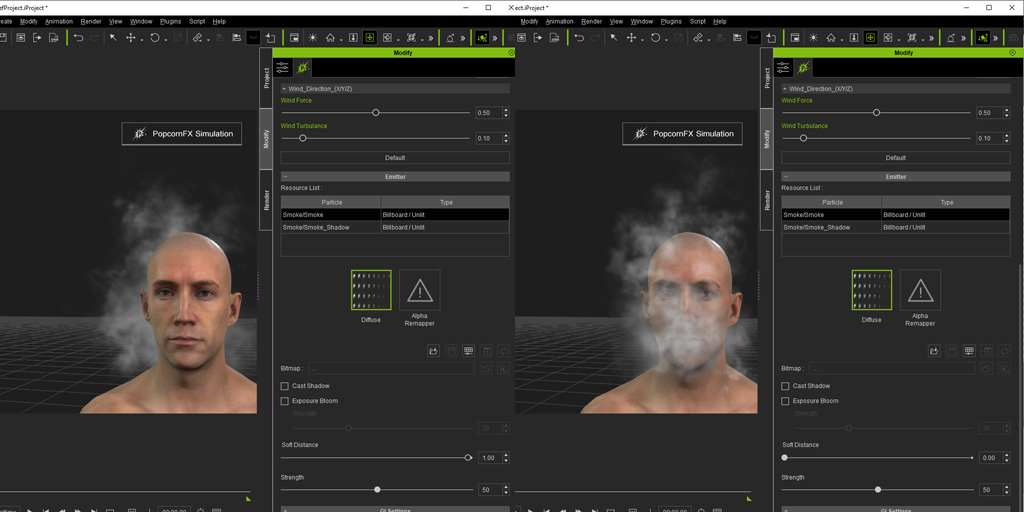
https://marketplace.reallusion.com/iclone/author/biggstrek
|
|
|
|
|
mark
|
|
|
Group: Forum Members
Last Active: 2 Years Ago
Posts: 4.9K,
Visits: 16.7K
|
Well leave it to the "old-pro"... great suggestion Biggs!!! But.... when I first tried that suggestion there was no difference.
I then noticed in your reference image that the "Emitter Resource List" was showing the "Emitter/Additive_32" highlighted in the Particle-Type List.
On my computer the "Emitter/Additive_1" was highlighted ( and always had been). I clicked on " Emitter/Additive_32" to highlight it and then everything started worked!!!! I re-clicked to highlight "Emitter/Additive_1" again and it still was working fine.
So weird... but I've grown to accept that through the years...and now that I think about it I needed to have the correct "Emitter" map selected...duh!!!:crying:
Thanks for the advice! :D
Click here to go to my YouTube Channel filled with iClone Tutes and Silly Stuff
Visit ANIMATED PROJECTIONS Powered by iCLONE
Intel Core i7 3960X @ 3300MHz Overclocked to 4999.7 MHz Sandy Bridge 24.0GB DDR3 @ 833MHz Graphic Display HP ZR30w
GeForce GTX 980Ti 6GB Microsoft Windows 7 Professional 64-bit SP1 ASUSTeK COMPUTER INC. P9X79 WS (LGA2011)
|
|
|
|
|
BiggsTrek
|
BiggsTrek
Posted 2 Years Ago
|
|
Group: Forum Members
Last Active: 6 Months Ago
Posts: 950,
Visits: 12.3K
|
mark (8/7/2024)
Well leave it to the "old-pro"... great suggestion Biggs!!! But.... when I first tried that suggestion there was no difference.
I then noticed in your reference image that the "Emitter Resource List" was showing the "Emitter/Additive_32" highlighted in the Particle-Type List.
On my computer the "Emitter/Additive_1" was highlighted ( and always had been). I clicked on " Emitter/Additive_32" to highlight it and then everything started worked!!!! I re-clicked to highlight "Emitter/Additive_1" again and it still was working fine.
So weird... but I've grown to accept that through the years...and now that I think about it I needed to have the correct "Emitter" map selected...duh!!!:crying:
Thanks for the advice! :D
Back in my programmer days, I'd have said that sounds like an "uninitialized variable", but what do I know? Very glad you got it to work, Mark. :) (From one "old pro" to another... lol)
https://marketplace.reallusion.com/iclone/author/biggstrek
|
|
|
|
|
K_Digital
|
K_Digital
Posted 2 Years Ago
|
|
Group: Forum Members
Last Active: Last Year
Posts: 327,
Visits: 1.4K
|
Today i messed with a few other effects, it looks like Soft Distance must be always set to 0, otherwise the (example fog or fire)
can bee seen only behind a mesh. Makes absolutely sense to me. Now because there are only 2 values it doesnt matter
if its set to 0 or 1 by default really. We just have to know what the slider does.
|
|
|
|