|
Author
|
Message
|
|
mark
|
|
|
Group: Forum Members
Last Active: 2 Years Ago
Posts: 4.9K,
Visits: 16.7K
|
Good thought...I'll check if that can get me started...thanks! ;)
And, of course, come to find out I had already copied them to my iC8 Custom folder awhile back when I copied a bunch of stuff from my iC7 Template folder that wasn't showing up correctly...still want it to install in the Default of course!

Click here to go to my YouTube Channel filled with iClone Tutes and Silly Stuff
Visit ANIMATED PROJECTIONS Powered by iCLONE
Intel Core i7 3960X @ 3300MHz Overclocked to 4999.7 MHz Sandy Bridge 24.0GB DDR3 @ 833MHz Graphic Display HP ZR30w
GeForce GTX 980Ti 6GB Microsoft Windows 7 Professional 64-bit SP1 ASUSTeK COMPUTER INC. P9X79 WS (LGA2011)
|
|
|
|
|
wires
|
|
|
Group: Forum Members
Last Active: 3 Months Ago
Posts: 5.7K,
Visits: 26.5K
|
There is a way to get them in iClone 8 if you already have them installed in iClone 7. Open Windows Explorer and in your iClone 7 Template folder look for the "Particle" folder. Open it and simply copy the 3 PopcornFX folders. In your iClone 8 Reallusion Custom folder go to Set > Particle and paste the 3 folders there. When you open iClone 8 the Content Manager will update your Custom content and you can use the PopcornFX assets. This workaround will get you started until Support can sort the issue out and you can get the items installed correctly in the default folders.
Gerry
System: Win 10 Pro (21H2), Asus X99-E WS, CPU i7-5930K -3,5 GHz, 32 GB DDR4 2666-16 RAM, NVidia GTX 1080 Ti GPU - 11 GB VRAM(Driver Studio-536.99), Samsung 850 Pro 512 GB SSD, 6 TB HD storage.
|
|
|
|
|
mark
|
|
|
Group: Forum Members
Last Active: 2 Years Ago
Posts: 4.9K,
Visits: 16.7K
|
Thanks Gerry. You know I'm pretty dense but I "think" that's what I've done..the license-key on the redeem page is the key I registered in my account for PopcornFX 8. In the Hub I have the option to install "PopcornFX plugin for iClone 8" which is what I have done. In the Content Manager I have gone through all the "not installed packs", synced and refreshed many times and it is simply not there...the only thing installed is what you saw in the pics I included in the previous post. This is weird for sure! Now one strange thing... if I download the PopcornFX iC8 pack from my account page the way we used to do it and click on the "Installcontent.rlcontent" utility, the requestor will only let me install in my old iC7 version of iClone, iC8 is not an option.... this is weird I think! May have to do a Ticket with Support on this one....
Click here to go to my YouTube Channel filled with iClone Tutes and Silly Stuff
Visit ANIMATED PROJECTIONS Powered by iCLONE
Intel Core i7 3960X @ 3300MHz Overclocked to 4999.7 MHz Sandy Bridge 24.0GB DDR3 @ 833MHz Graphic Display HP ZR30w
GeForce GTX 980Ti 6GB Microsoft Windows 7 Professional 64-bit SP1 ASUSTeK COMPUTER INC. P9X79 WS (LGA2011)
|
|
|
|
|
wires
|
|
|
Group: Forum Members
Last Active: 3 Months Ago
Posts: 5.7K,
Visits: 26.5K
|
@Mark, Make sure that you've redeemed the updated packs downloads for iClone 8 and then select Pack > Not Installed in the content manager, next click on Refresh and the 3 packs should not show in the content manager with B&W thumbnails and green "cloud" icons. Either double click on each, or right click and select "Install Content". If that doesn't work try using Pack > All and then refresh. Here's the link to redeem updated packs in case you don't have it. The 3 thumbnails to look for are shown below:  Gerry
Gerry
System: Win 10 Pro (21H2), Asus X99-E WS, CPU i7-5930K -3,5 GHz, 32 GB DDR4 2666-16 RAM, NVidia GTX 1080 Ti GPU - 11 GB VRAM(Driver Studio-536.99), Samsung 850 Pro 512 GB SSD, 6 TB HD storage.
|
|
|
|
|
mark
|
|
|
Group: Forum Members
Last Active: 2 Years Ago
Posts: 4.9K,
Visits: 16.7K
|
Just getting around to installing Popcorn 8 and I'm having a similar but different issue with iC8 and Popcorn FX 8. Installed through the Hub after registering but I'm not seeing the Popcorn FX Library 40 or Popcorn FX Super Tools in my Content directory. When I open the Popcorn FX folder that I do have there are some image maps! Any ideas? 
Click here to go to my YouTube Channel filled with iClone Tutes and Silly Stuff
Visit ANIMATED PROJECTIONS Powered by iCLONE
Intel Core i7 3960X @ 3300MHz Overclocked to 4999.7 MHz Sandy Bridge 24.0GB DDR3 @ 833MHz Graphic Display HP ZR30w
GeForce GTX 980Ti 6GB Microsoft Windows 7 Professional 64-bit SP1 ASUSTeK COMPUTER INC. P9X79 WS (LGA2011)
|
|
|
|
|
aplas
|
|
|
Group: Forum Members
Last Active: Last Month
Posts: 3,
Visits: 250
|
Thank you that worked.
|
|
|
|
|
wires
|
|
|
Group: Forum Members
Last Active: 3 Months Ago
Posts: 5.7K,
Visits: 26.5K
|
In the Content Manager select Template > Pack and then double click on the thumbnail for the tools. You can also right click on the thumbnail and select "Install Content" 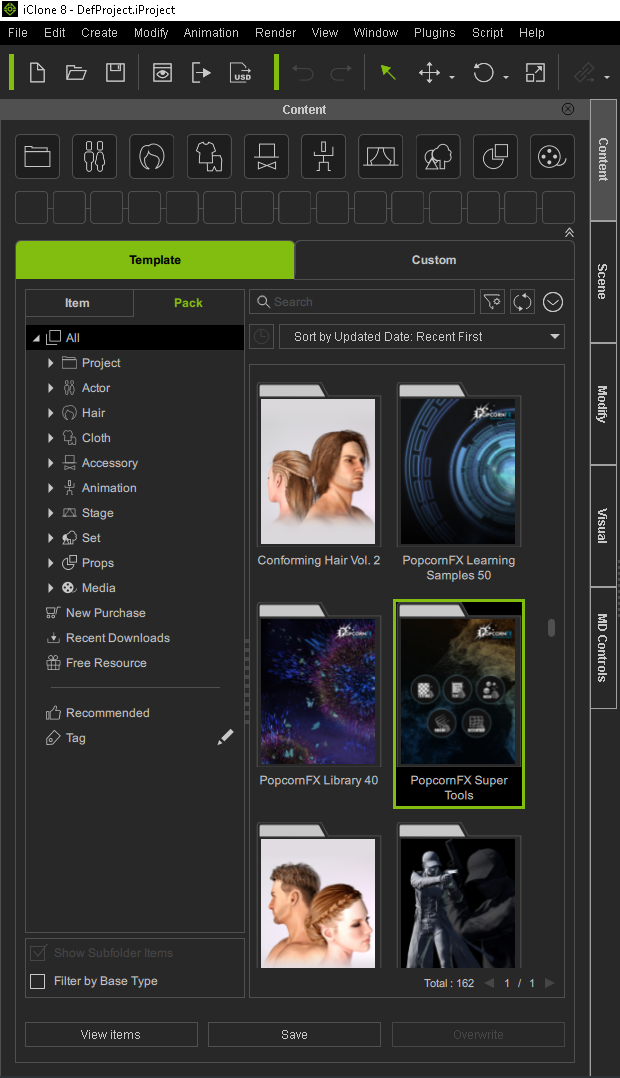 Gerry
Gerry
System: Win 10 Pro (21H2), Asus X99-E WS, CPU i7-5930K -3,5 GHz, 32 GB DDR4 2666-16 RAM, NVidia GTX 1080 Ti GPU - 11 GB VRAM(Driver Studio-536.99), Samsung 850 Pro 512 GB SSD, 6 TB HD storage.
|
|
|
|
|
aplas
|
|
|
Group: Forum Members
Last Active: Last Month
Posts: 3,
Visits: 250
|
Hello All, I bought the plugin PopcornFX for Iclone 8 and the Super Tools which came with it, but when i go to the Super Tools folder the tool icons say "Get It " and takes you to a web page to buy.  It shows its installed on the New Purchase folder. It shows its installed on the New Purchase folder.
How can i activate the Super Tools in Iclone 8
thanks
|
|
|
|
|
helielfilmz
|
helielfilmz
Posted 4 Years Ago
|
|
Group: Forum Members
Last Active: 2 Years Ago
Posts: 55,
Visits: 383
|
jeffkirkland (6/9/2022)
helielfilmz (6/9/2022)
How can i get popcornfx for Iclone 7 i don't have 8 yet and was going to buy it but the link for it is gone why?As I understand it, all iClone 7 specific add-ons ceased to be available for purchase when iClone 8 was released. If you get in touch with RL sales, they might be able to help you out but otherwise you've left it too late. Where can i get in touch with sales?
What you know today will be obsolete tomorrow
|
|
|
|
|
4u2ges
|
4u2ges
Posted 4 Years Ago
|
|
Group: Forum Members
Last Active: Last Week
Posts: 5.3K,
Visits: 16.8K
|
|
|
|
|