Profile Picture

Eporting CC3+ Character to Unity3D

Posted By martinortiz 5 Years Ago
You don't have permission to rate!
Author
Message
martinortiz
martinortiz
Posted 5 Years Ago
View Quick Profile
Senior Member

Senior Member (472 reputation)Senior Member (472 reputation)Senior Member (472 reputation)Senior Member (472 reputation)Senior Member (472 reputation)Senior Member (472 reputation)Senior Member (472 reputation)Senior Member (472 reputation)Senior Member (472 reputation)

Group: Forum Members
Last Active: Last Year
Posts: 26, Visits: 123
There was a general guide with tweaks that somebody posted, I don't remember if this was for CC3+ character or not.
I tried searching and couldn't find it....is there one?
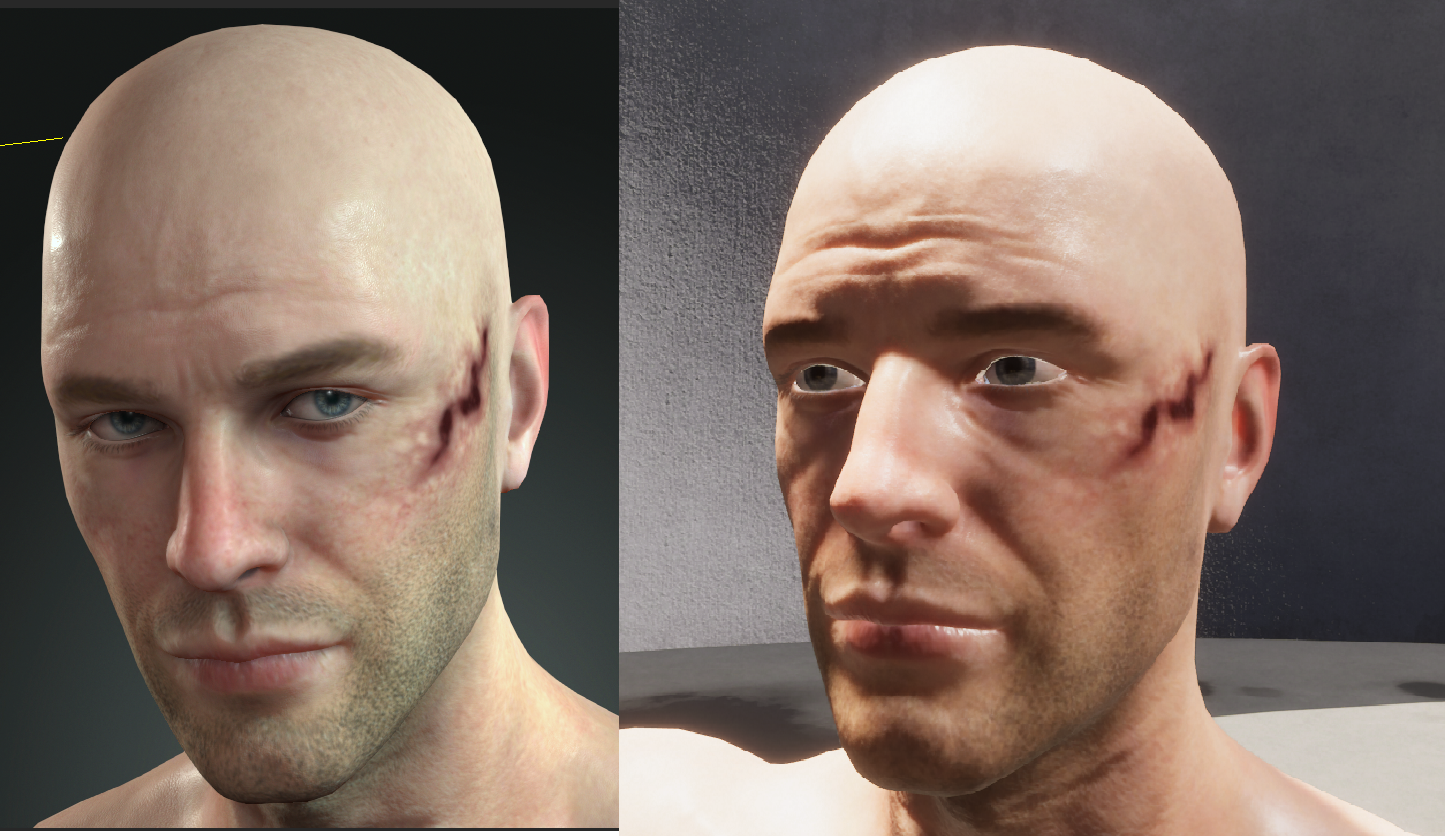
https://forum.reallusion.com/uploads/images/35eba205-1145-4a23-84fe-3578.png

On the left is a CC3+ character, I used SkinGen and added a scar. That was it (and some pants).
On the right is the imported character using the latest AutoSetup script, and using Unity3D 2021.1. in a HDRP project.
I am using the prefab generated by autosetup script and NOT the fbx file (my original mistake)
https://github.com/reallusion/Auto-Setup-for-Unity

While the results are good, I am trying to get it to look as close to what it looks like in CC3.
So that is my first question...
How close to the look in CC3 can our exporterd/imported character get?
Can this be achieved? Can we get it to look like what it looks like in CC3 in Unity3D(HDRP project)?


martinortiz
martinortiz
Posted 5 Years Ago
View Quick Profile
Senior Member

Senior Member (472 reputation)Senior Member (472 reputation)Senior Member (472 reputation)Senior Member (472 reputation)Senior Member (472 reputation)Senior Member (472 reputation)Senior Member (472 reputation)Senior Member (472 reputation)Senior Member (472 reputation)

Group: Forum Members
Last Active: Last Year
Posts: 26, Visits: 123
One thing I want to do to get it to look the same....
Is to export the lighting and the cameras out of CC3 and import those into Unity3D.
Is there a way to export the lights and lighting and the cameras out of CC3 and then import them into Unity3D?

As you can see from previous post, the big difference is in the eyes....
Also I the the eye brows and eye lashes are not right.
The skin looks reasonably good, I will have to double check the materials.
martinortiz
martinortiz
Posted 5 Years Ago
View Quick Profile
Senior Member

Senior Member (472 reputation)Senior Member (472 reputation)Senior Member (472 reputation)Senior Member (472 reputation)Senior Member (472 reputation)Senior Member (472 reputation)Senior Member (472 reputation)Senior Member (472 reputation)Senior Member (472 reputation)

Group: Forum Members
Last Active: Last Year
Posts: 26, Visits: 123
I think this was the guide I saw a while back.....
https://forum.reallusion.com/418332/CC3-to-Unity-Scyras-Exotic-Tricks-and-Traps
martinortiz
martinortiz
Posted 5 Years Ago
View Quick Profile
Senior Member

Senior Member (472 reputation)Senior Member (472 reputation)Senior Member (472 reputation)Senior Member (472 reputation)Senior Member (472 reputation)Senior Member (472 reputation)Senior Member (472 reputation)Senior Member (472 reputation)Senior Member (472 reputation)

Group: Forum Members
Last Active: Last Year
Posts: 26, Visits: 123
OK, I improved the eyelashes....

The material was set to transparent, I set it to opaque.
Then enabled Alpha Clipping
And adjusted the Threshold.

https://forum.reallusion.com/uploads/images/3d38a3df-8d41-425d-8d56-e3cb.png
martinortiz
martinortiz
Posted 5 Years Ago
View Quick Profile
Senior Member

Senior Member (472 reputation)Senior Member (472 reputation)Senior Member (472 reputation)Senior Member (472 reputation)Senior Member (472 reputation)Senior Member (472 reputation)Senior Member (472 reputation)Senior Member (472 reputation)Senior Member (472 reputation)

Group: Forum Members
Last Active: Last Year
Posts: 26, Visits: 123
I restarted with an empty HDRP scene..
Just had two white lights, one directional light, and one point light.
I also changed the main camera's FOV to 26.99.
This made a huge difference in the look.....not sure if there was anything "wrong" with the standard HDRP setup with all the HD lighting etc....

https://forum.reallusion.com/uploads/images/fa4b260e-ea1b-4842-852b-3ec2.png


https://forum.reallusion.com/uploads/images/2ca6ee96-33d5-448a-99db-83db.png
Victor.Soupday
Victor.Soupday
Posted 5 Years Ago
View Quick Profile
Distinguished Member

Distinguished Member (5.8K reputation)Distinguished Member (5.8K reputation)Distinguished Member (5.8K reputation)Distinguished Member (5.8K reputation)Distinguished Member (5.8K reputation)Distinguished Member (5.8K reputation)Distinguished Member (5.8K reputation)Distinguished Member (5.8K reputation)Distinguished Member (5.8K reputation)

Group: Forum Members
Last Active: 2 Months Ago
Posts: 569, Visits: 9.0K
I never could replicate those lights properly. The spot lights and area lights in Unity behave quite differently than the ones in CC3, then there's the limitation that only one directional light can cast shadows in Unity and HDRI filling out the ambient lighting in the scene in CC3, it's next to impossible to get an exact match.

Here's similar(ish) lighting:
https://forum.reallusion.com/uploads/images/4d80e8af-180f-4362-9115-fdf5.jpg

HDRP lighting can be really sensitive, it seems like there is only a very small range when the lights go from far too dark to far too bright, and it's all heavily dependant on the visual environment and post processing exposure settings.

Anyway, I made this to setup characters with a bit more fidelity in Unity HDRP: https://github.com/soupday/cc3_unity_tools_HDRP
It might help, or it might complicate things even more.

There's a preview scene in it, lets you preview the characters in a scene similar to the "_Default" lighting in CC3.

Edit: Forum thread for it: https://forum.reallusion.com/488356/Unity-Auto-Setup
martinortiz
martinortiz
Posted 5 Years Ago
View Quick Profile
Senior Member

Senior Member (472 reputation)Senior Member (472 reputation)Senior Member (472 reputation)Senior Member (472 reputation)Senior Member (472 reputation)Senior Member (472 reputation)Senior Member (472 reputation)Senior Member (472 reputation)Senior Member (472 reputation)

Group: Forum Members
Last Active: Last Year
Posts: 26, Visits: 123
That looks great!


Reading This Topic