Profile Picture

Unity Auto Setup

Posted By Victor.Soupday 5 Years Ago
Rated 5 stars based on 12 votes.
1
...
32
33
34
35
36
...
58

Author
Message
EddieChristian
EddieChristian
Posted 4 Years Ago
View Quick Profile
Senior Member

Senior Member (470 reputation)Senior Member (470 reputation)Senior Member (470 reputation)Senior Member (470 reputation)Senior Member (470 reputation)Senior Member (470 reputation)Senior Member (470 reputation)Senior Member (470 reputation)Senior Member (470 reputation)

Group: Forum Members
Last Active: Last Year
Posts: 23, Visits: 544
Well I have done this 4 times with the standard base and the game base and then exported the entire folder. And every time the hair comes out pink. And if you check the shader it says Error instead of HDRP/Lit

cc4
Victor.Soupday
Victor.Soupday
Posted 4 Years Ago
View Quick Profile
Distinguished Member

Distinguished Member (5.8K reputation)Distinguished Member (5.8K reputation)Distinguished Member (5.8K reputation)Distinguished Member (5.8K reputation)Distinguished Member (5.8K reputation)Distinguished Member (5.8K reputation)Distinguished Member (5.8K reputation)Distinguished Member (5.8K reputation)Distinguished Member (5.8K reputation)

Group: Forum Members
Last Active: Yesterday
Posts: 569, Visits: 9.0K
The Export Packages function doesn't include the custom shaders, for whatever reason.

So it's likely your project needs the shaders from the CC/iC Unity Tools Package.

You can either copy them in directly: The entire "HDRP" folder inside the package folders should do it.

OR: I've packaged up just the shaders and the diffusion profiles (added to the GitHub release files):
Installing that in your new project should fix the shader issues, though you may need the add/fix the diffusion profiles (if anything turns green, there will be a fix button for the diffusion profile in the material)

EddieChristian
EddieChristian
Posted 4 Years Ago
View Quick Profile
Senior Member

Senior Member (470 reputation)Senior Member (470 reputation)Senior Member (470 reputation)Senior Member (470 reputation)Senior Member (470 reputation)Senior Member (470 reputation)Senior Member (470 reputation)Senior Member (470 reputation)Senior Member (470 reputation)

Group: Forum Members
Last Active: Last Year
Posts: 23, Visits: 544
https://forum.reallusion.com/uploads/images/b64e2a93-a6da-4b7a-9513-c83e.jpg
Why is she Green on the Latest Version? I used the Latest shader pack and Character Importer then Imported her as a package into a new project and she turned into the She-Hulk.


cc4
EddieChristian
EddieChristian
Posted 4 Years Ago
View Quick Profile
Senior Member

Senior Member (470 reputation)Senior Member (470 reputation)Senior Member (470 reputation)Senior Member (470 reputation)Senior Member (470 reputation)Senior Member (470 reputation)Senior Member (470 reputation)Senior Member (470 reputation)Senior Member (470 reputation)

Group: Forum Members
Last Active: Last Year
Posts: 23, Visits: 544
It looks Like the Settings folder is not being properly updated on the latest release
Victor.Soupday
Victor.Soupday
Posted 4 Years Ago
View Quick Profile
Distinguished Member

Distinguished Member (5.8K reputation)Distinguished Member (5.8K reputation)Distinguished Member (5.8K reputation)Distinguished Member (5.8K reputation)Distinguished Member (5.8K reputation)Distinguished Member (5.8K reputation)Distinguished Member (5.8K reputation)Distinguished Member (5.8K reputation)Distinguished Member (5.8K reputation)

Group: Forum Members
Last Active: Yesterday
Posts: 569, Visits: 9.0K
EddieChristian (10/11/2022)

Why is she Green on the Latest Version? I used the Latest shader pack and Character Importer then Imported her as a package into a new project and she turned into the She-Hulk.


Diffusion profiles don't install themselves into the HDRP settings automatically. One of the things the tool did was install them for you, but as you don't want to use the tool in your new project, you will need to do that by hand.

But it's easy enough. Just inspect any of the green looking materials and click on the Fix button next to the diffusion profile slot. You only need to do this for one of the skin materials and one of the cornea/eye materials and that should fix it for all characters and materials in that project.

michael.pickering
michael.pickering
Posted 4 Years Ago
View Quick Profile
Junior Member

Junior Member (198 reputation)Junior Member (198 reputation)Junior Member (198 reputation)Junior Member (198 reputation)Junior Member (198 reputation)Junior Member (198 reputation)Junior Member (198 reputation)Junior Member (198 reputation)Junior Member (198 reputation)

Group: Forum Members
Last Active: 2 Years Ago
Posts: 46, Visits: 229
Hoping for help, I have the previous generation CC3/iClone(7?) and "3DXchange" bundle, and my only intended use case is to support customizing and exporting characters to Unity -- hopefully with some reasonable level of body animation and expressions, but I'll handle lip synch inside Unity itself. I am mainly targeting the HDRP.
The Soupday auto-setup asset has worked for me in the past, but I'm now tempted by the latest CC4 features.
At the same time, I'm honestly disillusioned that Reallusion has all but abandoned the Unity dev community. Clearly, their own first-party tools aren't enough to get the job done for me, and there is an obvious lack of focus in that I can't even figure out what newer generation tools I really need to accomplish my goals. For example, I don't remember ever using iClone much, and now that the 3DXchange functionality is included with CC4, it seems like this should be all that I need, perhaps combined with one or more content packs.
So, what won't I be able to do if I upgrade to CC4 but don't bother with the bundle that also includes iClone8?
Also, on the Unity side, I've seen tutorials and videos that cover the latest Unity 2021 LTS release, but it seems like the best visual fidelity requires Unity 2022, correct? Are there any potential gotchas in using Unity2022 with CC4 characters?
Thanks in advance for your guidance, and thanks so much for continuing to support the Unity export and setup process!!
bparnell
bparnell
Posted 4 Years Ago
View Quick Profile
New Member

New Member (56 reputation)New Member (56 reputation)New Member (56 reputation)New Member (56 reputation)New Member (56 reputation)New Member (56 reputation)New Member (56 reputation)New Member (56 reputation)New Member (56 reputation)

Group: Forum Members
Last Active: 3 Years Ago
Posts: 6, Visits: 55
Just wanted to pop in say thanks for making an awesome tool!
This is a HUGE help to getting CC4 characters in and setup super super fast.
Really appreciate the effort you've made. 
Thanks again!
Brian
Victor.Soupday
Victor.Soupday
Posted 4 Years Ago
View Quick Profile
Distinguished Member

Distinguished Member (5.8K reputation)Distinguished Member (5.8K reputation)Distinguished Member (5.8K reputation)Distinguished Member (5.8K reputation)Distinguished Member (5.8K reputation)Distinguished Member (5.8K reputation)Distinguished Member (5.8K reputation)Distinguished Member (5.8K reputation)Distinguished Member (5.8K reputation)

Group: Forum Members
Last Active: Yesterday
Posts: 569, Visits: 9.0K
michael.pickering (11/16/2022)
Hoping for help, I have the previous generation CC3/iClone(7?) and "3DXchange" bundle, and my only intended use case is to support customizing and exporting characters to Unity -- hopefully with some reasonable level of body animation and expressions, but I'll handle lip synch inside Unity itself. I am mainly targeting the HDRP.
The Soupday auto-setup asset has worked for me in the past, but I'm now tempted by the latest CC4 features.
At the same time, I'm honestly disillusioned that Reallusion has all but abandoned the Unity dev community. Clearly, their own first-party tools aren't enough to get the job done for me, and there is an obvious lack of focus in that I can't even figure out what newer generation tools I really need to accomplish my goals. For example, I don't remember ever using iClone much, and now that the 3DXchange functionality is included with CC4, it seems like this should be all that I need, perhaps combined with one or more content packs.
So, what won't I be able to do if I upgrade to CC4 but don't bother with the bundle that also includes iClone8?
Also, on the Unity side, I've seen tutorials and videos that cover the latest Unity 2021 LTS release, but it seems like the best visual fidelity requires Unity 2022, correct? Are there any potential gotchas in using Unity2022 with CC4 characters?
Thanks in advance for your guidance, and thanks so much for continuing to support the Unity export and setup process!!


I remember a time when there was no support, from any software package, to getting assets into Unity. Meshes had to be exported with exactly the right settings, which nobody ever seemed to know. Textures had to be converted and channel packed by hand in Gimp. All materials had to be set-up by hand. Fuse characters? Just follow this long list of instructions that don't work. Blender 2.49b? If you could even figure out how to put a texture on a model in that, good luck getting it back out. But that was the only version that had working export scripts. Those scripts were the only way to make anything work and at the time, everyone made their scripts for Blender 2.49b even when it was long obsolete. It was an absolute lifeline for those who couldn't afford the expensive 'industry standard' packages, but it was hard to use.

Reallusions support for Unity, as little as it may seem to some, is orders of magnitude better than I was used to. But I digress.


I would say, for Unity, iClone8 would mostly be used for animation editing. Creating long composite animation sequences. It could also be useful for compiling static scenes or partial scenes using assets from multiple sources. (Though I think I will need to put something in place to expand on and streamline that process, it's a bit messy at the moment tbh.)

I have had some success with exporting the scene from Unity into iClone (Using the FBX exporter package, though no textures or anything, just the meshes.), and using that as stage to animate around with iClone and sending those animations back to Unity. Though I really need to do more work on that, As a test, I made this a while ago with motion director in iClone8, the Timeline package in Unity and the Asian Residential asset from the Unity store:


I could have made this animation in Unity alone by piecing together animation clips in Timeline, but it was a whole lot easier with Motion Director in iClone8.

But all the powerful character export options are in CC4. Optimize, decimate, LOD creation, humanoid character profiles, facial expression profiles, all part of CC4. I would go as far to say that Characters should always be exported from CC4, where possible.

So for Unity: iClone8 = Animations sequences and staging, CC4 = Character work.


I find Unity 2022.1 a bit unstable at the moment (And the beta version of 2022.2 is very unstable). Typically the Unity releases don't become stable enough until they hit 20xx.3 mark. 2021.1 and 2021.2 were both pretty awful when first released, but 2021.3 is probably the best version to use right now in terms of stability vs visual quality. But also a lot of the features have been back ported all the way back to 2020.3 so you don't have to rule that out either.

But turning just about everything on in 2022.1, Camila rendered to this:
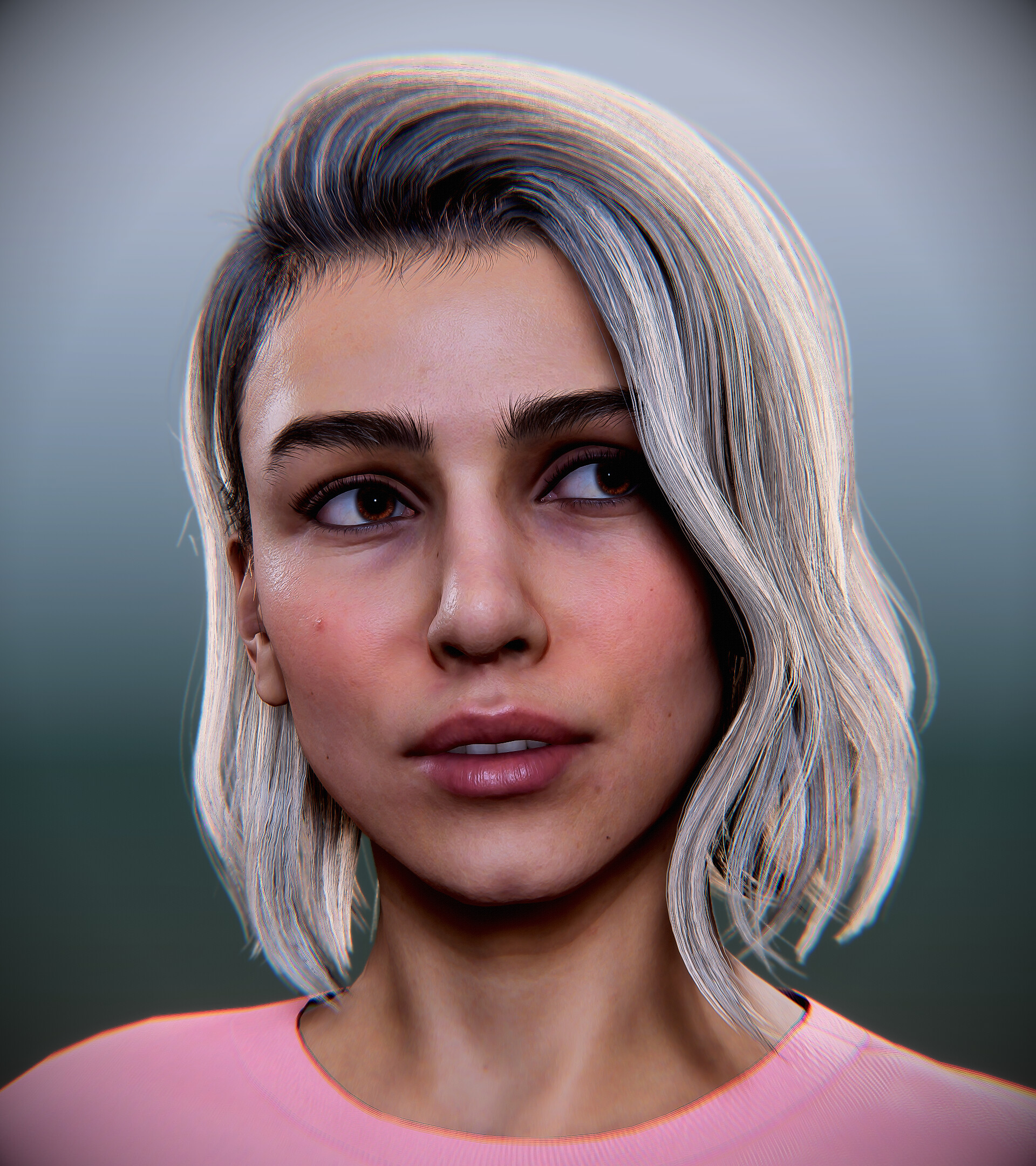
https://cdna.artstation.com/p/assets/images/images/054/779/000/large/victor-soupday-screenshot-221010-013002.jpg?1665361907

zisiang
zisiang
Posted 4 Years Ago
View Quick Profile
New Member

New Member (27 reputation)New Member (27 reputation)New Member (27 reputation)New Member (27 reputation)New Member (27 reputation)New Member (27 reputation)New Member (27 reputation)New Member (27 reputation)New Member (27 reputation)

Group: Forum Members
Last Active: 3 Years Ago
Posts: 3, Visits: 38
Hi @Victor.Soupday, Thank you for putting together the amazing Unity tools for CC/iClone. I've just upgraded to CC4/iClone8, and I've imported package 1.3.8 in my project using Unity 2020.3.36 and I'm using the standard Built-in workflow. I'm working on an educational VR project, in which the CC4 exported character (FBX) can be imported into Unity perfectly - it shows up perfectly in the Unity editor. However, once I've pressed "play", as I am using SteamVR with a SteamVR-compatible headset, the character only shows up on the left display (left eye); all other content in Unity shows up okay in both displays (e.g. stereo display on HTC Vive Pro 2) but not the character. For testing and trying to find out if there is an interim solution for this, I've changed all the Reallusion shaders to Standard shaders, and it shows up okay (by changing all the components one by one to Standard shaders). However, the current standard shaders do not show all the quality reproduced using the Reallusion shaders you've created. Do you think I may have missed anything or is there a solution for this? Another approach I've tried was that I removed package 1.3.8 and add the older 1.3.7, and it works quite well without the said problem in VR. Is it correct that package 1.3.8 is upgraded and based on Amplify shader, and do you think this issue may have anything to do with Amplify? Best regards, Zi

W: www.inclusivexrcollaboratory.com
W: https://www.utas.edu.au/profiles/staff/education/zi-siang-see


vr
michael.pickering
michael.pickering
Posted 4 Years Ago
View Quick Profile
Junior Member

Junior Member (198 reputation)Junior Member (198 reputation)Junior Member (198 reputation)Junior Member (198 reputation)Junior Member (198 reputation)Junior Member (198 reputation)Junior Member (198 reputation)Junior Member (198 reputation)Junior Member (198 reputation)

Group: Forum Members
Last Active: 2 Years Ago
Posts: 46, Visits: 229
Thanks!!
And btw, that Camila rendering looks awesome!

1
...
32
33
34
35
36
...
58


Reading This Topic