|
Author
|
Message
|
|
Jfrog
|
|
|
Group: Forum Members
Last Active: 2 Years Ago
Posts: 702,
Visits: 4.7K
|
@Victor.Soupday This maybe a bit out of topic but since I have been trying to do this for the last three days and that you are probably one of the few that may know the answer... We now have a Great solution for exporting characters and animations to Unity but I would really like to do the opposite, meaning importing a humanoid motion from Unity to either Iclone 8, CC4 or 3Dxchange? There are no profile in Iclone 8 for Unity humanoid and haven't had any success with the characterization method. My goal is to use iclone 8 to clean animations from Unity. Any input or idea would be appreciated. Thanks!
Ryzen R9 5950x, RTX 3090, 128Gb Ram ,2 x 2 TB Samsung 980 Pro M.2 SSD
Horror Stories in VR
Immersive Sound VR
Immersive Sound VR on Oculus TV
|
|
|
|
|
Necka
|
|
|
Group: Forum Members
Last Active: 2 Years Ago
Posts: 62,
Visits: 407
|
Hello Victor, it might be out of scope for your plugin but that would be helpful to avoid lot of manual work:
Could you consider "Same Materials" ?
Example:
I have a character with let say Pants, accessories, vest etc. Around 15 cloth/accessories items.
I prepared those to use only 3 materials.
In CC4 Those materials are the same name and I can change the settings of one it will influence all the others. Which is good.
Once imported in Unity with your tool, I will get 15 materials. For example the accessories will be acc, acc_1, acc_2, etc.
So of course it takes a lot of space for textures etc and it's not optimized. So I'd re-assign manually 1 material to each and delete the extra mats/textures myself.
Maybe the plugin could consider this and if multiple items have the exact same Material name, it could take care of this automatically.
Do you see this as feasible?
|
|
|
|
|
chris_466129
|
chris_466129
Posted 4 Years Ago
|
|
Group: Forum Members
Last Active: Last Year
Posts: 9,
Visits: 113
|
dgaban (6/17/2022)
chris_466129 (6/13/2022)
Running into an issue with skin poking through clothes once the character gets into Unity and going through animations. If I choose to hide the body parts or some of mesh in CC3 with the edit mesh tool and then export, that doesn't seem to work, I'm guessing because unity needs the whole skinned mesh. It seems to be a tricky situation because you want to customize the skin shader settings but at the same time, you don't want the skin poking through the clothes on animations.
Ideas?
Also, a giant thank you to Soupday for making the plugin/converter!
Someone posted the fix earlier but basically in CC4 you select the clothing item, conform, and set margin to 1.0 (no idea why it defaults to 0.1) Update: I found the fix. For anyone else having this issue: Hide the meshes with the hide mesh tool. Either painting them away with the Hide mesh tool or click on the body parts to hide them if you can with the type of clothing. I had to pain them away given the type of clothing on my character. Then, on FBX Export, check "Delete Hidden Faces". Here's the issue... 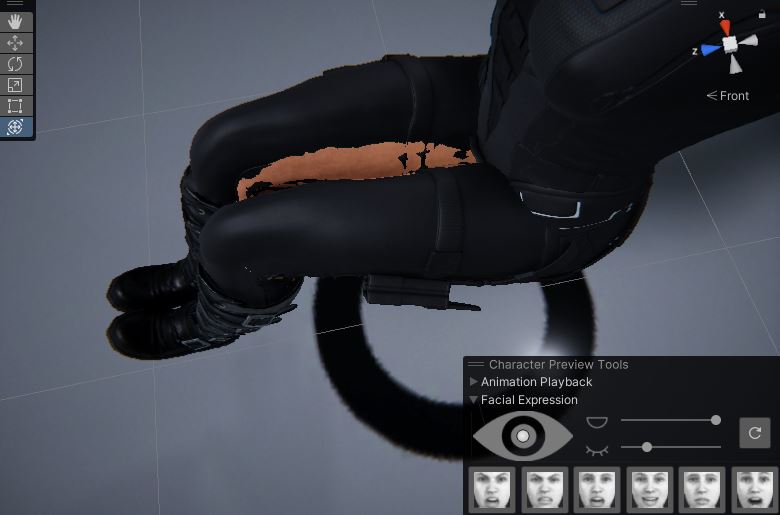 Fixed: 
|
|
|
|
|
mike_425218
|
mike_425218
Posted 4 Years Ago
|
|
Group: Forum Members
Last Active: 8 days ago
Posts: 2,
Visits: 139
|
I think I figured out the problem. There as already the maximum number of diffusion profiles, and the importing process added 3 on top of these, so HDRP started complaining. seems to work fine now that I took out unwanted profiles, and under the 15 profile limit
|
|
|
|
|
mike_425218
|
mike_425218
Posted 4 Years Ago
|
|
Group: Forum Members
Last Active: 8 days ago
Posts: 2,
Visits: 139
|
I just installed the importer, via PM and tried to import a character exported out of IClone 8. I built the materials but now the console.is spammed with a stream of errors around SSS and index outside bounds of array, and nothing is visible in screenview any more. what to do? 
|
|
|
|
|
paul.vanderlaan
|
paul.vanderlaan
Posted 4 Years Ago
|
|
Group: Forum Members
Last Active: Last Year
Posts: 11,
Visits: 29
|
The latest update has resolved my retargetting issues, thanks a lot Victor.Soupday!
I also appreciate the fact that the retargetter doesn't copy any of the 'empty' curves (curves with only 2 keys set at beginning and end with value of 0), this helps in file size and performance I assume.
The lighting presets feature is also a great addition! For perhaps more lighting preset inspiration, have you looked at the Unity The Heretic: Digital Human package? I like the presets in that package as well.
|
|
|
|
|
Victor.Soupday
|
Victor.Soupday
Posted 4 Years Ago
|
|
Group: Forum Members
Last Active: 6 days ago
Posts: 569,
Visits: 9.0K
|
You don't need to change the materials, there are custom shaders to match each one.
I don't know if there's anything for C4d. I deal mostly with Unity and Blender.
|
|
|
|
|
Angel Valtierra
|
Angel Valtierra
Posted 4 Years Ago
|
|
Group: Forum Members
Last Active: Last Year
Posts: 10,
Visits: 66
|
Wow! this is awesome and super helpful, let me ask a probably dumb question but I'm a bit of a newby here with regards of real time engines: do I need to change all materials to PBR before exporting for unity? I mean, no Digital Human Skin, hair etc? and lastly (probably not the right thread) but is there a tool like this for C4d? this would be awesome, since this solves exactly the kind of problems me and my team are facing in C4D as well. Thanks so much for your help. please keep it up and keep on sharing!
|
|
|
|
|
Victor.Soupday
|
Victor.Soupday
Posted 4 Years Ago
|
|
Group: Forum Members
Last Active: 6 days ago
Posts: 569,
Visits: 9.0K
|
Jfrog (6/21/2022)
@Victor.Soupday I just have a little error in the log in Unity 2020.3.37f1. Thanks again!  Looks like you have a copy in your Assets folder. Don't put it in Assets, it must be installed as a package though the package manager.
|
|
|
|
|
Jfrog
|
|
|
Group: Forum Members
Last Active: 2 Years Ago
Posts: 702,
Visits: 4.7K
|
@Victor.Soupday I just have a little error in the log in Unity 2020.3.37f1. Thanks again!
Ryzen R9 5950x, RTX 3090, 128Gb Ram ,2 x 2 TB Samsung 980 Pro M.2 SSD
Horror Stories in VR
Immersive Sound VR
Immersive Sound VR on Oculus TV
|
|
|
|