Profile Picture

Unity Dev Thread

Posted By MilesV 4 Years Ago
Rated 5 stars based on 2 votes.
1
2
3

Author
Message
MilesV
MilesV
Posted 4 Years Ago
View Quick Profile
Distinguished Member

Distinguished Member (1.3K reputation)Distinguished Member (1.3K reputation)Distinguished Member (1.3K reputation)Distinguished Member (1.3K reputation)Distinguished Member (1.3K reputation)Distinguished Member (1.3K reputation)Distinguished Member (1.3K reputation)Distinguished Member (1.3K reputation)Distinguished Member (1.3K reputation)

Group: Forum Members
Last Active: 3 Months Ago
Posts: 133, Visits: 2.2K
But down that Rabbit hole, you must go.


hahaha yes, it's unavoidable in order to achieve what I want and a skill I really want to develop.

I appreciate you continuing to share and really value your expertise. Can't wait to really dig into what you've shown and experiment in my own sandbox. :D

Necka
Necka
Posted 4 Years Ago
View Quick Profile
Veteran Member

Veteran Member (569 reputation)Veteran Member (569 reputation)Veteran Member (569 reputation)Veteran Member (569 reputation)Veteran Member (569 reputation)Veteran Member (569 reputation)Veteran Member (569 reputation)Veteran Member (569 reputation)Veteran Member (569 reputation)

Group: Forum Members
Last Active: Last Year
Posts: 62, Visits: 407
Victor.Soupday (6/29/2021)
MilesV (6/10/2021)
I was starting to dive into the documentation Unity has for Shader Graph and was getting a little overwhelmed. Its great to know I can switch to the hair and eye shaders from the inspector and not have to go down the rabbit hole of the node editor just yet.

But down that Rabbit hole, you must go.

It has taken me a while to figure all this out but, consider this character in CC3:
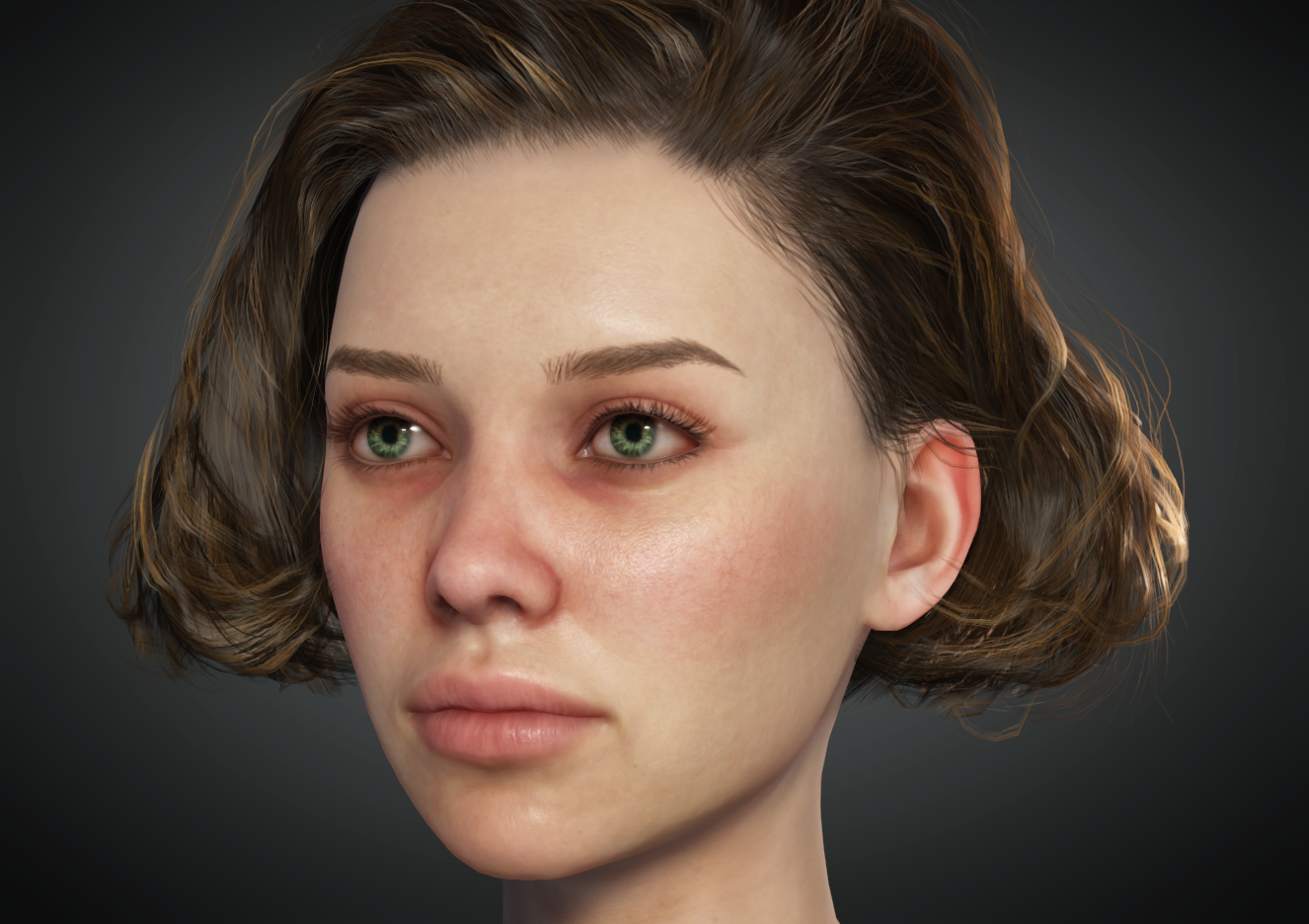
https://forum.reallusion.com/uploads/images/f3ef3fdf-2b27-43ba-8ed5-1b6e.png

She is of the quality you would expect from Character Creator, but when you export into Unity (I'm using Unity 2020.3 / HDRP Pipeline here) you get this:
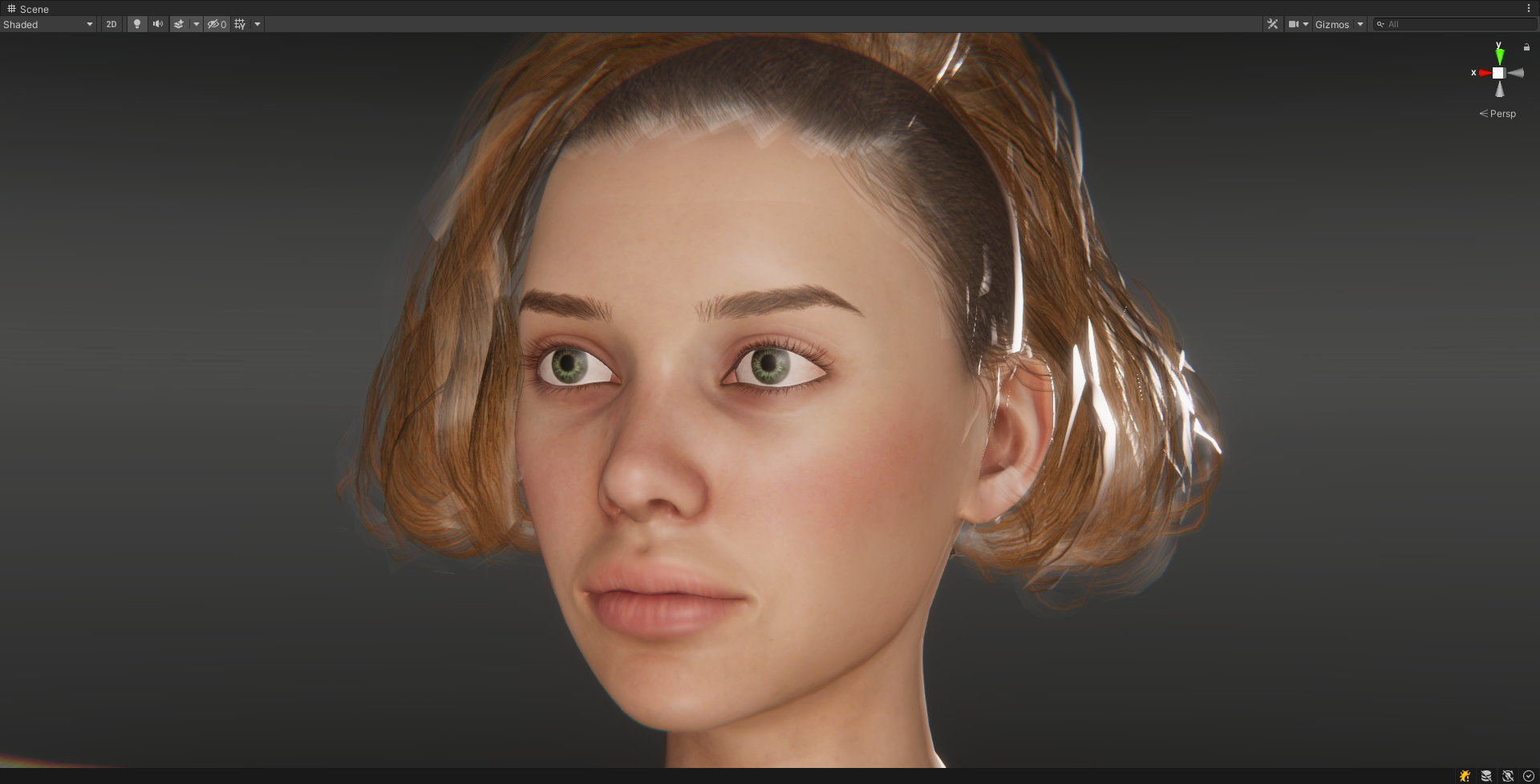
https://forum.reallusion.com/uploads/images/09fab6ef-dc54-454e-942f-e163.png

Which is obviously awful, Mainly due to the FBX format, which does not support the PBR texture set. (At least not the version of FBX that CC3 exports and Unity imports.). In fact, all it understands is the Diffuse texture, the Specular mask texture (which Unity doesn't actually support), the Opacity texture and the Normals. Which is why it looks terrible, because most of the textures are missing.

The next order of business is to populate the HDRP/Lit materials with the appropriate base textures, of which we have the Diffuse, Mask (named with the suffix '_HDRP' in the files.) and Normal maps.

Here I have plugged all these textures in, changed the hair material shader to HDRP/Hair, and given them some appropriate settings:
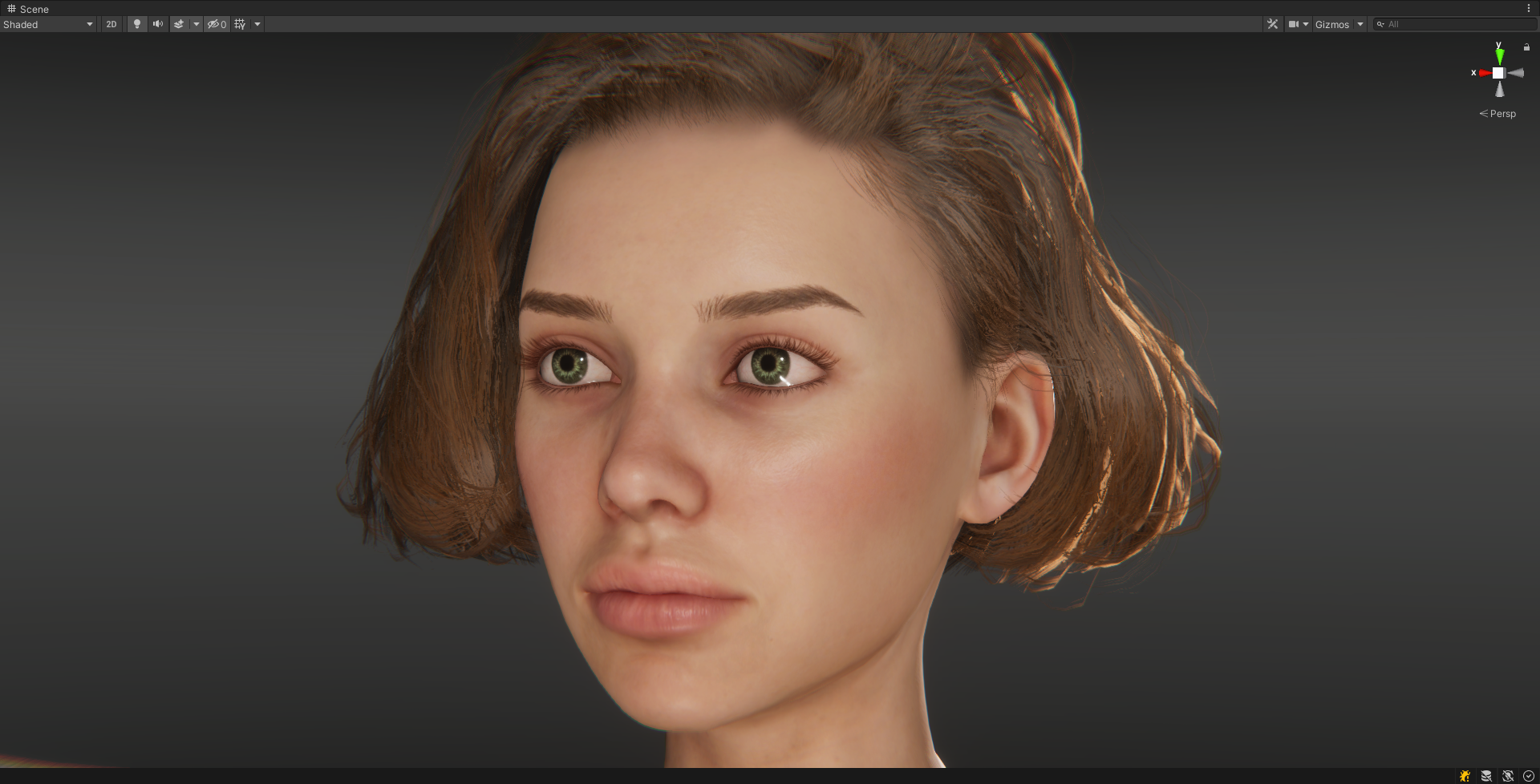
https://forum.reallusion.com/uploads/images/2b917803-daca-4785-9a79-0966.png

(I'm using the eye occlusion texture from the OBJ export to Blender as the alpha channel in an all black diffuse map, for some reason it doesn't come with the FBX export. The tearline material is 100% transparent, max smoothness material with no textures.)

And this is probably as good as it gets with the base textures and default HDRP material shaders, but it all looks flat and lifeless compared to the CC3 image above, particularly the eyes.

To truly recreate the character with all the details and layers and effects of the CC3 shaders, you have to dive into Shader Graph. Additionally we also have the problem that there is no 1:1 mapping of CC3 to Unity. They use different lighting, different shader models, different colour mapping and who knows what else. I had the same problem in Blender when I was making the Material setup add-on for that, the only real solution being to provide enough parameters and controls to the users so that they could make the characters in Blender look like the characters in CC3.

The same is true of Unity, so to achieve similar results to CC3 we need more control over the material shaders in Unity than the default HDRP/Lit and Hair shaders can provide.

The shader nodes in Blender materials and Unity's Shader Graph are very similar. Similar enough that I could reproduce the same shaders in Unity that I made in Blender, even improve on them a bit. And they look something like this:
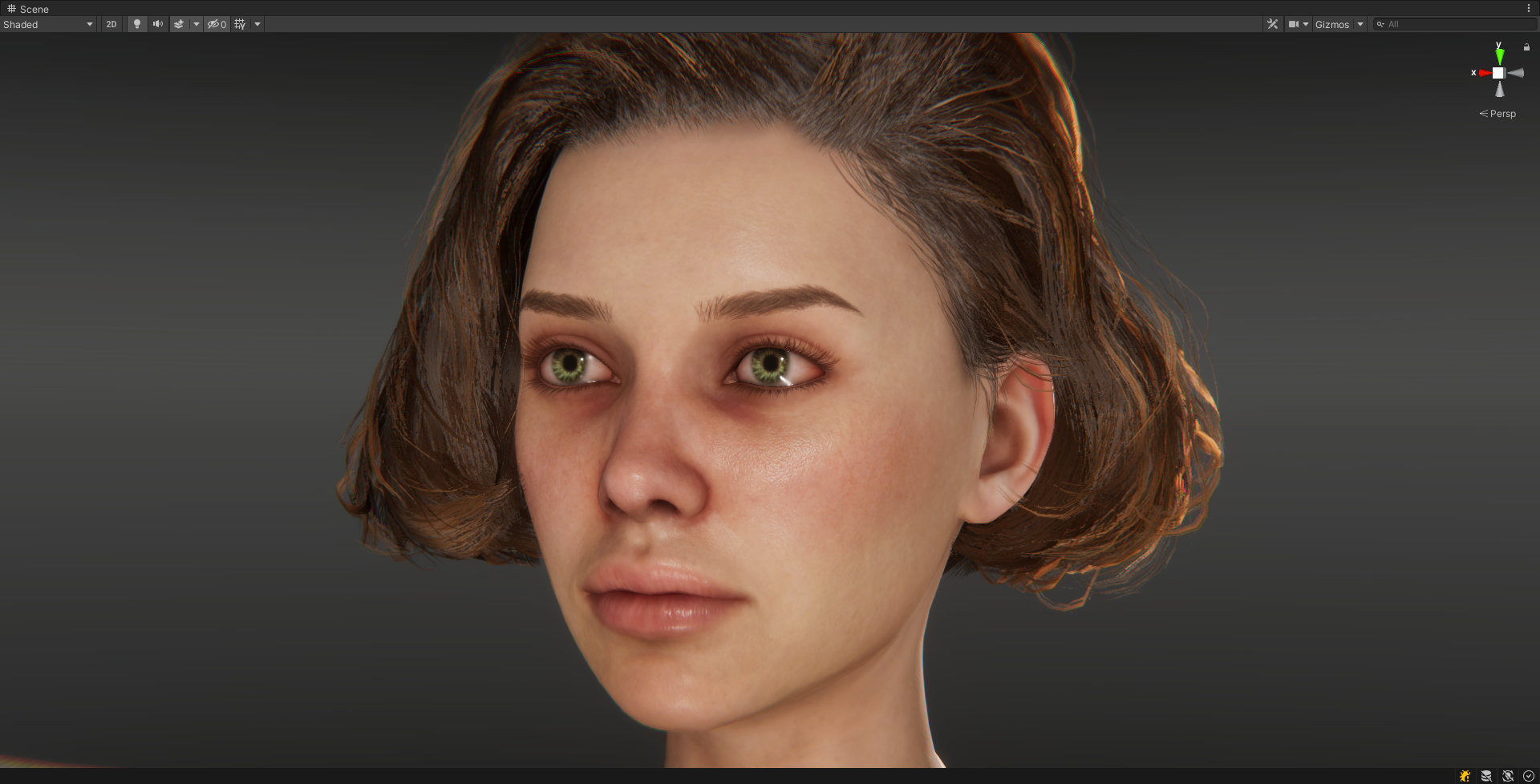
https://forum.reallusion.com/uploads/images/56a06e32-07f1-4cbb-a536-ab8d.png

These shaders are using all the textures for the blend layers, micro normals, normal blending, shadow layers, hair root, id and flow maps, vertex deformation for the eyes and all the parameters to control how each texture is used and layered into the final results. The eyes are refactive with iris depth control and pupil size control. The skin, hair and eyes have min-max remapping and power curve mapping for the smoothness and alpha channels and it has all the controls of the smart hair shaders too.

There's still more work to do on the shaders and they are going to take a serious amount of explaining, but so far, I'm quite pleased with the results.
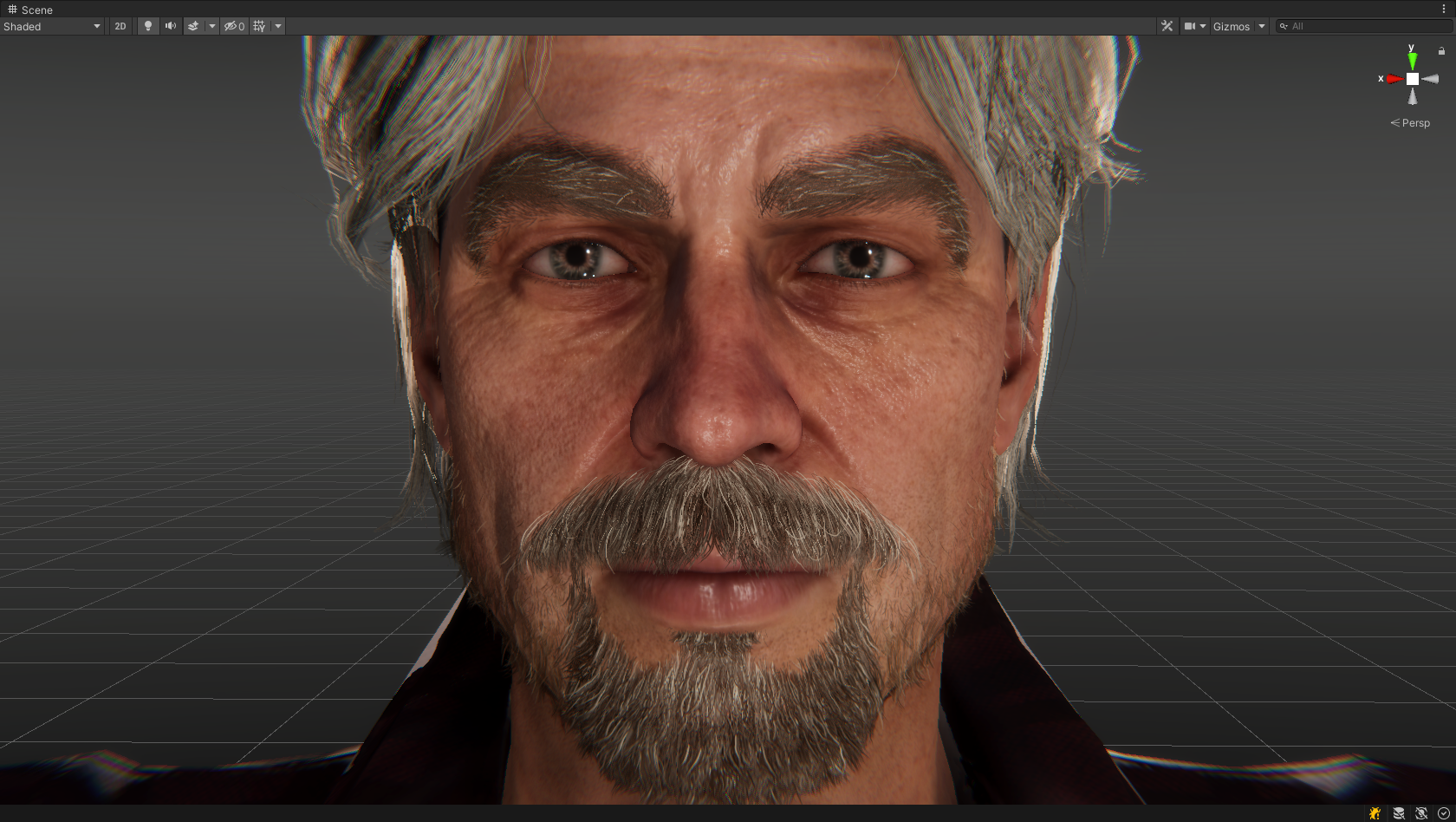
https://forum.reallusion.com/uploads/images/5f9eb223-e467-4fdd-abd4-971a.png

More to follow when I get the chance...


This is absolutely fabulous.

I'm not a shader guy at all... even with shader graph I just don't get how things work and yet I can code almost anything...

I'm not sure you are that open, but would you consider sharing those shaders? I'm personally mostly interested into Eyes and Hair
Also if you have time, would you mind showing the process on how to get the eye occlusion working that good? I couldn't find a way at all on that front.
Victor.Soupday
Victor.Soupday
Posted 4 Years Ago
View Quick Profile
Distinguished Member

Distinguished Member (5.8K reputation)Distinguished Member (5.8K reputation)Distinguished Member (5.8K reputation)Distinguished Member (5.8K reputation)Distinguished Member (5.8K reputation)Distinguished Member (5.8K reputation)Distinguished Member (5.8K reputation)Distinguished Member (5.8K reputation)Distinguished Member (5.8K reputation)

Group: Forum Members
Last Active: 4 days ago
Posts: 569, Visits: 9.0K
Well, as to that... The shaders shown here are part of something I've been working on for a while:


It's not entirely finished and this is just for HDRP so far. It doesn't do anything with the Avatars and the bones so there's a ways to go before it's complete. Also it needs to map all the CC3 material parameters to the equivalent for the Shader Graph parameters, it only does a few of them so far. So much like my Blender setup add-on it just works on the materials and shaders for now, but it's coming along nicely I think.

URP and the built-in renderer are going to be a challenge as they have no native methods for subsurface scattering or depth prepass or refraction. It will be interesting to see how much of the quality and detail can be retained for those render pipelines.

Edit: I can go into more detail on how the shaders work, they could do with some explaining.

Necka
Necka
Posted 4 Years Ago
View Quick Profile
Veteran Member

Veteran Member (569 reputation)Veteran Member (569 reputation)Veteran Member (569 reputation)Veteran Member (569 reputation)Veteran Member (569 reputation)Veteran Member (569 reputation)Veteran Member (569 reputation)Veteran Member (569 reputation)Veteran Member (569 reputation)

Group: Forum Members
Last Active: Last Year
Posts: 62, Visits: 407
Victor.Soupday (7/1/2021)
Well, as to that... The shaders shown here are part of something I've been working on for a while:


It's not entirely finished and this is just for HDRP so far. It doesn't do anything with the Avatars and the bones so there's a ways to go before it's complete. Also it needs to map all the CC3 material parameters to the equivalent for the Shader Graph parameters, it only does a few of them so far. So much like my Blender setup add-on it just works on the materials and shaders for now, but it's coming along nicely I think.

URP and the built-in renderer are going to be a challenge as they have no native methods for subsurface scattering or depth prepass or refraction. It will be interesting to see how much of the quality and detail can be retained for those render pipelines.

Edit: I can go into more detail on how the shaders work, they could do with some explaining.


I moved to HDRP for a side project now and I'm quite happy with what I got. But now I saw your own results and I'm not happy anymore :D 
I was upset to not be able to get the Eye occlusion and of course the Hair... 

But I see that you are the official provider for the Blender Pipeline topic, I guess it's on the way for the Unity pipeline as well now :)

If you are looking for testers etc, count me in, it's amazing
tantrum
tantrum
Posted 4 Years Ago
View Quick Profile
Senior Member

Senior Member (271 reputation)Senior Member (271 reputation)Senior Member (271 reputation)Senior Member (271 reputation)Senior Member (271 reputation)Senior Member (271 reputation)Senior Member (271 reputation)Senior Member (271 reputation)Senior Member (271 reputation)

Group: Forum Members
Last Active: 6 Months Ago
Posts: 28, Visits: 503
I saw/realized a while ago that shader graph would be the way to go, especially for the new "Smart Hair" system - even in Unity the shader graph shaders for things like HDRP/Hair are more capable than the old property-drawer shaders.

But then by the same token, you'd want to use the original textures and shader parameters (or some variant of them) that are already in CC3 for closely recreating them in Unity, instead of working off the baked textures provided (which would be better suited perhaps for generic / non-hero NPC models and/or lower LOD crowds)?

So at this point I'm wondering if it wouldn't be better to export (as a .json or something) the character meta data for that information and the paths to the textures used in CC3, so there would be some hope/chance of an automated workflow possible in Unity without having to manually match up the values.
Necka
Necka
Posted 4 Years Ago
View Quick Profile
Veteran Member

Veteran Member (569 reputation)Veteran Member (569 reputation)Veteran Member (569 reputation)Veteran Member (569 reputation)Veteran Member (569 reputation)Veteran Member (569 reputation)Veteran Member (569 reputation)Veteran Member (569 reputation)Veteran Member (569 reputation)

Group: Forum Members
Last Active: Last Year
Posts: 62, Visits: 407
tantrum (7/1/2021)
I saw/realized a while ago that shader graph would be the way to go, especially for the new "Smart Hair" system - even in Unity the shader graph shaders for things like HDRP/Hair are more capable than the old property-drawer shaders.

But then by the same token, you'd want to use the original textures and shader parameters (or some variant of them) that are already in CC3 for closely recreating them in Unity, instead of working off the baked textures provided (which would be better suited perhaps for generic / non-hero NPC models and/or lower LOD crowds)?

So at this point I'm wondering if it wouldn't be better to export (as a .json or something) the character meta data for that information and the paths to the textures used in CC3, so there would be some hope/chance of an automated workflow possible in Unity without having to manually match up the values.


That's a good point.
One way for this would be that Reallusion offers some kind of preset on export level when you chose Unity.
A preset that'd export the simpler textures as it is today or a more advanced preset which would change the json file accordingly so the auto setup script catches what to match in each materials

There is lots of potential but it also mean RL needs to work on this as well. Lots can be done on the Auto Setup side of things though.
Victor.Soupday
Victor.Soupday
Posted 4 Years Ago
View Quick Profile
Distinguished Member

Distinguished Member (5.8K reputation)Distinguished Member (5.8K reputation)Distinguished Member (5.8K reputation)Distinguished Member (5.8K reputation)Distinguished Member (5.8K reputation)Distinguished Member (5.8K reputation)Distinguished Member (5.8K reputation)Distinguished Member (5.8K reputation)Distinguished Member (5.8K reputation)

Group: Forum Members
Last Active: 4 days ago
Posts: 569, Visits: 9.0K
tantrum (7/1/2021)
But then by the same token, you'd want to use the original textures and shader parameters (or some variant of them) that are already in CC3 for closely recreating them in Unity, instead of working off the baked textures provided (which would be better suited perhaps for generic / non-hero NPC models and/or lower LOD crowds)?

So at this point I'm wondering if it wouldn't be better to export (as a .json or something) the character meta data for that information and the paths to the textures used in CC3, so there would be some hope/chance of an automated workflow possible in Unity without having to manually match up the values.


In fact the export from CC3 to Unity does actually include a .json file that details all the objects, materials & textures (and paths) and all the CC3 shader parameters for those materials and all the needed textures are included in the Unity export.

The old Auto-setup only used to connect the base texture maps which don't include any of the blend layers or details. It didn't actually bake any textures, other than packing the metallic, AO, detail mask and smoothness into the HDRP texture (Edit: CC3 does bake the smart hair diffuse textures, but you can turn that off in the export options). I'm using this .json information and the extra textures to recreate the character fully. (Actually, I haven't quite finished mapping all the CC3 shader parameters to my Unity Shader Graph parameters, but that is the intention.) So the result in Unity should be as close as possible to character you see in CC3.

But even then CC3 and Unity are completely different rendering engines, there's no real 1 to 1 mapping or one size fits all to recreating the characters in Unity, so there will be differences that need to be examined and fixed, or maybe something just doesn't look right in Unity's lighting and needs to be corrected.

That's the idea, anyway.
tantrum
tantrum
Posted 4 Years Ago
View Quick Profile
Senior Member

Senior Member (271 reputation)Senior Member (271 reputation)Senior Member (271 reputation)Senior Member (271 reputation)Senior Member (271 reputation)Senior Member (271 reputation)Senior Member (271 reputation)Senior Member (271 reputation)Senior Member (271 reputation)

Group: Forum Members
Last Active: 6 Months Ago
Posts: 28, Visits: 503
Yes, the issues don't start with the auto-setup, they start with the export.  That's where we get problems like these; none are to do with the import tool in Unity itself as the problem is already present prior.  Or rather, these issues and export decisions ensure that the import isn't going to be successful at recreating what you see in CC3:

Smart Hair assignment of brow blend/morph shapes (name and quantity) - FeedBack Tracker (reallusion.com)
Smart hair merged materials base hair and scalp combined - FeedBack Tracker (reallusion.com)
Smart hair merged materials builds wrong diffuse map - FeedBack Tracker (reallusion.com)
Substance Painter Pipeline Export error with Prime Hair - FeedBack Tracker (reallusion.com)

This is also why I don't quite agree with the "everything works" position either.  The product integrations just aren't tested satisfactorily prior to release and not supported adequately promptly post release, in my experience. 

@Victor.Soupday thanks for mentioning the .json file, I'll have to look into it.  I was just theorizing and not aware if something was already being produced, although I thought only the baked textures were exported (and would be referenced), not the source textures (e.g. ID map, flow map, etc.).  I haven't looked though and certainly not to the level you apparently have.  I will fundamentally disagree that "different rendering engines" preclude getting like for like results, the engines of Unity and Unreal are absolutely capable of reproducing the effects presented in CC3 100%.  Changing the lighting etc. doesn't account for the differences we see.  That's more to do with the resultant meshes and textures.  Your own continued improvements in the results that look very interesting to pursue are a testament to this potential.  Thank you.
tantrum
tantrum
Posted 4 Years Ago
View Quick Profile
Senior Member

Senior Member (271 reputation)Senior Member (271 reputation)Senior Member (271 reputation)Senior Member (271 reputation)Senior Member (271 reputation)Senior Member (271 reputation)Senior Member (271 reputation)Senior Member (271 reputation)Senior Member (271 reputation)

Group: Forum Members
Last Active: 6 Months Ago
Posts: 28, Visits: 503
Victor.Soupday (6/13/2021)
All the facial blend shapes available in CC3 are exported with the characters (the full characters, not sure about the Gamebase or InstaLod'ed characters).

e.g. these are all the blend shapes on the main body mesh:

https://forum.reallusion.com/uploads/images/4fdc3f56-2bd4-4944-9bb3-5d56.png

There are also blend shapes on the tongue, eye occlusion and tearline meshes, as well as on the smart hair: beard, moustache and eyebrow meshes too. Everything that takes part in the facial animation has the requisite blend shapes.


I noticed the blend shapes, but it also seems that a lot are just dumped inactive into the mix.

I would have liked the groups to be documented if some only come into play under certain conditions, or removed if they play no part in the piece at all.  To that extent I created this issue a little while ago; I would be interested to hear your thoughts:
Smart Hair assignment of brow blend/morph shapes (name and quantity) - FeedBack Tracker (reallusion.com)

Personally, I don't like having to go through them one by one and guess or try to figure out if they are usable or not.
Victor.Soupday
Victor.Soupday
Posted 4 Years Ago
View Quick Profile
Distinguished Member

Distinguished Member (5.8K reputation)Distinguished Member (5.8K reputation)Distinguished Member (5.8K reputation)Distinguished Member (5.8K reputation)Distinguished Member (5.8K reputation)Distinguished Member (5.8K reputation)Distinguished Member (5.8K reputation)Distinguished Member (5.8K reputation)Distinguished Member (5.8K reputation)

Group: Forum Members
Last Active: 4 days ago
Posts: 569, Visits: 9.0K
tantrum (7/2/2021)
I noticed the blend shapes, but it also seems that a lot are just dumped inactive into the mix.

I would have liked the groups to be documented if some only come into play under certain conditions, or removed if they play no part in the piece at all.  To that extent I created this issue a little while ago; I would be interested to hear your thoughts:
Smart Hair assignment of brow blend/morph shapes (name and quantity) - FeedBack Tracker (reallusion.com)

Personally, I don't like having to go through them one by one and guess or try to figure out if they are usable or not.


I've noticed different characters have different sets of blend shapes and I did think at the time that it culled the inactive blend shapes.

But if it isn't culling them or they are such a small influence that they don't have any visible effect, it should be possible in a script to build replacement meshes that only keep the blend shapes whose vertex delta's pass a certain threshold. I've already written a function to copy blend shapes from a source mesh into a new mesh and replace it in the prefab, putting a threshold condition on them is almost trivial. I can put that in the tool menu. e.g. select the character then: Menu->Tools->"Prune Blend Shapes" (assuming it works)


1
2
3


Reading This Topic