Profile Picture

Use Appearance Editor To Texture Clothes How You Want

Posted By Delerna 6 Years Ago
You don't have permission to rate!
Author
Message
Delerna
Delerna
Posted 6 Years Ago
View Quick Profile
Distinguished Member

Distinguished Member (8.5K reputation)Distinguished Member (8.5K reputation)Distinguished Member (8.5K reputation)Distinguished Member (8.5K reputation)Distinguished Member (8.5K reputation)Distinguished Member (8.5K reputation)Distinguished Member (8.5K reputation)Distinguished Member (8.5K reputation)Distinguished Member (8.5K reputation)

Group: Forum Members
Last Active: 4 Years Ago
Posts: 1.5K, Visits: 14.8K
Thanks Peter
I find there are so many great things about CC and iClone for things I want to do. Just so many things to learn so I like to try and help people....at least in ways as I use it anyway. That's a big thought for me, we all need to see/learn how things can be done and then we need to start using things in ways that suits our own preferences.

Writing here now because I thought I missed a final point.
1)When finished making our texture turn Appearance Editor back off
https://forum.reallusion.com/uploads/images/1f1cfa8c-67fb-4b79-9432-c6c4.png

2) This image shows that the textures got created from using Appearance Editor ad we don't need to be high level texturing people to make pretty good images

https://forum.reallusion.com/uploads/images/28ad54fe-b024-445a-bb1e-9d6b.png


I personally thank you Reallusion for adding the abilities of Appearance Editor to CC.

And I also know we have a similar method of this in iClone for texturing Props in similar way as this method in CC for clothes, accessories, etc.
Yes, I have and use iClones methods of these a lot too.


i7-3770 3.4GHz CPU 16 GB Ram   
GeForce GTX1080 TI 11GB
Windows 10 Pro 64bit
Peter (RL)
Peter (RL)
Posted 6 Years Ago
View Quick Profile
Distinguished Member

Distinguished Member (124.4K reputation)Distinguished Member (124.4K reputation)Distinguished Member (124.4K reputation)Distinguished Member (124.4K reputation)Distinguished Member (124.4K reputation)Distinguished Member (124.4K reputation)Distinguished Member (124.4K reputation)Distinguished Member (124.4K reputation)Distinguished Member (124.4K reputation)

Group: Administrators
Last Active: 2 Years Ago
Posts: 23.1K, Visits: 36.6K
Hi Delerna... Thanks for sharing your tutorial with the community. It should prove very useful for those unaware how the Appearance Editor works with color ID's. :)


Peter
Forum Administrator

www.reallusion.com


Delerna
Delerna
Posted 6 Years Ago
View Quick Profile
Distinguished Member

Distinguished Member (8.5K reputation)Distinguished Member (8.5K reputation)Distinguished Member (8.5K reputation)Distinguished Member (8.5K reputation)Distinguished Member (8.5K reputation)Distinguished Member (8.5K reputation)Distinguished Member (8.5K reputation)Distinguished Member (8.5K reputation)Distinguished Member (8.5K reputation)

Group: Forum Members
Last Active: 4 Years Ago
Posts: 1.5K, Visits: 14.8K
Reallusion has shown how to do these too and they are much more than what I showed.

I used theirs to teach myself to learn how to use the Appearance editors.
Although I found them a bit too much to start to learn the basics quickly but they are great to watch too.
What I showed is a good way that I think to start using it, then look into the Reallusion ones to learn more about it.

Here are a couple of theirs that I learnt from.


i7-3770 3.4GHz CPU 16 GB Ram   
GeForce GTX1080 TI 11GB
Windows 10 Pro 64bit
Delerna
Delerna
Posted 6 Years Ago
View Quick Profile
Distinguished Member

Distinguished Member (8.5K reputation)Distinguished Member (8.5K reputation)Distinguished Member (8.5K reputation)Distinguished Member (8.5K reputation)Distinguished Member (8.5K reputation)Distinguished Member (8.5K reputation)Distinguished Member (8.5K reputation)Distinguished Member (8.5K reputation)Distinguished Member (8.5K reputation)

Group: Forum Members
Last Active: 4 Years Ago
Posts: 1.5K, Visits: 14.8K
USING COLOR ID's TO CREATE AS MANY DIFFERENT TEXTURES WE WANT EASILLY

https://forum.reallusion.com/uploads/images/160713f0-a938-4571-942f-b1fa.png

https://forum.reallusion.com/uploads/images/04d43a61-1bf5-481b-b457-043d.png

https://forum.reallusion.com/uploads/images/58ffa379-73f7-42af-89eb-3b3b.png

https://forum.reallusion.com/uploads/images/fe0377d8-88b9-439d-bd46-1123.png

https://forum.reallusion.com/uploads/images/064ded3e-a1a1-44f1-8c9d-6d1e.png

https://forum.reallusion.com/uploads/images/b061cc0c-0648-405a-9daa-eb99.png


i7-3770 3.4GHz CPU 16 GB Ram   
GeForce GTX1080 TI 11GB
Windows 10 Pro 64bit
Delerna
Delerna
Posted 6 Years Ago
View Quick Profile
Distinguished Member

Distinguished Member (8.5K reputation)Distinguished Member (8.5K reputation)Distinguished Member (8.5K reputation)Distinguished Member (8.5K reputation)Distinguished Member (8.5K reputation)Distinguished Member (8.5K reputation)Distinguished Member (8.5K reputation)Distinguished Member (8.5K reputation)Distinguished Member (8.5K reputation)

Group: Forum Members
Last Active: 4 Years Ago
Posts: 1.5K, Visits: 14.8K
I have had a request about how to do cloth textures quickly and for me Appearance Editor is a great way to texture things how I want them.
Anyway, here are some methods I use to texture things how I want them to look. Hopefully this will help the person to find how to use Appearance editor in the way that person likes to do things.
Im just showing how I use them and we all need to find our own ways to use them. And the best thing about this is that we don't have to be great texture people in order to create textures we like
Took me a little time to use these but I find it really easy and quick to use now. At least in a way that suits me anyway.

THIS IS SHOWING HOW TO CREATE AND ADD A COLOR ID SO WE CAN DO OUR OWN TEXTURES ON SOMETHING
1) Load the item we want to texture and get its UV map
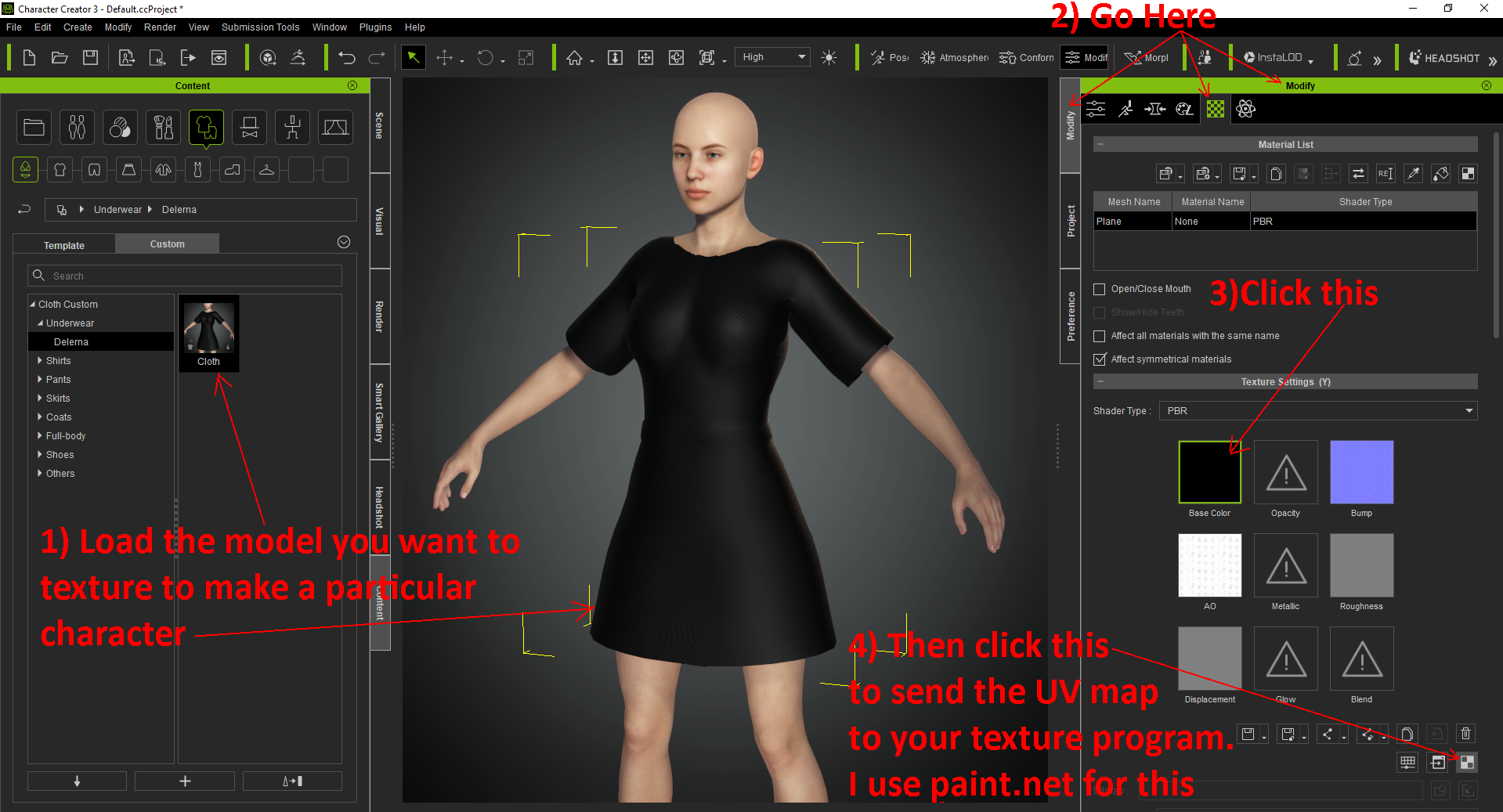
https://forum.reallusion.com/uploads/images/05428069-8a6c-461f-946f-1f49.png

2) Here is the UV map for that cloth
https://forum.reallusion.com/uploads/images/16fd9267-8a6c-4a77-a20b-9948.png

3) Set up the texture so we can easily create the ColorID we want to use
https://forum.reallusion.com/uploads/images/03748fdf-a90c-41d8-a6a3-54d4.png

4) Now setup the cloth so we can add the ColorID that we make to it
https://forum.reallusion.com/uploads/images/358966a1-c2cf-4ece-a86f-0ac3.png

5) Here it is setup ready now
https://forum.reallusion.com/uploads/images/7d70d448-d25f-40a4-a8ba-1d8b.png

6) This is showing the color settings we need to use to create the ColorID
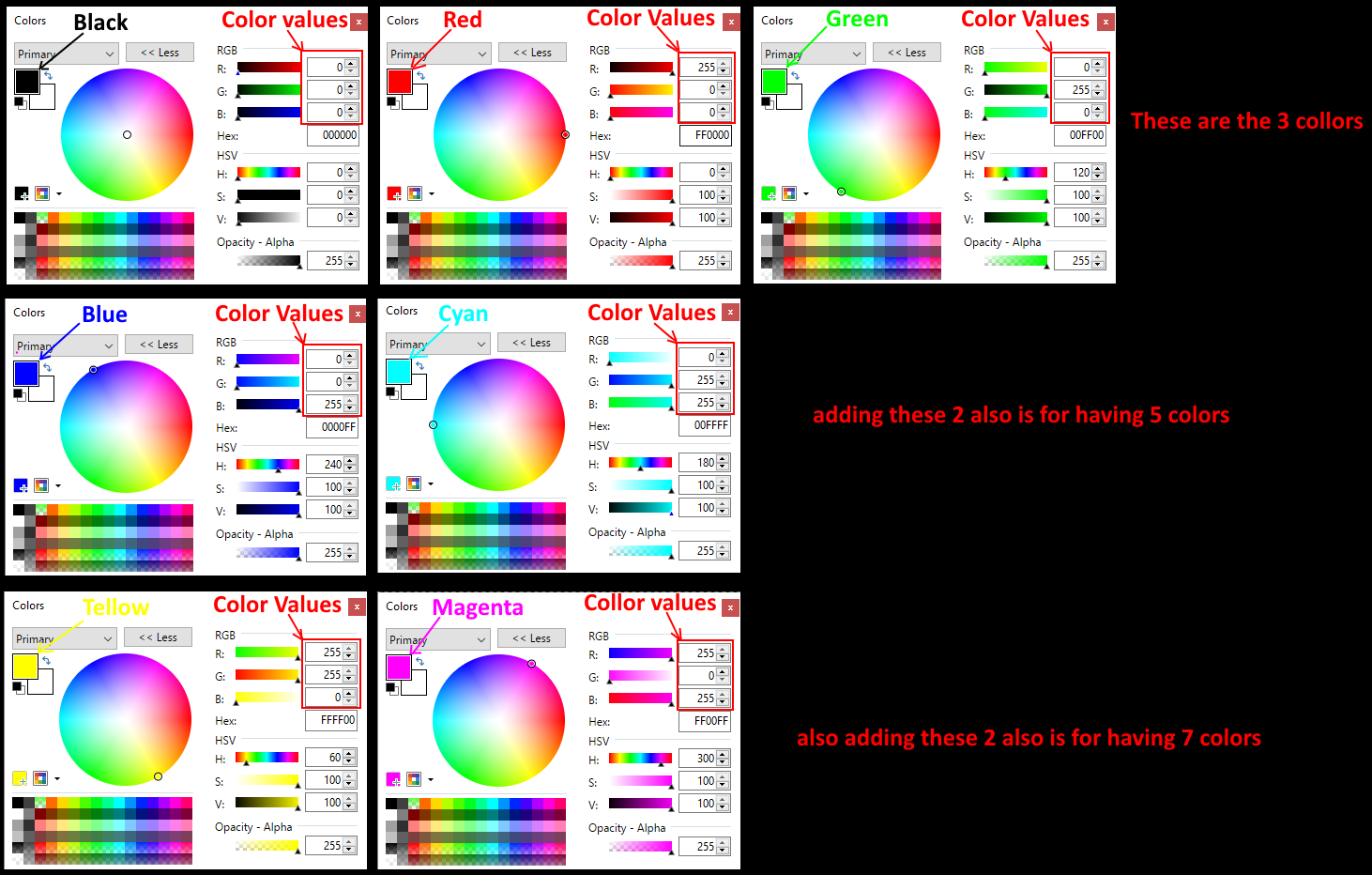
https://forum.reallusion.com/uploads/images/c96b4e56-323e-447f-aa00-731b.png

7) Here is the ColorID I made so I can setup the cloth I loaded however I want it to look
https://forum.reallusion.com/uploads/images/a3c481da-261c-4d5d-9ac9-702c.png

8) Now we need to set it up so we can save it so we can load it onto the cloth
https://forum.reallusion.com/uploads/images/3204e735-aabe-4240-9576-c833.png

9) This is showing the CC program we must have so we can load our own ColorID's onto the model we want to texture our own way
https://forum.reallusion.com/uploads/images/3410b6cc-2c3f-4f4c-bc65-7a43.png

10) And this is showing how to load it into the ColorID so we can texture the cloth. I am showing how to do that in the next post
https://forum.reallusion.com/uploads/images/1f786ca5-1123-4280-81be-fc83.png


i7-3770 3.4GHz CPU 16 GB Ram   
GeForce GTX1080 TI 11GB
Windows 10 Pro 64bit


Reading This Topic