|
greluk.a
|
greluk.a
Posted 5 Years Ago
|
|
Group: Forum Members
Last Active: 3 Years Ago
Posts: 5,
Visits: 344
|
CC 3.3 UE 4.25.3 Unreal Auto-Setup Plugin 1.1 1. Weird ass hole that shouldn't be:  2. Bug with tesseletion. After changing the Tesseletion Mode parameter to PN Triangels for the RL_HQSkin material, I got the following bug on the shoulder and neck 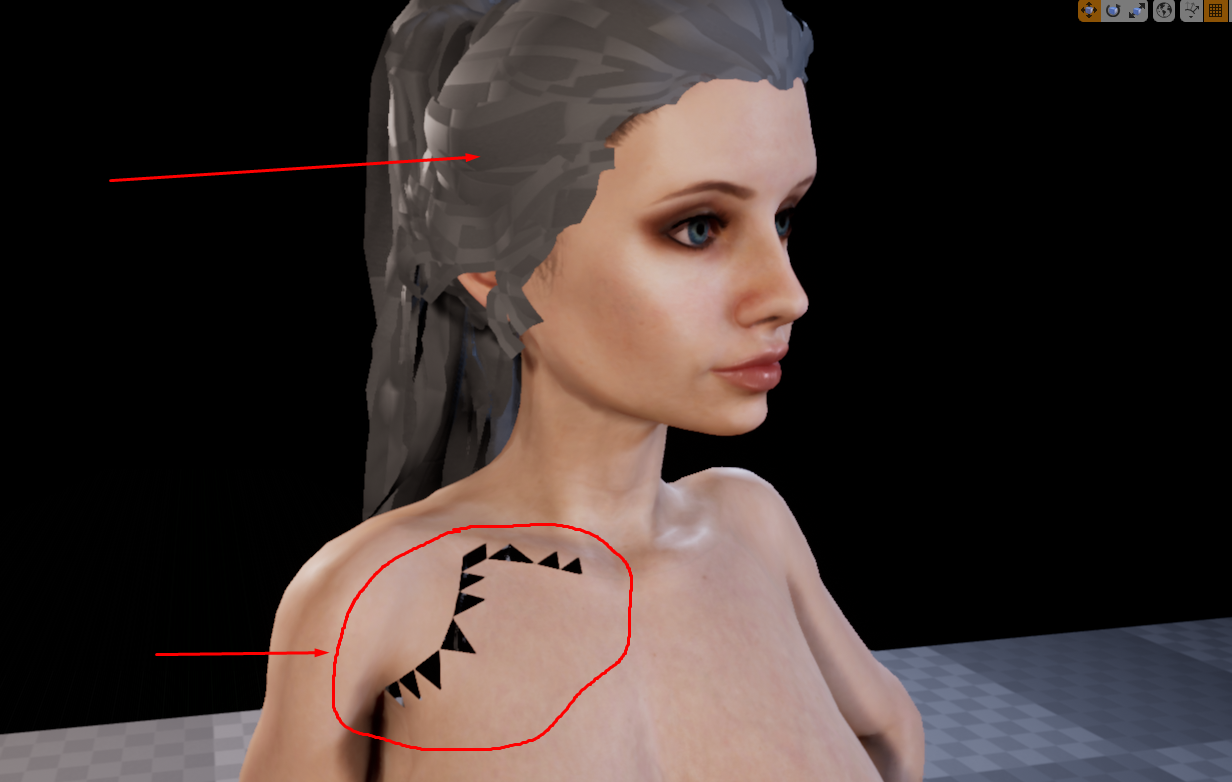  3. Problem with hair texture. After run project with animation in UE i got next bug  4. Next bug. Shoulders bulge up  Not exactly the level of implementation that you get for a lot of money.
Does anyone know how to solve these problems? I would be very grateful.
|
|
Miranda (RL)
|
Miranda (RL)
Posted 5 Years Ago
|
|
Group: Administrators
Last Active: 3 Years Ago
Posts: 1.8K,
Visits: 11.2K
|
Hi greluk.a, Can you provide us the screenshot of the FBX Export Panel in CC? Thanks! P.S. We just replied to your another thread about mesh penetration issue.
|
|
greluk.a
|
greluk.a
Posted 5 Years Ago
|
|
Group: Forum Members
Last Active: 3 Years Ago
Posts: 5,
Visits: 344
|
Miranda (RL) (8/6/2020)
Hi greluk.a, Can you provide us the screenshot of the FBX Export Panel in CC? Thanks! P.S. We just replied to your another thread about mesh penetration issue. 
|
|
jordanlaboon
|
jordanlaboon
Posted 5 Years Ago
|
|
Group: Forum Members
Last Active: Last Month
Posts: 13,
Visits: 57
|
Any solution for this problem while importing from cc3? 
|
|
TonyDPrime
|
TonyDPrime
Posted 5 Years Ago
|
|
Group: Forum Members
Last Active: Last Year
Posts: 3.4K,
Visits: 12.4K
|
On the 2. Bug with Tesselation, this seems is a weird glitch in UE4. More akin to a known-issue.
I have done this myself and found it comes and goes, for no reason, in other words, it is only seemingly due to activating tessellation and not any other environment visual.
Sometimes it just goes away on it's own for no reason. I note it also pauses as you hold down the mouse sometimes. But sometimes it just stops randomly, like the visual is just fighting its own processing.
On this one, RL has to talk with its UE4 contact and UE4 contact will likely first give them a smug runaround because they don't have an answer, and they are unable to say "I don't know.".
Then, once they have a fix, it will be a bug-fix in a later release.
UPDATE:
Not a fix, but a find...In the Blueprint there is part of the LiveLink avatar which has Render Static OFF/unchecked....when you click ON/checked, the flickering triangle thing goes away, but then the LiveLink pose is also stopped, in other words no longer active. This flickering might be related to a live real-time processing of LOD or culling, where the mesh is fighting itself for render.
UPDATE 2
This could be related to the CC3+ mesh itself - if there is, on the right shoulder some overlapping triangles upon tessellation, there could be fighting going on between the textures.
Because it is very odd that it keeps popping up with only the right shoulder area in every case now with the CC3+ mesh.
|
|
kodakov
|
kodakov
Posted 5 Years Ago
|
|
Group: Forum Members
Last Active: 5 Years Ago
Posts: 1,
Visits: 8
|
I have same problem! Did you find solution?
|