|
Author
|
Message
|
|
4u2ges
|
 4u2ges
Posted 6 Years Ago
4u2ges
Posted 6 Years Ago
|
|
Group: Forum Members
Last Active: Last Month
Posts: 5.3K,
Visits: 16.8K
|
Looking at Marks' tute and simulation ( https://forum.reallusion.com/FindPost447845.aspx) gave me an idea to make an interactive blanket, which could be controlled by user/character. Here is a Beta version:
Blanket has 2 locks bound to front corners. 2 spheres are inside locks serve the purpose of driving and animating the blanket.
The concept is pretty much similar to the flex cable (https://forum.reallusion.com/FindPost443792.aspx)
I am enclosing the project and .blend file, so that blanket/locks can be tweaked and re-imported into iClone.
https://www.dropbox.com/s/xb0vabyfghirxfh/Dynamic_Blanket.zip?dl=0
In the sample I only use one lock to drive blanket.
I did not test it with characters and not sure how well it would behave, when character would try sliding feet under the blanket.
One thing is for sure - blanket should have relatively high value of Solver Frequency in Physix for locks to stay in place securely.
There is chance blanket would need an additional lock/driver on the side to give more room for getting under. It can be added in .blend file, or just let me know and I'll add it.
Note however, a cloth can only interact with 32 spheres or 16 capsules at a time. Having too many locks in place would leave less capsules available for interaction with character.
As with flex cable, special care should be taken while animating drivers. Since you cannot see the result while animating them, try to imagine how the cloth should behave in real life and try to simulate accordingly.
To have the character pull the blanket you should link driver sphere to characters hand and release the link when character is in bed and covered with blanket.
This concept can be used with practically any soft cloth items, which need certain degree of animation control on the timeline.
2 pillows in sample project have morphs to accommodate characters head going down, but it was done specifically for this demo (https://forum.reallusion.com/FindPost442618.aspx). Still might work for your case.
Regarding 2 character. It is possible to have 2 characters slide under the blanket (not at the same time though). But it is quite complex.
I imagine one is getting under the blanket. Then you should bake and then "hard" bake the blanket by exporting as Alembic and re-importing via Blender.
Then apply weight map, so that blanket portion over first character is not interacting. At this point in iClone blankets are swapped with visibility setting.
Now the second character is getting under without affecting the first character simulation. And so on...
Sleep well :)
|
|
|
|
|
charly Rama
|
charly Rama
Posted 6 Years Ago
|
|
Group: Forum Members
Last Active: 2 Years Ago
Posts: 1.9K,
Visits: 17.3K
|
thank you , great idea
|
|
|
|
|
toystorylab
|
toystorylab
Posted 6 Years Ago
|
|
Group: Forum Members
Last Active: Last Week
Posts: 4.6K,
Visits: 29.9K
|
Thanx for sharing!
Toystorylab on Vimeo :  Crassitudes (my "Alter Ego") on Youtube: Crassitudes (my "Alter Ego") on Youtube: 
|
|
|
|
|
wires
|
|
|
Group: Forum Members
Last Active: Last Month
Posts: 5.7K,
Visits: 26.5K
|
More amazing solutions and samples. :cool: Thank you very much Gurgen. :)
Gerry
System: Win 10 Pro (21H2), Asus X99-E WS, CPU i7-5930K -3,5 GHz, 32 GB DDR4 2666-16 RAM, NVidia GTX 1080 Ti GPU - 11 GB VRAM(Driver Studio-536.99), Samsung 850 Pro 512 GB SSD, 6 TB HD storage.
|
|
|
|
|
4u2ges
|
4u2ges
Posted 6 Years Ago
|
|
Group: Forum Members
Last Active: Last Month
Posts: 5.3K,
Visits: 16.8K
|
Thanks guys, glad you liked it :) To finish already, I'll do another unload on RL. By default Physix Collision Shapes could have a tapered capsules, which would have been great for legs specifically avoiding the use of multiple capsules. RL however never implemented this. From Nvidia: 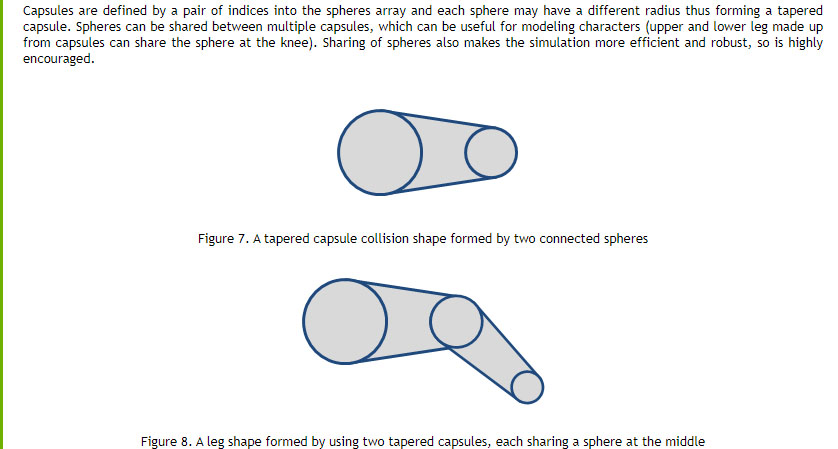 So this does not form right collision to begin with: 
|
|
|
|
|
mark
|
|
|
Group: Forum Members
Last Active: 2 Years Ago
Posts: 4.9K,
Visits: 16.7K
|
Just amazing stuff...WOW!!!! :D;)

Click here to go to my YouTube Channel filled with iClone Tutes and Silly Stuff
Visit ANIMATED PROJECTIONS Powered by iCLONE
Intel Core i7 3960X @ 3300MHz Overclocked to 4999.7 MHz Sandy Bridge 24.0GB DDR3 @ 833MHz Graphic Display HP ZR30w
GeForce GTX 980Ti 6GB Microsoft Windows 7 Professional 64-bit SP1 ASUSTeK COMPUTER INC. P9X79 WS (LGA2011)
|
|
|
|
|
4u2ges
|
4u2ges
Posted 6 Years Ago
|
|
Group: Forum Members
Last Active: Last Month
Posts: 5.3K,
Visits: 16.8K
|
|
|
|
|
|
rosuckmedia
|
rosuckmedia
Posted 6 Years Ago
|
|
Group: Forum Members
Last Active: Last Year
Posts: 3.2K,
Visits: 4.8K
|
@4u2ges
Thank you for sharing.
Excellent idea.
Can you show us how it looks with an actor?:)
Best regards rosuckmedia
|
|
|
|
|
4u2ges
|
4u2ges
Posted 6 Years Ago
|
|
Group: Forum Members
Last Active: Last Month
Posts: 5.3K,
Visits: 16.8K
|
rosuckmedia (6/23/2020)
@4u2ges
Thank you for sharing.
Excellent idea.
Can you show us how it looks with an actor?:)
Best regards rosuckmedia
Thanks! But I enclosed the project expecting you guys are going to show me ;)I'll try reserve some time over the weekend otherwise :hehe:
|
|
|
|
|
ultimativity
|
ultimativity
Posted 6 Years Ago
|
|
Group: Forum Members
Last Active: 8 Months Ago
Posts: 356,
Visits: 737
|
Thanks for this.
Nathan
|
|
|
|