Profile Picture

Daz 3D High Heels arrive as Flats in 3D Xchange and iClone

Posted By mayaenvogue2016 6 Years Ago
You don't have permission to rate!

Daz 3D High Heels arrive as Flats in 3D Xchange and iClone

Author
Message
mayaenvogue2016
mayaenvogue2016
Posted 6 Years Ago
View Quick Profile
Distinguished Member

Distinguished Member (1.3K reputation)Distinguished Member (1.3K reputation)Distinguished Member (1.3K reputation)Distinguished Member (1.3K reputation)Distinguished Member (1.3K reputation)Distinguished Member (1.3K reputation)Distinguished Member (1.3K reputation)Distinguished Member (1.3K reputation)Distinguished Member (1.3K reputation)

Group: Forum Members
Last Active: 3 Years Ago
Posts: 51, Visits: 216
https://forum.reallusion.com/uploads/images/9c85f146-522f-4714-9ec0-694d.jpghttps://forum.reallusion.com/uploads/images/40bb0762-cc9d-447c-bb90-edd0.jpghttps://forum.reallusion.com/uploads/images/08f2e7ff-98e1-48cd-9cfc-93a5.jpg

Dear Community,
it will be great if somebody knows  the answer to the following issue:
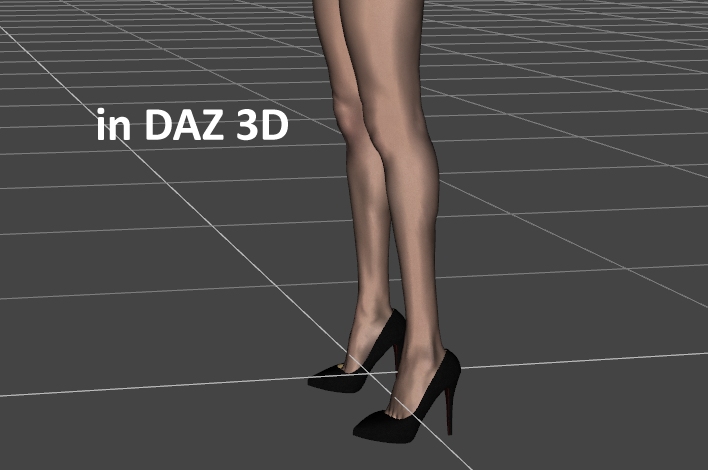
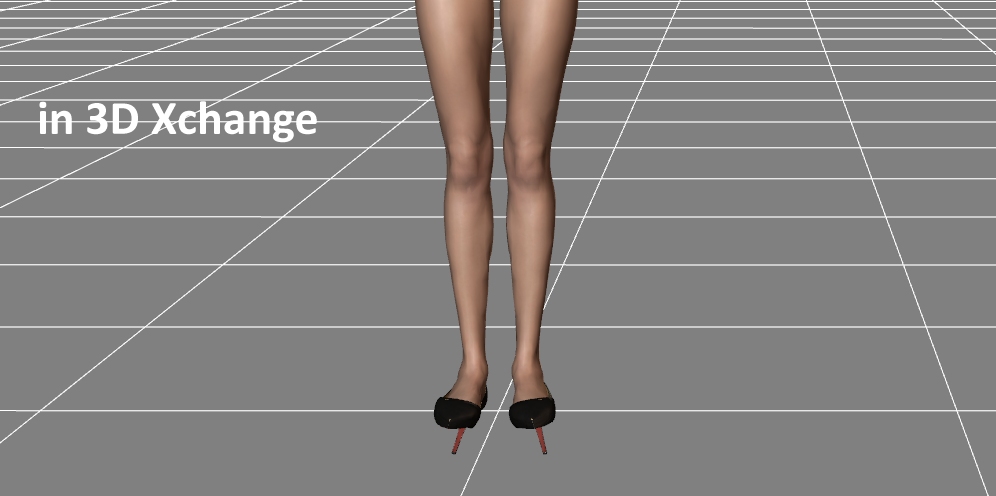
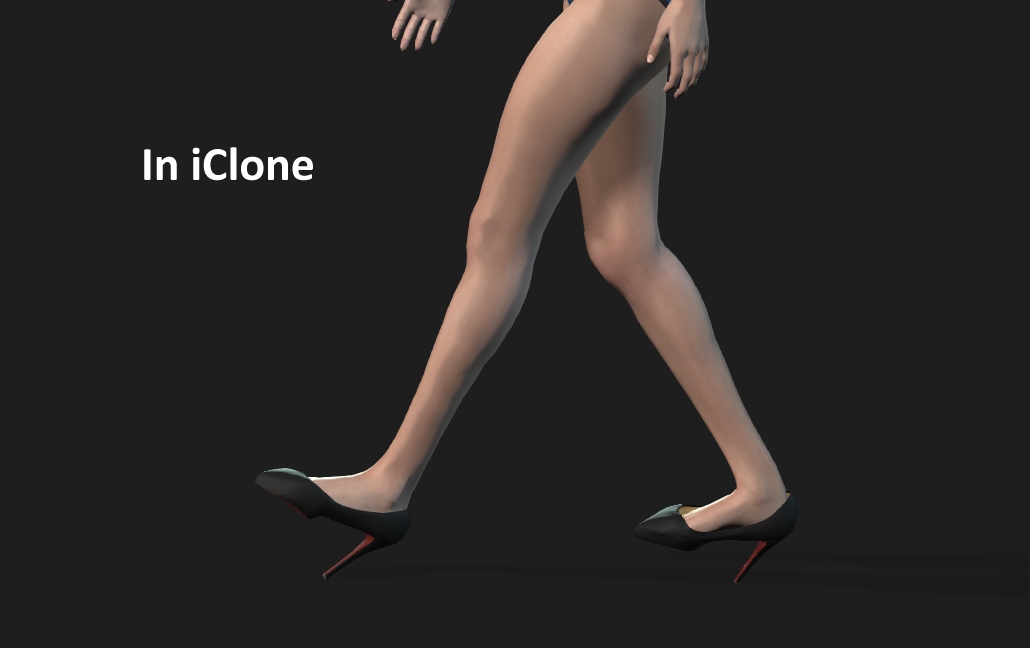
A female avatar in Daz 3D stands on her high heels. In 3D Xchange  those high heels arrive as flats and - as I  import them in iClone- they arrive as flats there as well. As I transfer the catwalk animation on the avatar, the heels do not go upright, but stay flat, and she walks on flats in this ugly walk, instead of walking as a high-heeled iclone avatar, who, as everybody knows, walks correctly and gracefully with heels.
How to correct this issue? Will be greatful for each suggestion and thanks a lot in advance.

P.S. The export/import has been done according to this tutorial:
https://www.youtube.com/watch?v=9EXDvs5uyyk
Please notice also, that I do not have a Character Creator PIPELINE version.

Kelleytoons
Kelleytoons
Posted 6 Years Ago
View Quick Profile
Distinguished Member

Distinguished Member (37.8K reputation)Distinguished Member (37.8K reputation)Distinguished Member (37.8K reputation)Distinguished Member (37.8K reputation)Distinguished Member (37.8K reputation)Distinguished Member (37.8K reputation)Distinguished Member (37.8K reputation)Distinguished Member (37.8K reputation)Distinguished Member (37.8K reputation)

Group: Forum Members
Last Active: 2 Years Ago
Posts: 9.2K, Visits: 22.1K
Pipeline would make this a snap but I *think* you can still import the OBJ into CC3 using "Create Accessory", reweight to a shoe, and then use the high heel adjustment there to fix.


Alienware Aurora R16, Win 11, i9-149000KF, 3.20GHz CPU, 64GB RAM, RTX 4090 (24GB), Samsung 870 Pro 8TB, Gen3 MVNe M-2 SSD, 4TBx2, 39" Alienware Widescreen Monitor
Mike "ex-genius" Kelley
toystorylab
toystorylab
Posted 6 Years Ago
View Quick Profile
Distinguished Member

Distinguished Member (17.3K reputation)Distinguished Member (17.3K reputation)Distinguished Member (17.3K reputation)Distinguished Member (17.3K reputation)Distinguished Member (17.3K reputation)Distinguished Member (17.3K reputation)Distinguished Member (17.3K reputation)Distinguished Member (17.3K reputation)Distinguished Member (17.3K reputation)

Group: Forum Members
Last Active: Last Year
Posts: 4.6K, Visits: 29.9K
As far as I remember doing this in 3DXchange,
before converting to non-standard rotate feet so heels fit.
I think you have to untick "activate" to do so...


Toystorylab on Vimeo : https://forum.reallusion.com/uploads/images/ce44ea78-6984-47d8-9bf4-b783.png    Crassitudes (my "Alter Ego") on Youtube: https://forum.reallusion.com/uploads/images/fcc4df30-b3a8-40a5-a427-0735.png

mayaenvogue2016
mayaenvogue2016
Posted 6 Years Ago
View Quick Profile
Distinguished Member

Distinguished Member (1.3K reputation)Distinguished Member (1.3K reputation)Distinguished Member (1.3K reputation)Distinguished Member (1.3K reputation)Distinguished Member (1.3K reputation)Distinguished Member (1.3K reputation)Distinguished Member (1.3K reputation)Distinguished Member (1.3K reputation)Distinguished Member (1.3K reputation)

Group: Forum Members
Last Active: 3 Years Ago
Posts: 51, Visits: 216
Thank you Toystorylab, that is a very good method, I have tried some other methods following the tutorials before,  as for example:   https://www.youtube.com/watch?v=fVHcFehSKcU but  it does not work, because the current version of 3d Xchange is different. But the method you have suggested works and I would recommend it to anyone who has the same issue. Thanks a lot!
mayaenvogue2016
mayaenvogue2016
Posted 6 Years Ago
View Quick Profile
Distinguished Member

Distinguished Member (1.3K reputation)Distinguished Member (1.3K reputation)Distinguished Member (1.3K reputation)Distinguished Member (1.3K reputation)Distinguished Member (1.3K reputation)Distinguished Member (1.3K reputation)Distinguished Member (1.3K reputation)Distinguished Member (1.3K reputation)Distinguished Member (1.3K reputation)

Group: Forum Members
Last Active: 3 Years Ago
Posts: 51, Visits: 216
Thank you very much,  surely  this option would also work, but unfortunately I am not yet familiar with reweighting and so I was not able to do it.  I was able to apply the  method toystorylab has suggested and it works!
Kelleytoons
Kelleytoons
Posted 6 Years Ago
View Quick Profile
Distinguished Member

Distinguished Member (37.8K reputation)Distinguished Member (37.8K reputation)Distinguished Member (37.8K reputation)Distinguished Member (37.8K reputation)Distinguished Member (37.8K reputation)Distinguished Member (37.8K reputation)Distinguished Member (37.8K reputation)Distinguished Member (37.8K reputation)Distinguished Member (37.8K reputation)

Group: Forum Members
Last Active: 2 Years Ago
Posts: 9.2K, Visits: 22.1K
As long as you got it.

Reweighting just means applying weights to an accessory.  When you use "Create Accessory" it comes in just "attached" and not as cloth.  You go to the Modify/Apply Skin weights and just choose "Shoes".


Alienware Aurora R16, Win 11, i9-149000KF, 3.20GHz CPU, 64GB RAM, RTX 4090 (24GB), Samsung 870 Pro 8TB, Gen3 MVNe M-2 SSD, 4TBx2, 39" Alienware Widescreen Monitor
Mike "ex-genius" Kelley


Reading This Topic