|
Author
|
Message
|
|
StyleMarshal
|
StyleMarshal
Posted 4 Years Ago
|
|
Group: Forum Members
Last Active: Last Year
Posts: 5.8K,
Visits: 14.3K
|
rosuckmedia (4/11/2021)
I do not find the settings delay before warm up in the movie render queue?
Can anyone tell me??
Greetings rosuckmediaIn Movie Render it is "preset" :  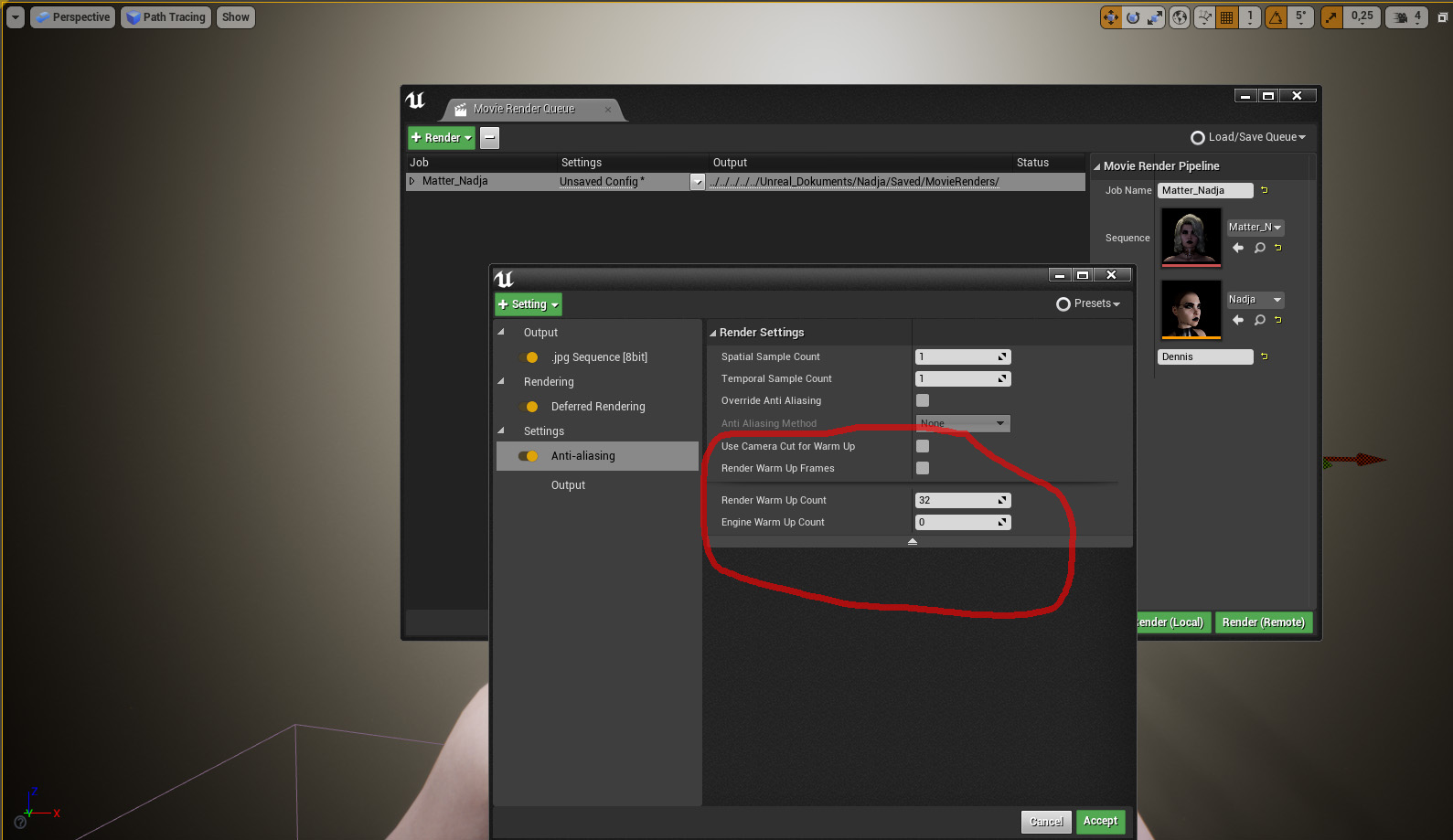
|
|
|
|
|
rosuckmedia
|
rosuckmedia
Posted 4 Years Ago
|
|
Group: Forum Members
Last Active: 7 Months Ago
Posts: 3.2K,
Visits: 4.8K
|
Vielen Dank, Bassline:):) ich habe noch eine andere Lösung gefunden. Ich verwende Cam Shake das klappt hervorragend. Habe reibungslose Übergänge damit siehe Beispiel. Auch für den Movie Render Que Many Thanks,:):) I found another solution. I use Cam Shake that works great. Have smooth transitions so see example. Also for the movie render. Greetings Robert 
|
|
|
|
|
Jeasy
|
|
|
Group: Forum Members
Last Active: Last Year
Posts: 178,
Visits: 2.4K
|
I'm trying to get a character into Unreal 4.26 film project and the character has tattoos that I would like to have glow as in your example @Bassline303 but not sure how to do that. Do you have a tutorial for that? Also your POWER IK Live Link Tutorial, I followed it exactly but my character floats in the air when I hit play not sure what I am doing wrong. Can you Help please?   
|
|
|
|
|
StyleMarshal
|
StyleMarshal
Posted 4 Years Ago
|
|
Group: Forum Members
Last Active: Last Year
Posts: 5.8K,
Visits: 14.3K
|
@Jeasy
Guess your Character is standing on the "Player Start Capsule".
Glow Map : Here I used a suit with only 1 material , better you have separate materials so you can adjust the "Glow Map" for each part.
Have a look :
|
|
|
|
|
kungphu
|
kungphu
Posted 4 Years Ago
|
|
Group: Forum Members
Last Active: Last Month
Posts: 997,
Visits: 7.1K
|
Thanks a ton Rocksuck and BL it certainly worked with no problems! @TonyDPrime... man you crack me up! Instead of that twitch I was thinking it was a wiggle to the jiggle :laugh:
Many thanks gents this has to be the most informative forum ever!
My "NEWEST" Latest:) Movie Made With Amaaaazing iClone
—> High Noon”ish” in Narrow Valley<—
|
|
|
|
|
StyleMarshal
|
StyleMarshal
Posted 4 Years Ago
|
|
Group: Forum Members
Last Active: Last Year
Posts: 5.8K,
Visits: 14.3K
|
|
|
|
|
|
Jeasy
|
|
|
Group: Forum Members
Last Active: Last Year
Posts: 178,
Visits: 2.4K
|
@ Bassline303 I have a silly issue that I can solve. I need to do an animation of a woman running while holding a baby in her left arm, I am using the run motion from Spunky Moves on ArtCore from Reallusion and need to keep the left arm unaffected by the motion clip from moving as the baby will be attached to the forearm. I know that if using Motion puppeteering tool, we can mask out body parts for the applied motion, how can we mask out the body part when applying a motion clip in iclone and getting it ready for transfer or livelink to Unreal Engine. I have been trying to figure this out and can't seem to get anywhere. I wonder if you can please help. Still trying the emmisive layer as per your video but finally managed to get teh CCLiveLink BP with FootIK working. :D Thanks. Couldn't figure out if you had Unreal on play mode or not as your screen was cropped and I didn't hit play. Also the CC character collision was not set to ignore the trace channel.
|
|
|
|
|
TonyDPrime
|
TonyDPrime
Posted 4 Years Ago
|
|
Group: Forum Members
Last Active: Last Year
Posts: 3.4K,
Visits: 12.4K
|
Jeasy (4/13/2021)
@ Bassline303 I have a silly issue that I can solve. I need to do an animation of a woman running while holding a baby in her left arm, I am using the run motion from Spunky Moves on ArtCore from Reallusion and need to keep the left arm unaffected by the motion clip from moving as the baby will be attached to the forearm. I know that if using Motion puppeteering tool, we can mask out body parts for the applied motion, how can we mask out the body part when applying a motion clip in iclone and getting it ready for transfer or livelink to Unreal Engine. I have been trying to figure this out and can't seem to get anywhere. I wonder if you can please help. Still trying the emmisive layer as per your video but finally managed to get teh CCLiveLink BP with FootIK working. :D Thanks. Couldn't figure out if you had Unreal on play mode or not as your screen was cropped and I didn't hit play. Also the CC character collision was not set to ignore the trace channel. Jeasy - what happened when you masked out the body part and then export the animation, or when you run it through Live Link....does UE4 not follow the motion you did in iClone, or can you show what your current result is? This can probably help https://manual.reallusion.com/iClone_7/ENU/Content/iClone_7/Pro_7.4/08_Animation/Body_Puppeteering/Masking_Puppeteering_and_Multi_Layer_Recording.htm
|
|
|
|
|
TonyDPrime
|
TonyDPrime
Posted 4 Years Ago
|
|
Group: Forum Members
Last Active: Last Year
Posts: 3.4K,
Visits: 12.4K
|
Bassline303 (4/13/2021)
A lot of MH Shorts :Cool
|
|
|
|
|
zbeech249
|
zbeech249
Posted 4 Years Ago
|
|
Group: Forum Members
Last Active: 4 Years Ago
Posts: 1,
Visits: 14
|
Guys I cant work out why the physics for the cloth i made in marvellous and animated in iclone, wont transfer correctly via ue4 livelink? any help would be greatly appreciated.
|
|
|
|