|
jason_770227
|
jason_770227
Posted 7 Years Ago
|
|
Group: Forum Members
Last Active: 2 Years Ago
Posts: 8,
Visits: 344
|
Thank you!
|
|
Peter (RL)
|
Peter (RL)
Posted 7 Years Ago
|
|
Group: Administrators
Last Active: 2 Years Ago
Posts: 23.1K,
Visits: 36.6K
|
All you need to do is click the dropdown arrow for your character on the Timeline and put a check in the Expression box. You can do the same for any other tracks you wish to display. 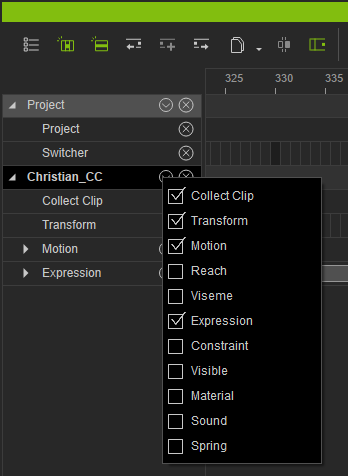
Peter
Forum Administrator www.reallusion.com
|
|
ldmarkley
|
ldmarkley
Posted 7 Years Ago
|
|
Group: Forum Members
Last Active: 7 Years Ago
Posts: 8,
Visits: 40
|
I'm sorry for the newbie post but I'm at a loss here. I just started using Face Puppet and I've recorded some simple animations. I wanted to find them on the Facial Expression track on the timeline that I understand is supposed to be there but it's...not. I know the animations recorded because I can play them back but they don't show up anywhere on the timeline. Do I need to enable the expression track somewhere?
|