Profile Picture

How could I create the 4 arcs that come with this picture?

Posted By Data Juggler 6 Years Ago
You don't have permission to rate!
1
2

How could I create the 4 arcs that come with this picture?

Author
Message
3DChick
3DChick
Posted 6 Years Ago
View Quick Profile
Distinguished Member

Distinguished Member (2.3K reputation)Distinguished Member (2.3K reputation)Distinguished Member (2.3K reputation)Distinguished Member (2.3K reputation)Distinguished Member (2.3K reputation)Distinguished Member (2.3K reputation)Distinguished Member (2.3K reputation)Distinguished Member (2.3K reputation)Distinguished Member (2.3K reputation)

Group: Forum Members
Last Active: Last Month
Posts: 411, Visits: 1.9K
On the hat/opacity issue, I had this problem with hair viewed through a window. I can't remember exactly how I fixed it, but I did turn the opacity of the window down pretty low, and also removed bump/metallic maps from the window glass. If I get time, I'll open that file and see what the settings were. but you might try those things. It is fixable, just takes tweaking.
:-)

____________________________________________
Life-long learner and having waaaay too much fun with iClone! Youtube Channel: 3DChick
Book Covers: www.significantcover.com Largely Unfinished Fiction: www.nemontgomery.com
Skuzzlebutt
Skuzzlebutt
Posted 6 Years Ago
View Quick Profile
Distinguished Member

Distinguished Member (4.4K reputation)Distinguished Member (4.4K reputation)Distinguished Member (4.4K reputation)Distinguished Member (4.4K reputation)Distinguished Member (4.4K reputation)Distinguished Member (4.4K reputation)Distinguished Member (4.4K reputation)Distinguished Member (4.4K reputation)Distinguished Member (4.4K reputation)

Group: Forum Members
Last Active: 2 Years Ago
Posts: 582, Visits: 8.6K
Data Juggler (5/9/2019)
[quote]Kipster (5/9/2019)


here is zip file of the same prop

making it move,
it could be done with physics or soft cloth
but ask yourself for such a thrown together prop
would it be worth the time?
and wind in iclone just causes ugly problems


.
Data Juggler
Data Juggler
Posted 6 Years Ago
View Quick Profile
Distinguished Member

Distinguished Member (13.9K reputation)Distinguished Member (13.9K reputation)Distinguished Member (13.9K reputation)Distinguished Member (13.9K reputation)Distinguished Member (13.9K reputation)Distinguished Member (13.9K reputation)Distinguished Member (13.9K reputation)Distinguished Member (13.9K reputation)Distinguished Member (13.9K reputation)

Group: Forum Members
Last Active: 9 Months Ago
Posts: 1.8K, Visits: 5.6K
animagic (5/9/2019)
For glass, the Diffuse color should be set to a dark color or black. It looks like it's white right now.


You have a better eye for this stuff than I do. You were right; I changed the diffuse to black and now I can see through the window better.

I had to keep the Self Illumination for the Window at 100 to keep the beret looking right. 

Thanks; can you tell me what Diffuse means (does)? 

https://forum.reallusion.com/uploads/images/0419a168-e125-4ee1-8c80-7eb6.png


Creator of the free website:
PixelDatabase.Net
A Free Online Text Based Image Editor
https://forum.reallusion.com/uploads/images/6e6663e2-0ecf-447a-ab3d-d49d.png

Data Juggler
Data Juggler
Posted 6 Years Ago
View Quick Profile
Distinguished Member

Distinguished Member (13.9K reputation)Distinguished Member (13.9K reputation)Distinguished Member (13.9K reputation)Distinguished Member (13.9K reputation)Distinguished Member (13.9K reputation)Distinguished Member (13.9K reputation)Distinguished Member (13.9K reputation)Distinguished Member (13.9K reputation)Distinguished Member (13.9K reputation)

Group: Forum Members
Last Active: 9 Months Ago
Posts: 1.8K, Visits: 5.6K
Kipster (5/9/2019)
modify/edit mesh/face
check ignore backfaces if needed
make a selection
press hide
 im using 3.03 still so it might be slightly different in the recent one

i uploaded one i made which can be modified
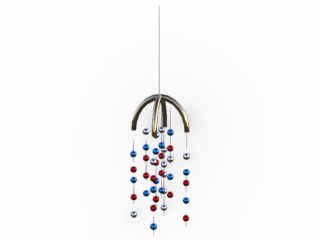

https://forum.reallusion.com/uploads/images/c5f01737-3edd-4688-846d-54f8.png
it only took about 5 minutes since most of it was cloned
and positioned along a hidden torus.
i build a lot of stuff with primitives when i get in a jam


The only took me 5 minutes part is where I think it takes me 5 minutes to get IClone open and find the props I need.

Thanks for answering the CC question also. I have clicked on Edit Mesh, and every time i do I regret it. I can do a little move because I know the W key stands for 'We Need To Move It', but that is all I know about mesh. 

If any IClone expert out there started a Remote 1 on 1 session help that charges by the minute, that would probably be a lucrative business. Forums are great and extremely helpful, reading documentation and watching someone else do something in a 15 minute video is also great to see they know how to do it. I will do something the hard way for a long time until it is so painful it finally dawns on me to ask if there is a faster way, and almost every time there is.

I will have to find something that opens .rar files when I get off work. I don't have the heart to ask you to make it into a zip file since I was even asking (or in the least bit expecting) to have someone create it for me; I will figure that the how to open it when I get off work.

I was just telling one of my co-workers this morning that I feel more productive today than the past month. Probably from going to bed at 10 last night.

Now that I solved my window issue I may not need that prop in this set, but I could see it having some use just as decoration.

Taking this thread on its very last tangent, I have seen Wind somewhere in IClone for these tropical plants prop.

Is there a way to apply wind to make that prop into a wind chime? I wanted this also for some shrubs to give them a little movement.

Many thanks for all the info and the prop


Creator of the free website:
PixelDatabase.Net
A Free Online Text Based Image Editor

https://forum.reallusion.com/uploads/images/6e6663e2-0ecf-447a-ab3d-d49d.png

animagic
animagic
Posted 6 Years Ago
View Quick Profile
Distinguished Member

Distinguished Member (33.4K reputation)Distinguished Member (33.4K reputation)Distinguished Member (33.4K reputation)Distinguished Member (33.4K reputation)Distinguished Member (33.4K reputation)Distinguished Member (33.4K reputation)Distinguished Member (33.4K reputation)Distinguished Member (33.4K reputation)Distinguished Member (33.4K reputation)

Group: Forum Members
Last Active: Last Month
Posts: 15.8K, Visits: 31.4K
For glass, the Diffuse color should be set to a dark color or black. It looks like it's white right now.


https://forum.reallusion.com/uploads/images/436b0ffd-1242-44d6-a876-d631.jpg

Skuzzlebutt
Skuzzlebutt
Posted 6 Years Ago
View Quick Profile
Distinguished Member

Distinguished Member (4.4K reputation)Distinguished Member (4.4K reputation)Distinguished Member (4.4K reputation)Distinguished Member (4.4K reputation)Distinguished Member (4.4K reputation)Distinguished Member (4.4K reputation)Distinguished Member (4.4K reputation)Distinguished Member (4.4K reputation)Distinguished Member (4.4K reputation)

Group: Forum Members
Last Active: 2 Years Ago
Posts: 582, Visits: 8.6K
modify/edit mesh/face
check ignore backfaces if needed
make a selection
press hide
 im using 3.03 still so it might be slightly different in the recent one

i uploaded one i made which can be modified
https://forum.reallusion.com/uploads/images/c5f01737-3edd-4688-846d-54f8.png
it only took about 5 minutes since most of it was cloned
and positioned along a hidden torus.
i build a lot of stuff with primitives when i get in a jam


.
Data Juggler
Data Juggler
Posted 6 Years Ago
View Quick Profile
Distinguished Member

Distinguished Member (13.9K reputation)Distinguished Member (13.9K reputation)Distinguished Member (13.9K reputation)Distinguished Member (13.9K reputation)Distinguished Member (13.9K reputation)Distinguished Member (13.9K reputation)Distinguished Member (13.9K reputation)Distinguished Member (13.9K reputation)Distinguished Member (13.9K reputation)

Group: Forum Members
Last Active: 9 Months Ago
Posts: 1.8K, Visits: 5.6K
@Kipster Yes I have CC3, what tool do I use there to erase?

Trying to file this away for future knowledge, and having a forum is good. I always like finding my own old questions years later. Kind of like time travel and memory loss and deja vu all in one experience.

Creator of the free website:
PixelDatabase.Net
A Free Online Text Based Image Editor
https://forum.reallusion.com/uploads/images/6e6663e2-0ecf-447a-ab3d-d49d.png

Skuzzlebutt
Skuzzlebutt
Posted 6 Years Ago
View Quick Profile
Distinguished Member

Distinguished Member (4.4K reputation)Distinguished Member (4.4K reputation)Distinguished Member (4.4K reputation)Distinguished Member (4.4K reputation)Distinguished Member (4.4K reputation)Distinguished Member (4.4K reputation)Distinguished Member (4.4K reputation)Distinguished Member (4.4K reputation)Distinguished Member (4.4K reputation)

Group: Forum Members
Last Active: 2 Years Ago
Posts: 582, Visits: 8.6K
if you have cc3, it can also be used as a eraser tool
for anything made into a obj and imported into it


.
Data Juggler
Data Juggler
Posted 6 Years Ago
View Quick Profile
Distinguished Member

Distinguished Member (13.9K reputation)Distinguished Member (13.9K reputation)Distinguished Member (13.9K reputation)Distinguished Member (13.9K reputation)Distinguished Member (13.9K reputation)Distinguished Member (13.9K reputation)Distinguished Member (13.9K reputation)Distinguished Member (13.9K reputation)Distinguished Member (13.9K reputation)

Group: Forum Members
Last Active: 9 Months Ago
Posts: 1.8K, Visits: 5.6K
I solved my issue by changing the Self Illumination of the window from 62 (is what the class room scene I purchased came with), and bumped it to 100 and now it looks fine.

Not sure why Self Illumination did the trick, but having a slider was easy to try so I tried it.

Thanks for the Opacity image; I have seen others but I guess it didn't register in my brain as that is a way to hide what you want by making it white (based on your example). I will count this as what I learned today, and it is only 8:29 AM!

https://forum.reallusion.com/uploads/images/9048883c-f77f-4b9c-96e2-6c94.png


Creator of the free website:
PixelDatabase.Net
A Free Online Text Based Image Editor
https://forum.reallusion.com/uploads/images/6e6663e2-0ecf-447a-ab3d-d49d.png

Data Juggler
Data Juggler
Posted 6 Years Ago
View Quick Profile
Distinguished Member

Distinguished Member (13.9K reputation)Distinguished Member (13.9K reputation)Distinguished Member (13.9K reputation)Distinguished Member (13.9K reputation)Distinguished Member (13.9K reputation)Distinguished Member (13.9K reputation)Distinguished Member (13.9K reputation)Distinguished Member (13.9K reputation)Distinguished Member (13.9K reputation)

Group: Forum Members
Last Active: 9 Months Ago
Posts: 1.8K, Visits: 5.6K
Thanks for the opacity tip. Not sure what you mean about won't be flat, but 3D is not flat usually so that is a good thing I think.

I will check out the Defraction on the window; maybe that's it. 

You actually counted the 36, I didn't think there were that many just by looking. 

Thanks, when I get off work I will try your suggestions or if I get a break maybe sooner.

[Edit]
I just checked, and I don't have Refraction on the window, just opacity is set at 19.

I will either create the mobile as described above or just buy something to have the camera focus on. It was just an idea to start outside the class, may not be the best angle.


Creator of the free website:
PixelDatabase.Net
A Free Online Text Based Image Editor
https://forum.reallusion.com/uploads/images/6e6663e2-0ecf-447a-ab3d-d49d.png


1
2


Reading This Topic