Profile Picture

IClone >> 3DXchange Export to FBX for Unity - Animations are offset

Posted By mattypattyfp 6 Years Ago
You don't have permission to rate!

IClone >> 3DXchange Export to FBX for Unity - Animations are offset

Author
Message
mattypattyfp
mattypattyfp
Posted 6 Years Ago
View Quick Profile
Veteran Member

Veteran Member (636 reputation)Veteran Member (636 reputation)Veteran Member (636 reputation)Veteran Member (636 reputation)Veteran Member (636 reputation)Veteran Member (636 reputation)Veteran Member (636 reputation)Veteran Member (636 reputation)Veteran Member (636 reputation)

Group: Forum Members
Last Active: 3 Years Ago
Posts: 14, Visits: 76
Hi,
When I export a CC3 character through 3Dxchange as an FBX, along with animations, my animations are "offset" in unity from the position of the model.  I first drag my iAvatar into 3dx, then I drag my animations into 3dx as iMotionPlus files.  I add all to perform and export with Unity settings.  The "Default" animation that is part of my iAvatar is fine (but empty, which is fine) in Unity.
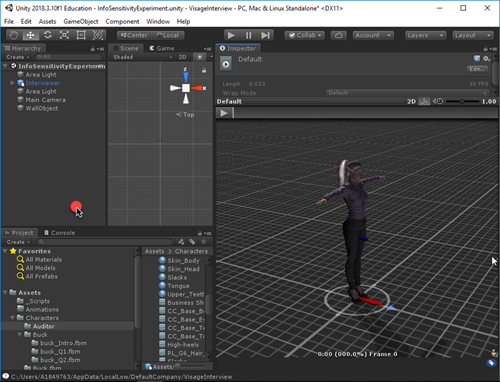
https://forum.reallusion.com/uploads/images/6e1ffb64-dff5-45c8-ba66-6622.png

But my iMotionPlus animations are offset, like this:
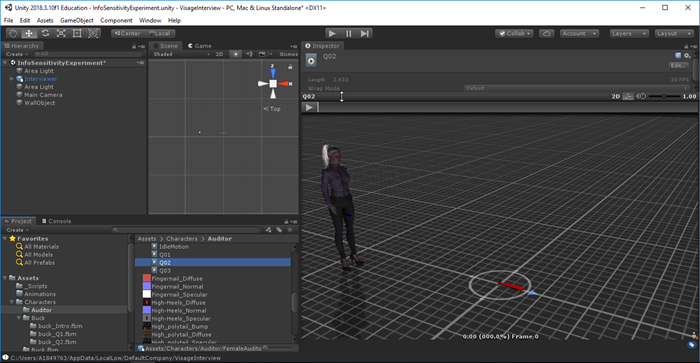
https://forum.reallusion.com/uploads/images/6cad86ab-d172-4b09-ad5e-44dc.png

I created a separate iClone project for each animation, but exported the iMotionPlus clips the same way.  I'm I doing something wrong in exporting the model and animations in this way?  I uncheck the "Save One Take Per File" option when exporting.  Is there a way in Unity to fix this offset?  The problem is that before I start an animation, the model is in one position, but playing the animation shifts the models to another position.

Any help would be greatly appreciated.  Thanks.
mattypattyfp
mattypattyfp
Posted 6 Years Ago
View Quick Profile
Veteran Member

Veteran Member (636 reputation)Veteran Member (636 reputation)Veteran Member (636 reputation)Veteran Member (636 reputation)Veteran Member (636 reputation)Veteran Member (636 reputation)Veteran Member (636 reputation)Veteran Member (636 reputation)Veteran Member (636 reputation)

Group: Forum Members
Last Active: 3 Years Ago
Posts: 14, Visits: 76
I figured this out. I had transformed the model in my separate animation files instead of panned the camera.  I reset the transform location and all was good.
wildstar
wildstar
Posted 6 Years Ago
View Quick Profile
Distinguished Member

Distinguished Member (8.8K reputation)Distinguished Member (8.8K reputation)Distinguished Member (8.8K reputation)Distinguished Member (8.8K reputation)Distinguished Member (8.8K reputation)Distinguished Member (8.8K reputation)Distinguished Member (8.8K reputation)Distinguished Member (8.8K reputation)Distinguished Member (8.8K reputation)

Group: Forum Members
Last Active: 9 Months Ago
Posts: 1.2K, Visits: 5.1K
drag and drop of unity is a problem. When you do this go to the inspector, transform and put 0 in all values ​​position scale scale x y z and your character will stay in the same place where it was in the iclone.
wildstar
wildstar
Posted 6 Years Ago
View Quick Profile
Distinguished Member

Distinguished Member (8.8K reputation)Distinguished Member (8.8K reputation)Distinguished Member (8.8K reputation)Distinguished Member (8.8K reputation)Distinguished Member (8.8K reputation)Distinguished Member (8.8K reputation)Distinguished Member (8.8K reputation)Distinguished Member (8.8K reputation)Distinguished Member (8.8K reputation)

Group: Forum Members
Last Active: 9 Months Ago
Posts: 1.2K, Visits: 5.1K
drag and drop of unity is a problem. When you do this go to the inspector, transform and put 0 in all values ​​position scale scale x y z and your character will stay in the same place where it was in the iclone.
mattypattyfp
mattypattyfp
Posted 6 Years Ago
View Quick Profile
Veteran Member

Veteran Member (636 reputation)Veteran Member (636 reputation)Veteran Member (636 reputation)Veteran Member (636 reputation)Veteran Member (636 reputation)Veteran Member (636 reputation)Veteran Member (636 reputation)Veteran Member (636 reputation)Veteran Member (636 reputation)

Group: Forum Members
Last Active: 3 Years Ago
Posts: 14, Visits: 76
Sorry, I wasn't very clear here.  I zero'd out the transform coordinates in iClone, not Unity.  But, yes, I've noticed that problem in Unity with drag and drop as well.


Reading This Topic