|
Author
|
Message
|
|
SeanMac
|
SeanMac
Posted 6 Years Ago
|
|
Group: Forum Members
Last Active: 2 Years Ago
Posts: 416,
Visits: 3.4K
|
Hey! It's entertainment!
|
|
|
|
|
RobertoColombo
|
RobertoColombo
Posted 6 Years Ago
|
|
Group: Forum Members
Last Active: 4 Years Ago
Posts: 1.6K,
Visits: 3.0K
|
My version starts fine... but I do not like that this DEVELOPMENT version has completely overwritten the stable 7.41. That's not what i wanted when I downloaded and run it. Now if I want to create some scene in parallel with Python development I am not sure whether any project created with this temporary version will ever be recgnized by a stable one RL should have create a standalone .exe, which does not install anything, like was done in the earlier stages of IC7 Beta testing. Roberto
My PC:
OS: Windows 10 Pro English 64-bit / CPU: Intel i7-9700 3.6GHz / MB: ASUS ROG Strix Z390 RAM: 32GB DDR4 2.6GHz / HD: 2TB+3TB / SSD: 2x512GB Samsung 860 EVO + 1x2TB Samsung
VB: Palit GTX2080 TI GamingPro 11GB / AB: embedded in the MB and VB (audio from the MOTU M4 I/F) / DirectX: 12
|
|
|
|
|
Zeronimo
|
Zeronimo
Posted 6 Years Ago
|
|
Group: Forum Members
Last Active: 6 Months Ago
Posts: 482,
Visits: 19.3K
|
Test of experimental Python API (RLPy.RILight example) I just tested the example script provided in the following page: http://manual.reallusion.com/iClone/script/python/class_r_l_py_1_1_r_i_light.html
--- the script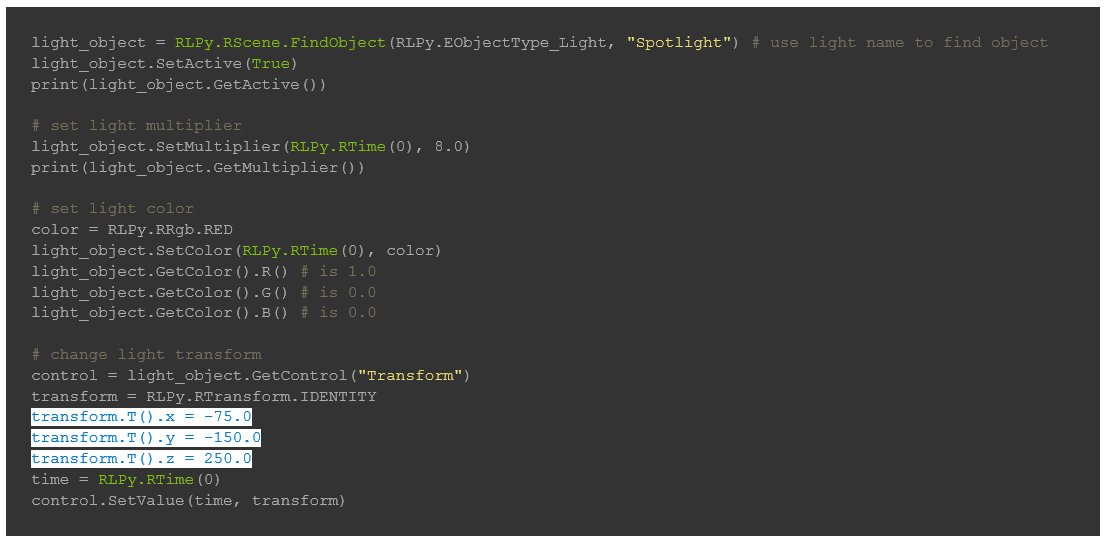
My initial project:
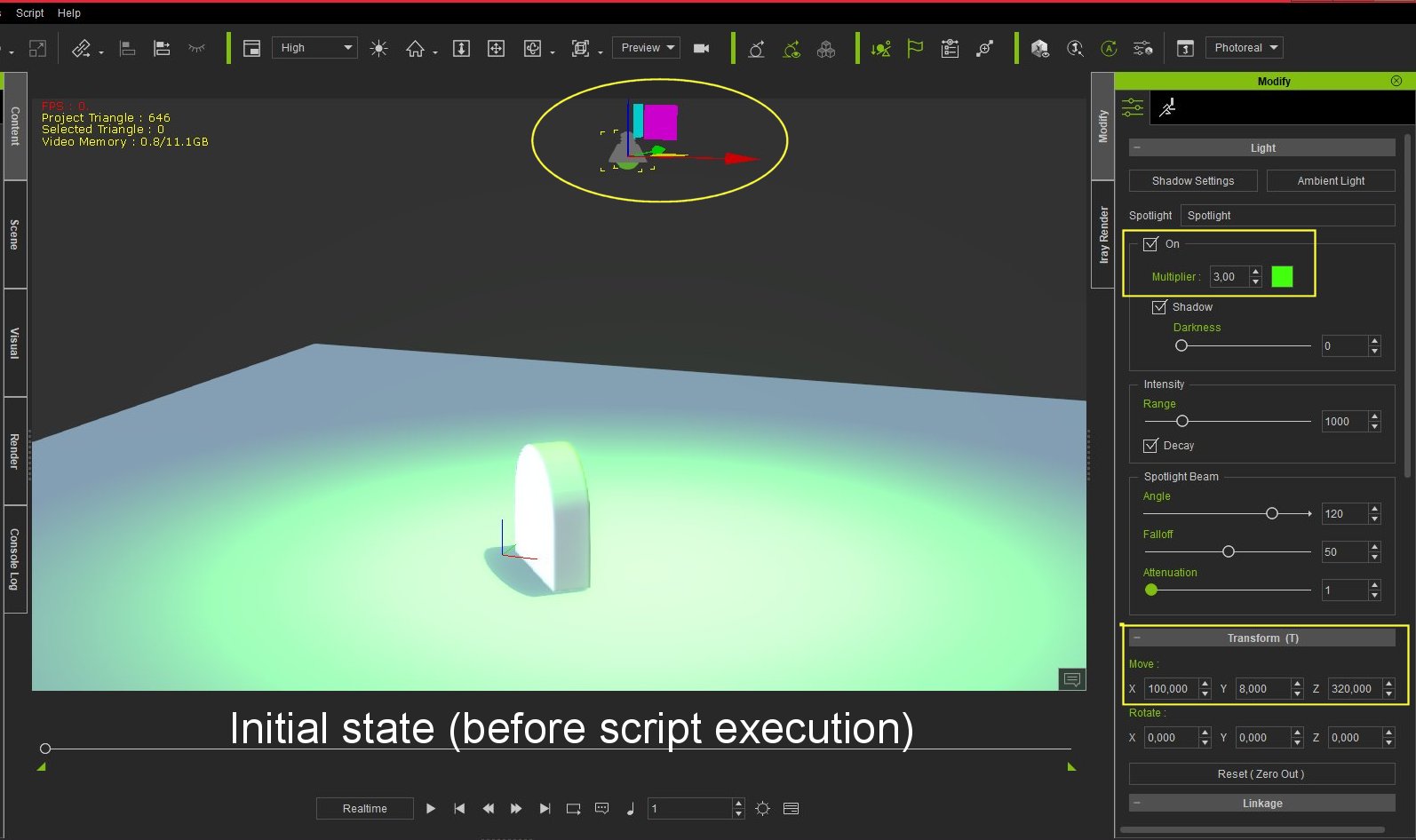 the result obtained after execution of the script: the result obtained after execution of the script:
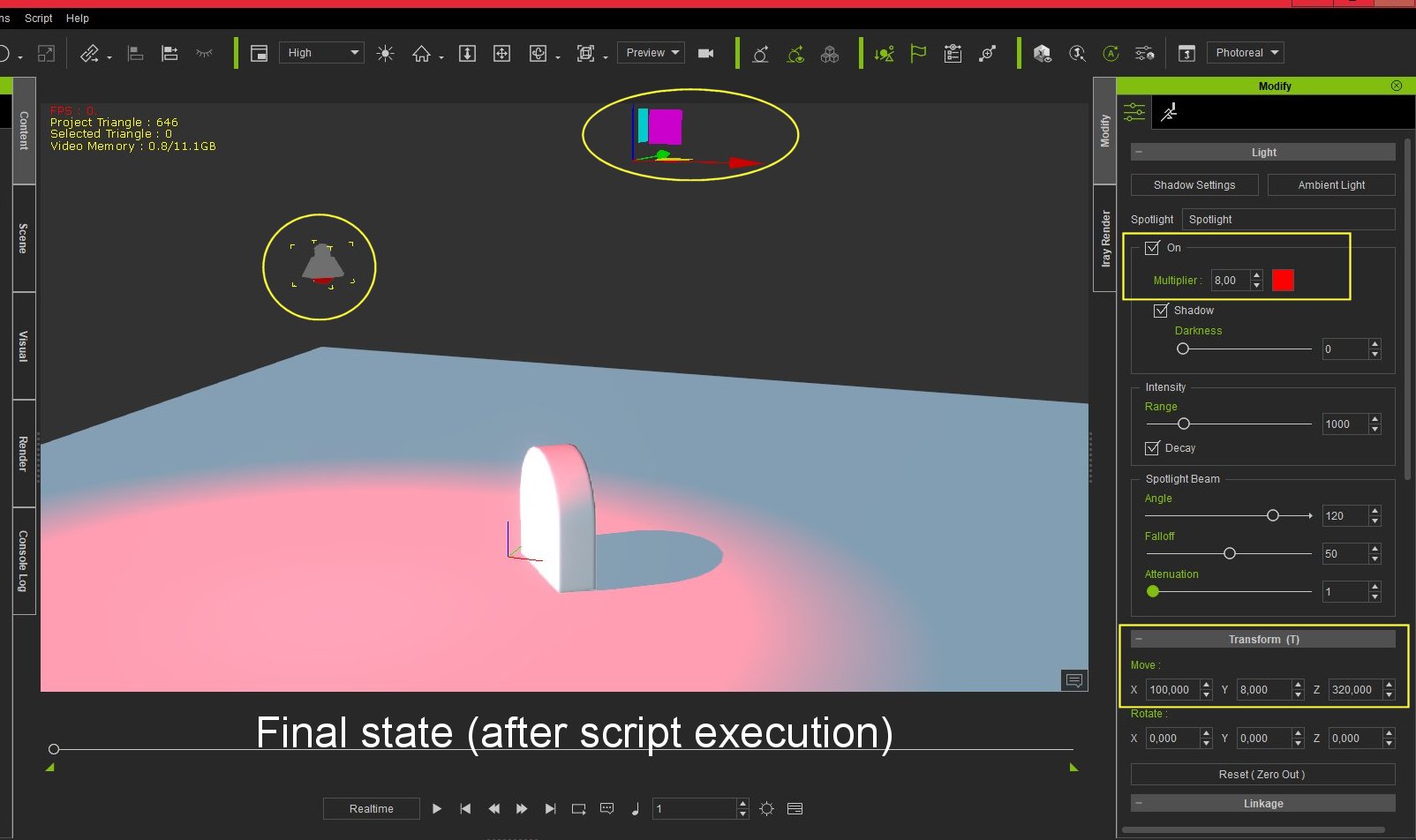 we notice that the spotlight has been moved to the coordinate provided by the script, but the GIZMO has remained at the old coordinates of the spotlight, and that the Transform coordinate X, Y, Z of the iClone MODIFY panel are not updated. we notice that the spotlight has been moved to the coordinate provided by the script, but the GIZMO has remained at the old coordinates of the spotlight, and that the Transform coordinate X, Y, Z of the iClone MODIFY panel are not updated.
|
|
|
|
|
Kelleytoons
|
Kelleytoons
Posted 6 Years Ago
|
|
Group: Forum Members
Last Active: Last Year
Posts: 9.2K,
Visits: 22.1K
|
Just for fun did you try pressing play to see if things would get updated? (and/or hiding/unhiding the spotlight)
Alienware Aurora R16, Win 11, i9-149000KF, 3.20GHz CPU, 64GB RAM, RTX 4090 (24GB), Samsung 870 Pro 8TB, Gen3 MVNe M-2 SSD, 4TBx2, 39" Alienware Widescreen Monitor
Mike "ex-genius" Kelley
|
|
|
|
|
Zeronimo
|
Zeronimo
Posted 6 Years Ago
|
|
Group: Forum Members
Last Active: 6 Months Ago
Posts: 482,
Visits: 19.3K
|
YES, after doing PLAY the GIZMO and the transform coordinates are updated.
What disturbed me was that the color of the light and the multiplier was up to date but not the coordinates of transform before the PLAY.
|
|
|
|
|
Kelleytoons
|
Kelleytoons
Posted 6 Years Ago
|
|
Group: Forum Members
Last Active: Last Year
Posts: 9.2K,
Visits: 22.1K
|
For some reason the UI doesn't update properly when running Python -- I don't know if that will ever be fixed, although the key guy here says you can put a hide/unhide object in your code so it gets fixed. Kind of. But it IS a bit disconcerting.
Alienware Aurora R16, Win 11, i9-149000KF, 3.20GHz CPU, 64GB RAM, RTX 4090 (24GB), Samsung 870 Pro 8TB, Gen3 MVNe M-2 SSD, 4TBx2, 39" Alienware Widescreen Monitor
Mike "ex-genius" Kelley
|
|
|
|
|
RobertoColombo
|
RobertoColombo
Posted 6 Years Ago
|
|
Group: Forum Members
Last Active: 4 Years Ago
Posts: 1.6K,
Visits: 3.0K
|
I had the same issue, reported in the Forum some time ago: the XYZ coordinates were not updated in real time, but rather only after I pressed PLAY.
RL mentioned that this is to guarantee a certain level of performance, which might sounds ok for certain plug-ins, which algorithmically create a fixed situation, i.e., not controllable in real-time, but it is surely not ok if we want to try to create real-time controllers.
Just a simple example/challenge for who wants to take it: moving a prop in real-time with the mouse and creating the prop keys accordingly (kind of old iClone "Director Mode" or also the Physics Toolbox, regrettably dismissed by RL).
Creating teh jkeys using a system timer is surely possible but... how to visualize the result in real-time if the GUI updates only after we press PLAY ?
Cheers
Roberto
My PC:
OS: Windows 10 Pro English 64-bit / CPU: Intel i7-9700 3.6GHz / MB: ASUS ROG Strix Z390 RAM: 32GB DDR4 2.6GHz / HD: 2TB+3TB / SSD: 2x512GB Samsung 860 EVO + 1x2TB Samsung
VB: Palit GTX2080 TI GamingPro 11GB / AB: embedded in the MB and VB (audio from the MOTU M4 I/F) / DirectX: 12
|
|
|
|
|
luke (RL)
|
luke (RL)
Posted 6 Years Ago
|
|
Group: Power Developer
Last Active: 3 Months Ago
Posts: 289,
Visits: 5.6K
|
The-any-Key (2/4/2019)
Some examples to get and set the rotation quaternions for objects in local and world (or a way to transform world to local and set it or vice versa). Also the API update gives me this error when trying to start iClone 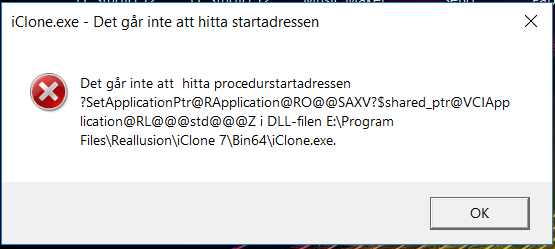 Translation: Could not find the address (memory pointer) to start the process. Could you send me the dump file? I could check it when I back from lunar new year
|
|
|
|
|
luke (RL)
|
luke (RL)
Posted 6 Years Ago
|
|
Group: Power Developer
Last Active: 3 Months Ago
Posts: 289,
Visits: 5.6K
|
RobertoColombo (2/4/2019)
My version starts fine... but I do not like that this DEVELOPMENT version has completely overwritten the stable 7.41. That's not what i wanted when I downloaded and run it. Now if I want to create some scene in parallel with Python development I am not sure whether any project created with this temporary version will ever be recgnized by a stable one RL should have create a standalone .exe, which does not install anything, like was done in the earlier stages of IC7 Beta testing. Roberto Okay, we will think about how to give you the full installer or a zip file rather than replace current one before that, I suggest you to backup the official version (copy whole iClone folder to other place) then update to the development one, so you should get both version to run in your computer
|
|
|
|
|
luke (RL)
|
luke (RL)
Posted 6 Years Ago
|
|
Group: Power Developer
Last Active: 3 Months Ago
Posts: 289,
Visits: 5.6K
|
zeronimo (2/5/2019)
YES, after doing PLAY the GIZMO and the transform coordinates are updated.
What disturbed me was that the color of the light and the multiplier was up to date but not the coordinates of transform before the PLAY. Some UI update will have the performance issue so we disable that, and we will give you a function to force UI update in further patch, however the data already set down no matter the UI show up or not.
|
|
|
|