Dear iCloners,
We are excited to announce that iClone 7.4 is available now. The major improvement of this version is Python Open API, which has been expected by many developers since iClone 7.0 was released.
*Important Notice: Please update Curve Editor Plugin to version 1.11 to prevent crashes due to incompatibility with iClone 7.4. More >
Through iClone’s Python Open API, developers can build various plugins to expand iClone's functions. These plugins can be designed to satisfy different purposes and needs, such as increasing productivity or using more creative ways to make animations. Moreover, with the upcoming Reallusion Plugin Marketplace, iClone developers can upload, share, and even sell created plugins to a global community.
By helping developers to create plugins for iClone, Reallusion creates a long-term program: iClone Open, providing essential resources and support. For example, the developers can read Developer Guides to learn the skills of building a plug-in step by step, download free sample codes from GitHub, and visit the Plugin Developer Forum to exchange the newest ideas and information with other iClone plugin developers. To know more about iClone Open, please visit its Website.
The Roadmap of iClone Open
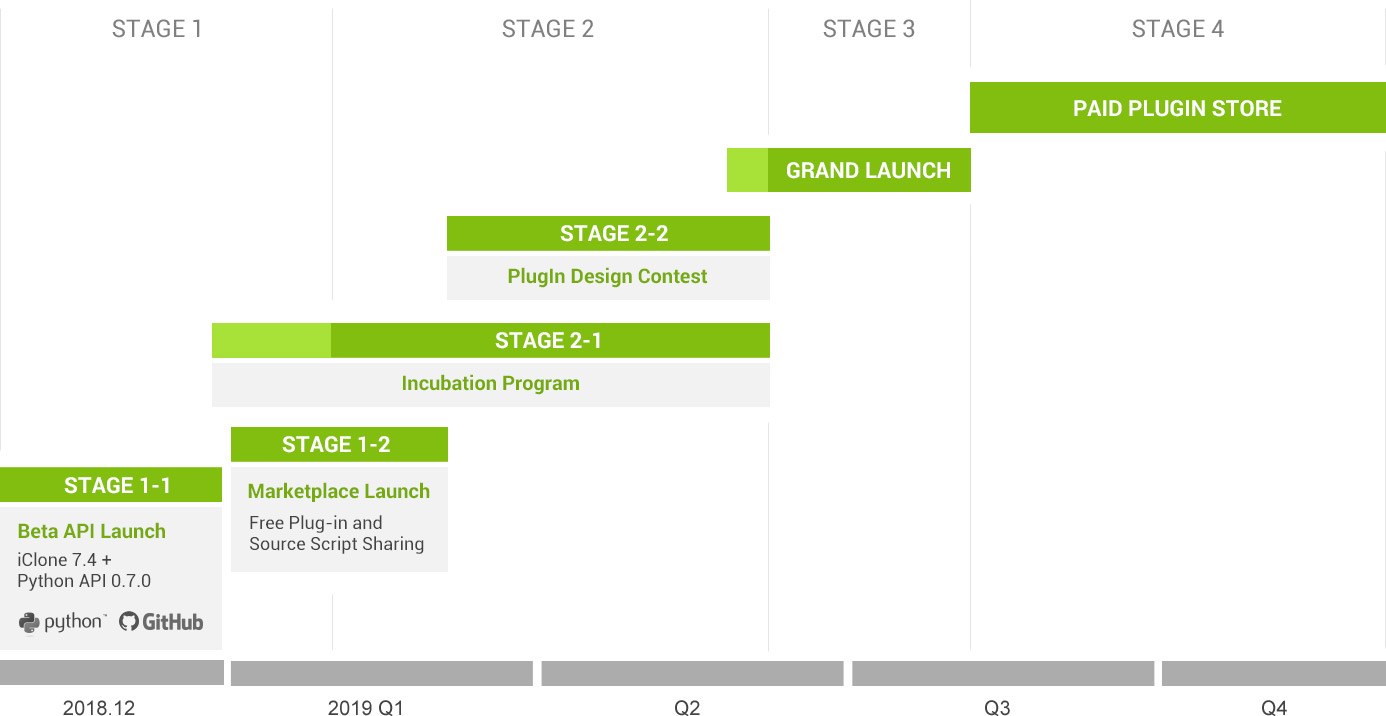
We hope Python Open API for iClone can become a Scripting Tool for Artists, and you’re more than welcome to join the iClone Open program. Please feel free to let us know if you have any suggestions or feedback in the Plugin Developer Forum.
The Reallusion Python Team is very willing to adjust current APIs or add new APIs over time based on developers’ opinions.
Thank you!
In addition to adding Python Open API, the team fixed several bugs in iClone 7.4 based on users’ feedback from previous iClone versions.
General
Fixed: Performing Send Character to iClone while iClone is closed had the tendency of opening the iClone application but not sending the character over.
Fixed: iClone crashes when importing characters with camera(s) attached.
Fixed: Fail to apply .iAtm after the application of an .iScene.
Fixed: Crash resulting from deleting the eyes or teeth and saving the head while Quick Thumbnail Generation is disabled.
Fixed: .iMaterialPlus format now comes with a Data icon thumbnail.
Fixed: Applying motion to a character while one has not been picked disabled the toolbar Move and Rotate buttons.
Fixed: Importing iC7.3 rlMotion into iC7.22 prompted an error message: "Cannot replace motion: Invalid file or avatar not compatible."
Timeline
Fixed: Pressing Set End Frame while using large or small font sizes has a tendency of shifting the end frame away from the position of the playhead. [FT5198]
iClone 7.3 - The playhead's position doesn't match the mark-in and mark-out points.
iClone 7.4 - The playhead's position exactly matches the mark-in and mark-out points.
Path
Fixed: Deleting all the points of a path under the Path > Edit Path mode had a tendency to crash iClone.
Fixed: Immediately canceling the creation of a path after it has been made prompted an error message: "Failed to record under/redo step. Under manager will restart."
Fixed: Imperfections in the Follow Terrain feature. [FT3710]
iClone 7.3 - An object would blindly follow the path while ignoring confirmation to the terrain.
iClone 7.4 - Correct object conformation to terrain via following the path.
Fixed: "Fail to Record Undo" message appears when right-clicking after Create Path was performed.
Tony
Product Marketing Manager
www.reallusion.com