|
Author
|
Message
|
|
djafararboncana
|
djafararboncana
Posted 7 Years Ago
|
|
Group: Forum Members
Last Active: 6 Years Ago
Posts: 2,
Visits: 7
|
guys i am having problem about fews hours ago, i can not export my character using fbx format, the problem is i can not see the export tab, it is down, and i cannot also scroll down to see . sorry my bad english 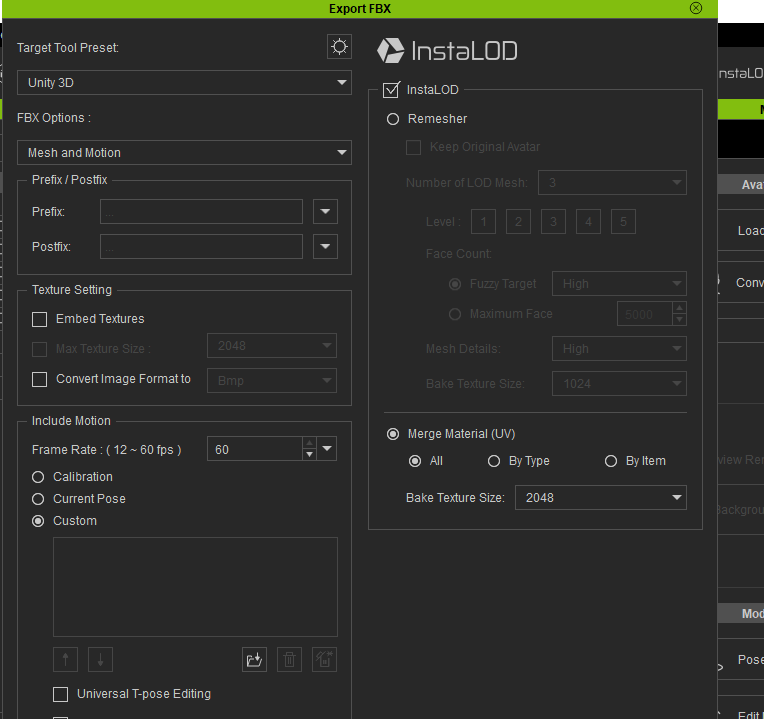
|
|
|
|
|
Peter (RL)
|
Peter (RL)
Posted 7 Years Ago
|
|
Group: Administrators
Last Active: 2 Years Ago
Posts: 23.1K,
Visits: 36.6K
|
mrtobycook (10/5/2019)
Peter, sorry to hijack this thread. :-) Just wondering if you could help - the "plus" button is greyed out for me in CHARACTER CREATOR 3 PIPELINE (on PC) when I choose Pose > Face and Body.
Can you think of any reason I couldn't be able to save any MotionPlus poses in CC3? It's probably something obvious - I'm brand new to this workflow. :-)Have you tried uninstalling Character Creator 3 and reinstalling using the Reallusion Hub. This will often resolve these kind of issues. If you still have problems after a clean install, please contact Technical Support using the link below. They will be able to advise you further. https://www.reallusion.com/CustomerSupport/UserEx/QForm.html
Peter
Forum Administrator www.reallusion.com
|
|
|
|
|
mrtobycook
|
mrtobycook
Posted 7 Years Ago
|
|
Group: Forum Members
Last Active: Last Year
Posts: 425,
Visits: 2.7K
|
Peter, sorry to hijack this thread. :-) Just wondering if you could help - the "plus" button is greyed out for me in CHARACTER CREATOR 3 PIPELINE (on PC) when I choose Pose > Face and Body. Can you think of any reason I couldn't be able to save any MotionPlus poses in CC3? It's probably something obvious - I'm brand new to this workflow. :-)
- - - - - - - - - - - - - - - - - - - - - - - - - - - -

virtualfilmer.com | youtube
|
|
|
|
|
Peter (RL)
|
Peter (RL)
Posted 7 Years Ago
|
|
Group: Administrators
Last Active: 2 Years Ago
Posts: 23.1K,
Visits: 36.6K
|
fabitorychter (1/2/2019)
I am having the same problem... How do you save a pose as IMotion Plus?Once you have posed your character the way you want, just switch to Pose > Face & Body in Content Manager and then click the ADD button at the bottom (see image below). 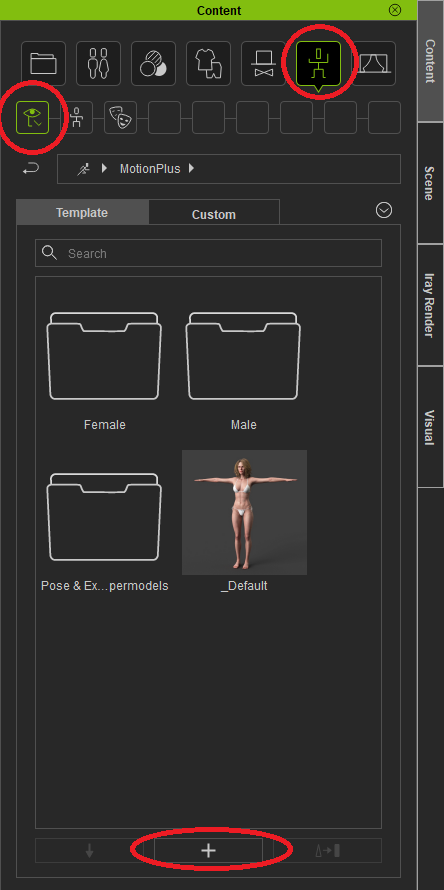
Peter
Forum Administrator www.reallusion.com
|
|
|
|
|
fabitorychter
|
fabitorychter
Posted 7 Years Ago
|
|
Group: Forum Members
Last Active: 7 Years Ago
Posts: 3,
Visits: 67
|
I am having the same problem... How do you save a pose as IMotion Plus?
|
|
|
|
|
steve_209669
|
steve_209669
Posted 8 Years Ago
|
|
Group: Forum Members
Last Active: 4 Years Ago
Posts: 6,
Visits: 41
|
OK, I've worked it out! Thanks so much for the info guys, I didn't know where to start.
I'm saving the pose as iMotion Plus and the character is translating to Cinema 4D really well. The face morphs are a bit off but its nothing a bit of tweaking wont sort out in C4D.
This is looking like a great workflow.
Regards
Steve
|
|
|
|
|
steve_209669
|
steve_209669
Posted 8 Years Ago
|
|
Group: Forum Members
Last Active: 4 Years Ago
Posts: 6,
Visits: 41
|
Hi Peter,
Thanks for your response. I still have some questions:
Once I've got the character posed and the facial expression that I need, How do I save this information as an .imotionPlus file ready for exporting with the FBX?
Can I then add this new pose to the pose library for future use?
Regards
Steve
|
|
|
|
|
Peter (RL)
|
Peter (RL)
Posted 8 Years Ago
|
|
Group: Administrators
Last Active: 2 Years Ago
Posts: 23.1K,
Visits: 36.6K
|
Hi Steve In Character Creator 3 poses are saved as .rlMotion for the body only (also .iMotion is supported), or .iMotionPlus for facial and body poses. These can all be exported with your character to FBX by checking the box marked "Include Motion" on the export panel and then loading your saved poses. You can also export full animations in the same formats using this method if you also have iClone.
Peter
Forum Administrator www.reallusion.com
|
|
|
|
|
steve_209669
|
steve_209669
Posted 8 Years Ago
|
|
Group: Forum Members
Last Active: 4 Years Ago
Posts: 6,
Visits: 41
|
Hi Postfrosch,
I have Pipeline. Could you tell me how I can export my character with a pose I have created?
I can save an FBX with an animation (imotion) but I just want the static pose I have set in Character Creator 3. I can work out how to do it.
Regards
Steve
|
|
|
|
|
Postfrosch
|
Postfrosch
Posted 8 Years Ago
|
|
Group: Forum Members
Last Active: 3 Years Ago
Posts: 6.9K,
Visits: 18.4K
|
You must have "Character Creator 3 PIPELINE" than you can exportet. But not with "CC 3 for Iclone" (free-Version) Greets Postfrosch
--------------------------------------------------------------

|
|
|
|