Profile Picture

iClone to Blender for render pt 02 - tutorial 01

Posted By illusionLAB 7 Years Ago
Rated 5 stars based on 1 vote.
Author
Message
sonic7
sonic7
Posted 7 Years Ago
View Quick Profile
Distinguished Member

Distinguished Member (14.2K reputation)Distinguished Member (14.2K reputation)Distinguished Member (14.2K reputation)Distinguished Member (14.2K reputation)Distinguished Member (14.2K reputation)Distinguished Member (14.2K reputation)Distinguished Member (14.2K reputation)Distinguished Member (14.2K reputation)Distinguished Member (14.2K reputation)

Group: Forum Members
Last Active: 2 Years Ago
Posts: 1.7K, Visits: 19.4K

OK ... (thx Mark) - better this time ...

https://forum.reallusion.com/uploads/images/d6e81cd2-2a1c-4fcf-9f26-0768.png


--------------------------------------------------------------------------------------------------------------------------------------------------------
Please be patient with me ..... I don't always 'get it' the first time 'round - not even the 2nd time! :(  - yikes! ... 
MSI GT72VR Laptop, i7 7700HQ 4-Core 3.8 GHz 16GB RAM; Nvidia 1070, 8GB Vram iClone-7.93  3DXChange Pipeline 7.81  CC-3 Pipeline 3.44  Live Face  HeadShot  Brekel Pro-Body  Popcorn FX  iRAY  Kinect V2  DaVinci Resolve17  Mixcraft 8.1

illusionLAB
illusionLAB
Posted 7 Years Ago
View Quick Profile
Distinguished Member

Distinguished Member (4.1K reputation)Distinguished Member (4.1K reputation)Distinguished Member (4.1K reputation)Distinguished Member (4.1K reputation)Distinguished Member (4.1K reputation)Distinguished Member (4.1K reputation)Distinguished Member (4.1K reputation)Distinguished Member (4.1K reputation)Distinguished Member (4.1K reputation)

Group: Forum Members
Last Active: 3 Years Ago
Posts: 393, Visits: 4.8K
Hey Steve,  first note... the physX will not translate because Blender uses it's own dynamics engine - I haven't got to it yet (learning to walk before I run ;-)  Your experiment - although logical - was doomed to fail as the CC3 fbx appears to use a layered UV tile - that is, if you were to look at the UV maps for the body, they are all on top of each other.  I'm pretty sure this is one of those 'game optimized' methods.

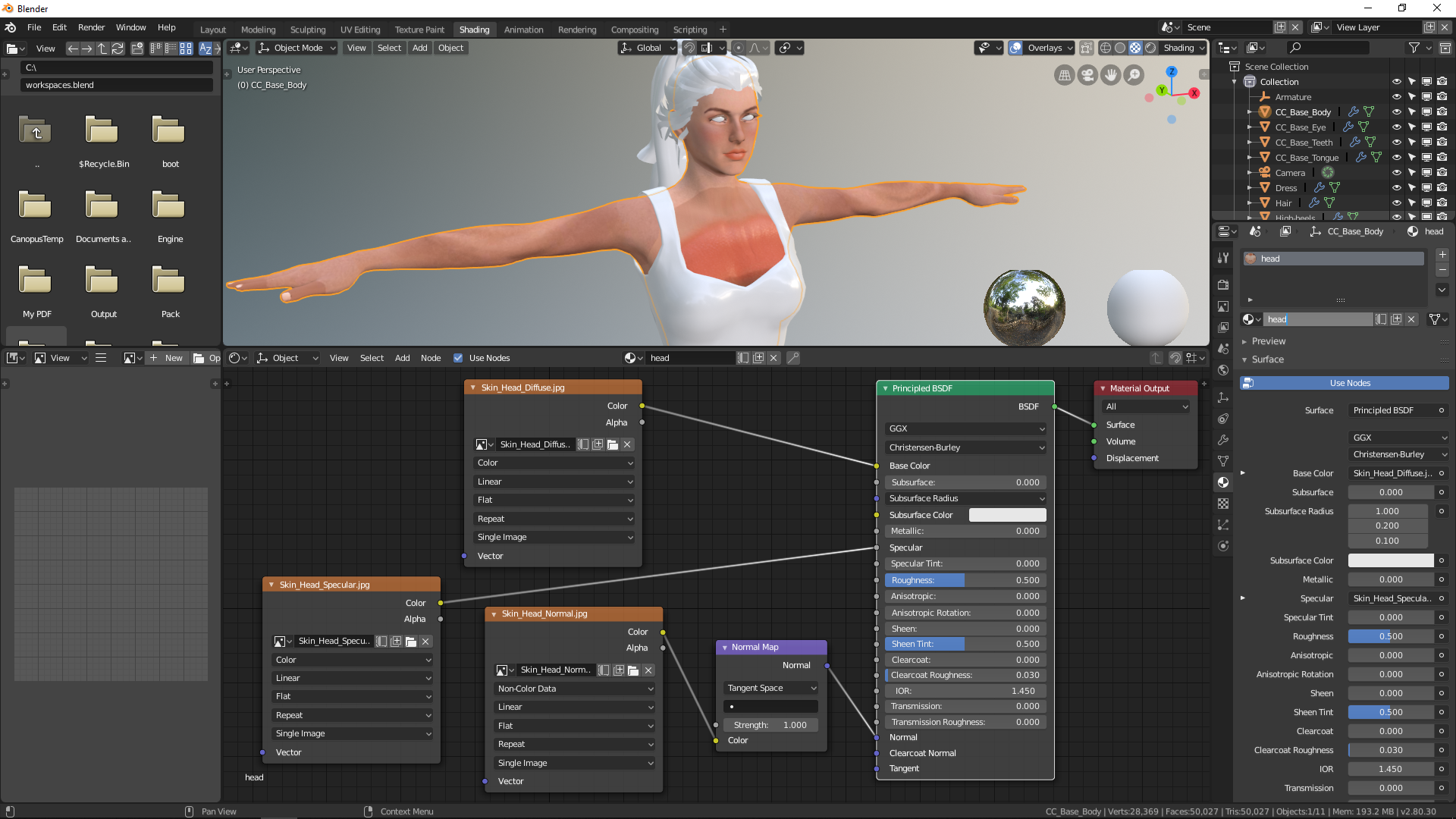
Export your character from CC3 using the Blender default preset.  Import the FBX into Blender (remember to set the scale to 2.00 to ensure correct 'real world' size).  Unlike the Alembic example I made where all the body parts have been separated by their UVs, you'll notice the body is all one object.  Twirl open the 'base body' layer in your collection (you can hide the Armature by clicking on the eye icon) like my screen shot.  Select the materials one by one and 'pipe' the appropriate "image textures" as per my tutorial and you should be good to go (except the transparency... which I'll get to soon).  The textures should already be loaded into Blender, and you don't have to 'create' new materials... so FBX import is a few steps easier than Alembic.  Good luck!https://forum.reallusion.com/uploads/images/8afa6188-3fb2-4ea2-a127-40c1.jpg
sonic7
sonic7
Posted 7 Years Ago
View Quick Profile
Distinguished Member

Distinguished Member (14.2K reputation)Distinguished Member (14.2K reputation)Distinguished Member (14.2K reputation)Distinguished Member (14.2K reputation)Distinguished Member (14.2K reputation)Distinguished Member (14.2K reputation)Distinguished Member (14.2K reputation)Distinguished Member (14.2K reputation)Distinguished Member (14.2K reputation)

Group: Forum Members
Last Active: 2 Years Ago
Posts: 1.7K, Visits: 19.4K

Mark, I've been trying to replicate all of your great tutorial here, but since I don't have '3DXChange Pipeline', I don't have Alembic export.
Instead, I went iClone > CC3 P/L > exported FBX > imported Blender 2.79 > exported Alembic > imported ABC in Blender 2.8. and went from there.
● 1st. None of the physX arrived in Blender. (hair & dress were dead). (using 'Natalie' btw).
● 2nd. Can't select a *separate* face zone for the head skin - it 'highlights' the entire body no matter where I right click the face (tongue & hair were selectable though).
● I was successful in getting Image Textures applied upon 1st attempt (in a folder named CC_Base_Body there were sub-folders for both Skin_Body and Skin_Head - but when constructing the 2nd (Body) Principled BSDF, the body skin overlapped the face adding a secondary influence. :(
Further attempts resulted in navigating to totally 'empty' materials folders - don't know why. Only thing I consciously altered was CC3's FBX export settings where I ticked 'Convert Image Format' to PNG - I'd noticed yours were PNG and mine (when it 'worked' 1st tme), were JPG's. I never got a 'list' of files like you, all the body 'parts' were folder grouped. Also tried deselecting 'Embed Textures' in CC3's FBX output. But texture folders were showing up empty. I'll try a total reboot and go again. It might be that my work-around is flawed from the get-go. It may not be possible without Alembic direct from iClone?

Edit: OK ... got it sorta working - I used texture maps from the original CC3 export fbm folder. Mapped the body skin first this time - that looked fine (for the body) - but the head looked wrong. Added a 2nd 'Principled' doodad to map the head, which then became OK, but the body now mangled... eeek ... For some reason they don't want to map 'separately'. Changing one - changes the other ....
https://forum.reallusion.com/uploads/images/5ab10cc7-5ec6-4a0c-9676-737d.png


--------------------------------------------------------------------------------------------------------------------------------------------------------
Please be patient with me ..... I don't always 'get it' the first time 'round - not even the 2nd time! :(  - yikes! ... 
MSI GT72VR Laptop, i7 7700HQ 4-Core 3.8 GHz 16GB RAM; Nvidia 1070, 8GB Vram iClone-7.93  3DXChange Pipeline 7.81  CC-3 Pipeline 3.44  Live Face  HeadShot  Brekel Pro-Body  Popcorn FX  iRAY  Kinect V2  DaVinci Resolve17  Mixcraft 8.1

sonic7
sonic7
Posted 7 Years Ago
View Quick Profile
Distinguished Member

Distinguished Member (14.2K reputation)Distinguished Member (14.2K reputation)Distinguished Member (14.2K reputation)Distinguished Member (14.2K reputation)Distinguished Member (14.2K reputation)Distinguished Member (14.2K reputation)Distinguished Member (14.2K reputation)Distinguished Member (14.2K reputation)Distinguished Member (14.2K reputation)

Group: Forum Members
Last Active: 2 Years Ago
Posts: 1.7K, Visits: 19.4K

Thank-you Mark for starting to 'de-mystify' things for us. There's obviously a lot to blender beneath the surface, so having your help navigating through - gives noobies like myself 'a chance' at making a go of it. I'll certainly be downloading and re-viewing all your tutorials (and many times through) - so it can sink in. Valuable videos like this can make the difference between a person embarking on a Blender solution vs not considering it possible. This offers possibly the best chance any iCloner has of taking projects to the next level. :)


--------------------------------------------------------------------------------------------------------------------------------------------------------
Please be patient with me ..... I don't always 'get it' the first time 'round - not even the 2nd time! :(  - yikes! ... 
MSI GT72VR Laptop, i7 7700HQ 4-Core 3.8 GHz 16GB RAM; Nvidia 1070, 8GB Vram iClone-7.93  3DXChange Pipeline 7.81  CC-3 Pipeline 3.44  Live Face  HeadShot  Brekel Pro-Body  Popcorn FX  iRAY  Kinect V2  DaVinci Resolve17  Mixcraft 8.1

Delerna
Delerna
Posted 7 Years Ago
View Quick Profile
Distinguished Member

Distinguished Member (8.5K reputation)Distinguished Member (8.5K reputation)Distinguished Member (8.5K reputation)Distinguished Member (8.5K reputation)Distinguished Member (8.5K reputation)Distinguished Member (8.5K reputation)Distinguished Member (8.5K reputation)Distinguished Member (8.5K reputation)Distinguished Member (8.5K reputation)

Group: Forum Members
Last Active: 3 Years Ago
Posts: 1.5K, Visits: 14.8K
I will be checking this out more fully when I get home tonight.
Usually find something that helps me from other tutorials


i7-3770 3.4GHz CPU 16 GB Ram   
GeForce GTX1080 TI 11GB
Windows 10 Pro 64bit
illusionLAB
illusionLAB
Posted 7 Years Ago
View Quick Profile
Distinguished Member

Distinguished Member (4.1K reputation)Distinguished Member (4.1K reputation)Distinguished Member (4.1K reputation)Distinguished Member (4.1K reputation)Distinguished Member (4.1K reputation)Distinguished Member (4.1K reputation)Distinguished Member (4.1K reputation)Distinguished Member (4.1K reputation)Distinguished Member (4.1K reputation)

Group: Forum Members
Last Active: 3 Years Ago
Posts: 393, Visits: 4.8K
Hey all, here's a step by step video to get you going if you're curious about trying Blender's eevee and/or cycles renderers.  If you haven't installed the Alpha 2 version of Blender 2.8 you can find it by Googling "Blender Build 2.8 download".  As it's still in the Alpha stage of development, you shouldn't start any 'critical' productions as they are still adding/changing the features - which can introduce instability.  The cool thing about these builds is you don't even need to install it as it runs from the .exe file - so no worries about messing up your registry or other install directories.  Also, they update it almost daily... so I've been downloading it every couple of weeks (and there truly is always something new or improved.)


Reading This Topic