|
Author
|
Message
|
|
animagic
|
animagic
Posted 8 Years Ago
|
|
Group: Forum Members
Last Active: Last Month
Posts: 15.8K,
Visits: 31.4K
|
Thanks, all, for your helpful suggestions! Is this a great forum, or what! :)
|
|
|
|
|
illusionLAB
|
illusionLAB
Posted 8 Years Ago
|
|
Group: Forum Members
Last Active: 4 Years Ago
Posts: 393,
Visits: 4.8K
|
I would like to see a 3dcoat tutorial if it's possible to sculpt with subdivision up , baking normal and occlusion then down subdivision to export. 3D Coat's architecture and workflow philosophy is quite different to Z-Brush and 'currently', for CC models at least, I'd say it's not possible. I do it all the time with props (and custom characters that are not CC compatible) but the 'extra' bits of geometry like eyelashes and fingernails derail the process. Z-Brush has a layer based 'subdivision' and it can "ignore" geometry (ie. hiding the eyelashes etc.) when baking the normals. Layered subdivisions is a popular topic (most likely started by former Z-Brush artists!), so it's possible we'll get it eventually. As previously mentioned, the "Tweak room" is actually quite a capable tool - especially for morphs... let's remember that the 'base geometry' vertex count is fixed regardless if you're using Z-Brush or any other sculpt software - so the 'high poly' work you can achieve in Z-Brush is pretty much limited to normal maps anyway... which, you can 'sculpt' in 3D Coat's "Paint room" with the depth tools. Of course, if there is someone "out there" who's replicated the Z-Brush workflow in 3D Coat... add me to the list of "wanting to see it" ;-)
|
|
|
|
|
duchess110
|
duchess110
Posted 8 Years Ago
|
|
Group: Forum Members
Last Active: 6 Years Ago
Posts: 2.0K,
Visits: 15.5K
|
The helmet hair collar and corset were sculpted and painted from the base mesh in 3dcoat. So as well as being good for creating morphs in the tweak room it can be very useful for items of clothing as well.  
Duchess Designs Store
|
|
|
|
|
mtakerkart
|
mtakerkart
Posted 8 Years Ago
|
|
Group: Forum Members
Last Active: 2 Months Ago
Posts: 3.2K,
Visits: 29.2K
|
Hi Ani, Don't forget when you export your object to enable "source position"  And yes for me too , I would like to see a 3dcoat tutorial if it's possible to sculpt with subdivision up , baking normal and occlusion then down subdivision to export.
|
|
|
|
|
alemar
|
alemar
Posted 8 Years Ago
|
|
Group: Forum Members
Last Active: Last Year
Posts: 712,
Visits: 10.1K
|
yes Animagic its work but sometimes i had problems...best to try before doing something serious... I didn't try with CC3 to make morphs, but modeling is working like a charm...I sculped this panels to woman body and texturize in 3DCoat. I posted more but forgot to talk about here... 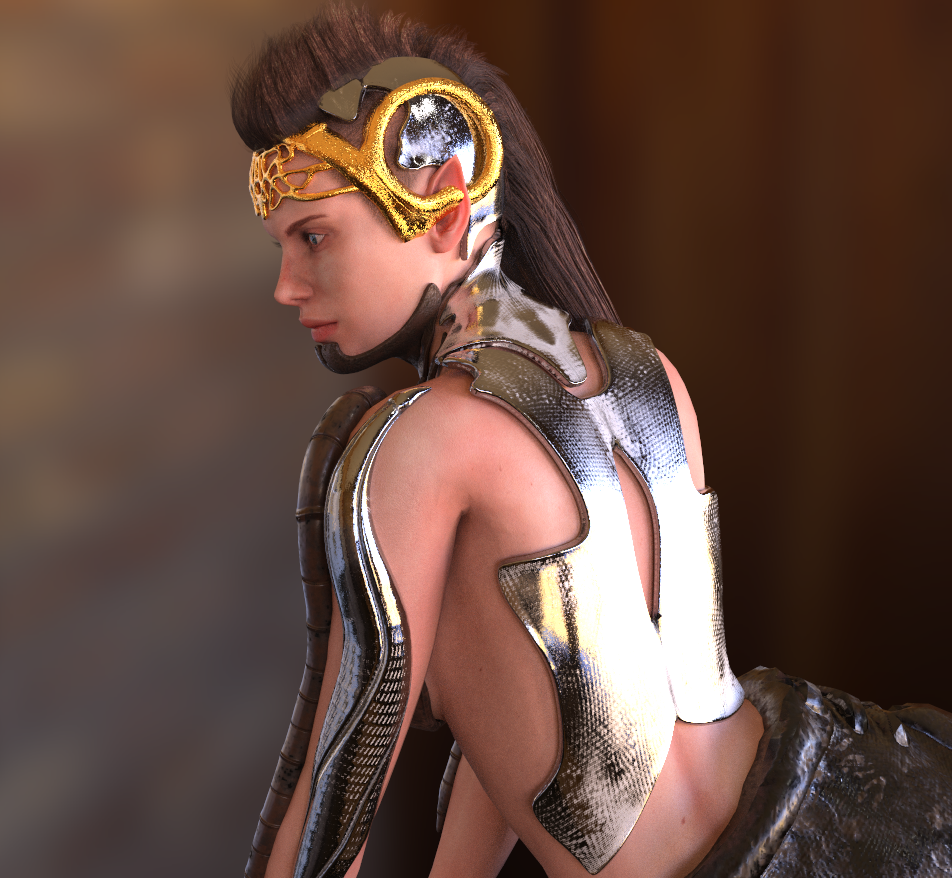

ALEMAR GAMES MARKETPLACE STORE
|
|
|
|
|
duchess110
|
duchess110
Posted 8 Years Ago
|
|
Group: Forum Members
Last Active: 6 Years Ago
Posts: 2.0K,
Visits: 15.5K
|
Hi Job as Galfridus said the Tweak Room is good for this. If you launch 3dc Go to file import Reference Mesh this will import you base obj file. Then press the w key on keyboard to bring up the wire frame which will display where the vertex are. Then go into the tweak room and adjust as you need.
Duchess Designs Store
|
|
|
|
|
Galfridus
|
Galfridus
Posted 8 Years Ago
|
|
Group: Forum Members
Last Active: 2 Years Ago
Posts: 727,
Visits: 2.2K
|
Hi Job, I`ve had 3d coat for a couple of years now and have installed the updates but never really got round to exploring possibilities with Iclone until the past couple of weeks. I have exported object mesh from 3DX7 and then imported in to the Tweak Room of 3dCoat. The tweak room has a very limited tool set but move, smooth etc are very similar to what I have in Argile2. You can export your "tweaked" object and use replace mesh in 3DX7 to update your original. Makes me think "Tweak room" must keep polycount / vertex order. I have no insider knowledge to confirm this but in practice know hat it works for the simple "modeling" effects I require. Geoff.
|
|
|
|
|
animagic
|
animagic
Posted 8 Years Ago
|
|
Group: Forum Members
Last Active: Last Month
Posts: 15.8K,
Visits: 31.4K
|
I didn't see a Tools subsection, so I'm asking my question here. As I don't have Z-brush, I would like to use 3D Coat instead as sculpting tool. What I would do is export an OBJ, do my sculpting and save as a new OBJ file. I would create a morph slider using the OBJ file and the apply to the model. I tried that with another sculpting program (Agile 2) and it works. (If there is a more direct way (other than using Z-Brush), I would like to know.) Now it is necessary to keep vertex order and count the same, and I didn't see an obvious way to accomplish that in 3D Coat. So my question is, how would one go about that?
|
|
|
|