|
Author
|
Message
|
|
akober
|
akober
Posted 8 Years Ago
|
|
Group: Forum Members
Last Active: 7 Years Ago
Posts: 4,
Visits: 17
|
Hello everyone,
I have 2 probably simple questions the answer to which I couldn’t find:
Is it possible to convert a 2d photo of a location with objects or just a single 2d object from a photo into a 3d prop in IClone 7 or elsewhere from Reallusion?
Is it possible to import a character into that location (from the z1st question) to IClone and make it move in IClone as well as create a path for it in this location.
I’ve scoured for tutorials but nothing so far, please please help.
Thank
Alex
|
|
|
|
|
Rampa
|
|
|
Group: Forum Members
Last Active: Last Month
Posts: 8.2K,
Visits: 62.6K
|
You can build a room from parts. There are a few parts in the iClone content library. Here is an Old iClone 5 video tutorial I dug up. The UI is different now, but the content and procedure is the same. To find those props in the current version, see this picture guide:  It looks like you may be wanting to create a room from photogrammetry. That would need a third party program to create. You can create walking paths through the room. There a few ways to have a character walk around in the room, so it's good to ask when you get a room built.
|
|
|
|
|
akober
|
akober
Posted 8 Years Ago
|
|
Group: Forum Members
Last Active: 7 Years Ago
Posts: 4,
Visits: 17
|
Dear Rampa, I think that’s the fastest response ever :) much obliged. Tell me please, can I simply take pics of my furniture objects and convert them to 3d props? All I could find is this here: https://youtu.be/oUmfxvTPJhEBut I don’t understand in which software he first selected parts to be then imported to IClone and edit them. What I want is to create my own kids room with my props from still images.......ideally of course that I can take a pic of my room and make it look like 3d and use it as background scene and additionally I would place my created props......rather than making a room from boring parts. Is my idea feasible at all? Thank you Alex
|
|
|
|
|
akober
|
akober
Posted 8 Years Ago
|
|
Group: Forum Members
Last Active: 7 Years Ago
Posts: 4,
Visits: 17
|
I just thought, since we are sending people to mars and undertake all sorts of things, surely, a simple conversion of a 2d static image into a 3d background must be possible :)
In YouTube, all they do is making 3d effects with moving camera to make 2d image look like 3d but as soon as camera movement stops, it’s just another 2d image.
|
|
|
|
|
sonic7
|
sonic7
Posted 8 Years Ago
|
|
Group: Forum Members
Last Active: 3 Years Ago
Posts: 1.7K,
Visits: 19.4K
|
This isn't a direct solution to your question akober, but imagine this!
As far a 'props' or models - this is interesting: (But where did it go?)
--------------------------------------------------------------------------------------------------------------------------------------------------------
Please be patient with me ..... I don't always 'get it' the first time 'round - not even the 2nd time! :( - yikes! ... ● MSI GT72VR Laptop, i7 7700HQ 4-Core 3.8 GHz 16GB RAM; Nvidia 1070, 8GB Vram ● iClone-7.93 ● 3DXChange Pipeline 7.81 ● CC-3 Pipeline 3.44 ● Live Face ● HeadShot ● Brekel Pro-Body ● Popcorn FX ● iRAY ● Kinect V2 ● DaVinci Resolve17 ● Mixcraft 8.1
|
|
|
|
|
animagic
|
animagic
Posted 8 Years Ago
|
|
Group: Forum Members
Last Active: Last Month
Posts: 15.8K,
Visits: 31.4K
|
Autodesk used to offer the free 123D software which created 3D objects from a series of photos, but that is no longer available. Many years ago there was a software that allowed to create a 3D scene like a room based on a photo, but that's gone too. EDIT 1: There is something called photogrammetric modeling, which is used a lot in architecture to create 3D models of existing buildings (Agisoft Photoscan). It seems quite a lot of work though compared to just modeling a room. EDIT 2: There is a free program called Meshroom:
|
|
|
|
|
Rampa
|
|
|
Group: Forum Members
Last Active: Last Month
Posts: 8.2K,
Visits: 62.6K
|
You might want to give Meshroom a go.
These types of programs usually are shown working with objects in the quick demos, but they can also do rooms.
|
|
|
|
|
akober
|
akober
Posted 8 Years Ago
|
|
Group: Forum Members
Last Active: 7 Years Ago
Posts: 4,
Visits: 17
|
Just to understand....there’s no solution at all in Reallusion for my 2 things, correct?
Somehow I got the other impression through a research and purchased a bundle.
|
|
|
|
|
GrannyJ
|
GrannyJ
Posted 8 Years Ago
|
|
Group: Forum Members
Last Active: 5 Years Ago
Posts: 502,
Visits: 1.5K
|
To date, the only way to convert actual 2d photograpghy to 3D is with some sort of photogammetry software (most only work for Windows or Linux and use CUDA, so you must have a decent nVidia card - forget MAC altogether unless you are good at reprogramming binary). One should be advised that this is NOT a quick process. For example, to recreate everything in your kid's bedrooms, you would need to photograph EVERY element individually from EVERY angle (so that you capture at least 30-50 images of EACH object) then use the photos to create the mesh for the individual items. Then the final meshes would need to be imported into iClone using 3dXchange, then they would need to be placed in the room & scaled to correct sizing. Photogrammetry is NOT a great tool for capturing architectural elements like walls, windows, etc., but better for things like individual pieces of furniture, lamps, toys, etc. The reason content developers build & texture meshes from scratch instead of using photogammetry is because we can create better results (all photogammetry meshes must be "tweaked" when the software completes the mesh building process as there are always faults in the mesh) & it takes less time to build it right the first time through. Another point is photogammetry creates meshes that are extremely high in polycounts, to the point where the mesh will require optimization and/or decimation to be more compatible with iClone. NOW, that being said, there are ways in iClone to achieve the appearance you desire using photographs... I will try to explain this in brief. 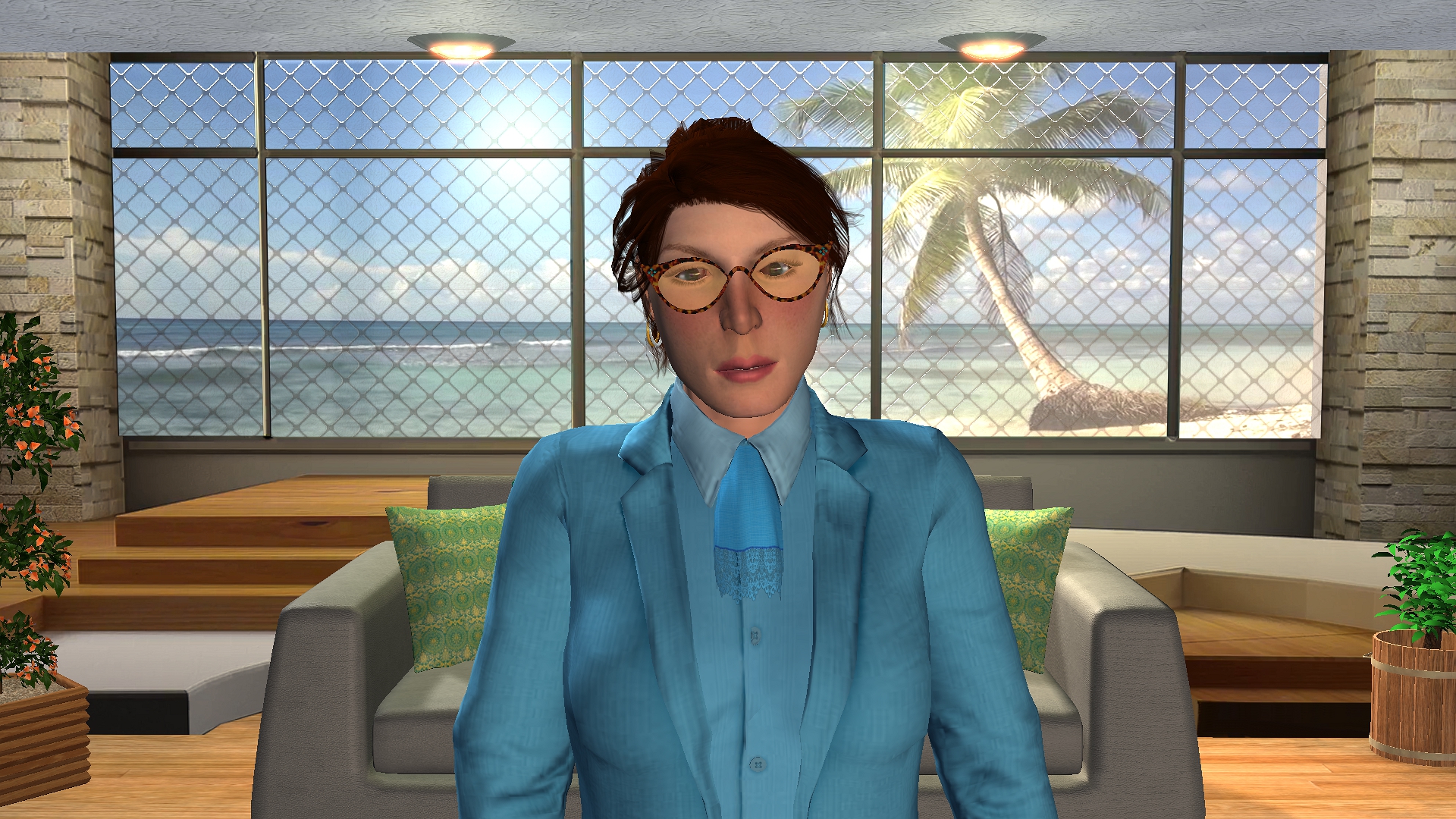 In the image above (using iClone) the rear wall with window, columns and stairs is a flat image placed on 3D Surface Plane A (stock content) using an opacity map for the window & a normal bump map to create an appearance of 3D. The ceiling is a flat Plane B with a ceiling texture & normal bump map and two 3D can light props added using glow to create the lit effect. The floor is a flat Plane B with a wood plank flooring texture with diffuse & normal bump , plus blend & rreflection maps. The beach scene is a flat Plane A placed behind the rear wall plane with a beach video in .wmv format for the diffuse. The plants (left & right) plus the sofa & pillows are actual 3D props added to the scene. The avatar was created & added to the scene. It appears to be a totally 3D room, but in fact, the only 3D elements are the can lights, the plants, the sofa with pillows & the avatar. As the room itself is only 8 poly with some high res imagery, computer resource load is minimized. I created this scene in less than 15 minutes, so as long as the project does not require the avatar to move from room to room, using flat planes with good imagery can work for your background. I used this scene to create a quick birthday video for my 8 year old grand daughter (final video can be seen here http://www.grannyjs3dattic.com/BDs/2018/HB2LORAfromGrammy.mp4 )

iClone Certified Content Developer and Author of the Pinky Frink® Adventure Series & the Pinky Frink® Learning Books
site: Granny J's 3D Attic SKYPE = grannyjsplace email: grannyj@grannyjs3dattic.com
MY RIG: GPU: Dual GeForce GTX 970M | CPU: Intel(R) Core(TM)i7-5930K @3.50GHz| 32.00 GB RAM | OS: Win 7 Pro SP1 | DX11
|
|
|
|
|
Rogue Anime
|
Rogue Anime
Posted 8 Years Ago
|
|
Group: Forum Members
Last Active: 3 Years Ago
Posts: 548,
Visits: 3.4K
|
@Granny J - WOW! Excellent information, once again! You have always been so talented and knowledgeable, thank you for being such a great mentor & contributing to all the friends here. :D ~V~
Val RogueAnanda
|
|
|
|