|
Author
|
Message
|
|
Peter (RL)
|
Peter (RL)
Posted 8 Years Ago
|
|
Group: Administrators
Last Active: 2 Years Ago
Posts: 23.1K,
Visits: 36.6K
|
Jeremy_Lawrence (12/16/2018)
Also is the web-support site down again? Can't postThere have been reports of issues with the Support Form for those using Malwarebytes or Bitdefender. Can you try disabling them briefly and try again to check if that is the problem.
Peter
Forum Administrator www.reallusion.com
|
|
|
|
|
Stefos
|
Stefos
Posted 8 Years Ago
|
|
Group: Forum Members
Last Active: Last Year
Posts: 126,
Visits: 1.1K
|
Peter (RL) (12/17/2018)
Stefos (12/15/2018)
Installation was cancelled. All update processes will stop!
Reallusion Hub downloads a 2.4GB update (3.03) and fails to install!!!!
This has broken my character Creator 3.02 !!!!
HELP!
Please can you contact Technical Support about this issue. They will help you get the problem resolved as soon as possible. Thanks. I installed it manually all looks okay now other than I lost a lot of my recent files...I actually added the problem on the tracker. I am not using the HUB again for updating, I will do it manually from now on.

Greco Arts
www.grecoarts.com
|
|
|
|
|
4u2ges
|
4u2ges
Posted 8 Years Ago
|
|
Group: Forum Members
Last Active: Last Month
Posts: 5.3K,
Visits: 16.8K
|
FBX Export would fail if one of the names (avatar, cloth, acc.) has a white space at the end - FT Issue 5528I have spent a few hours trying to figure out why I cannot export one of my characters to FBX in CC3, while I had no problem exporting it in CC2. Finally I have found a cloth name which had a white space at the end. To replicate: 1. Within the default project add a white space at the end of any name. Like rename "Bra" to "Bra " 2. Try to export to FBX Suggestion: Evaluate names and Trim white spaces. Users might accidentally add some and then would have a headache trying to figure out the problem with export.
|
|
|
|
|
TonyDPrime
|
TonyDPrime
Posted 8 Years Ago
|
|
Group: Forum Members
Last Active: 2 Years Ago
Posts: 3.4K,
Visits: 12.4K
|
Virtual Human- not sure if this is supposed to be this way, but the blink only closes to this point: Character-Denisa Thoughts before making an FBT? 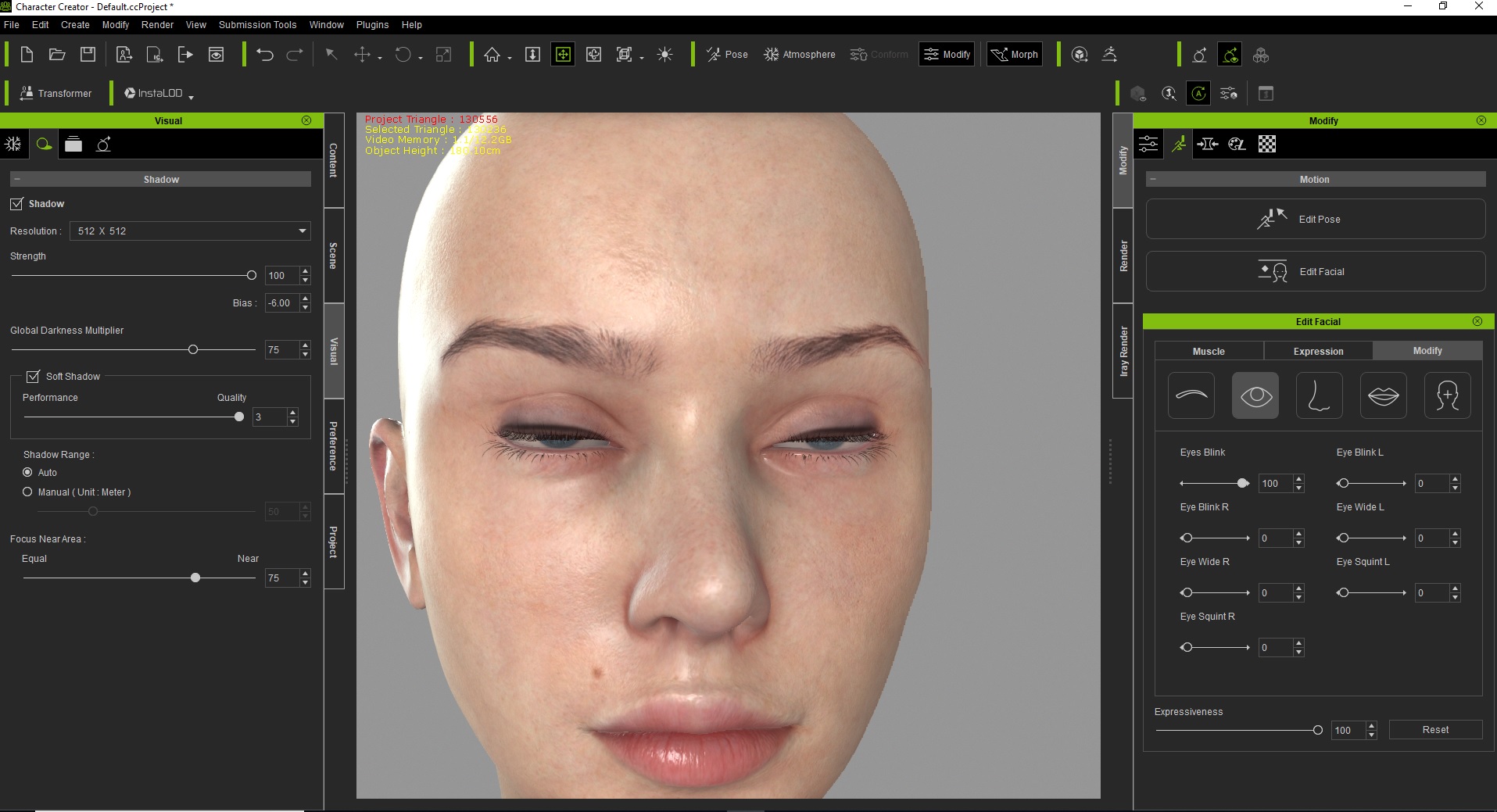 Also RL, while I am at it - could we get an "Eye Squint" for both eyes simultaneously in the Facekey. Currently only have "Eye Squint L" and "Eye Squint R"....
|
|
|
|
|
eternityblue
|
eternityblue
Posted 8 Years Ago
|
|
Group: Forum Members
Last Active: Last Year
Posts: 769,
Visits: 2.7K
|
We could really use something like Poser's morph brush and the ability to create and edit morphs in CC3.
~~~~~~~~~~~~~~~~~~
My system: i7 3770 Gtx1060 6GB
|
|
|
|
|
Rampa
|
|
|
Group: Forum Members
Last Active: 2 Months Ago
Posts: 8.2K,
Visits: 62.6K
|
eternityblue (12/30/2018)
We could really use something like Poser's morph brush and the ability to create and edit morphs in CC3.
You can use the mesh edit tools, and then save your modified mesh as a new morph slider from the Create menu. :)
|
|
|
|
|
eternityblue
|
eternityblue
Posted 8 Years Ago
|
|
Group: Forum Members
Last Active: Last Year
Posts: 769,
Visits: 2.7K
|
Rampa (12/30/2018)
eternityblue (12/30/2018)
We could really use something like Poser's morph brush and the ability to create and edit morphs in CC3.
You can use the mesh edit tools, and then save your modified mesh as a new morph slider from the Create menu. :) I'm thinking more like editing all the visemes and eye blinks or whatever, fixing smiles to look nice, I don't think that is possible right now.
~~~~~~~~~~~~~~~~~~
My system: i7 3770 Gtx1060 6GB
|
|
|
|
|
TonyDPrime
|
TonyDPrime
Posted 8 Years Ago
|
|
Group: Forum Members
Last Active: 2 Years Ago
Posts: 3.4K,
Visits: 12.4K
|
TonyDPrime (12/29/2018)
Virtual Human- not sure if this is supposed to be this way, but the blink only closes to this point: Character-Denisa Thoughts before making an FBT? Also RL, while I am at it - could we get an "Eye Squint" for both eyes simultaneously in the Facekey. Currently only have "Eye Squint L" and "Eye Squint R".... Actually, now that I see in iClone, it looks bad. The blinks in motion do not close, and it does not look good.
|
|
|
|
|
TonyDPrime
|
TonyDPrime
Posted 8 Years Ago
|
|
Group: Forum Members
Last Active: 2 Years Ago
Posts: 3.4K,
Visits: 12.4K
|
There are some oddities with the Virtual Humans that seem to need more tailoring... For example, character Denisa - she has this gap between the eyes and eyelids that looks too large. Now, this can be fixed with adjusting the morphs, but at the cost of poke-through with the eye when panning eye movement. Now, he default CC3 does not have this gap, so the fact that the product is otherwise a more true-to-life "virtual human" makes it more stick out more of an issue: 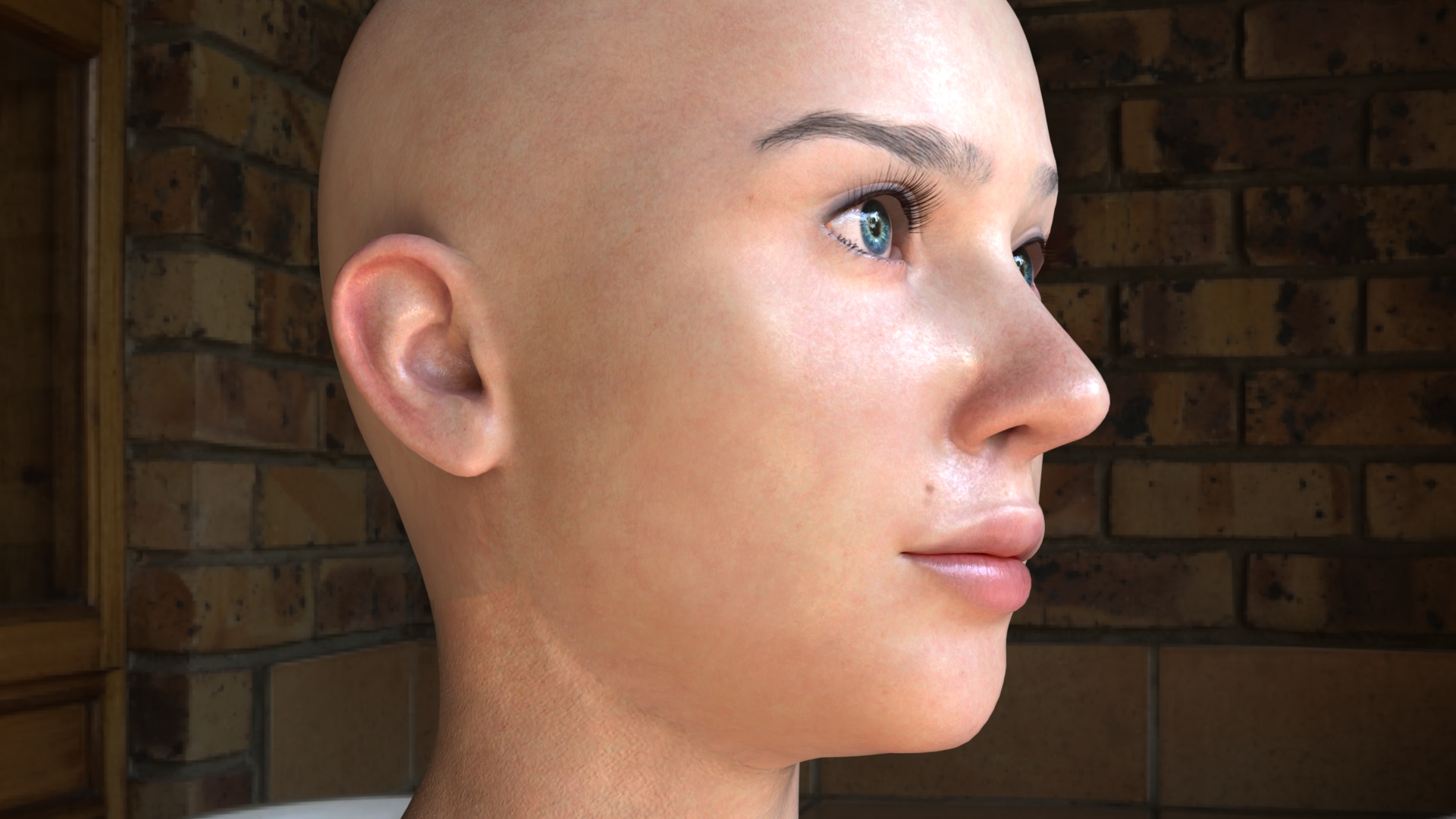
|
|
|
|
|
Peter (RL)
|
Peter (RL)
Posted 8 Years Ago
|
|
Group: Administrators
Last Active: 2 Years Ago
Posts: 23.1K,
Visits: 36.6K
|
TonyDPrime (12/31/2018)Virtual Human- not sure if this is supposed to be this way, but the blink only closes to this point:
Character-Denisa
Thoughts before making an FBT
Hi Tony... Please see the video below. This explains how to resolve the issues you mention. https://youtu.be/y0G7Y37lZDo
Peter
Forum Administrator www.reallusion.com
|
|
|
|