|
Author
|
Message
|
|
gkscoot
|
gkscoot
Posted 8 Years Ago
|
|
Group: Forum Members
Last Active: 8 Years Ago
Posts: 24,
Visits: 76
|
Hi, I really like the look and feel of Affinity, and was all set to buy it to use with my Reallusion CrazyTalk Animator 3, when I hit a snag. Affinity is not exporting all the layers that are in the file, and this causes a fatal problem when importing it to my program.
The error is:
Missing Head Group: HeadImage Missing Face Layer
I tried uploading the files, got a message that the file type is not allowed or something! its a .psd file... Can anyone who uses it please tell my why Affinity is deleting layers from the original file, and how to correct this?
Thanks a bunch!
|
|
|
|
|
illusionLAB
|
illusionLAB
Posted 8 Years Ago
|
|
Group: Forum Members
Last Active: 4 Years Ago
Posts: 393,
Visits: 4.8K
|
I'm not using Affinity with CTA3 specifically, but if you're missing layers on export it is most likely because you've added a 'live' filter to a layer and have not rasterized it. Photoshop format does not support live filters.
|
|
|
|
|
gkscoot
|
gkscoot
Posted 8 Years Ago
|
|
Group: Forum Members
Last Active: 8 Years Ago
Posts: 24,
Visits: 76
|
OK thanks, I tried a few settings, including rasterizing all layers. So far the result is always the same, missing layers.
If anyone who uses Affinity knows the answer, please let me know. Thank you.
|
|
|
|
|
kylelee
|
kylelee
Posted 8 Years Ago
|
|
Group: Forum Members
Last Active: 4 Years Ago
Posts: 462,
Visits: 4.2K
|
You can click the Error Log to know more information and help you check your layer naming. 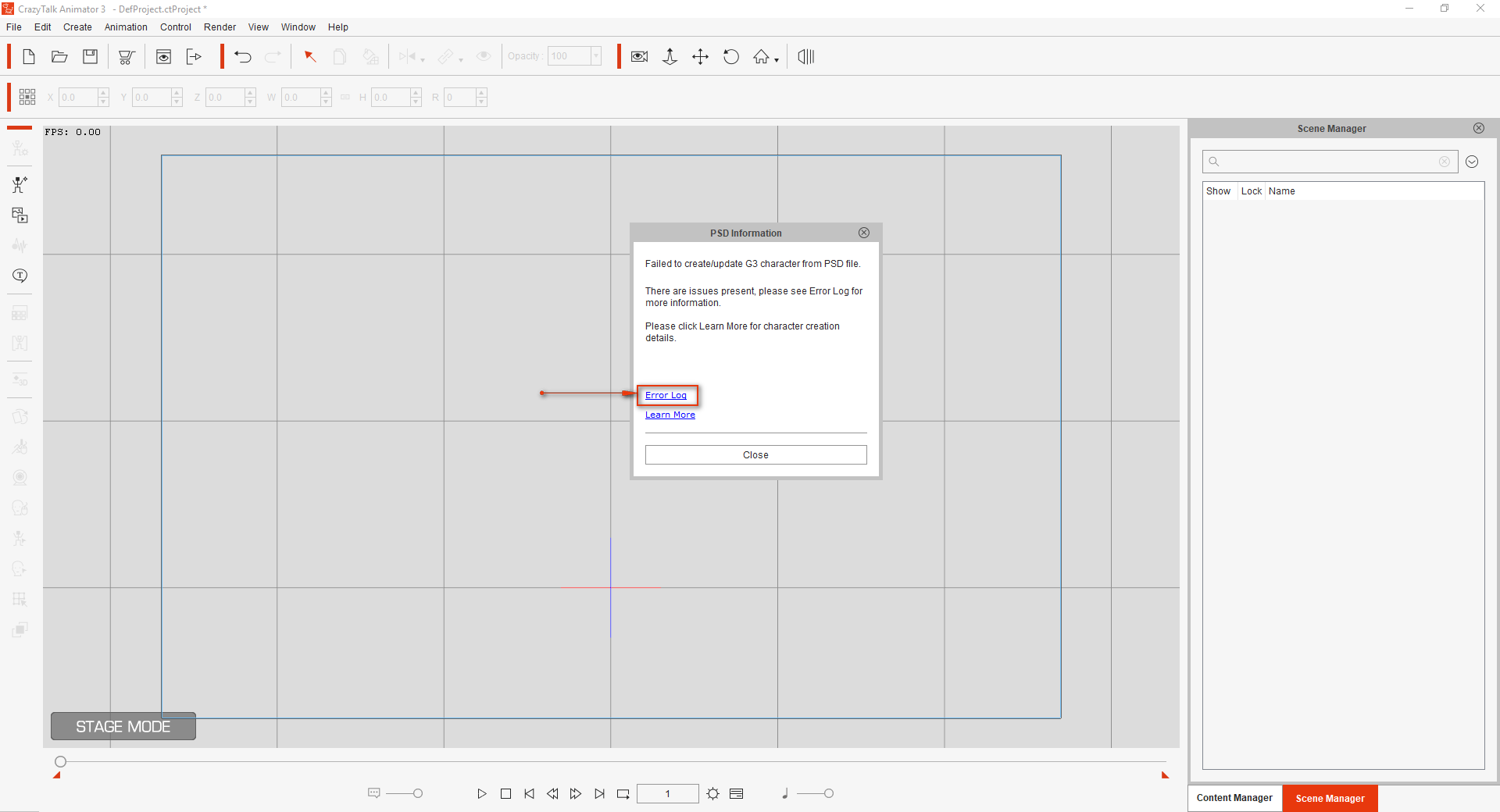
|
|
|
|
|
gkscoot
|
gkscoot
Posted 8 Years Ago
|
|
Group: Forum Members
Last Active: 8 Years Ago
Posts: 24,
Visits: 76
|
Thanks all. My mistake was that I was using Affinity Photo, not Affinity Designer. Doh! Problem solved.
|
|
|
|
|
LinnieBinnie
|
LinnieBinnie
Posted 8 Years Ago
|
|
Group: Forum Members
Last Active: 2 Years Ago
Posts: 4,
Visits: 75
|
Hello,
I have the same problem. So now I want to launch it to the psd editor for the Affinty Designer, but it opens with the Affinity Photo. How do you open the designer insteda of the photo? Thanks already.
|
|
|
|
|
Peter (RL)
|
Peter (RL)
Posted 8 Years Ago
|
|
Group: Administrators
Last Active: 2 Years Ago
Posts: 23.1K,
Visits: 36.6K
|
linspire (12/21/2018)
Hello,
I have the same problem. So now I want to launch it to the psd editor for the Affinty Designer, but it opens with the Affinity Photo. How do you open the designer insteda of the photo? Thanks already.
You can change the Texture Editor you use in Preferences (CTRL+P). Just click the "Open File" button in the Texture section and choose the .exe of Affinity Designer.
Peter
Forum Administrator www.reallusion.com
|
|
|
|
|
DavidSm
|
DavidSm
Posted 7 Years Ago
|
|
Group: Forum Members
Last Active: 5 Years Ago
Posts: 3,
Visits: 27
|
Hi,
I seem to be experiencing exactly this same problem when using your 'Human_Front_Full_Template.psd' in Affinity Designer.
I followed your 'Animate a character from 6 body parts' tutorial using my own 6-part character. I 'exported' the completed character as a psd file, but when I then tried to 'create' this character in CTA3 it came up with the same Error message regarding the 'Missing Head' [as above in earlier posts].
I then tried 'exporting' this same 6-part character in Affinity, but without the 'Human_Front_Full_Template.psd' and when I 'created' it in CTA3 it appeared satisfactorily.
Finally I tried opening your 'Human_Front_Full_Template.psd' in Affinity and saving it again as a psd [in each of the psd options in Affinity in turn] but the result was always the same. CTA3 giving the same error message in all cases.
This leads me to conclude that there is something about the 'Human_Front_Full_Template.psd' that the Affinity programme doesn't like.
Can anyone suggest a way around this please. Thank you.
|
|
|
|
|
DavidSm
|
DavidSm
Posted 7 Years Ago
|
|
Group: Forum Members
Last Active: 5 Years Ago
Posts: 3,
Visits: 27
|
Since my last post I have tried using the ‘Human_Front_Simple_Template.psd’and this seems to open my character in CTA3 after it has been created and savedas a .psd file in Affinity. [so this suggests that the ‘Human_Front_Full_Template.psd’may have some feature that causes a problem in Affinity] HOWEVER, I still have a problem. In Affinity, I paste mycharacter onto your ‘Human_Front_Simple_Template.psd’ and the next step is toalign the Pivot Points so that they are at the correct positions on mycharacter. When I then click-and-drag the ‘Head Nub’, say, the ‘Head’, ‘Neck’, ‘Torso’,and ‘Hip’ points also move [because they are all ‘Grouped’]. If I ‘Ungroup’everything to correctly position all the Pivot Points and then ‘Group’ themagain, my character appears in CTA3 as a pile of parts!
In your tutorial ‘Animate a character from 6 body parts’ youseem to be able to move these Pivot Points without ‘Ungrouping’ them. Is therea way to do this in Affinity?
Can somebody help me please?
Thank you.
|
|
|
|
|
DavidSm
|
DavidSm
Posted 7 Years Ago
|
|
Group: Forum Members
Last Active: 5 Years Ago
Posts: 3,
Visits: 27
|
My next experiment was in Affinity. I pasted my characteronto your ‘Human_Front_Simple_Template.psd’ and then stretched it to fit thetemplate and configured it so that all of the correct parts of my character satover the relevant Pivot Points. [so that I didn’t need to alter the template atall.] When I opened this in CTA3 it looked fine, but when I usedPreview it didn’t respond properly! This is only a six part character, but yourtemplate shows something like 18 bones. When one bone is selected in Previewthe starting node for that bone remains at the same fixed point on the page.The bone [and all bones below it] rotate about this fixed point [even when thefixed point is at the middle of one of the six parts].
In your tutorial ‘Animate a character from 6 body parts’, inpreview, the whole limb flexes but only rotates about the Pivot Point at theconnecting end of the limb.
Can someone please tell me what I am doing wrong?
|
|
|
|